

大多数 Markdown 笔记应用程序使用 Pandoc 将笔记转换为 Word 文档,例如我主要使用的思源笔记。然而,Pandoc 默认导出的 Word 文档样式往往不美观,不符合中文排版习惯。
幸运的是,pandoc 可以自定义 Word 模板,用于导出时的自动格式化以美化文档,但是很奇怪的是,全网很少有人分享自己是如何具体制作模板的,就算提到也只是泛泛而谈。我自己在制作模板中遇到很多问题,比如怎么设置表格样式、怎么设置列表样式。这里分享下目前在用的 word 模板,也当做一个抛砖引用,希望有更多人能分享自己的模板!😁
- 本模板仅在Windows端的Office Word进行测试,可能不适用于WPS和苹果端的Office。
pandoc 不设置模板导出 docx 的样式
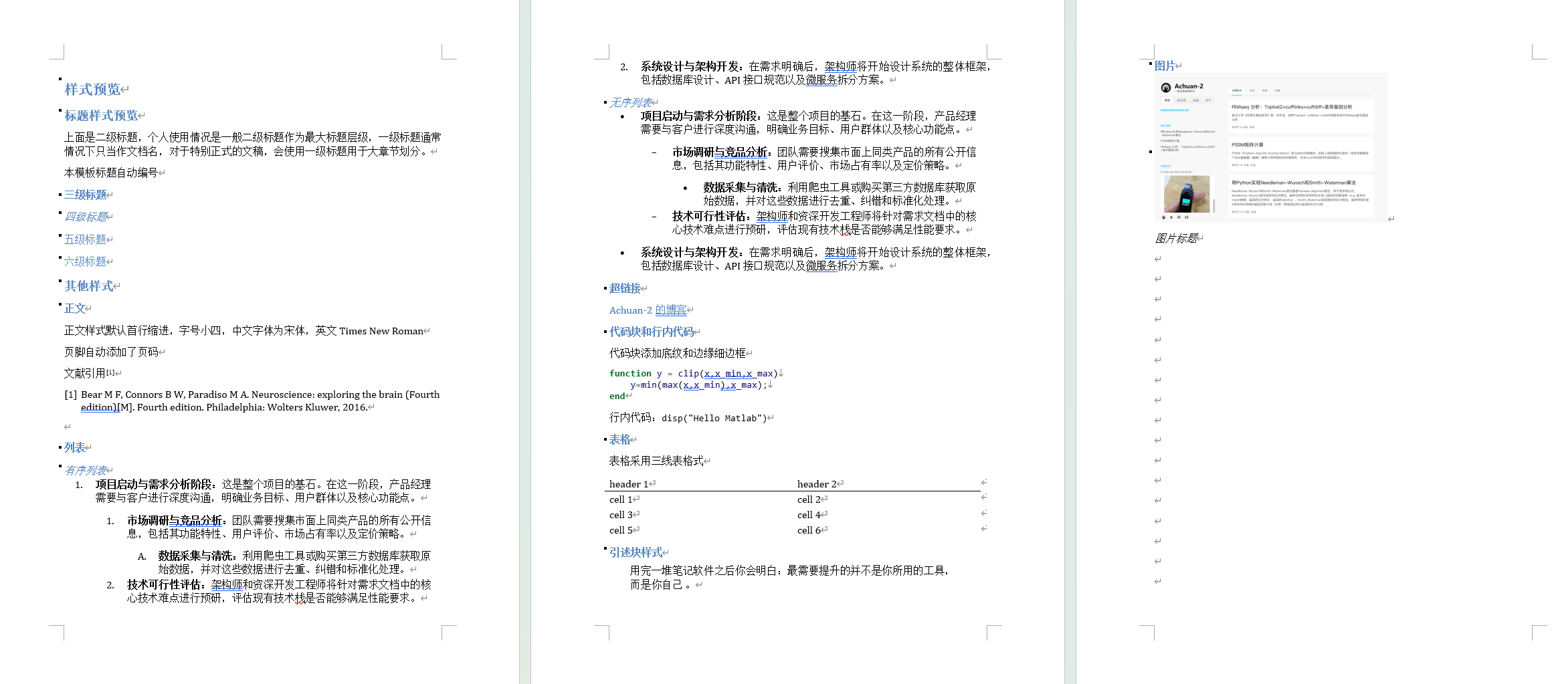
设置本模板导出 docx 的样式
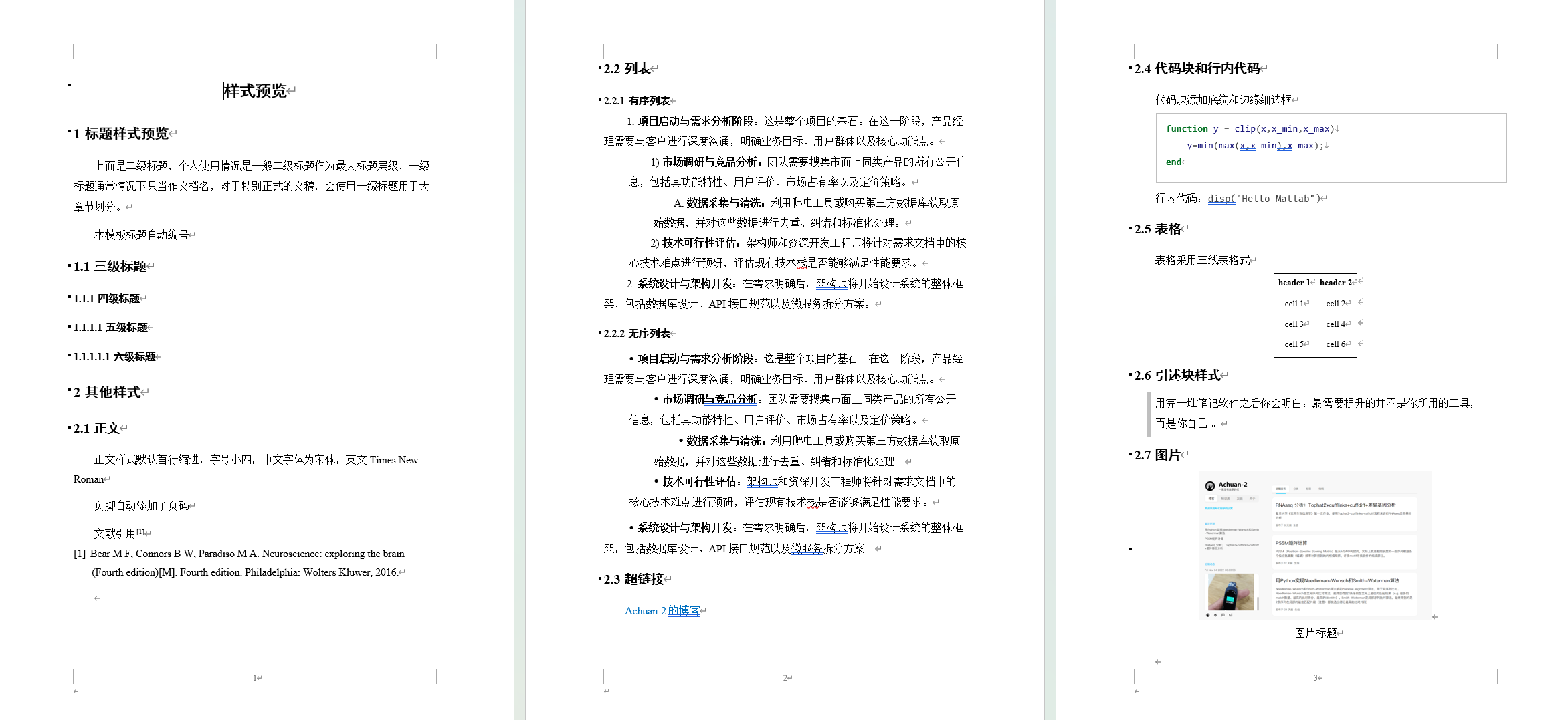
-
标题编号 or 不编号
-
列表第二行缩进 or 列表第二行顶格

-
sci论文模板:
- 正文双倍行距
- 使用引述块作为Figure图注样式
- 添加行号
pandoc通过 --reference-doc 参数来设置模板路径,可以使用下面命令来设置导出Word(.docx)模板:
pandoc input.md --reference-doc templates/template_标题不编号-列表第二行顶格.docx -o output.docx为保证Markdown中的HTML标签转换正常,可以使用下面命令:
pandoc README.md -t html | \
    pandoc -f html -o README.docx \
--reference-doc templates/template_标题不编号-列表第二行顶格.docx-
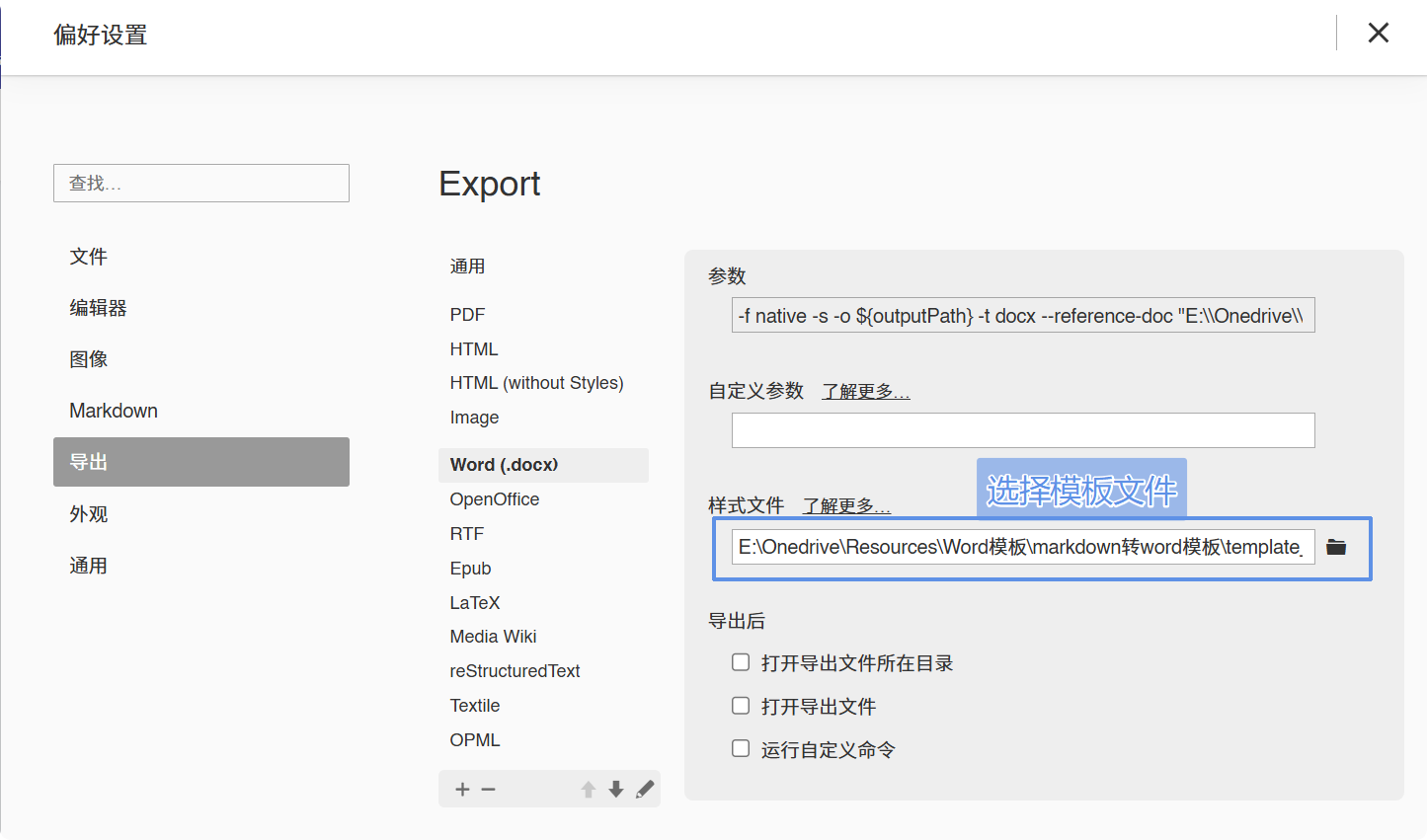
Typora如何设置导出为Word(.docx)的模板
在Typora的偏好设置中的「导出-Word(.docx)」设置样式文件路径
-
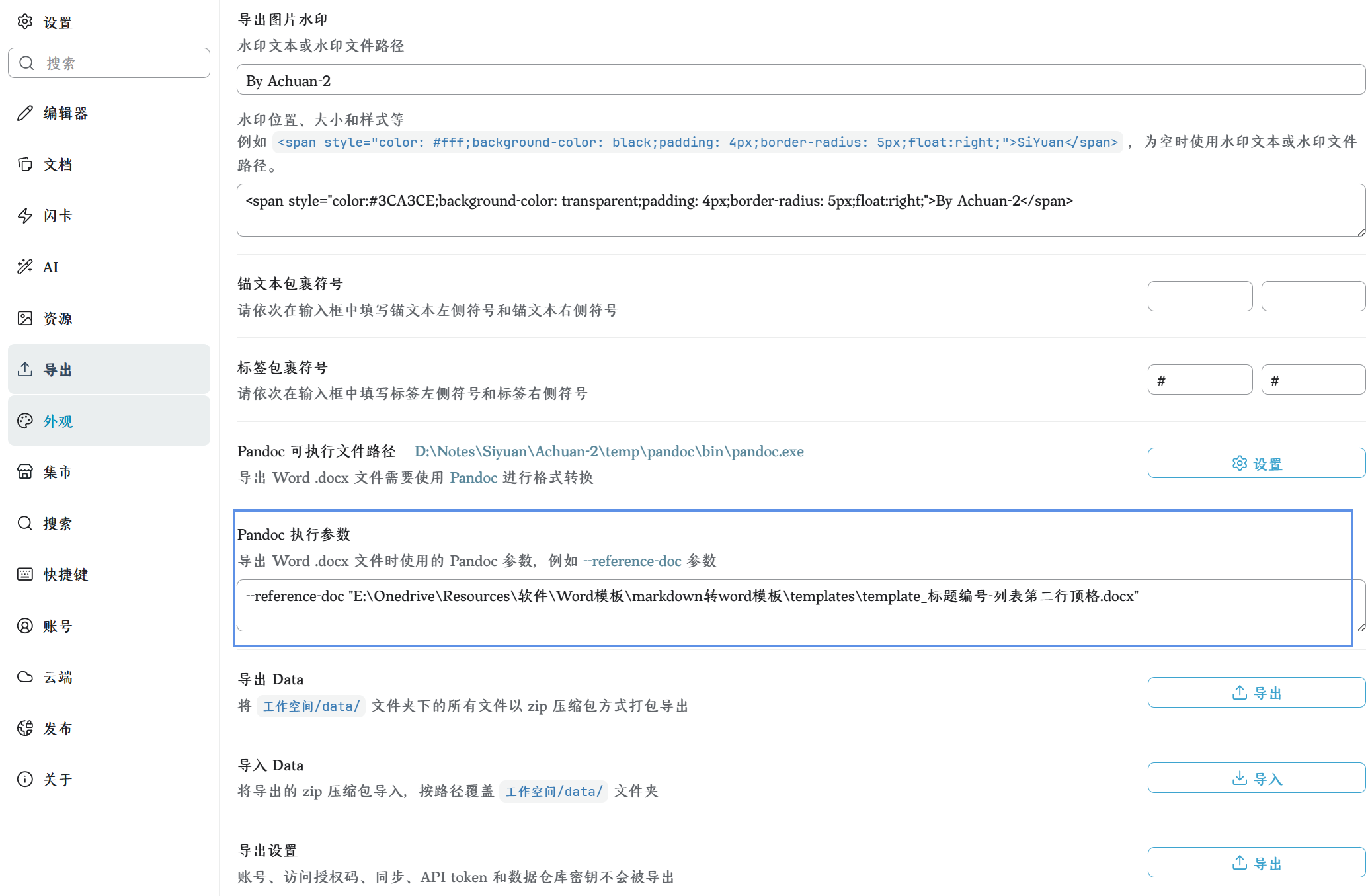
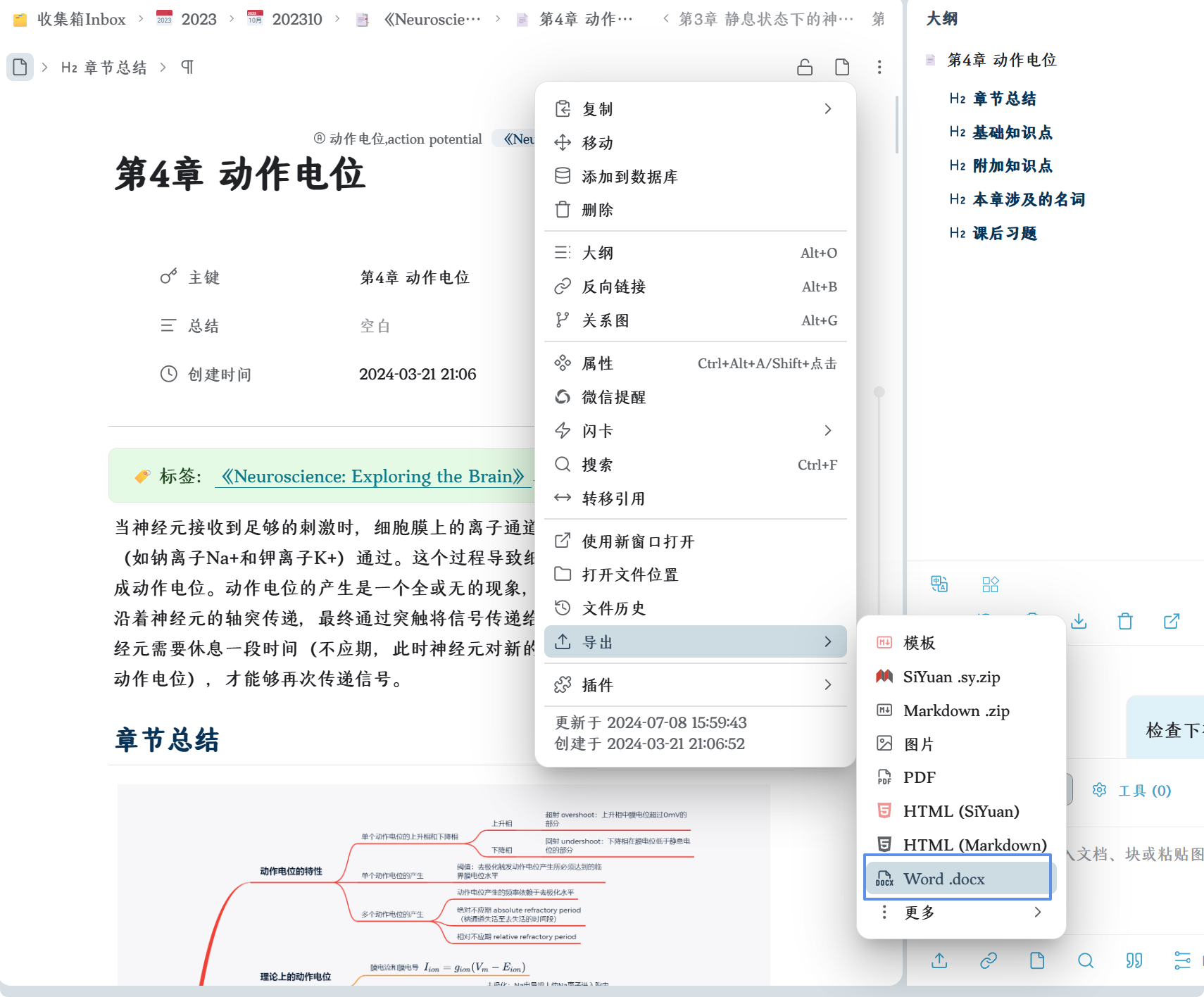
思源笔记如何设置导出为Word(.docx)的模板
在思源笔记的设置中的「导出-Pandoc执行参数」设置
--reference-doc "word模板路径"然后即可通过文档块的菜单的「导出-Word(.docx)」按钮导出为Word(.docx)
-
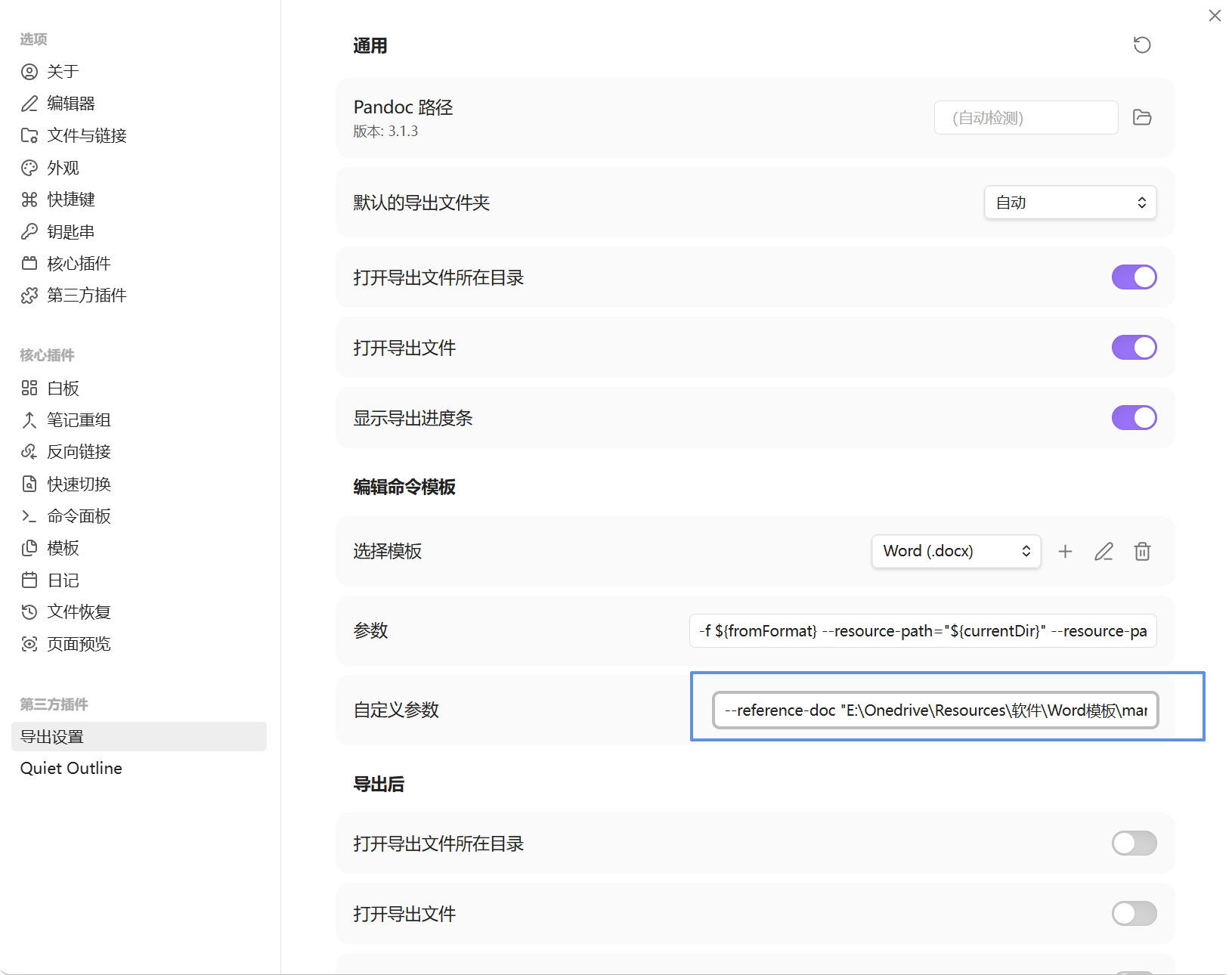
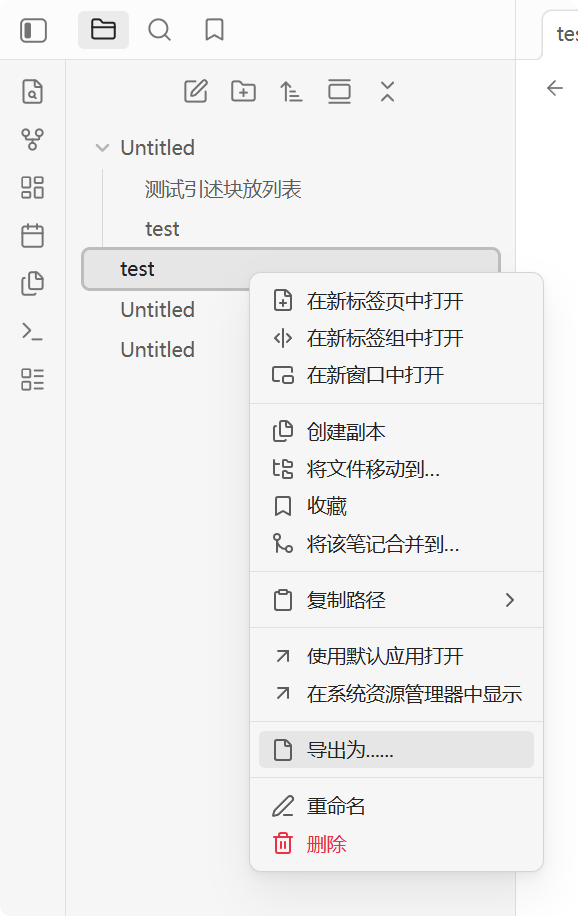
Obsidian如何设置导出为Word(.docx)的模板
安装obsidian-enhancing-export插件
在插件设置的「编辑命令模板」,选择Word(.docx),设置自定义参数为
--reference-doc "word模板路径"然后即可点击文档右键菜单中的「导出为……」导出为Word(.docx)
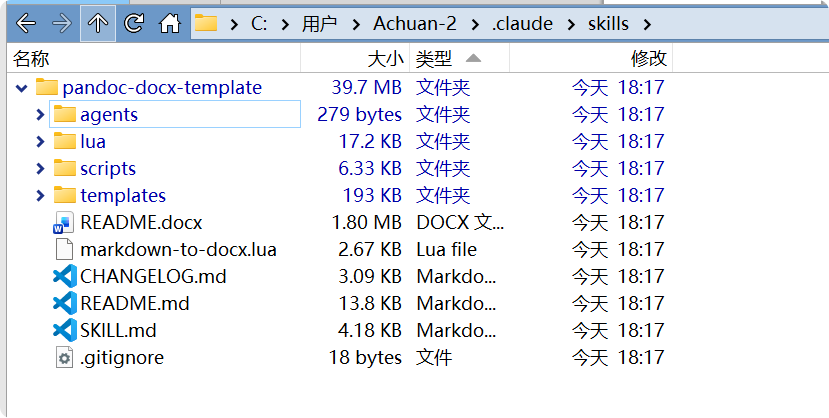
本仓库已经提供了可供 Agent 识别的 SKILL.md,适合在 Codex,Claude Code 等支持 Skill 的 Agent 中使用。当用户要求“把 Markdown 转成 Word”“套用中文 Word 模板导出 docx”“使用本仓库模板转换文档”时,Agent 会使用本仓库的 pandoc-docx-template skill。
默认会使用 templates/template_标题不编号-列表第二行顶格.docx 作为 Word 参考模板,并加载 markdown-to-docx.lua 过滤器,以便处理图片标题、字体颜色、行内代码等 Pandoc 默认转换效果不理想的内容。
Agent 安装Skill方式:
方式一:让AI自己安装 在 Claude Code、Codex、OpenClaw 等支持 Skill 的 Agent 里,直接说:
帮我安装这个 skill:https://github.com/Achuan-2/pandoc_docx_template
方式二:人工手动安装
-
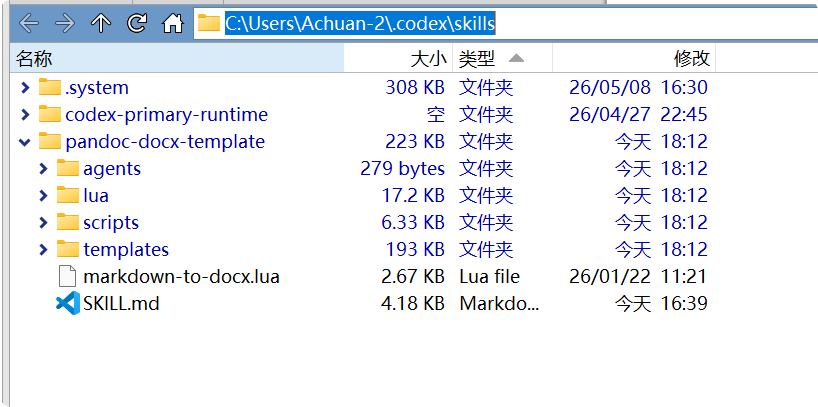
Codex
创建并打开
%USERPROFILE%\.codex\skills\pandoc-docx-template文件夹,存放本Skill相关文件 -
Claude Code
创建并打开
%USERPROFILE%\.claude\skills\pandoc-docx-template文件夹,存放本Skill相关文件
pandoc在处理markdown转docx中存在以下问题
-
问题:不支持解析markdown中的html标签,比如
<sub>、<sup>、<img>等- 解决方案1:可以使用lua过滤器来解决这个问题,使用本repo的
lua/markdown-html-recognition.lua文件 - 解决方案2:先转html再转docx
- 解决方案1:可以使用lua过滤器来解决这个问题,使用本repo的
-
问题:pandoc默认的图片标题是alt文本,我习惯是用title文本而不是alt文本作为图片标题(这也是思源笔记、语雀等笔记软件的语法解析规则)
- 解决方案:使用本repo的
lua/image-title-to-caption.lua文件,,并且这个lua还能把图片都添加Figure样式,就可以用Figure样式整体控制图片是居左还是居右了
- 解决方案:使用本repo的
-
问题:markdown设置了字体颜色,比如
<span style="color:red">红色文字</span>,但是导出时颜色丢失- 解决方案:使用本repo的
lua/preserve_font_color.lua文件
- 解决方案:使用本repo的
-
问题:图片编号无法自定义
- 解决方案:使用本repo 的
lua/image-title-to-caption-add-number.lua
- 解决方案:使用本repo 的
-
问题:pandoc代码块和行内代码都是在word里默认都是用一个样式的Source Code,比如我想要代码块只加边框没有底纹,行内代码有底纹就做不到
- 解决方案:使用本repo 的
lua/add-inline-code.lua,为行内代码添加自定义样式Inline Code,然后在word模板中修改该样式即可
- 解决方案:使用本repo 的
本repo提供了一个lua过滤器合集markdown-to-docx.lua,可以根据需要选用lua,这样可以让导出的docx文件更符合自己的需求:
pandoc input.md -t html | pandoc -f html -o output.docx --reference-doc templates/template_标题不编号-列表第二行顶格.docx --lua-filter markdown-to-docx.lua我的pandoc使用博客:
- pandoc 导出docx如何对图表进行编号
- pandoc将markdown导出为docx,如何修改图片标题为title文本而不是alt文本
- pandoc 导出markdown为word不支持html标签
- pandoc 将Markdown/Html导出为Docx,如何保留字体颜色
其他经验博客
- 设置word模板,Markdown 也能自动转换为美观规范的 Word 文档
- 全网找不到满意的 Markdown 转 Docx 模板,那就自己动手吧
- 科研写作之Docx格式(Word)与Markdown如何互转
注意,要修改模板,需要更改每个类型所对应的Word的样式,而不是只是自己改改当前段落的样式就能生效的。
一般样式,只需要打开word的样式面板,鼠标点击该行,将自动显示对应的样式,然后点击【修改】根据自己的需求修改样式就可以了
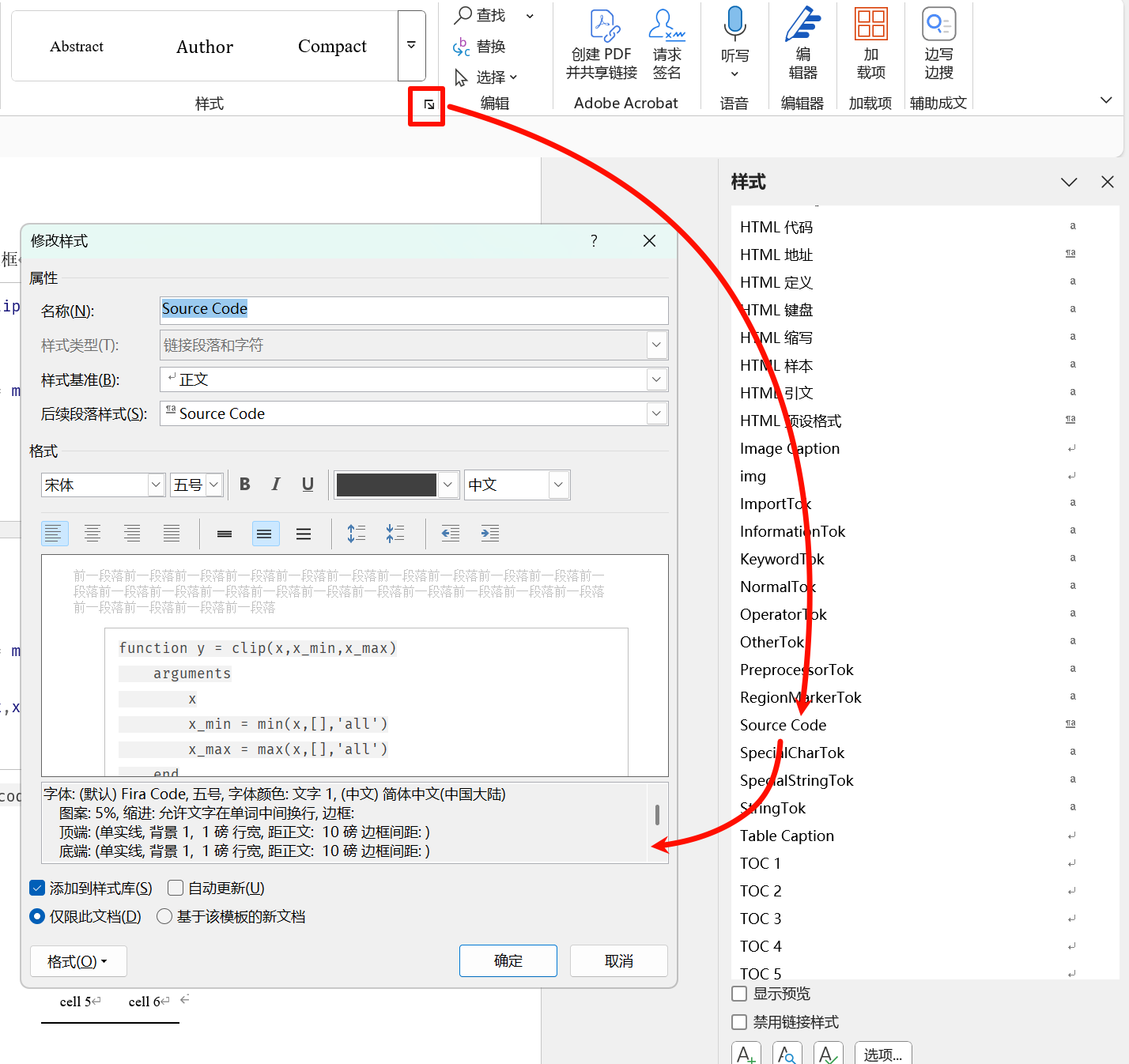
一般样式如下:
| 样式名 | 描述 | 默认样式 |
|---|---|---|
| 正文文本 | 在正文段落中应用 | 首行缩进, 字号小四,中文字体为宋体,英文Times New Roman |
| First Paragraph | 段落首段 | 首行缩进, 字号小四,中文字体为宋体,英文Times New Roman |
| Compact | 表格单元格 | 字号10,中文字体为宋体,英文Times New Roman |
| Heading 1(标题1) | 一级标题 | 字号小二,加粗,中文字体为黑体,英文Times New Roman, 段前24磅,段后24磅 |
| Heading 2(标题2) | 二级标题 | 字号三号,加粗,中文字体为黑体,英文Times New Roman |
| Heading 3(标题3) | 三级标题 | 字号小三,加粗,中文字体为黑体,英文Times New Roman |
| Heading 4(标题4) | 四级标题 | 字号小四,加粗,中文字体为黑体,英文Times New Roman |
| Heading 5(标题5) | 五级标题 | 字号小四,加粗,中文字体为黑体,英文Times New Roman |
| Heading 6(标题6) | 六级标题 | 字号小四,加粗,中文字体为黑体,英文Times New Roman |
| Block Text(文本块) | 引述块样式 | 左侧设置为6磅粗边框 |
| Source Code | 行内代码和代码块样式 | 四周添加1磅边框 |
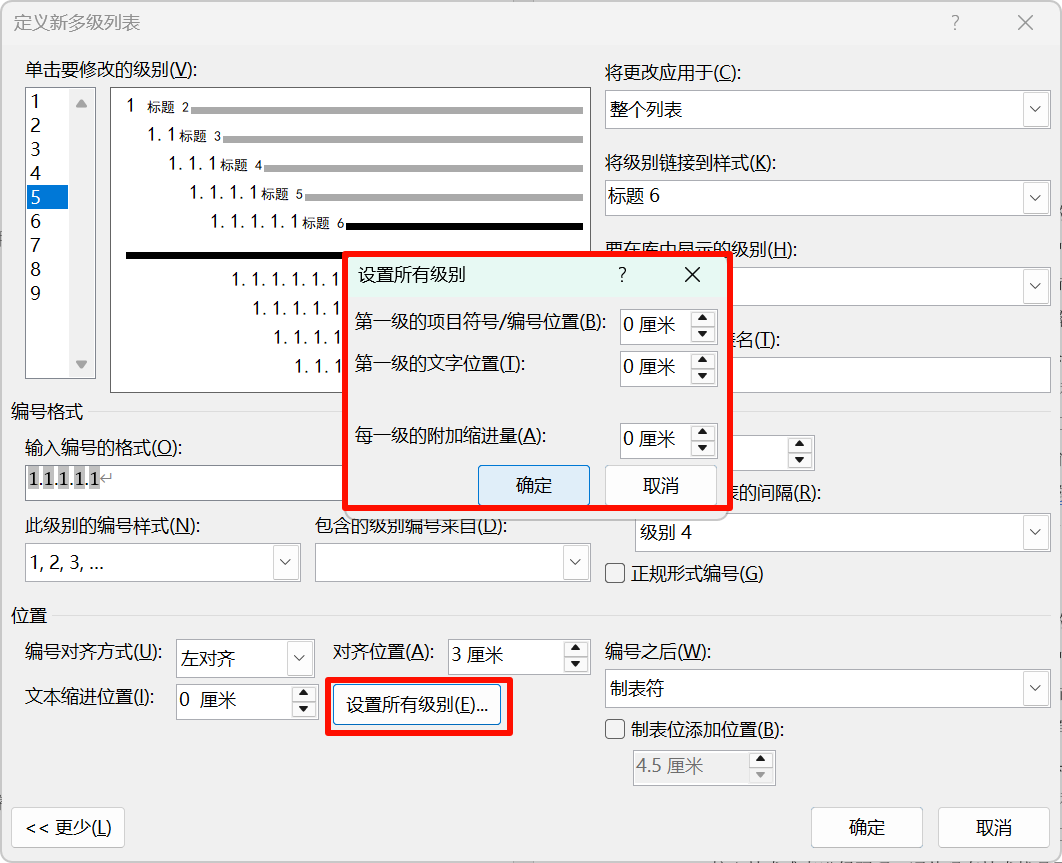
点击「多级列表」,点击「定义新的多级列表」,打开弹窗后点击「更多」进行展开
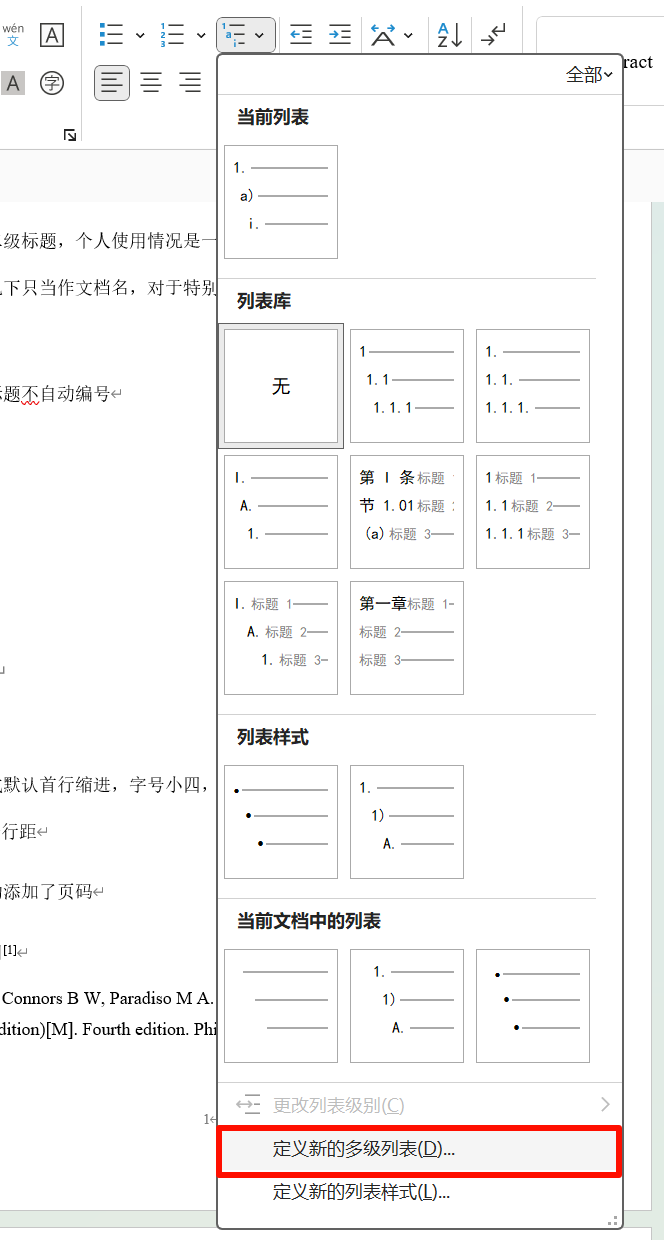
在「定义新的多级列表」弹窗,对每个级别设置编号格式和对应的标题
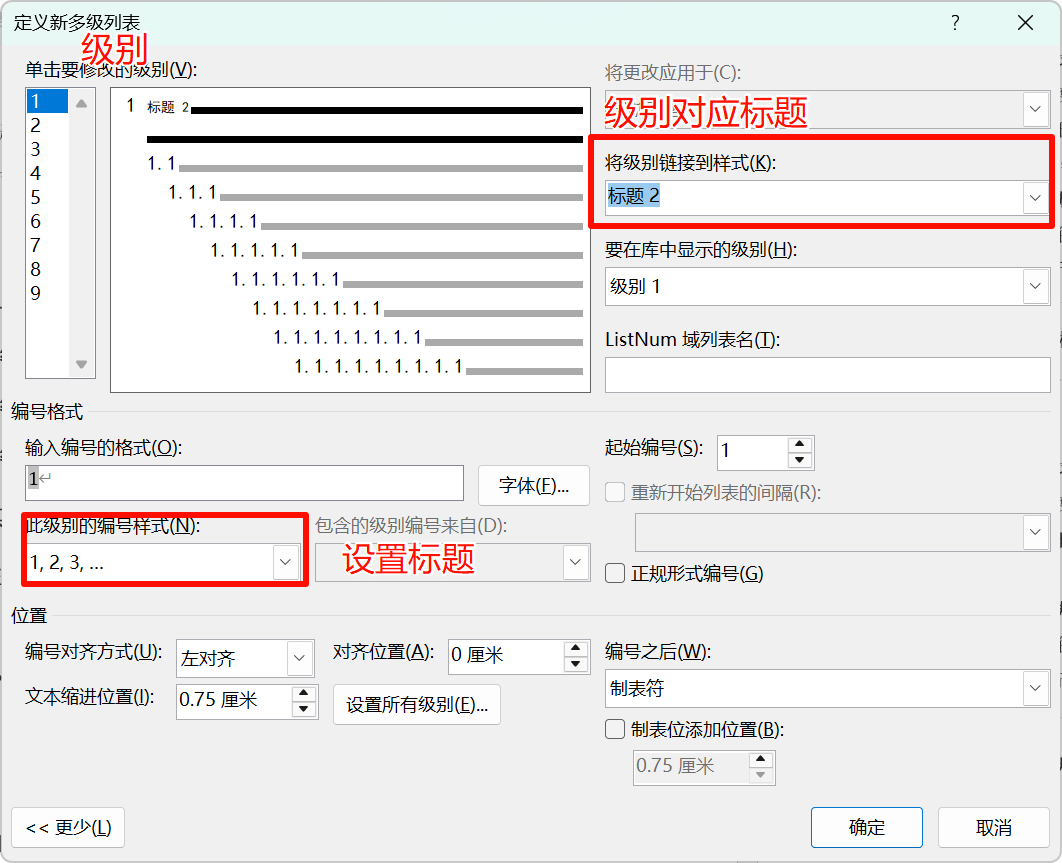
设置文本缩进位置为0,并设置所有级别
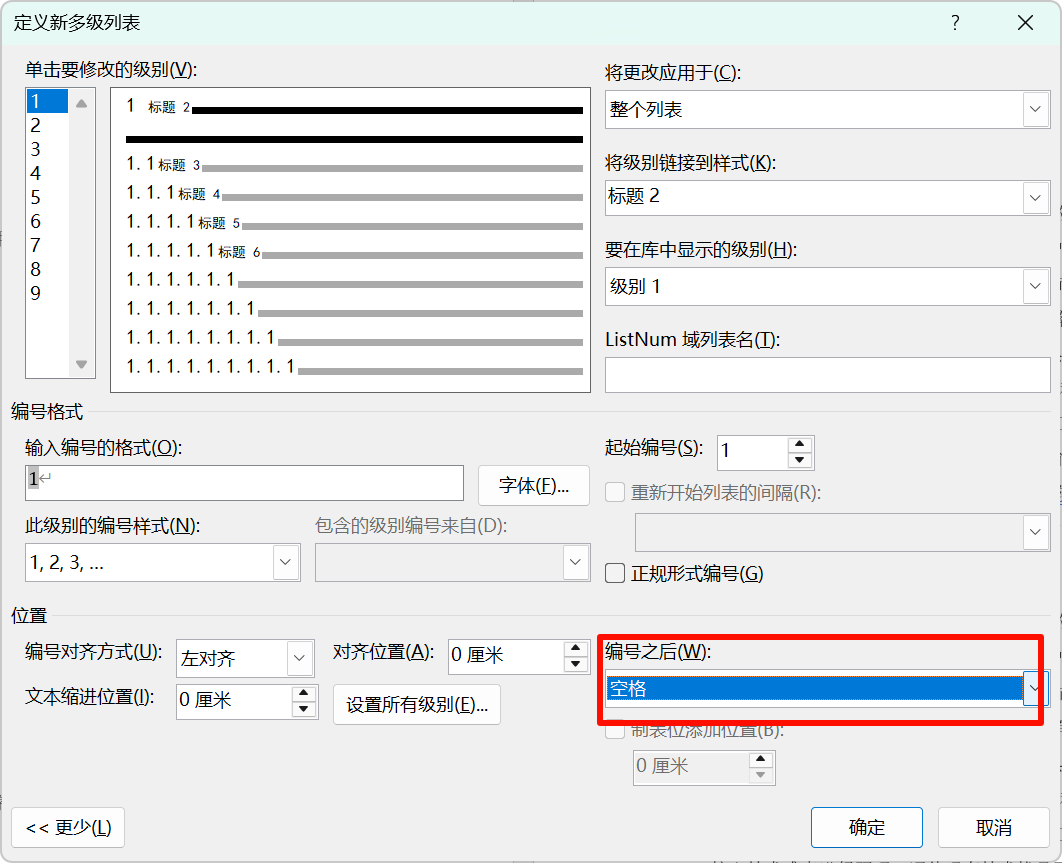
设置每个级别的「编号之后」是空格
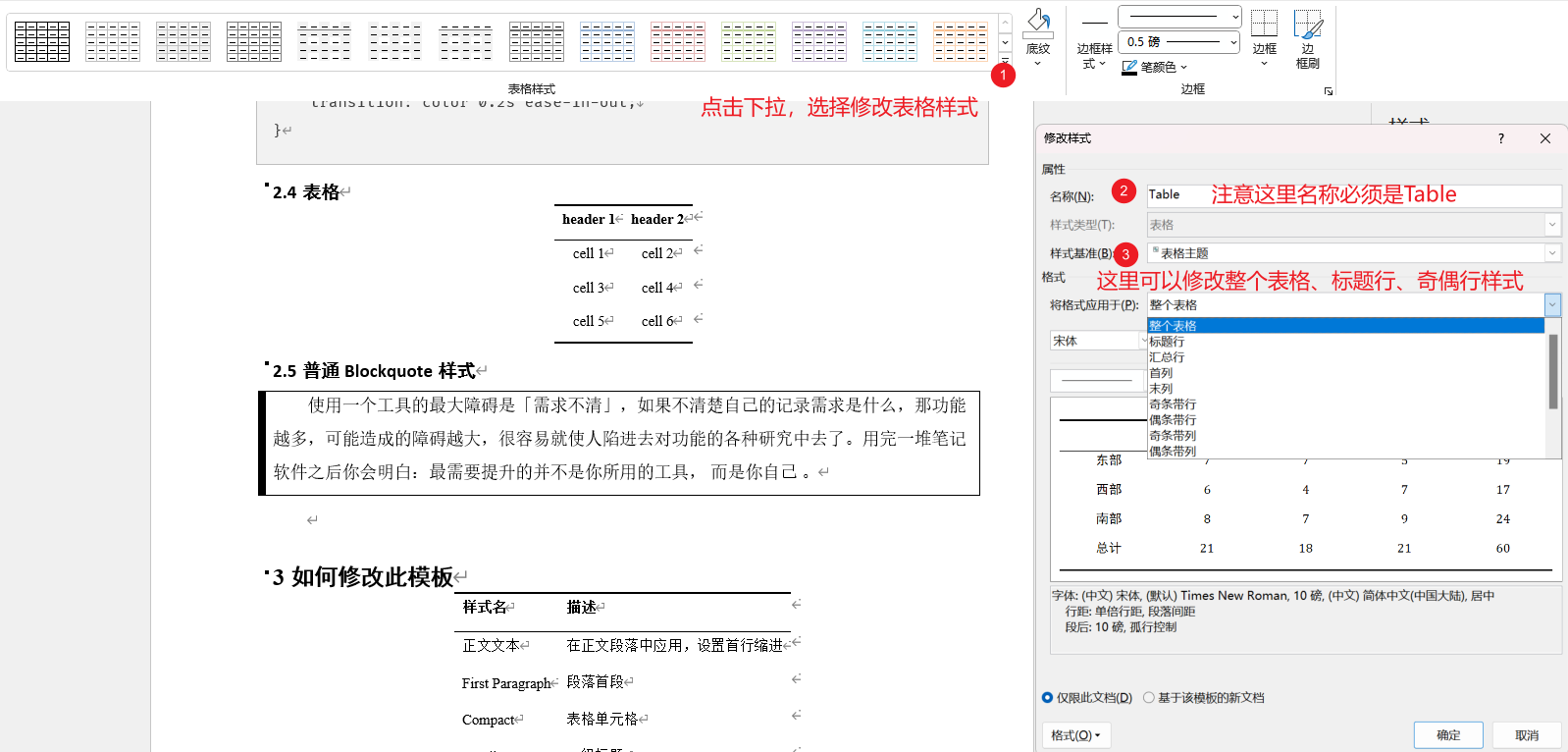
修改表格需要点击表格后,在【表设计】下拉,点击【修改表格样式】,进行修改
所谓的层级样式是无序列表不同层级是圆点还是方块,有序列表则是不同层级的编号格式。
在下图①的位置点击,可以看到列表样式有两个样式,分别对应无序列表和有序列表样式,右键修改。
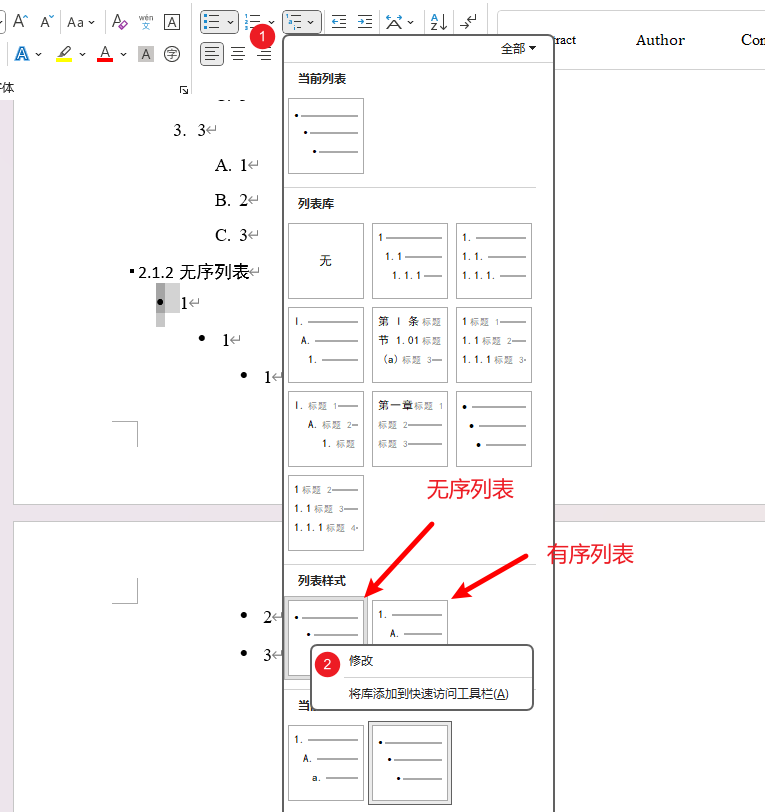
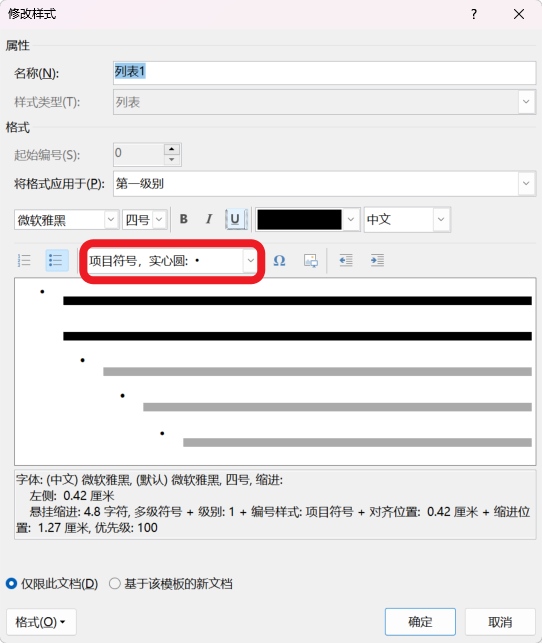
有序列表和无序列表可以基于模板改动项目符号,老实说这是我误打误撞搞出来的😂……目前自己都没能复现,所以大家不想折腾,还是基于本模板改动,且用且珍惜(如果有知道怎么复现的,欢迎指教🙏)。
鼠标点击列表所在行,右键点击【调整列表缩进】,选择【设置所有级别】
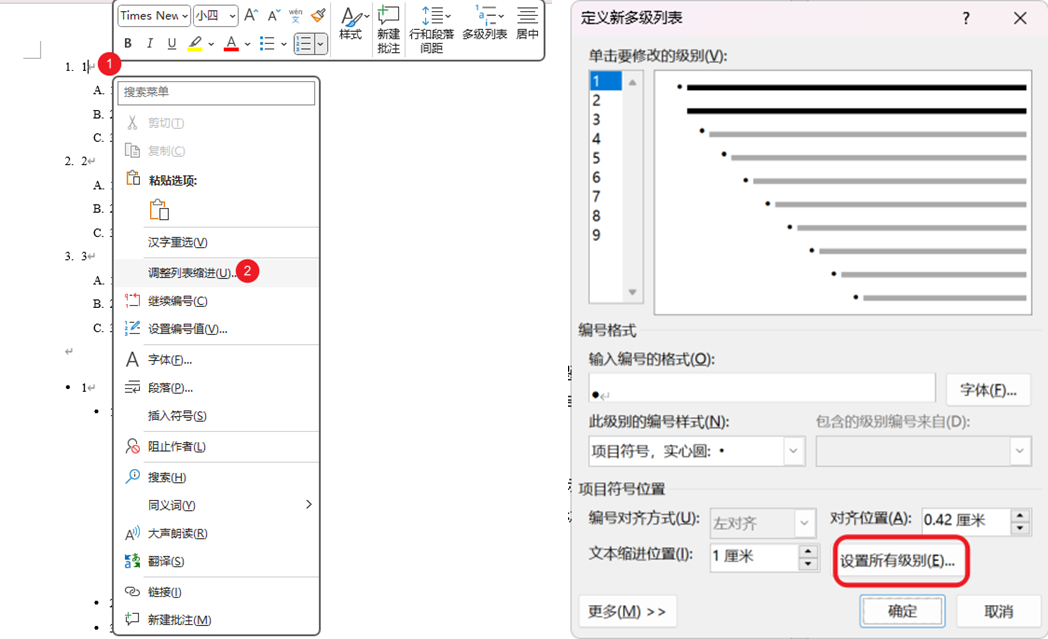
每个列表项的间距与【正文】样式的行间距有关,此外列表项的子文本段落也是【正文】样式而不是【正文文本样式】。所以要修改列表项间距,需要修改【正文】样式的行间距。
一般段落其实是【First Paragraph】、【正文文本】样式,而这两个样式都是继承于【正文】样式的,所以调整列表行间距而改动【正文】样式有可能会影响到普通文本样式。
为了让列表更美观,我把【正文】样式设置为1.5倍行距,不设置段前和段后距离,【First Paragraph】、【正文文本】会设置段前和段后距离
如果使用WPS和Mac版本的Word打开基于模板导出的文档,可能存在兼容性问题,建议还是用Windows端的Office Word打开
模板可以做到表格整体居中,但是表格单元格自动居中需要表格本身先设置居中,否则不居中。这是因为markdown表格默认是居左的。markdown的居中语法如下:
| header 1 | header 2 |
| :------: | :------: |
|  cell 1  |  cell 2  |
|  cell 3  |  cell 4  |
| cell 5 | cell 6 |当使用--highlight-style xxx参数导出时,代码块的高亮样式会根据 xxx 的值来决定。pandoc 支持多种高亮样式,如 pygments、breezeDark、tango、zenburn 等。
但是如果你用markdown转docx得到的文件再作为模板的话,docx文件会有带有-Tok结尾的样式,导致代码块高亮样式无法修改。所以请直接使用本repo的docx文件作为模板。也可以尝试删除docx中的代码高亮样式(所有Tok结尾的样式),然后再重新导出。
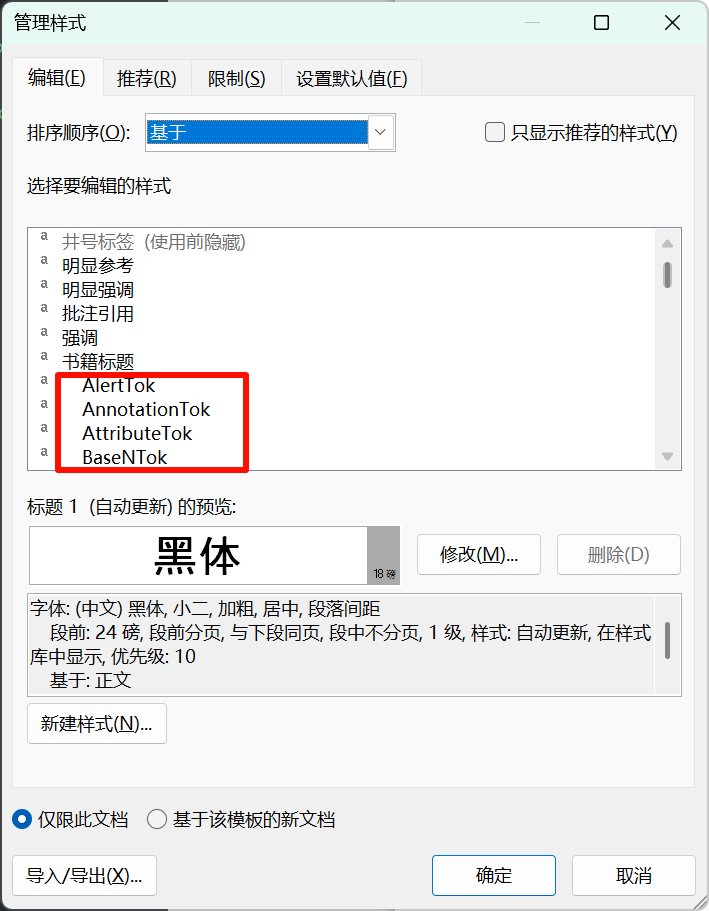
pandoc 相关issue:When pandoc sets a Word template, it cannot set highlight-style · Issue #10896 · jgm/pandoc
如果这个项目对你有帮助,欢迎给我打赏!


