

A ComfyUI custom node suite for Qwen3-TTS, supporting 1.7B and 0.6B models, Custom Voice, Voice Design, Voice Cloning and Fine-Tuning.
🎤 Looking for Speech-to-Text? Check out ComfyUI-Qwen3-ASR for audio transcription with compatible outputs!
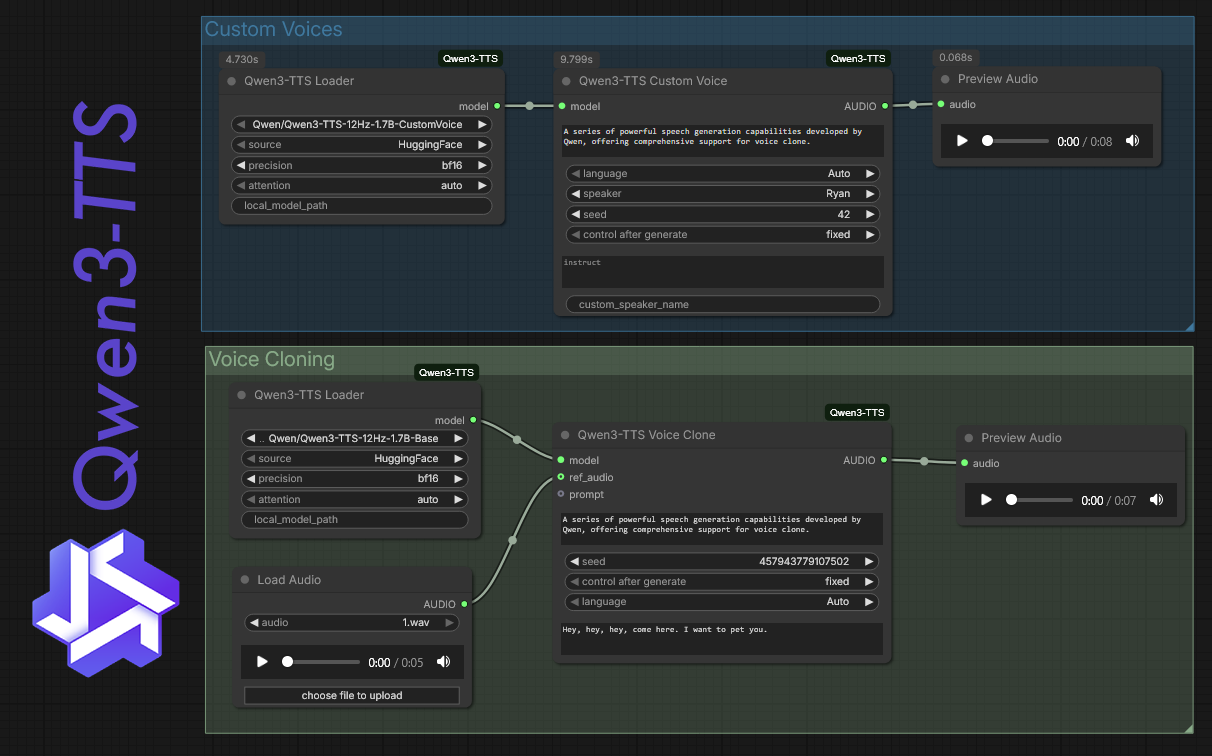
- ComfyUI Model Folder Integration: Models are stored in
ComfyUI/models/Qwen3-TTS/, keeping your models organized alongside other ComfyUI models. - On-Demand Download: Only downloads the model you select—no need to pre-download all variants.
- Full Qwen3-TTS Support:
- Custom Voice: Use 9 preset high-quality voices (Vivian, Ryan, etc.).
- Voice Design: Create new voices using natural language descriptions.
- Voice Cloning: Clone voices from a short reference audio clip.
- Fine-Tuning: Train a custom voice model using your own dataset (folder of .wav + .txt files).
- Resume training from checkpoints
- VRAM optimizations: gradient checkpointing, 8-bit AdamW, configurable batch sizes
- Per-epoch checkpointing with automatic cleanup
- Support for both 1.7B and 0.6B models
- Audio Comparison: Evaluate fine-tuned models with speaker similarity and mel spectrogram metrics.
- Cross-Lingual Support: Generate speech in Chinese, English, Japanese, Korean, German, French, Russian, Portuguese, Spanish, and Italian.
- Flexible Attention: robust support for
flash_attention_2with automatic fallback tosdpa(standard PyTorch 2.0 attention) if dependencies are missing.
-
Clone this repository into your
ComfyUI/custom_nodesfolder:cd ComfyUI/custom_nodes git clone https://github.com/DarioFT/ComfyUI-Qwen3-TTS.git -
Install dependencies:
cd ComfyUI-Qwen3-TTS
pip install -r requirements.txt
For portable/standalone ComfyUI installations, use the embedded Python instead:
# From your ComfyUI_windows_portable root folder
.\python_embeded\python.exe -m pip install -r ComfyUI\custom_nodes\ComfyUI-Qwen3-TTS\requirements.txt
⚠️ Note: ComfyUI does not auto-install dependencies fromrequirements.txt. You must run the install command manually.For GPU acceleration, ensure you have a CUDA-compatible PyTorch installed.
⚠️ Dependency Note: The upstreamqwen-ttspackage requirestransformers==4.57.3. This may downgrade your existing transformers version. If other custom nodes require a newer version, consider using a separate Python environment.
Models and tokenizers are automatically stored in your ComfyUI models folder:
ComfyUI/models/Qwen3-TTS/
├── Qwen3-TTS-12Hz-1.7B-CustomVoice/
├── Qwen3-TTS-12Hz-1.7B-VoiceDesign/
├── Qwen3-TTS-12Hz-1.7B-Base/
├── Qwen3-TTS-12Hz-0.6B-CustomVoice/
├── Qwen3-TTS-12Hz-0.6B-Base/
├── Qwen3-TTS-Tokenizer-12Hz/          # For fine-tuning
└── prompts/                           # Saved voice embeddings (.safetensors)
First-time use: When you first select a model and run the workflow, it will be downloaded automatically. Only the model you select is downloaded—not all variants.
Existing cached models: If you previously used this extension and have models in HuggingFace (~/.cache/huggingface/hub/) or ModelScope (~/.cache/modelscope/hub/) cache, they will be automatically migrated to the ComfyUI models folder.
Use the Qwen3-TTS Loader node.
- repo_id: Select the model you want to use.
CustomVoicemodels: For using preset speakers.VoiceDesignmodels: For designing voices with text prompts.Basemodels: For voice cloning and fine-tuning.
- source: Choose between HuggingFace or ModelScope for downloading (if model not already present locally).
- local_model_path: (Optional) Path to a locally trained/downloaded model (overrides repo_id).
- attention: Leave at
autofor best performance (tries Flash Attention 2, falls back to SDPA).
Connect the loaded model to one of the generator nodes:
- speaker: Choose one of the 9 presets (e.g., Vivian, Ryan).
- text: The text to speak.
- language: Target language (or Auto).
- instruct: (Optional) Add emotional instructions like "Happy" or "Whispering".
- instruct: Describe the voice you want, e.g., "A deep, resonant male voice, narrator style, calm and professional."
- text: The text to speak.
- ref_audio: Upload a reference audio file (1-10 seconds ideal, max 30s by default).
- ref_text: The transcription of the reference audio (improves quality).
- text: The text for the cloned voice to speak.
- max_new_tokens: Maximum tokens to generate (default: 2048). Increase for longer outputs, but higher values may increase hang risk.
- ref_audio_max_seconds: Auto-trim reference audio to this length (default: 30s, set to -1 to disable). Longer reference audio can cause generation hangs.
Use the Qwen3-TTS Prompt Maker node to pre-calculate the voice features from a reference audio. Connect the output Qwen3_Prompt to the Voice Clone node. This is faster if you are generating many sentences with the same cloned voice.
You can save voice clone prompts to disk for reuse without recomputing:
- Qwen3-TTS Save Prompt: Takes a
QWEN3_PROMPTand saves it tomodels/Qwen3-TTS/prompts/<filename>.safetensors - Qwen3-TTS Load Prompt: Dropdown of saved prompts, outputs
QWEN3_PROMPTdirectly usable by Voice Clone
Workflow example:
- First time: Voice Design → audio → Prompt Maker → Save Prompt (saves embedding)
- Reuse: Load Prompt → Voice Clone (instant, no recomputation)
Train a dedicated model for a specific voice.
-
Prepare Dataset:
- Organize a folder with
.wavaudio files and corresponding.txttranscripts (same filename). - Include a
ref.wav(representative sample) in the folder, or specify it in the node. - Use Qwen3-TTS Dataset Maker node pointing to this folder. It generates a
dataset.jsonl.
- Organize a folder with
-
Process Data:
- Use Qwen3-TTS Data Prep node with the
dataset.jsonl. It tokenizes audio and creates*_codes.jsonl. - batch_size: Control VRAM usage during processing (default: 16, lower if OOM).
- Includes SHA256-based caching to skip reprocessing unchanged datasets.
- Use Qwen3-TTS Data Prep node with the
-
Fine-Tune:
- Use Qwen3-TTS Finetune node.
- train_jsonl: Connect the
*_codes.jsonl. - init_model: Use
Qwen3-TTS-12Hz-1.7B-Base(or 0.6B variant). - output_dir: Where to save the new model.
- speaker_name: Name your new voice.
- Advanced options:
- resume_training: Continue training from a checkpoint.
- gradient_checkpointing: Enable for ~30-40% VRAM savings.
- use_8bit_adam: Use 8-bit AdamW optimizer (requires bitsandbytes) for reduced VRAM.
- warmup_ratio: Learning rate warmup (default: 0.1).
- gradient_accumulation: Simulate larger batch sizes.
- Run the node (Queue Prompt). Per-epoch checkpoints are saved automatically.
-
Evaluate Fine-Tuned Model (Optional):
- Use Qwen3-TTS Audio Compare node to compare reference vs generated audio.
- Measures speaker similarity, mel spectrogram distance, and speaking rate ratio.
-
Use Fine-Tuned Model:
- Use Qwen3-TTS Loader and set
local_model_pathto your fine-tunedoutput_dir/epoch_X. - Use Qwen3-TTS Custom Voice node. Your
speaker_namewon't appear in the dropdown, you should type your exact trainedspeaker_namein the input, and it'll ignore the default voices and use the trained one.
- Use Qwen3-TTS Loader and set
The Qwen3-TTS model can occasionally enter infinite generation loops when it fails to emit an end-of-sequence token. This is a known upstream issue.
Symptoms:
- Generation never completes, GPU stays at 100% usage
- More common with long reference audio (>30 seconds) or when generating long outputs
Solutions:
- Lower
max_new_tokens(default: 2048). Try 1024 for shorter outputs. - Use shorter reference audio for voice cloning (5-15 seconds is ideal). The
ref_audio_max_secondsparameter auto-trims long audio (default: 30s). - Kill the Python process and restart ComfyUI if generation hangs.
- Try a different seed - some seeds may produce more stable results.
FlashAttention 2 is not easily available on Windows. Without it, inference may be slower.
Solutions:
- Set attention to
sdpa(PyTorch 2.0+ native attention) for decent performance. - Use
eageras a fallback ifsdpacauses issues. - Consider using WSL2 with Linux for FlashAttention 2 support.
Based on the Qwen3-TTS library by QwenLM.