

Booru style tag autocompletion for the AUTOMATIC1111 Stable Diffusion WebUI





Tag Autocomplete is an extension for the popular AUTOMATIC1111 web UI for Stable Diffusion. You can install it using the inbuilt available extensions list, clone the files manually as described below, or use a pre-packaged version from Releases.
It displays autocompletion hints for recognized tags from "image booru" boards such as Danbooru, which are primarily used for browsing Anime-style illustrations. Since most custom Stable Diffusion models were trained using this information or merged with ones that did, using exact tags in prompts can often improve composition and consistency, even if the model itself has a photorealistic style.
Disclaimer: The default tag lists contain NSFW terms, please use them responsibly.
- 🚀 Instant completion hints while typing (under normal circumstances)
- ⌨️ Keyboard navigation
- 🌒 Dark & Light mode support
- 🛠️ Many settings and customizability
- 🌍 Translation support for tags, with optional live preview for the full prompt
- Note: Translation files are provided by the community, see here for a list of translations I know of.
Tag autocomplete supports built-in completion for:
- 🏷️ Danbooru & e621 tags (Top 100k by post count, as of November 2022)
- ✳️ Wildcards
- ➕ Extra network filenames, including
- Textual Inversion embeddings [(jump to readme section)]
- Hypernetworks
- LoRA
- LyCORIS / LoHA
- 🪄 Chants (custom format for longer prompt presets)
- 🏷️ "Extra file", one set of customizable extra tags
Additionally, some support for other third party extensions exists:
Click to expand
- Image Browser - Filename & EXIF keyword search
- Multidiffusion Upscaler - Regional Prompts
- Dataset Tag Editor - Caption, Interrogate Result, Edit Tags & Edit Caption
- WD 1.4 Tagger - Additional & Excluded tags
- Umi AI - Completion for YAML wildcards
Click to expand
Basic usage (with keyboard navigation):demo_basic.mp4
Wildcard script support:
demo_wildcards.mp4
Extra Network preview support:
demo_live_preview.mp4
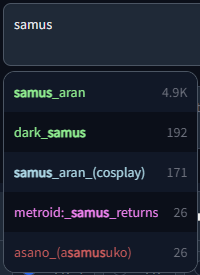
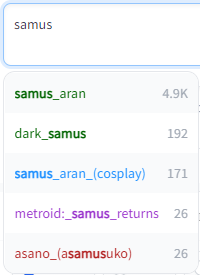
Dark and Light mode supported, including tag colors:
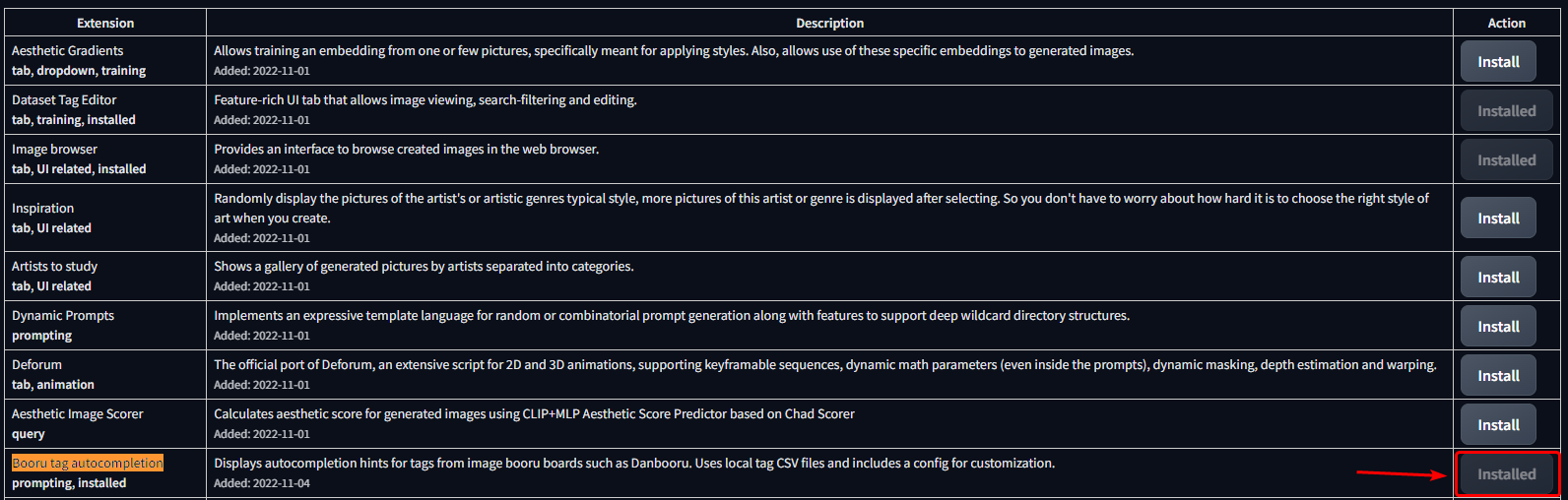
- Open the
Extensionstab - Open the
Availablesub-tab - Click Load from
- Find Booru tag autocompletion in the list
- The extension was one of the first available, so selecting "oldest first" will show it high up in the list.
- Alternatively, use CRTL + F to search for the text on the page
- Click Install on the right side


git clone "https://github.com/DominikDoom/a1111-sd-webui-tagcomplete.git" extensions/tag-autocomplete(The second argument specifies the name of the folder, you can choose whatever you like).
Autocompletion also works with wildcard files used by https://github.com/AUTOMATIC1111/stable-diffusion-webui-wildcards or other similar scripts/extensions.
Completion is triggered by typing __ (double underscore). It will first show a list of your wildcard files, and upon choosing one, the replacement options inside that file.
This enables you to either insert categories to be replaced by the script, or directly choose one and use wildcards as a sort of categorized custom tag system.
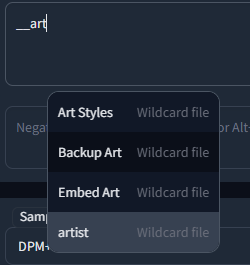
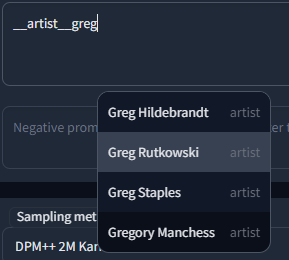
Wildcards are searched for in every extension folder, as well as the scripts/wildcards folder to support legacy versions. This means that you can combine wildcards from multiple extensions. Nested folders are also supported if you have grouped your wildcards in that way.
Completion for these types is triggered by typing <. By default it will show them all mixed together, but further filtering can be done in the following way:
<e:will only show embeddings<l:will only show LoRA and LyCORIS- Or
<lora:and<lyco:respectively for the long form
- Or
<h:or<hypernet:will only show Hypernetworks
Tag Autocomplete will now also show the preview images used for the cards in the Extra Networks menu in a small window next to the regular popup. This enables quick comparisons and additional info for unclear filenames without having to stop typing to look it up in the webui menu. It works for all supported extra network types that use preview images (Loras/Lycos, Embeddings & Hypernetworks). The preview window will stay hidden for normal tags or if no preview was found.

This feature will try to add known trigger words on autocompleting a Lora/Lyco.
It primarily uses the list provided by the model-keyword extension, which thus needs to be installed to use this feature. The list is also regularly updated through it.
However, once installed, you can deactivate it if you want, since tag autocomplete only needs the local keyword lists it ships with, not the extension itself.
The used files are lora-keyword.txt and lora-keyword-user.txt in the model-keyword installation folder.
If the main file isn't found, the feature will simply deactivate itself, everything else should work normally.
As of v1.5.0, the webui provides a native method to add activation keywords for Lora through the Extra networks config UI. These trigger words will always be preferred over the model-keyword ones and can be used without needing to install the model-keyword extension. This will however, obviously, be limited to those manually added keywords. For automatic discovery of keywords, you will still need the big list provided by model-keyword.
Custom trigger words can be added through two methods:
- Using the extra networks UI (recommended):
-
Only works with webui version v1.5.0 upwards, but much easier to use and works without the model-keyword extension
-
This method requires no manual refresh
-
Image example


-
- Through the model-keyword UI:
-
One issue with this method is that it has no official support for the Lycoris extension and doesn't scan its folder for files, so to add them through the UI you will have to temporarily move them into the Lora model folder to be able to select them in model-keywords dropdown. Some are already included in the default list though, so trying it out first is advisable.
-
After having added your custom keywords, you will need to either restart the UI or use the "Refresh TAC temp files" setting button.
-
Image example

-
Sometimes the inserted keywords can be wrong due to a hash collision, however model-keyword and tag autocomplete take the name of the file into account too if the collision is known.
If it still inserts something wrong or you simply don't want the keywords added that time, you can undo / redo it directly after as often as you want, until you type something else (It uses the default undo/redo action of the browser, so CTRL + Z, context menu and mouse macros should all work).
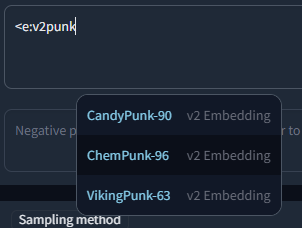
Embeddings trained for Stable Diffusion 1.x or 2.x models respectively are incompatible with the other type. To make it easier to find valid embeds, they are categorized by "v1 Embedding" and "v2 Embedding", including a slight color difference. You can also filter your search to include only v1 or v2 embeddings by typing <v1/2 or <e:v1/2 followed by the actual search term.
For example:
Chants are longer prompt presets. The name is inspired by some early prompt collections from Chinese users, which often were called along the lines of "Spellbook", "Codex", etc. The prompt snippets from such documents were fittingly called spells or chants for this reason.
Similar to embeddings and loras, this feature is triggered by typing the <, <c: or <chant: commands. For instance, when you enter <c:HighQuality in the prompt box and select it, the following prompt text will be inserted:
(masterpiece, best quality, high quality, highres, ultra-detailed),
Chants can be added in JSON files following this format:
Chant format (click to expand)
[
    {
        "name": "Basic-NegativePrompt",
        "terms": "Negative,Low,Quality",
        "content": "(worst quality, low quality, normal quality)",
        "color": 3
    },
    {
        "name": "Basic-HighQuality",
        "terms": "Best,High,Quality",
        "content": "(masterpiece, best quality, high quality, highres, ultra-detailed)",
        "color": 1
    },
    {
        "name": "Basic-Start",
        "terms": "Basic, Start, Simple, Demo",
        "content": "(masterpiece, best quality, high quality, highres), 1girl, extremely beautiful detailed face, ...",
        "color": 5
    }
]
The file can then be selected using the "Chant file" settings dropdown if it is located inside the extension's tags folder.
A chant object has four fields:
name- Display nameterms- Search termscontent- The actual prompt contentcolor- Color, using the same category color system as normal tags
https://github.com/Klokinator/Umi-AI is a feature-rich wildcard extension similar to Unprompted or Dynamic Wildcards.
In recent releases, it uses YAML-based wildcard tags to enable a complex chaining system,for example <[preset][--female][sfw][species]> will choose the preset category, exclude female related tags, further narrow it down with the following categories, and then choose one random fill-in matching all these criteria at runtime. Completion is triggered by <[ and then each following new unclosed bracket, e.g. <[xyz][, until closed by >.
Tag Autocomplete can recommend these options in a smart way, meaning while you continue to add category tags, it will only show results still matching what comes before. It also shows how many fill-in tags are available to choose from for that combo in place of the tag post count, enabling a quick overview and filtering of the large initial set.
Most of the credit goes to @ctwrs here, they contributed a lot as one of the Umi developers.
The extension has a large amount of configuration & customizability built in. Most should be self-explanatory, but for a detailed description click on a section below.
Tag filename
The main tag file the script uses. Included by default are danbooru.csv and e621.csv. While you can add custom tags here, the vast majority of models are not trained on anything other than these two (mostly danbooru), so it will not have much benefit.
You can also set it to None if you want to use other functionality of the extension (e.g. Wildcard or LoRA completion), but aren't interested in the normal tags.

"Active in" settings
Specifies where tag autocomplete should attach itself to and listen for changes. Negative prompts follow the settings for txt2img & img2img, so they will only be active if their "parent" is active.

Black / Whitelist
While the above options can turn off tag autocomplete globally, sometimes you might want to enable or disable it only for specific models. For example, if most of your models are Anime ones, you could add your photorealistic models, that weren't trained on booru tags and don't benefit from it, to the blacklist, which will automatically disable it after you switch to these models. You can use both the model name (including file extension) and their webui hashes (both short and long form).
Blacklist will exclude all specified models, while Whitelist will only activate it for these and stay off by default. One exception is an empty whitelist, which will be ignored (making it the same as an empty blacklist).

Move completion popup with cursor
This option enables or disables the floating popup to follow the position of your cursor, like it would do in an IDE. The script tries to reserve enough room for the popup to prevent squishing on the right side, but that doesn't always work for longer tags. If disabled, the popup will stay on the left.


Result count
Settings for the amount of results to show at once.
If Show all results is active, it will show a scrollable list instead of cutting it off after the number specified in Maximum results. For performance reasons, in that case not all are loaded at once, but instead in blocks. The block size is dictated by How many results to load at once. Once you reach the bottom, the next block will load (but that should rarely happen).
Notably, Maximum results will still have an influence if Show all results is used, since it dictates the height of the popup before scrolling begins.

Completion delay
Depending on the configuration, real time tag completion can get computationally expensive. This option sets a "debounce" delay in milliseconds (1000ms = 1s), during which no second completion will get queried. This might especially be useful if you type very fast.

"Search for" settings
Pretty self explanatory, enables or disables certain completion types.
Umi AI wildcards are included in the normal wildcard option here, although they use a different format, since their usage intention is similar.

"?" Wiki links
If this option is turned on, it will show a ? link next to the tag. Clicking this will try to open the wiki page for that tag on danbooru or e621, depending on which tag file you use.
⚠️ Warning:Danbooru and e621 are external sites and include a lot of NSFW content, which might show in the list of examples for a tag on its wiki page. Because of this, the option is disabled by default.

Extra network live previews
This option enables a small preview window alongside the normal completion popup that will show the card preview also usd in the extra networks tab for that file.

Completion settings
These settings specify how the text will be inserted.
Booru sites mostly use underscores in tags instead of spaces, but during preprocessing most models replaced this back with spaces since the CLIP encoder used in Stable diffusion was trained on natural language. Thus, by default tag autocomplete will as well.
Parentheses are used as control characters in the webui to give more attention / weight to a specific part of the prompt, so tags including parentheses are escaped (\( \)) by default to not influence that.
Depending on the last setting, tag autocomplete will append a comma and space after inserting a tag, which may help for rapid completion of multiple tags in a row.

Lora / Lyco trigger word insertion
See the detailed readme section for more info.
Selects the mode to use for Lora / Lyco trigger word insertion. Needs the model-keyword extension to be installed, else it will do nothing.
- Never
- Will not complete trigger words, even if the model-keyword extension is installed
- Only user list
- Will only load the custom keywords specified in the lora-keyword-user.txt file and ignore the default list
- Always
- Will load and use both lists
Switching from "Never" to what you had before or back will not require a restart, but changing between the full and user only list will.

Wildcard path completion
Some collections of wildcards are organized in nested subfolders. They are listed with the full path to the file, like "hair/colors/light/..." or "clothing/male/casual/..." etc.
In these cases it is often hard to type the full path manually, but you still want to narrow the selection before further scrolling in the list.
For this, a partial completion of the path can be triggered with Tab (or the custom hotkey for ChooseSelectedOrFirst) if the results to choose from are all paths.
This setting determines the mode it should use for completion:
- To next folder level:
- Completes until the next
/in the path, preferring your selection as the way forward - If you want to directly choose an option, Enter / the
ChooseSelectedhotkey will skip it and fully complete.
- Completes until the next
- To first difference:
- Completes until the first difference in the results and waits for additional info
- E.g. if you have "/sub/folder_a/..." and "/sub/folder_b/...", completing after typing "su" will insert everything up to "/sub/folder_" and stop there until you type a or b to clarify.
- If you selected something with the arrow keys (regardless of pressing Enter or Tab), it will skip it and fully complete.
- Always fully:
- As the name suggests, disables the partial completion behavior and inserts the full path under all circumstances like with normal tags.

Alias settings
Tags often are referred to with multiple aliases. If Search by alias is turned on, those will be included in the search results, which might help if you are unsure of the correct tag. They will still get replaced by the actual tag they are linked to on insertion, since that is what the models were trained on.
Only show alias sets if you want to see only the alias or also the tag it maps to
(shown as <alias> ➝ <actual>)

Translation settings
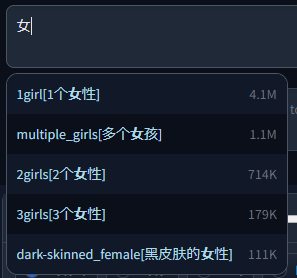
Tag Autocomplete has support for tag translations specified in a separate file (Translation filename). You can search for tags using those translations, meaning that if you don't know the English tagword and have a translation file in your native language, you can use that instead.
It also has a legacy format option for some old files used in the community, as well as an experimental live translation preview for the whole prompt so you can easily find and edit tags afterwards.
For more details, see the section on translations below.

Extra file settings
Specifies a set of extra tags that get appended either before or after the regular results, as specified here. Mostly useful for small custom tag sets such as the commonly used quality tags (masterpiece, best quality, etc.)
If you want completion for longer presets or even whole prompts, have a look at Chants instead.

Chant filename
Chants are longer presets or even whole prompts that can be selected & inserted at once, similar to the built in styles dropdown of the webui. They do offer some additional features though, and are faster to use.
For more info, see the section on Chants above.

Hotkeys
You can specify the hotkeys for most keyboard navigation features here. Should be one of the key names specified in https://www.w3.org/TR/uievents-key/#named-key-attribute-value.
Function explanation:
- Move Up / Down: Select the next tag
- Jump Up / Down: Move by five places at once
- Jump to Start / End: Jump to the top or bottom of the list
- ChooseSelected: Select the highlighted tag, or close popup if nothing was selected
- ChooseSelectedOrFirst: Same as above, but default to the first result if nothing was selected
- Close: Closes the popup

Colors
Here, you can change the default colors used for different tag categories. They were chosen to be similar to the category colors of their source site.
The format is standard JSON
- The object names correspond to the tag filename they should be used for.
- The numbers are specifying the tag type, which is dependent on the tag source. For more info, see CSV tag data.
- The first value in the square brackets is for dark, the second for light mode. HTML color names and hex codes should both work.
This can also be used to add new color sets for custom tag files.

Refresh TAC temp files
This is a "fake" setting, meaning it doesn't actually configure anything. Rather, it is a small hack to abuse the refresh button developers can add to webui options. Clicking on the refresh button next to this setting will force tag autocomplete to recreate and reload some temporary internal files, which normally only happens on restarting the UI.
Tag autocomplete depends on these files for various functionality, especially related to extra networks and wildcard completion. This setting can be used to rebuild the lists if you have, for example, added a few new LoRAs into the folder and don't want to restart the UI to get tag autocomplete to list them.
You can also add this to your quicksettings bar to have the refresh button available at all times.

An additional file can be added in the translation section, which will be used to translate both tags and aliases and also enables searching by translation.
This file needs to be a CSV in the format <English tag/alias>,<Translation>. Some older files use a three column format, which requires a compatibility setting to be activated.
You can find it under Settings > Tag autocomplete > Translation filename > Translation file uses old 3-column translation format instead of the new 2-column one.
With it on, the second column will be unused and skipped during parsing.
Example with Chinese translation:
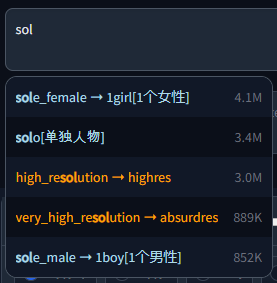
- 🇨🇳 Chinese tags by @HalfMAI, using machine translation and manual correction for the most common tags (uses legacy format)
- 🇨🇳 Chinese tags by @sgmklp, smaller set of manual translations based on https://github.com/zcyzcy88/TagTable
- 🇯🇵 Japanese tags by @applemango, both machine and human translations available
Translations are a community effort. If you have translated a tag file or want to create one, please open a Pull Request or Issue so your link can be added here. Please make sure the quality is alright though, machine translation gets a lot of stuff wrong even for the most common tags.
⚠️ Warning:This feature is still experimental, you might encounter some bugs when using it.
This will show a live preview of all detected tags in the prompt, both correctly separated by commas as well as in a longer sentence. It can detect up to three-word pairs in natural sentences, preferring perfect multi-word matches over single tags.
Above the detected tags will be their translation from the translation file, so if you aren't sure what the English tag means, you can easily find it there even after they have been inserted into the prompt (instead of just in the popup during completion).
The option defaults to off, but you can activate it by choosing a translation file and checking "Show live tag translation below prompt". It will not affect the normal functionality if it is off.
Example with Chinese translation:

Clicking on a detected tag will also select it in the prompt for quick editing.

The translation updates when the user types or pastes text, but not if the action happens programmatically (e.g. applying a style or loading from PNG Info / Image Browser). This can be worked around by typing something manually after the programmatic edit.
An extra file can be used to add new / custom tags not included in the main set. The format is identical to the normal tag format shown in CSV tag data below, with one exception: Since custom tags likely have no count, column three (or two if counting from zero) is instead used for the gray meta text displayed next to the tag. If left empty, it will instead show "Custom tag".
An example with the included (very basic) extra-quality-tags.csv file:
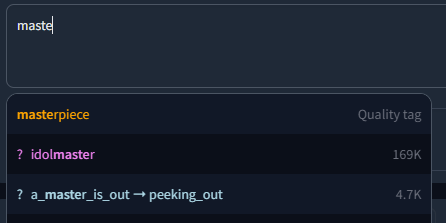
Whether the custom tags should be added before or after the normal tags can be chosen in the settings.
The script expects a CSV file with tags saved in the following way:
<name>,<type>,<postCount>,"<aliases>"Example:
1girl,0,4114588,"1girls,sole_female"
solo,0,3426446,"female_solo,solo_female"
highres,5,3008413,"high_res,high_resolution,hires"
long_hair,0,2898315,longhair
commentary_request,5,2610959,
Notably, it does not expect column names in the first row and both count and aliases are technically optional, although count is always included in the default data. Multiple aliases need to be comma separated as well, but encased in string quotes to not break the CSV parsing.
The numbering system follows the tag API docs of Danbooru:
| Value | Description |
|---|---|
| 0 | General |
| 1 | Artist |
| 3 | Copyright |
| 4 | Character |
| 5 | Meta |
or similarly for e621:
| Value | Description |
|---|---|
| -1 | Invalid |
| 0 | General |
| 1 | Artist |
| 3 | Copyright |
| 4 | Character |
| 5 | Species |
| 6 | Invalid |
| 7 | Meta |
| 8 | Lore |
The tag type is used for coloring entries in the result list.
- Depending on your browser settings, sometimes an old version of the script can get cached. Try CTRL + F5 to force-reload the site without cache if e.g. a new feature doesn't appear for you after an update.
- If the prompt popup has broken styling for you or doesn't appear at all (like this), make sure to update your openpose-editor extension if you have it installed. It is known to cause issues with other extensions in older versions.


