

Hi guys, happy new year! Today we are going to implement the famous Vi(sual)T(transformer) proposed in AN IMAGE IS WORTH 16X16 WORDS: TRANSFORMERS FOR IMAGE RECOGNITION AT SCALE.
Code is here, an interactive version of this article can be downloaded from here.
ViT will be soon available on my new computer vision library called glasses
This is a technical tutorial, not your normal medium post where you find out about the top 5 secret pandas functions to make you rich.
So, before beginning, I highly recommend you to:
- have a look at the amazing The Illustrated Transformer website
- watch Yannic Kilcher video about ViT
- read Einops doc
So, ViT uses a normal transformer (the one proposed in Attention is All You Need) that works on images. But, how?
The following picture shows ViT's architecture
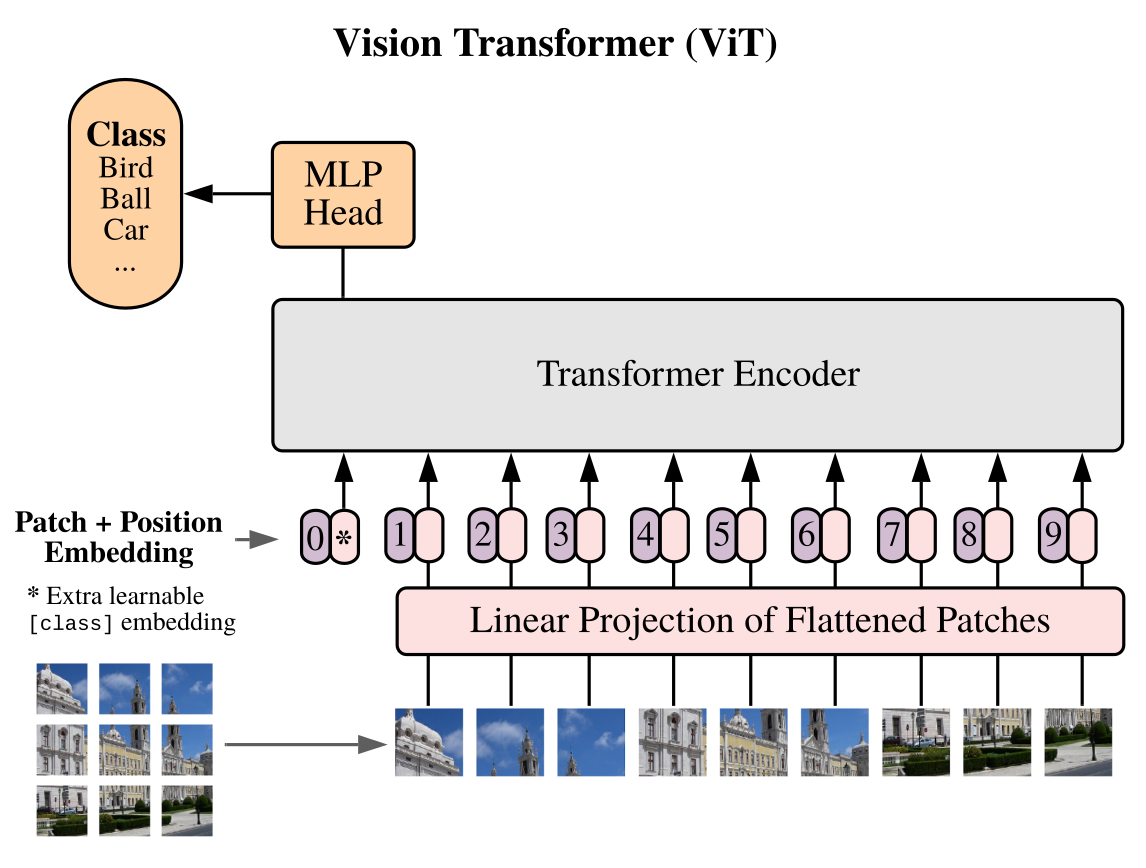
The input image is decomposed into 16x16 flatten patches (the image is not in scale). Then they are embedded using a normal fully connected layer, a special cls token is added in front of them and the positional encoding is summed. The resulting tensor is passed first into a standard Transformer and then to a classification head. That's it.
The article is structure into the following sections:
- Data
- Patches Embeddings
- CLS Token
- Position Embedding
- Transformer
- Attention
- Residuals
- MLP
- TransformerEncoder
- Head
- ViT
We are going to implement the model block by block with a bottom-up approach. We can start by importing all the required packages
import torch
import torch.nn.functional as F
import matplotlib.pyplot as plt

from torch import nn
from torch import Tensor
from PIL import Image
from torchvision.transforms import Compose, Resize, ToTensor
from einops import rearrange, reduce, repeat
from einops.layers.torch import Rearrange, Reduce
from torchsummary import summary
Nothing fancy here, just PyTorch + stuff
First of all, we need a picture, a cute cat works just fine :)
img = Image.open('./cat.jpg')

fig = plt.figure()
plt.imshow(img)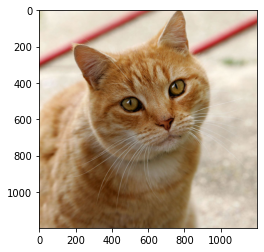
Then, we need to preprocess it
# resize to imagenet size
transform = Compose([Resize((224, 224)), ToTensor()])
x = transform(img)
x = x.unsqueeze(0) # add batch dim
x.shape
torch.Size([1, 3, 224, 224])
The first step is to break-down the image in multiple patches and flatten them.

Quoting from the paper:

This can be easily done using einops.
patch_size = 16 # 16 pixels
pathes = rearrange(x, 'b c (h s1) (w s2) -> b (h w) (s1 s2 c)', s1=patch_size, s2=patch_size)
Now, we need to project them using a normal linear layer
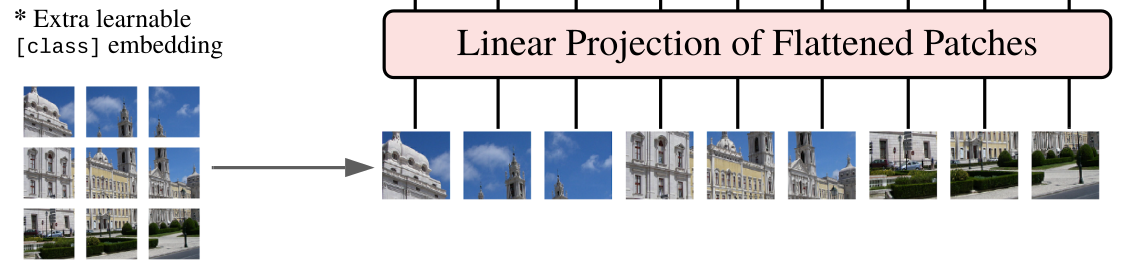
We can create a PatchEmbedding class to keep our code nice and clean
class PatchEmbedding(nn.Module):
    def __init__(self, in_channels: int = 3, patch_size: int = 16, emb_size: int = 768):
        self.patch_size = patch_size
        super().__init__()
        self.projection = nn.Sequential(
            # break-down the image in s1 x s2 patches and flat them
            Rearrange('b c (h s1) (w s2) -> b (h w) (s1 s2 c)', s1=patch_size, s2=patch_size),
            nn.Linear(patch_size * patch_size * in_channels, emb_size)
        )

    def forward(self, x: Tensor) -> Tensor:
        x = self.projection(x)
        return x

PatchEmbedding()(x).shape
torch.Size([1, 196, 768])
Note After checking out the original implementation, I found out that the authors are using a Conv2d layer instead of a Linear one for performance gain. This is obtained by using a kernel_size and stride equal to the patch_size. Intuitively, the convolution operation is applied to each patch individually. So, we have to first apply the conv layer and then flat the resulting images.
class PatchEmbedding(nn.Module):
    def __init__(self, in_channels: int = 3, patch_size: int = 16, emb_size: int = 768):
        self.patch_size = patch_size
        super().__init__()
        self.projection = nn.Sequential(
            # using a conv layer instead of a linear one -> performance gains
            nn.Conv2d(in_channels, emb_size, kernel_size=patch_size, stride=patch_size),
            Rearrange('b e (h) (w) -> b (h w) e'),
        )

    def forward(self, x: Tensor) -> Tensor:
        x = self.projection(x)
        return x

PatchEmbedding()(x).shape
torch.Size([1, 196, 768])
Next step is to add the cls token and the position embedding. The cls token is just a number placed in from of each sequence (of projected patches)
class PatchEmbedding(nn.Module):
    def __init__(self, in_channels: int = 3, patch_size: int = 16, emb_size: int = 768):
        self.patch_size = patch_size
        super().__init__()
        self.projection = nn.Sequential(
            # using a conv layer instead of a linear one -> performance gains
            nn.Conv2d(in_channels, emb_size, kernel_size=patch_size, stride=patch_size),
            Rearrange('b e (h) (w) -> b (h w) e'),
        )

        self.cls_token = nn.Parameter(torch.randn(1,1, emb_size))

    def forward(self, x: Tensor) -> Tensor:
        b, _, _, _ = x.shape
        x = self.projection(x)
        cls_tokens = repeat(self.cls_token, '() n e -> b n e', b=b)
        # prepend the cls token to the input
        x = torch.cat([cls_tokens, x], dim=1)
        return x

PatchEmbedding()(x).shape
torch.Size([1, 197, 768])
cls_token is a torch Parameter randomly initialized, in the forward the method it is copied b (batch) times and prepended before the projected patches using torch.cat
So far, the model has no idea about the original position of the patches. We need to pass this spatial information. This can be done in different ways, in ViT we let the model learn it. The position embedding is just a tensor of shape N_PATCHES + 1 (token), EMBED_SIZE that is added to the projected patches.

class PatchEmbedding(nn.Module):
    def __init__(self, in_channels: int = 3, patch_size: int = 16, emb_size: int = 768, img_size: int = 224):
        self.patch_size = patch_size
        super().__init__()
        self.projection = nn.Sequential(
            # using a conv layer instead of a linear one -> performance gains
            nn.Conv2d(in_channels, emb_size, kernel_size=patch_size, stride=patch_size),
            Rearrange('b e (h) (w) -> b (h w) e'),
        )
        self.cls_token = nn.Parameter(torch.randn(1,1, emb_size))
        self.positions = nn.Parameter(torch.randn((img_size // patch_size) **2 + 1, emb_size))


    def forward(self, x: Tensor) -> Tensor:
        b, _, _, _ = x.shape
        x = self.projection(x)
        cls_tokens = repeat(self.cls_token, '() n e -> b n e', b=b)
        # prepend the cls token to the input
        x = torch.cat([cls_tokens, x], dim=1)
        # add position embedding
        x += self.positions
        return x

PatchEmbedding()(x).shape
torch.Size([1, 197, 768])
We added the position embedding in the .positions field and sum it to the patches in the .forward function
Now we need the implement Transformer. In ViT only the Encoder is used, the architecture is visualized in the following picture.

Let's start with the Attention part
So, the attention takes three inputs, the famous queries, keys, and values, and computes the attention matrix using queries and values and use it to "attend" to the values. In this case, we are using multi-head attention meaning that the computation is split across n heads with smaller input size.
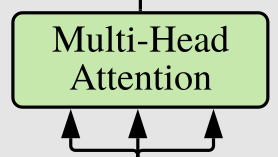
We can use nn.MultiHadAttention from PyTorch or implement our own. For completeness I will show how it looks like:
class MultiHeadAttention(nn.Module):
    def __init__(self, emb_size: int = 768, num_heads: int = 8, dropout: float = 0):
        super().__init__()
        self.emb_size = emb_size
        self.num_heads = num_heads
        self.keys = nn.Linear(emb_size, emb_size)
        self.queries = nn.Linear(emb_size, emb_size)
        self.values = nn.Linear(emb_size, emb_size)
        self.att_drop = nn.Dropout(dropout)
        self.projection = nn.Linear(emb_size, emb_size)
        self.scaling = (self.emb_size // num_heads) ** -0.5

    def forward(self, x : Tensor, mask: Tensor = None) -> Tensor:
        # split keys, queries and values in num_heads
        queries = rearrange(self.queries(x), "b n (h d) -> b h n d", h=self.num_heads)
        keys = rearrange(self.keys(x), "b n (h d) -> b h n d", h=self.num_heads)
        values  = rearrange(self.values(x), "b n (h d) -> b h n d", h=self.num_heads)
        # sum up over the last axis
        energy = torch.einsum('bhqd, bhkd -> bhqk', queries, keys) # batch, num_heads, query_len, key_len
        if mask is not None:
            fill_value = torch.finfo(torch.float32).min
            energy.mask_fill(~mask, fill_value)

        att = F.softmax(energy, dim=-1) * self.scaling
        att = self.att_drop(att)
        # sum up over the third axis
        out = torch.einsum('bhal, bhlv -> bhav ', att, values)
        out = rearrange(out, "b h n d -> b n (h d)")
        out = self.projection(out)
        return out

patches_embedded = PatchEmbedding()(x)
MultiHeadAttention()(patches_embedded).shape
torch.Size([1, 197, 768])
So, step by step. We have 4 fully connected layers, one for queries, keys, values, and a final one dropout.
Okay, the idea (really go and read The Illustrated Transformer ) is to use the product between the queries and the keys to knowing "how much" each element is the sequence in important with the rest. Then, we use this information to scale the values.
The forward method takes as input the queries, keys, and values from the previous layer and projects them using the three linear layers. Since we implementing multi heads attention, we have to rearrange the result in multiple heads.
This is done by using rearrange from einops.
Queries, Keys and Values are always the same, so for simplicity, I have only one input (x).
queries = rearrange(self.queries(x), "b n (h d) -> b h n d", h=self.n_heads)
keys = rearrange(self.keys(x), "b n (h d) -> b h n d", h=self.n_heads)
values  = rearrange(self.values(x), "b n (h d) -> b h n d", h=self.n_heads)
The resulting keys, queries, and values have a shape of BATCH, HEADS, SEQUENCE_LEN, EMBEDDING_SIZE.
To compute the attention matrix we first have to perform matrix multiplication between queries and keys, a.k.a sum up over the last axis. This can be easily done using torch.einsum
energy = torch.einsum('bhqd, bhkd -> bhqk', queries, keysThe resulting vector has the shape BATCH, HEADS, QUERY_LEN, KEY_LEN. Then the attention is finally the softmax of the resulting vector divided by a scaling factor based on the size of the embedding.
Lastly, we use the attention to scale the values
torch.einsum('bhal, bhlv -> bhav ', att, values)and we obtain a vector of size BATCH HEADS VALUES_LEN, EMBEDDING_SIZE. We concat the heads together and we finally return the results
Note we can use a single matrix to compute in one shot queries, keys and values.
class MultiHeadAttention(nn.Module):
    def __init__(self, emb_size: int = 768, num_heads: int = 8, dropout: float = 0):
        super().__init__()
        self.emb_size = emb_size
        self.num_heads = num_heads
        # fuse the queries, keys and values in one matrix
        self.qkv = nn.Linear(emb_size, emb_size * 3)
        self.att_drop = nn.Dropout(dropout)
        self.projection = nn.Linear(emb_size, emb_size)

    def forward(self, x : Tensor, mask: Tensor = None) -> Tensor:
        # split keys, queries and values in num_heads
        qkv = rearrange(self.qkv(x), "b n (h d qkv) -> (qkv) b h n d", h=self.num_heads, qkv=3)
        queries, keys, values = qkv[0], qkv[1], qkv[2]
        # sum up over the last axis
        energy = torch.einsum('bhqd, bhkd -> bhqk', queries, keys) # batch, num_heads, query_len, key_len
        if mask is not None:
            fill_value = torch.finfo(torch.float32).min
            energy.mask_fill(~mask, fill_value)

        scaling = self.emb_size ** (1/2)
        att = F.softmax(energy, dim=-1) / scaling
        att = self.att_drop(att)
        # sum up over the third axis
        out = torch.einsum('bhal, bhlv -> bhav ', att, values)
        out = rearrange(out, "b h n d -> b n (h d)")
        out = self.projection(out)
        return out

patches_embedded = PatchEmbedding()(x)
MultiHeadAttention()(patches_embedded).shape
torch.Size([1, 197, 768])
The transformer block has residuals connection
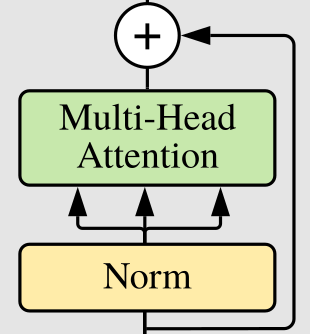
We can create a nice wrapper to perform the residual addition, it will be handy later on
class ResidualAdd(nn.Module):
    def __init__(self, fn):
        super().__init__()
        self.fn = fn

    def forward(self, x, **kwargs):
        res = x
        x = self.fn(x, **kwargs)
        x += res
return xThe attention's output is passed to a fully connected layer composed of two layers that upsample by a factor of expansion the input

class FeedForwardBlock(nn.Sequential):
    def __init__(self, emb_size: int, expansion: int = 4, drop_p: float = 0.):
        super().__init__(
            nn.Linear(emb_size, expansion * emb_size),
            nn.GELU(),
            nn.Dropout(drop_p),
            nn.Linear(expansion * emb_size, emb_size),
        )
Just a quick side note. I don't know why but I've never seen people subclassing nn.Sequential to avoid writing the forward method. Start doing it, this is how object programming works!
Finally, we can create the Transformer Encoder Block
ResidualAdd allows us to define this block in an elegant way
class TransformerEncoderBlock(nn.Sequential):
    def __init__(self,
                 emb_size: int = 768,
                 drop_p: float = 0.,
                 forward_expansion: int = 4,
                 forward_drop_p: float = 0.,
                 ** kwargs):
        super().__init__(
            ResidualAdd(nn.Sequential(
                nn.LayerNorm(emb_size),
                MultiHeadAttention(emb_size, **kwargs),
                nn.Dropout(drop_p)
            )),
            ResidualAdd(nn.Sequential(
                nn.LayerNorm(emb_size),
                FeedForwardBlock(
                    emb_size, expansion=forward_expansion, drop_p=forward_drop_p),
                nn.Dropout(drop_p)
            )
            ))
Let's test it
patches_embedded = PatchEmbedding()(x)
TransformerEncoderBlock()(patches_embedded).shape
torch.Size([1, 197, 768])
you can also PyTorch build-in multi-head attention but it will expect 3 inputs: queries, keys, and values. You can subclass it and pass the same input
In ViT only the Encoder part of the original transformer is used. Easily, the encoder is L blocks of TransformerBlock.
class TransformerEncoder(nn.Sequential):
    def __init__(self, depth: int = 12, **kwargs):
        super().__init__(*[TransformerEncoderBlock(**kwargs) for _ in range(depth)])
Easy peasy!
The last layer is a normal fully connect that gives the class probability. It first performs a basic mean over the whole sequence.

class ClassificationHead(nn.Sequential):
    def __init__(self, emb_size: int = 768, n_classes: int = 1000):
        super().__init__(
            Reduce('b n e -> b e', reduction='mean'),
            nn.LayerNorm(emb_size),
nn.Linear(emb_size, n_classes))We can compose PatchEmbedding, TransformerEncoder and ClassificationHead to create the final ViT architecture.
class ViT(nn.Sequential):
    def __init__(self,
                in_channels: int = 3,
                patch_size: int = 16,
                emb_size: int = 768,
                img_size: int = 224,
                depth: int = 12,
                n_classes: int = 1000,
                **kwargs):
        super().__init__(
            PatchEmbedding(in_channels, patch_size, emb_size, img_size),
            TransformerEncoder(depth, emb_size=emb_size, **kwargs),
            ClassificationHead(emb_size, n_classes)
        )
We can use torchsummary to check the number of parameters
summary(ViT(), (3, 224, 224), device='cpu')----------------------------------------------------------------
Layer (type) Output Shape Param #
================================================================
Conv2d-1 [-1, 768, 14, 14] 590,592
Rearrange-2 [-1, 196, 768] 0
PatchEmbedding-3 [-1, 197, 768] 0
LayerNorm-4 [-1, 197, 768] 1,536
Linear-5 [-1, 197, 2304] 1,771,776
Dropout-6 [-1, 8, 197, 197] 0
Linear-7 [-1, 197, 768] 590,592
MultiHeadAttention-8 [-1, 197, 768] 0
Dropout-9 [-1, 197, 768] 0
ResidualAdd-10 [-1, 197, 768] 0
LayerNorm-11 [-1, 197, 768] 1,536
Linear-12 [-1, 197, 3072] 2,362,368
GELU-13 [-1, 197, 3072] 0
Dropout-14 [-1, 197, 3072] 0
Linear-15 [-1, 197, 768] 2,360,064
Dropout-16 [-1, 197, 768] 0
ResidualAdd-17 [-1, 197, 768] 0
LayerNorm-18 [-1, 197, 768] 1,536
Linear-19 [-1, 197, 2304] 1,771,776
Dropout-20 [-1, 8, 197, 197] 0
Linear-21 [-1, 197, 768] 590,592
MultiHeadAttention-22 [-1, 197, 768] 0
Dropout-23 [-1, 197, 768] 0
ResidualAdd-24 [-1, 197, 768] 0
LayerNorm-25 [-1, 197, 768] 1,536
Linear-26 [-1, 197, 3072] 2,362,368
GELU-27 [-1, 197, 3072] 0
Dropout-28 [-1, 197, 3072] 0
Linear-29 [-1, 197, 768] 2,360,064
Dropout-30 [-1, 197, 768] 0
ResidualAdd-31 [-1, 197, 768] 0
LayerNorm-32 [-1, 197, 768] 1,536
Linear-33 [-1, 197, 2304] 1,771,776
Dropout-34 [-1, 8, 197, 197] 0
Linear-35 [-1, 197, 768] 590,592
MultiHeadAttention-36 [-1, 197, 768] 0
Dropout-37 [-1, 197, 768] 0
ResidualAdd-38 [-1, 197, 768] 0
LayerNorm-39 [-1, 197, 768] 1,536
Linear-40 [-1, 197, 3072] 2,362,368
GELU-41 [-1, 197, 3072] 0
Dropout-42 [-1, 197, 3072] 0
Linear-43 [-1, 197, 768] 2,360,064
Dropout-44 [-1, 197, 768] 0
ResidualAdd-45 [-1, 197, 768] 0
LayerNorm-46 [-1, 197, 768] 1,536
Linear-47 [-1, 197, 2304] 1,771,776
Dropout-48 [-1, 8, 197, 197] 0
Linear-49 [-1, 197, 768] 590,592
MultiHeadAttention-50 [-1, 197, 768] 0
Dropout-51 [-1, 197, 768] 0
ResidualAdd-52 [-1, 197, 768] 0
LayerNorm-53 [-1, 197, 768] 1,536
Linear-54 [-1, 197, 3072] 2,362,368
GELU-55 [-1, 197, 3072] 0
Dropout-56 [-1, 197, 3072] 0
Linear-57 [-1, 197, 768] 2,360,064
Dropout-58 [-1, 197, 768] 0
ResidualAdd-59 [-1, 197, 768] 0
LayerNorm-60 [-1, 197, 768] 1,536
Linear-61 [-1, 197, 2304] 1,771,776
Dropout-62 [-1, 8, 197, 197] 0
Linear-63 [-1, 197, 768] 590,592
MultiHeadAttention-64 [-1, 197, 768] 0
Dropout-65 [-1, 197, 768] 0
ResidualAdd-66 [-1, 197, 768] 0
LayerNorm-67 [-1, 197, 768] 1,536
Linear-68 [-1, 197, 3072] 2,362,368
GELU-69 [-1, 197, 3072] 0
Dropout-70 [-1, 197, 3072] 0
Linear-71 [-1, 197, 768] 2,360,064
Dropout-72 [-1, 197, 768] 0
ResidualAdd-73 [-1, 197, 768] 0
LayerNorm-74 [-1, 197, 768] 1,536
Linear-75 [-1, 197, 2304] 1,771,776
Dropout-76 [-1, 8, 197, 197] 0
Linear-77 [-1, 197, 768] 590,592
MultiHeadAttention-78 [-1, 197, 768] 0
Dropout-79 [-1, 197, 768] 0
ResidualAdd-80 [-1, 197, 768] 0
LayerNorm-81 [-1, 197, 768] 1,536
Linear-82 [-1, 197, 3072] 2,362,368
GELU-83 [-1, 197, 3072] 0
Dropout-84 [-1, 197, 3072] 0
Linear-85 [-1, 197, 768] 2,360,064
Dropout-86 [-1, 197, 768] 0
ResidualAdd-87 [-1, 197, 768] 0
LayerNorm-88 [-1, 197, 768] 1,536
Linear-89 [-1, 197, 2304] 1,771,776
Dropout-90 [-1, 8, 197, 197] 0
Linear-91 [-1, 197, 768] 590,592
MultiHeadAttention-92 [-1, 197, 768] 0
Dropout-93 [-1, 197, 768] 0
ResidualAdd-94 [-1, 197, 768] 0
LayerNorm-95 [-1, 197, 768] 1,536
Linear-96 [-1, 197, 3072] 2,362,368
GELU-97 [-1, 197, 3072] 0
Dropout-98 [-1, 197, 3072] 0
Linear-99 [-1, 197, 768] 2,360,064
Dropout-100 [-1, 197, 768] 0
ResidualAdd-101 [-1, 197, 768] 0
LayerNorm-102 [-1, 197, 768] 1,536
Linear-103 [-1, 197, 2304] 1,771,776
Dropout-104 [-1, 8, 197, 197] 0
Linear-105 [-1, 197, 768] 590,592
MultiHeadAttention-106 [-1, 197, 768] 0
Dropout-107 [-1, 197, 768] 0
ResidualAdd-108 [-1, 197, 768] 0
LayerNorm-109 [-1, 197, 768] 1,536
Linear-110 [-1, 197, 3072] 2,362,368
GELU-111 [-1, 197, 3072] 0
Dropout-112 [-1, 197, 3072] 0
Linear-113 [-1, 197, 768] 2,360,064
Dropout-114 [-1, 197, 768] 0
ResidualAdd-115 [-1, 197, 768] 0
LayerNorm-116 [-1, 197, 768] 1,536
Linear-117 [-1, 197, 2304] 1,771,776
Dropout-118 [-1, 8, 197, 197] 0
Linear-119 [-1, 197, 768] 590,592
MultiHeadAttention-120 [-1, 197, 768] 0
Dropout-121 [-1, 197, 768] 0
ResidualAdd-122 [-1, 197, 768] 0
LayerNorm-123 [-1, 197, 768] 1,536
Linear-124 [-1, 197, 3072] 2,362,368
GELU-125 [-1, 197, 3072] 0
Dropout-126 [-1, 197, 3072] 0
Linear-127 [-1, 197, 768] 2,360,064
Dropout-128 [-1, 197, 768] 0
ResidualAdd-129 [-1, 197, 768] 0
LayerNorm-130 [-1, 197, 768] 1,536
Linear-131 [-1, 197, 2304] 1,771,776
Dropout-132 [-1, 8, 197, 197] 0
Linear-133 [-1, 197, 768] 590,592
MultiHeadAttention-134 [-1, 197, 768] 0
Dropout-135 [-1, 197, 768] 0
ResidualAdd-136 [-1, 197, 768] 0
LayerNorm-137 [-1, 197, 768] 1,536
Linear-138 [-1, 197, 3072] 2,362,368
GELU-139 [-1, 197, 3072] 0
Dropout-140 [-1, 197, 3072] 0
Linear-141 [-1, 197, 768] 2,360,064
Dropout-142 [-1, 197, 768] 0
ResidualAdd-143 [-1, 197, 768] 0
LayerNorm-144 [-1, 197, 768] 1,536
Linear-145 [-1, 197, 2304] 1,771,776
Dropout-146 [-1, 8, 197, 197] 0
Linear-147 [-1, 197, 768] 590,592
MultiHeadAttention-148 [-1, 197, 768] 0
Dropout-149 [-1, 197, 768] 0
ResidualAdd-150 [-1, 197, 768] 0
LayerNorm-151 [-1, 197, 768] 1,536
Linear-152 [-1, 197, 3072] 2,362,368
GELU-153 [-1, 197, 3072] 0
Dropout-154 [-1, 197, 3072] 0
Linear-155 [-1, 197, 768] 2,360,064
Dropout-156 [-1, 197, 768] 0
ResidualAdd-157 [-1, 197, 768] 0
LayerNorm-158 [-1, 197, 768] 1,536
Linear-159 [-1, 197, 2304] 1,771,776
Dropout-160 [-1, 8, 197, 197] 0
Linear-161 [-1, 197, 768] 590,592
MultiHeadAttention-162 [-1, 197, 768] 0
Dropout-163 [-1, 197, 768] 0
ResidualAdd-164 [-1, 197, 768] 0
LayerNorm-165 [-1, 197, 768] 1,536
Linear-166 [-1, 197, 3072] 2,362,368
GELU-167 [-1, 197, 3072] 0
Dropout-168 [-1, 197, 3072] 0
Linear-169 [-1, 197, 768] 2,360,064
Dropout-170 [-1, 197, 768] 0
ResidualAdd-171 [-1, 197, 768] 0
Reduce-172 [-1, 768] 0
LayerNorm-173 [-1, 768] 1,536
Linear-174 [-1, 1000] 769,000
================================================================
Total params: 86,415,592
Trainable params: 86,415,592
Non-trainable params: 0
----------------------------------------------------------------
Input size (MB): 0.57
Forward/backward pass size (MB): 364.33
Params size (MB): 329.65
Estimated Total Size (MB): 694.56
----------------------------------------------------------------
(tensor(86415592), tensor(86415592), tensor(329.6493), tensor(694.5562))
et voilà
================================================================
Total params: 86,415,592
Trainable params: 86,415,592
Non-trainable params: 0
----------------------------------------------------------------
Input size (MB): 0.57
Forward/backward pass size (MB): 364.33
Params size (MB): 329.65
Estimated Total Size (MB): 694.56
---------------------------------------------------------------
I checked the parameters with other implementations and they are the same!
In this article, we have seen how to implement ViT in a nice, scalable, and customizable way. I hope it was useful.
By the way, I am working on a new computer vision library called glasses, check it out if you like
Take care :)
Francesco