


This tool(calflops) is designed to compute the theoretical amount of FLOPs(floating-point operations)、MACs(multiply-add operations) and Parameters in all various neural networks, such as Linear、 CNN、 RNN、 GCN、Transformer(Bert、LlaMA etc Large Language Model),even including any custom models via torch.nn.function.* as long as based on the Pytorch implementation. Meanwhile this tool supports the printing of FLOPS, Parameter calculation value and proportion of each submodule of the model, it is convient for users to understand the performance consumption of each part of the model.
Latest news, calflops has launched a tool on Huggingface Space, which is more convenient for computing FLOPS in the model of 🤗Huggingface Platform. Welcome to use it:https://huggingface.co/spaces/MrYXJ/calculate-model-flops

For LLM, this is probably the easiest tool to calculate FLOPs and it is very convenient for huggingface platform models. You can use calflops.calculate_flops_hf(model_name) by model_name which in huggingface models to calculate model FLOPs without downloading entire model weights locally.Notice this method requires the model to support the empty model being created for model inference in meta device.

from calflops import calculate_flops_hf

model_name = "meta-llama/Llama-2-7b"
access_token = "..." # your application token for using llama2
flops, macs, params = calculate_flops_hf(model_name=model_name, access_token=access_token) # default input shape: (1, 128)
print("%s FLOPs:%s  MACs:%s  Params:%s \n" %(model_name, flops, macs, params))
If model can't inference in meta device, you just need assign llm corresponding tokenizer to the parameter: transformers_tokenizer to pass in funcional of calflops.calculate_flops(), and it will automatically help you build the model input data whose size is input_shape. Alternatively, you also can pass in the input data of models which need multi data as input that you have constructed.
In addition, the implementation process of this package inspired by ptflops、deepspeed、hf accelerate libraries, Thanks for their great efforts, they are both very good work. Meanwhile this package also improves some aspects to calculate FLOPs based on them.
pip install --upgrade calflopsAnd you also can download latest calflops-*-py3-none-any.whl files from https://pypi.org/project/calflops/
pip install calflops-*-py3-none-any.whlIf model has only one input, you just need set the model input size by parameter input_shape , it can automatically generate random model input to complete the calculation:
from calflops import calculate_flops
from torchvision import models

model = models.alexnet()
batch_size = 1
input_shape = (batch_size, 3, 224, 224)
flops, macs, params = calculate_flops(model=model,
                                      input_shape=input_shape,
                                      output_as_string=True,
                                      output_precision=4)
print("Alexnet FLOPs:%s   MACs:%s   Params:%s \n" %(flops, macs, params))
#Alexnet FLOPs:4.2892 GFLOPS   MACs:2.1426 GMACs   Params:61.1008 M
If the model has multiple inputs, use the parameters args or kargs, as shown in the Transfomer Model below.
No need to download the entire parameter weight of the model to the local, just by the model name can test any open source large model on the huggingface platform.

from calflops import calculate_flops_hf

batch_size, max_seq_length = 1, 128
model_name = "baichuan-inc/Baichuan-13B-Chat"

flops, macs, params = calculate_flops_hf(model_name=model_name, input_shape=(batch_size, max_seq_length))
print("%s FLOPs:%s  MACs:%s  Params:%s \n" %(model_name, flops, macs, params))
You can also use this model urls of huggingface platform to calculate it FLOPs.

from calflops import calculate_flops_hf

batch_size, max_seq_length = 1, 128
model_name = "https://huggingface.co/THUDM/glm-4-9b-chat" # THUDM/glm-4-9b-chat
flops, macs, params = calculate_flops_hf(model_name=model_name, input_shape=(batch_size, max_seq_length))
print("%s FLOPs:%s  MACs:%s  Params:%s \n" %(model_name, flops, macs, params))
------------------------------------- Calculate Flops Results -------------------------------------
Notations:
number of parameters (Params), number of multiply-accumulate operations(MACs),
number of floating-point operations (FLOPs), floating-point operations per second (FLOPS),
fwd FLOPs (model forward propagation FLOPs), bwd FLOPs (model backward propagation FLOPs),
default model backpropagation takes 2.00 times as much computation as forward propagation.
Total Training Params: 9.4 B
fwd MACs: 1.12 TMACs
fwd FLOPs: 2.25 TFLOPS
fwd+bwd MACs: 3.37 TMACs
fwd+bwd FLOPs: 6.74 TFLOPS
-------------------------------- Detailed Calculated FLOPs Results --------------------------------
Each module caculated is listed after its name in the following order:
params, percentage of total params, MACs, percentage of total MACs, FLOPS, percentage of total FLOPs
Note: 1. A module can have torch.nn.module or torch.nn.functional to compute logits (e.g. CrossEntropyLoss).
They are not counted as submodules in calflops and not to be printed out. However they make up the difference between a parent's MACs and the sum of its submodules'.
2. Number of floating-point operations is a theoretical estimation, thus FLOPS computed using that could be larger than the maximum system throughput.
ChatGLMForConditionalGeneration(
9.4 B = 100% Params, 1.12 TMACs = 100% MACs, 2.25 TFLOPS = 50% FLOPs
(transformer): ChatGLMModel(
9.4 B = 100% Params, 1.12 TMACs = 100% MACs, 2.25 TFLOPS = 50% FLOPs
(embedding): Embedding(
620.76 M = 6.6% Params, 0 MACs = 0% MACs, 0 FLOPS = 0% FLOPs
(word_embeddings): Embedding(620.76 M = 6.6% Params, 0 MACs = 0% MACs, 0 FLOPS = 0% FLOPs, 151552, 4096)
)
(rotary_pos_emb): RotaryEmbedding(0 = 0% Params, 0 MACs = 0% MACs, 0 FLOPS = 0% FLOPs)
(encoder): GLMTransformer(
8.16 B = 86.79% Params, 1.04 TMACs = 92.93% MACs, 2.09 TFLOPS = 46.46% FLOPs
(layers): ModuleList(
(0-39): 40 x GLMBlock(
203.96 M = 2.17% Params, 26.11 GMACs = 2.32% MACs, 52.21 GFLOPS = 1.16% FLOPs
(input_layernorm): RMSNorm(4.1 K = 0% Params, 0 MACs = 0% MACs, 0 FLOPS = 0% FLOPs)
(self_attention): SelfAttention(
35.66 M = 0.38% Params, 4.56 GMACs = 0.41% MACs, 9.13 GFLOPS = 0.2% FLOPs
(query_key_value): Linear(18.88 M = 0.2% Params, 2.42 GMACs = 0.22% MACs, 4.83 GFLOPS = 0.11% FLOPs, in_features=4096, out_features=4608, bias=True)
(core_attention): CoreAttention(
0 = 0% Params, 0 MACs = 0% MACs, 0 FLOPS = 0% FLOPs
(attention_dropout): Dropout(0 = 0% Params, 0 MACs = 0% MACs, 0 FLOPS = 0% FLOPs, p=0.0, inplace=False)
)
(dense): Linear(16.78 M = 0.18% Params, 2.15 GMACs = 0.19% MACs, 4.29 GFLOPS = 0.1% FLOPs, in_features=4096, out_features=4096, bias=False)
)
(post_attention_layernorm): RMSNorm(4.1 K = 0% Params, 0 MACs = 0% MACs, 0 FLOPS = 0% FLOPs)
(mlp): MLP(
168.3 M = 1.79% Params, 21.54 GMACs = 1.92% MACs, 43.09 GFLOPS = 0.96% FLOPs
(dense_h_to_4h): Linear(112.2 M = 1.19% Params, 14.36 GMACs = 1.28% MACs, 28.72 GFLOPS = 0.64% FLOPs, in_features=4096, out_features=27392, bias=False)
(dense_4h_to_h): Linear(56.1 M = 0.6% Params, 7.18 GMACs = 0.64% MACs, 14.36 GFLOPS = 0.32% FLOPs, in_features=13696, out_features=4096, bias=False)
)
)
)
(final_layernorm): RMSNorm(4.1 K = 0% Params, 0 MACs = 0% MACs, 0 FLOPS = 0% FLOPs)
)
(output_layer): Linear(620.76 M = 6.6% Params, 79.46 GMACs = 7.07% MACs, 158.91 GFLOPS = 3.54% FLOPs, in_features=4096, out_features=151552, bias=False)
)
)
There are some model uses that require an application first, and you only need to pass the application in through the access_token to calculate its FLOPs.

from calflops import calculate_flops_hf

batch_size, max_seq_length = 1, 128
model_name = "meta-llama/Llama-2-7b"
access_token = "" # your application for using llama2

flops, macs, params = calculate_flops_hf(model_name=model_name,
                                         access_token=access_token,
                                         input_shape=(batch_size, max_seq_length))
print("%s FLOPs:%s MACs:%s Params:%s \n" %(model_name, flops, macs, params))Compared to the CNN Model, Transformer Model if you want to use the parameter input_shape to make calflops automatically generating the input data, you should pass its corresponding tokenizer through the parameter transformer_tokenizer.
# Transformers Model, such as bert.
from calflops import calculate_flops
from transformers import AutoModel
from transformers import AutoTokenizer

batch_size, max_seq_length = 1, 128
model_name = "hfl/chinese-roberta-wwm-ext/"
model_save = "../pretrain_models/" + model_name
model = AutoModel.from_pretrained(model_save)
tokenizer = AutoTokenizer.from_pretrained(model_save)

flops, macs, params = calculate_flops(model=model,
                                      input_shape=(batch_size,max_seq_length),
                                      transformer_tokenizer=tokenizer)
print("Bert(hfl/chinese-roberta-wwm-ext) FLOPs:%s   MACs:%s   Params:%s \n" %(flops, macs, params))
#Bert(hfl/chinese-roberta-wwm-ext) FLOPs:67.1 GFLOPS   MACs:33.52 GMACs   Params:102.27 M
If you want to use your own generated specific data to calculate FLOPs, you can use
parameter args or kwargs,and parameter input_shape can no longer be assigned to pass in this case. Here is an example that can be seen is inconvenient comparedt to use parametertransformer_tokenizer.
# Transformers Model, such as bert.
from calflops import calculate_flops
from transformers import AutoModel
from transformers import AutoTokenizer


batch_size, max_seq_length = 1, 128
model_name = "hfl/chinese-roberta-wwm-ext/"
model_save = "/code/yexiaoju/generate_tags/models/pretrain_models/" + model_name
model = AutoModel.from_pretrained(model_save)
tokenizer = AutoTokenizer.from_pretrained(model_save)

text = ""
inputs = tokenizer(text,
                   add_special_tokens=True,
                   return_attention_mask=True,
                   padding=True,
                   truncation="longest_first",
                   max_length=max_seq_length)

if len(inputs["input_ids"]) < max_seq_length:
    apply_num = max_seq_length-len(inputs["input_ids"])
    inputs["input_ids"].extend([0]*apply_num)
    inputs["token_type_ids"].extend([0]*apply_num)
    inputs["attention_mask"].extend([0]*apply_num)

inputs["input_ids"] = torch.tensor([inputs["input_ids"]])
inputs["token_type_ids"] = torch.tensor([inputs["token_type_ids"]])
inputs["attention_mask"] = torch.tensor([inputs["attention_mask"]])

flops, macs, params = calculate_flops(model=model,
                                      kwargs = inputs,
                                      print_results=False)
print("Bert(hfl/chinese-roberta-wwm-ext) FLOPs:%s   MACs:%s   Params:%s \n" %(flops, macs, params))
#Bert(hfl/chinese-roberta-wwm-ext) FLOPs:22.36 GFLOPS MACs:11.17 GMACs Params:102.27 M from calflops import calculate_flops_hf
batch_size, max_seq_length = 1, 128
model_name = "meta-llama/Llama-2-7b"
access_token = "" # your application for using llama
flops, macs, params = calculate_flops_hf(model_name=model_name,
access_token=access_token,
input_shape=(batch_size, max_seq_length))
print("%s FLOPs:%s MACs:%s Params:%s \n" %(model_name, flops, macs, params))Note here that the tokenizer must correspond to the llm model because llm tokenizer processes maybe are different.
#Large Languase Model, such as llama2-7b.
from calflops import calculate_flops
from transformers import LlamaTokenizer
from transformers import LlamaForCausalLM

batch_size, max_seq_length = 1, 128
model_name = "llama2_hf_7B"
model_save = "../model/" + model_name
model = LlamaForCausalLM.from_pretrained(model_save)
tokenizer = LlamaTokenizer.from_pretrained(model_save)
flops, macs, params = calculate_flops(model=model,
                                      input_shape=(batch_size, max_seq_length),
                                      transformer_tokenizer=tokenizer)
print("Llama2(7B) FLOPs:%s   MACs:%s   Params:%s \n" %(flops, macs, params))
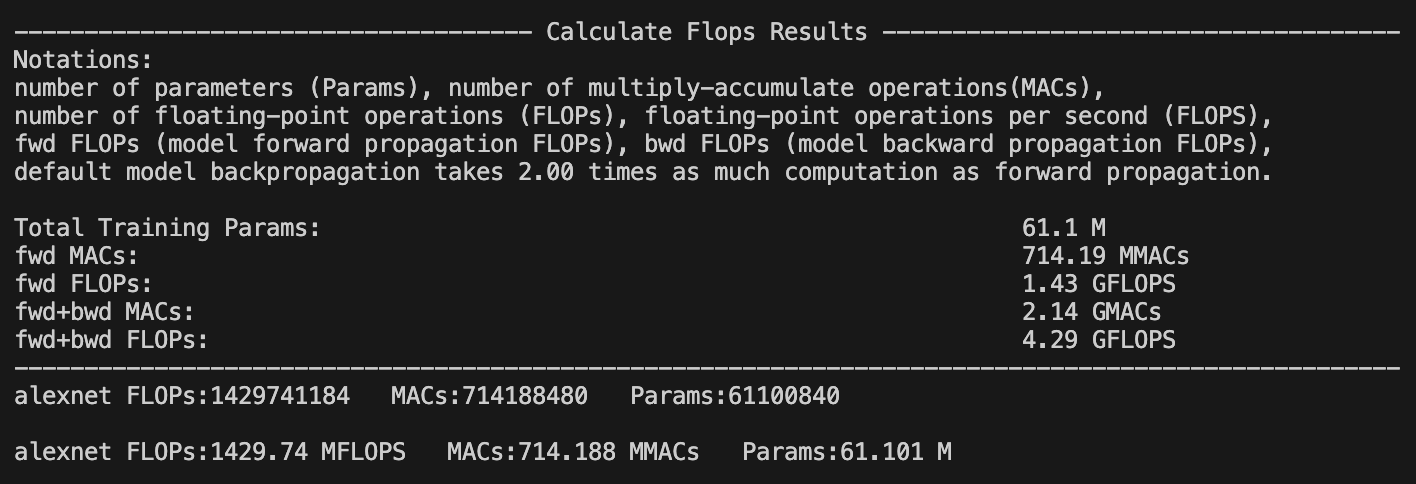
#Llama2(7B) FLOPs:1.7 TFLOPS MACs:850.00 GMACs Params:6.74 B The calflops provides a more detailed display of model FLOPs calculation information. By setting the parameter print_result=True, which defaults to True, flops of the model will be printed in the terminal or jupyter interface.
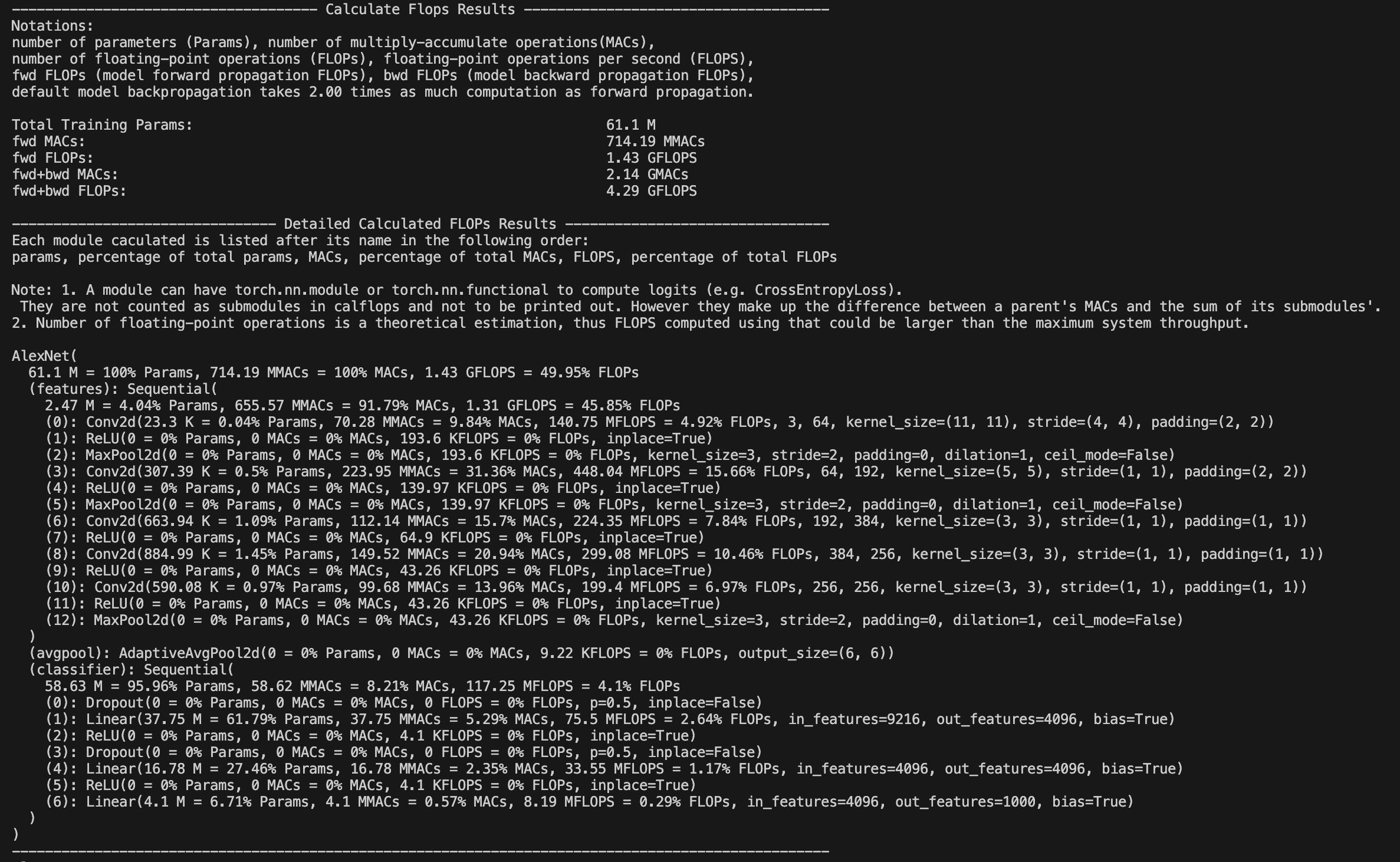
Meanwhile, by setting the parameter print_detailed=True which default to True, the calflops supports the display of the calculation results and proportion of FLOPs、MACs and Parameter in each submodule of the entire model, so that it is convenient to see the largest part of the calculation consumption in the entire model.
How to make output format more elegant
You can use parameter output_as_string、output_precision、output_unit to determine the format of output data is value or string, if it is string, how many bits of precision to retain and the unit of value, such as FLOPs, the unit of result is "TFLOPs" or "GFLOPs", "MFLOPs".How do deal with model has multiple inputs
The calflops support multiple inputs of model, just use parameter args or kwargs to construct multiple inputs can be passed in as model inference.How to calculate the results of FLOPS include forward and backward pass of the model
You can use the parameter include_backPropagation to select whether the calculation of FLOPs results includes the process of model backpropagation. The default is False, that is result of FLOPs only include forward pass.In addition, the parameter compute_bp_factor to determine how many times backward as much computation as forward pass.The defaults that is 2.0, according to https://epochai.org/blog/backward-forward-FLOP-ratio
How to calculate FLOPs for only part of the model module
You can use the parameter ignore_modules to select which modules of model are ignored during FLOPs calculation. The default is [], that is all modules of model would be calculated in results.How to calculate FLOPs of the generate function in LLM
You just need to assign "generate" to parameter forward_mode.calflops.calculate_flops()
from calflops import calculate_flops

def calculate_flops(model,
                    input_shape=None,
                    transformer_tokenizer=None,
                    args=[],
                    kwargs={},
                    forward_mode="forward",
                    include_backPropagation=False,
                    compute_bp_factor=2.0,
                    print_results=True,
                    print_detailed=True,
                    output_as_string=True,
                    output_precision=2,
                    output_unit=None,
                    ignore_modules=None):

    """Returns the total floating-point operations, MACs, and parameters of a model.

    Args:
        model ([torch.nn.Module]): The model of input must be a PyTorch model.
        input_shape (tuple, optional): Input shape to the model. If args and kwargs is empty, the model takes a tensor with this shape as the only positional argument. Default to [].
        transformers_tokenizer (None, optional): Transforemrs Toekenizer must be special if model type is transformers and args、kwargs is empty. Default to None
        args (list, optinal): list of positional arguments to the model, such as bert input args is [input_ids, token_type_ids, attention_mask]. Default to []
        kwargs (dict, optional): dictionary of keyword arguments to the model, such as bert input kwargs is {'input_ids': ..., 'token_type_ids':..., 'attention_mask':...}. Default to {}
        forward_mode (str, optional): To determine the mode of model inference, Default to 'forward'. And use 'generate' if model inference uses model.generate().
        include_backPropagation (bool, optional): Decides whether the final return FLOPs computation includes the computation for backpropagation.
        compute_bp_factor (float, optional): The model backpropagation is a multiple of the forward propagation computation. Default to 2.
        print_results (bool, optional): Whether to print the model profile. Defaults to True.
        print_detailed (bool, optional): Whether to print the detailed model profile. Defaults to True.
        output_as_string (bool, optional): Whether to print the output as string. Defaults to True.
        output_precision (int, optional) : Output holds the number of decimal places if output_as_string is True. Default to 2.
        output_unit (str, optional): The unit used to output the result value, such as T, G, M, and K. Default is None, that is the unit of the output decide on value.
        ignore_modules ([type], optional): the list of modules to ignore during profiling. Defaults to None.
calflops.calculate_flops_hf()
def calculate_flops_hf(model_name,
                       input_shape=None,
                       library_name="transformers",
                       trust_remote_code=True,
                       access_token="",
                       forward_mode="forward",
                       include_backPropagation=False,
                       compute_bp_factor=2.0,
                       print_results=True,
                       print_detailed=True,
                       output_as_string=True,
                       output_precision=2,
                       output_unit=None,
                       ignore_modules=None):

    """Returns the total floating-point operations, MACs, and parameters of a model.

    Args:
        model_name (str): The model name in huggingface platform https://huggingface.co/models, such as meta-llama/Llama-2-7b、baichuan-inc/Baichuan-13B-Chat etc.
        input_shape (tuple, optional): Input shape to the model. If args and kwargs is empty, the model takes a tensor with this shape as the only positional argument. Default to [].
        trust_remote_code (bool, optional): Trust the code in the remote library for the model structure.
        access_token (str, optional): Some models need to apply for a access token, such as meta llama2 etc.
        forward_mode (str, optional): To determine the mode of model inference, Default to 'forward'. And use 'generate' if model inference uses model.generate().
        include_backPropagation (bool, optional): Decides whether the final return FLOPs computation includes the computation for backpropagation.
        compute_bp_factor (float, optional): The model backpropagation is a multiple of the forward propagation computation. Default to 2.
        print_results (bool, optional): Whether to print the model profile. Defaults to True.
        print_detailed (bool, optional): Whether to print the detailed model profile. Defaults to True.
        output_as_string (bool, optional): Whether to print the output as string. Defaults to True.
        output_precision (int, optional) : Output holds the number of decimal places if output_as_string is True. Default to 2.
        output_unit (str, optional): The unit used to output the result value, such as T, G, M, and K. Default is None, that is the unit of the output decide on value.
        ignore_modules ([type], optional): the list of modules to ignore during profiling. Defaults to None.

    Example:
    .. code-block:: python
    from calflops import calculate_flops_hf

    batch_size = 1
    max_seq_length = 128
    model_name = "baichuan-inc/Baichuan-13B-Chat"
    flops, macs, params = calculate_flops_hf(model_name=model_name,
                                            input_shape=(batch_size, max_seq_length))
    print("%s FLOPs:%s  MACs:%s  Params:%s \n" %(model_name, flops, macs, params))

    Returns:
        The number of floating-point operations, multiply-accumulate operations (MACs), and parameters in the model.
    """
calflops.generate_transformer_input()
def generate_transformer_input(model_tokenizer, input_shape, device):
    """Automatically generates data in the form of transformes model input format.

    Args:
        input_shape (tuple):transformers model input shape: (batch_size, seq_len).
        tokenizer (transformer.model.tokenization): transformers model tokenization.tokenizer.

    Returns:
        dict: data format of transformers model input, it is a dict which contain 'input_ids', 'attention_mask', 'token_type_ids' etc.
"""if calflops was useful for your paper or tech report, please cite me:
@online{calflops,
  author = {xiaoju ye},
  title = {calflops: a FLOPs and Params calculate tool for neural networks in pytorch framework},
  year = 2023,
  url = {https://github.com/MrYxJ/calculate-flops.pytorch},
}
Input data format: batch_size=1, seq_len=128
-
fwd FLOPs: The FLOPs of the model forward propagation
-
bwd + fwd FLOPs: The FLOPs of model forward and backward propagation
In addition, note that fwd + bwd does not include calculation losses for model parameter activation recomputation, if the results wants to include activation recomputation that is only necessary to multiply the result of fwd FLOPs by 4(According to the paper: https://arxiv.org/pdf/2205.05198.pdf), and in calflops you can easily set parameter computer_bp_factor=3 to make the result of including the activate the recalculation.
| Model | Input Shape | Params(B) | Params(Total) | fwd FLOPs(G) | fwd MACs(G) | fwd + bwd FLOPs(G) | fwd + bwd MACs(G) |
|---|---|---|---|---|---|---|---|
| bloom-1b7 | (1,128) | 1.72B | 1722408960 | 310.92 | 155.42 | 932.76 | 466.27 |
| bloom-7b1 | (1,128) | 7.07B | 7069016064 | 1550.39 | 775.11 | 4651.18 | 2325.32 |
| bloomz-1b7 | (1,128) | 1.72B | 1722408960 | 310.92 | 155.42 | 932.76 | 466.27 |
| baichuan-7B | (1,128) | 7B | 7000559616 | 1733.62 | 866.78 | 5200.85 | 2600.33 |
| chatglm-6b | (1,128) | 6.17B | 6173286400 | 1587.66 | 793.75 | 4762.97 | 2381.24 |
| chatglm2-6b | (1,128) | 6.24B | 6243584000 | 1537.68 | 768.8 | 4613.03 | 2306.4 |
| Qwen-7B | (1,128) | 7.72B | 7721324544 | 1825.83 | 912.88 | 5477.48 | 2738.65 |
| llama-7b | (1,128) | 6.74B | 6738415616 | 1700.06 | 850 | 5100.19 | 2550 |
| llama2-7b | (1,128) | 6.74B | 6738415616 | 1700.06 | 850 | 5100.19 | 2550 |
| llama2-7b-chat | (1,128) | 6.74B | 6738415616 | 1700.06 | 850 | 5100.19 | 2550 |
| chinese-llama-7b | (1,128) | 6.89B | 6885486592 | 1718.89 | 859.41 | 5156.67 | 2578.24 |
| chinese-llama-plus-7b | (1,128) | 6.89B | 6885486592 | 1718.89 | 859.41 | 5156.67 | 2578.24 |
| EleutherAI/pythia-1.4b | (1,128) | 1.31B | 1311625216 | 312.54 | 156.23 | 937.61 | 468.69 |
| EleutherAI/pythia-12b | (1,128) | 11.59B | 11586549760 | 2911.47 | 1455.59 | 8734,41 | 4366.77 |
| moss-moon-003-sft | (1,128) | 16.72B | 16717980160 | 4124.93 | 2062.39 | 12374.8 | 6187.17 |
| moss-moon-003-sft-plugin | (1,128) | 16.06B | 16060416000 | 3956.62 | 1978.24 | 11869.9 | 5934.71 |
We can draw some simple and interesting conclusions from the table above:
-
The chatglm2-6b in the model of the same scale, the model parameters are smaller, and FLOPs is also smaller, which has certain advantages in speed performance.
-
The parameters of the llama1-7b, llama2-7b, and llama2-7b-chat models did not change at all, and FLOPs remained consistent. The structure of the model that conforms to the 7b described by meta in its llama2 report has not changed, the main difference is the increase of training data tokens.
-
Similarly, it can be seen from the table that the chinese-llama-7b and chinese-llama-plus-7b data are also in line with cui's report, just more chinese data tokens are added for training, and the model structure and parameters do not change.
-
......
More model FLOPs would be updated successively, see github calculate-flops.pytorch
Input data format: batch_size=1, seq_len=128
| Model | Input Shape | Params(M) | Params(Total) | fwd FLOPs(G) | fwd MACs(G) | fwd + bwd FLOPs(G) | fwd + bwd MACs(G) |
|---|---|---|---|---|---|---|---|
| hfl/chinese-roberta-wwm-ext | (1,128) | 102.27M | 102267648 | 22.363 | 11.174 | 67.089 | 33.523 |
| ...... |
You can use calflops to calculate the more different transformer models based bert, look forward to updating in this form.
Input data format: batch_size = 1, actually input_shape = (1, 3, 224, 224)
Note: The FLOPs in the table only takes into account the computation of forward propagation of the model, Total refers to the total numerical representation without unit abbreviations.
| Model | Input Resolution | Params(M) | Params(Total) | FLOPs(G) | FLOPs(Total) | Macs(G) | Macs(Total) |
|---|---|---|---|---|---|---|---|
| alexnet | 224x224 | 61.10 | 61100840 | 1.43 | 1429740000 | 741.19 | 7418800000 |
| vgg11 | 224x224 | 132.86 | 132863000 | 15.24 | 15239200000 | 7.61 | 7609090000 |
| vgg13 | 224x224 | 133.05 | 133048000 | 22.65 | 22647600000 | 11.31 | 11308500000 |
| vgg16 | 224x224 | 138.36 | 138358000 | 30.97 | 30973800000 | 15.47 | 15470300000 |
| vgg19 | 224x224 | 143.67 | 143667000 | 39.30 | 39300000000 | 19.63 | 19632100000 |
| vgg11_bn | 224x224 | 132.87 | 132869000 | 15.25 | 15254000000 | 7.61 | 7609090000 |
| vgg13_bn | 224x224 | 133.05 | 133054000 | 22.67 | 22672100000 | 11.31 | 11308500000 |
| vgg16_bn | 224x224 | 138.37 | 138366000 | 31.00 | 31000900000 | 15.47 | 15470300000 |
| vgg19_bn | 224x224 | 143.68 | 143678000 | 39.33 | 39329700000 | 19.63 | 19632100000 |
| resnet18 | 224x224 | 11.69 | 11689500 | 3.64 | 3636250000 | 1.81 | 1814070000 |
| resnet34 | 224x224 | 21.80 | 21797700 | 7.34 | 7339390000 | 3.66 | 3663760000 |
| resnet50 | 224x224 | 25.56 | 25557000 | 8.21 | 8211110000 | 4.09 | 4089180000 |
| resnet101 | 224x224 | 44.55 | 44549200 | 15.65 | 15690900000 | 7.80 | 7801410000 |
| resnet152 | 224x224 | 60.19 | 60192800 | 23.09 | 23094300000 | 11.51 | 11513600000 |
| squeezenet1_0 | 224x224 | 1.25 | 1248420 | 1.65 | 1648970000 | 0.82 | 818925000 |
| squeezenet1_1 | 224x224 | 1.24 | 1235500 | 0.71 | 705014000 | 0.35 | 349152000 |
| densenet121 | 224x224 | 7.98 | 7978860 | 5.72 | 5716880000 | 2.83 | 2834160000 |
| densenet169 | 224x224 | 14.15 | 14195000 | 6.78 | 6778370000 | 3.36 | 3359840000 |
| densenet201 | 224x224 | 20.01 | 20013900 | 8.66 | 8658520000 | 4.29 | 4291370000 |
| densenet161 | 224x224 | 28.68 | 28681000 | 15.55 | 1554650000 | 7.73 | 7727900000 |
| inception_v3 | 224x224 | 27.16 | 27161300 | 5.29 | 5692390000 | 2.84 | 2837920000 |
Thanks to @zigangzhao-ai use calflops to static torchvision form.
You also can compare torchvision results of calculate FLOPs with anthoer good tool: ptflops readme.md.
Author: MrYXJ
Mail: [email protected]


