

Web-LLM Assistant is a simple web search assistant that leverages a large language model (LLM) running via either Llama.cpp or Ollama to provide informative and context-aware responses to user queries. This project combines the power of LLMs with real-time web searching capabilities, allowing it to access up-to-date information and synthesize comprehensive answers.
Here is how it works in practice:
You can ask the LLM a question, for example: "Is the boeing starliner still stuck on the international space station", then the LLM will decide on a search query and a time frame for which to get search results from, such as results from the last day or the last year, depending on the needs of your specific question.
Then it will perform a web search, and collect the first 10 results and the information contained within them, it then will select 2 most relevant results and web scrape them to acquire the information contained within those results, after reviewing the information it will decide whether or not the information is sufficient to answer the your question. If it is then the LLM will answer the question, if it isn't then the LLM will perform a new search, likely rephrasing the search terms and/or time-frame, to find more appropriate and relevant information to use to answer your question, it can continue to do multiple searches refining the search terms or time-frame until it either has enough information to actually answer the User's question, or until it has done 5 separate searches, retrieving information from the the LLMs decided top 2 relevant results of each search, at which time if it hasn't been able to find the information needed to answer the User's question it will try it's best to provide whatever information it has acquired from the searches at that point to answer your question the best it can.
Thus allowing you to ask it queries about recent events, or anything that may not actually be in it's training data. Which it can now, via this python program still determine the answer to your question, even if the answer is absent from the LLM's training data via web searching and retrieving information from those searches.
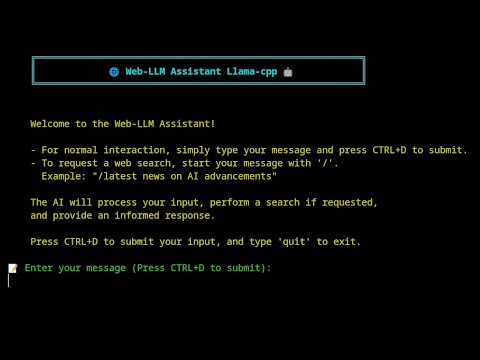
Click the image above to watch a demonstration of the Web-LLM-Assistant Llama-cpp in action.
- Local LLM usage via llama_cpp or ollama.
- Web scraping of search results for full information for the LLM to utilise
- Web searching using DuckDuckGo for privacy-focused searching for pages for scraping
- Self-improving search mechanism that refines queries based on initial results
- Rich console output with colorful and animated indicators for better user experience
- Multi-attempt searching with intelligent evaluation of search results
- Comprehensive answer synthesis using both LLM knowledge, web search results, and scraped information from the LLMs selected webpages
- Clone the repository: Clone the repository from GitHub using:
git clone https://github.com/TheBlewish/Web-LLM-Assistant-Llamacpp-Ollama
then navigate to the project directory.
-
Create a virtual environment (optional but recommended): python -m venv venv source venv/bin/activate # On Windows, use venv\Scripts\activate
-
Install the required dependencies: Install the required packages by running pip install -r requirements.txt
-
Install and setup either Ollama or Llama.cpp, then proceed to either the Ollama or Llama.cpp usage instructions below, depending on which you plan to use.
Using with Ollama:
-
Start the Ollama server: Run the command ollama serve to start the Ollama server.
-
Download your desired model using Ollama: Use the ollama pull command followed by the model name you wish to use, for example, ollama pull gemma2:9b-instruct-q5_K_M
-
Configure the LLM settings: Open the llm_config.py file and update the LLM_TYPE to "ollama" and set the "model_name" to the name of the Ollama model you downloaded.
-
Run the main script: Execute the main script by running python Web-LLM.py.
Using with Llama.cpp:
-
Prepare your model file: Ensure you have a compatible model file (e.g., Phi-3-medium-128k-instruct-Q6_K.gguf) in your desired location.
-
Configure the LLM settings: Open the llm_config.py file and update the LLM_TYPE to "llama_cpp". Set the MODEL_PATH to the path of your model file. Update other settings in the llama.cpp section of the config file as needed.
-
Run the main script: Execute the main script by running python Web-LLM.py.
Interacting with the Assistant:
For normal interaction, simply type your message and press CTRL+D to submit. To request a web search, start your message with '/'. Example: "/latest news on AI advancements"
The AI will process your input, perform a search if requested, and provide an informed response.
You can modify various llama.cpp or ollama parameters in the llm_config.py file.
- llama-cpp-python or ollama
- see full list of dependencies in the requirements.txt
- Given that this is using an LLM running via Llama.cpp or ollama ensure you have installed an appropriate model, I would reccommend basically any instruct model feel free to try and find the best one for your system!
Contributions to improve Web-LLM Assistant are welcome and encouraged! Please feel free to submit a Pull Request.
This project is licensed under the MIT License - see the [LICENSE] file for details.
- Thanks to the creators of Llama.cpp and Ollama for providing the foundation for local LLM usage.
- DuckDuckGo for their search API.
This project is for educational purposes only. Ensure you comply with the terms of service of all APIs and services used.
I tried my best to create something that allows for the use of local Llama.cpp run LLM's for web-searching, always in the past being frustrated that while services like ChatGPT could do web searching, while local models were never easily able to. Now of course this program has been updated to also work with Ollama after several requests, I have tried to give people what they want and now it is possible to use Ollama as well as Llama.cpp with this program!
Web-LLM Assistant represents countless hours of learning, coding, and problem-solving and is actually my first ever attempt at anything coding related, especially anything I built from scratch.
I hope you find this program both useful and enjoyable! Please leave any issues with this program or any suggestions on the github and will fix the issues and implement any decent suggestions for new features on this program!