

This is an official VOCA repository.

VOCA is a simple and generic speech-driven facial animation framework that works across a range of identities. This codebase demonstrates how to synthesize realistic character animations given an arbitrary speech signal and a static character mesh. For details please see the scientific publication
Capture, Learning, and Synthesis of 3D Speaking Styles.
D. Cudeiro*, T. Bolkart*, C. Laidlaw, A. Ranjan, M. J. Black
Computer Vision and Pattern Recognition (CVPR), 2019
A pre-print of the publication can be found here. You can also check out the VOCA Blender Addon
See the demo video for more details and results.
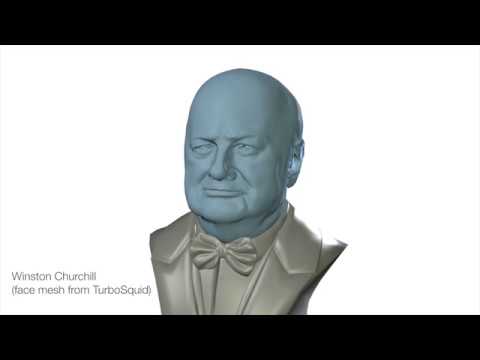
The code uses Python 3.6.8 and it was tested on Tensorflow 1.14.0.
Install pip and virtualenv
sudo apt-get install python3-pip python3-venv
Install ffmpeg
sudo apt install ffmpeg
Clone the git project:
git clone https://github.com/TimoBolkart/voca.git
Set up virtual environment:
mkdir <your_home_dir>/.virtualenvs
python3.7 -m venv <your_home_dir>/.virtualenvs/voca
Activate virtual environment:
cd voca
source <your_home_dir>/voca/bin/activate
Set the right pip version:
pip install -U pip==22.0.4
Install mesh processing libraries from MPI-IS/mesh within the virtual environment.
Finally, the requirements (including tensorflow) can be installed using:
pip install -r requirements.txt
Download the trained VOCA model, audio sequences, and template meshes from MPI-IS/VOCA.
Download FLAME model from MPI-IS/FLAME.
Download the trained DeepSpeech model (v0.1.0) from Mozilla/DeepSpeech (i.e. deepspeech-0.1.0-models.tar.gz).
To download and prepare these data, run:
./fetch_data.sh
VOCA is trained on VOCASET, a unique 4D face dataset with about 29 minutes of 4D scans captured at 60 fps and synchronized audio from 12 speakers that can be downloaded at MPI-IS/VOCASET.
Training subjects:
FaceTalk_170728_03272_TA, FaceTalk_170904_00128_TA, FaceTalk_170725_00137_TA, FaceTalk_170915_00223_TA, FaceTalk_170811_03274_TA, FaceTalk_170913_03279_TA, FaceTalk_170904_03276_TA, FaceTalk_170912_03278_TA
This is also the order of the subjects for the one-hot-encoding (i.e. FaceTalk_170728_03272_TA: 0, FaceTalk_170904_00128_TA: 1, ...)
Validation subjects:
FaceTalk_170811_03275_TA, FaceTalk_170908_03277_TA
Test subjects:
FaceTalk_170809_00138_TA, FaceTalk_170731_00024_TA
We provide demos to
- synthesize a character animation given an speech signal (VOCA),
- add eye blinks, alter identity dependent face shape and head pose of an animation sequence using FLAME, and
- generate templates (e.g. by sampling the FLAME identity shape space, or by reconstructing a template from an image using RingNet that can be animated with VOCA.)
This demo runs VOCA, which outputs the animation meshes given audio sequences, and renders the animation sequence to a video.
python run_voca.py --tf_model_fname './model/gstep_52280.model' --ds_fname './ds_graph/output_graph.pb' --audio_fname './audio/test_sentence.wav' --template_fname './template/FLAME_sample.ply' --condition_idx 3 --out_path './animation_output'
To run VOCA and visualize the meshes with a pre-defined texture (obtained by fitting FLAME to an image using TF_FLAME), run:
python run_voca.py --tf_model_fname './model/gstep_52280.model' --ds_fname './ds_graph/output_graph.pb' --audio_fname './audio/test_sentence.wav' --template_fname './template/FLAME_sample.ply' --condition_idx 3 --uv_template_fname './template/texture_mesh.obj' --texture_img_fname './template/texture_mesh.png' --out_path './animation_output_textured'
By default, running the demo uses pyrender to render the sequence to a video, however this causes problems for certain configurations (e.g. if running the code remotely). In this case try running the demo with an additional flag --visualize False to disable the visualization. The animated meshes are then still stored to the output directory and can be viewed or rendered with another tool.
VOCA outputs meshes in FLAME topology in "zero pose". This allows to edit the output sequences by varying the FLAME model parameters. These demos shows how to use FLAME to add eye blinks, edit the identity dependent face shape, or head pose of a VOCA animation sequence.
Add eye blinks (FLAME2019 only):
python edit_sequences.py --source_path './animation_output/meshes' --out_path './FLAME_eye_blink' --flame_model_path './flame/generic_model.pkl' --mode blink --num_blinks 2 --blink_duration 15
Please not that this only demonstrates how to use FLAME to manipulate the eyelids to blink. The output motion does not resemble a true eye blink. This demo works with the FLAME2019 model only.
Edit identity-dependent shape:
python edit_sequences.py --source_path './animation_output/meshes' --out_path './FLAME_variation_shape' --flame_model_path './flame/generic_model.pkl' --mode shape --index 0 --max_variation 3
Edit head pose:
python edit_sequences.py --source_path './animation_output/meshes' --out_path './FLAME_variation_pose' --flame_model_path './flame/generic_model.pkl' --mode pose --index 3 --max_variation 0.52
This demo renders an animation sequence to a video.
python visualize_sequence.py --sequence_path './FLAME_eye_blink/meshes' --audio_fname './audio/test_sentence.wav' --out_path './FLAME_eye_blink'
python visualize_sequence.py --sequence_path './FLAME_variation_shape/meshes' --audio_fname './audio/test_sentence.wav' --out_path './FLAME_variation_shape'
python visualize_sequence.py --sequence_path './FLAME_variation_pose/meshes' --audio_fname './audio/test_sentence.wav' --out_path './FLAME_variation_pose'
To visualize the sequences with a pre-defined texture, additionally specify the flags --uv_template_fname and --texture_img_fname as done for the run_voca demo.
VOCA outputs meshes in FLAME topology in "zero pose". This demo shows how to compute the FLAME paramters for such a sequence.
python compute_FLAME_params.py --source_path './animation_output/meshes' --params_fname './FLAME_parameters/params.npy' --flame_model_path './flame/generic_model.pkl' --template_fname './template/FLAME_sample.ply'
The --template_fname must specify the template provided to VOCA to generate the sequence.
To reconstruct the FLAME meshes from the sequence paramters back:
python compute_FLAME_params.py --params_fname './FLAME_parameters/params.npy' --flame_model_path './flame/generic_model.pkl' --out_path './FLAME_parameters/meshes'
VOCA animates static templates in FLAME topology. Such templates can be obtained by fitting FLAME to scans, images, or by sampling the FLAME shape space. This demo randomly samples the FLAME identity shape space to generate new templates.
python sample_templates.py --flame_model_path './flame/generic_model.pkl' --num_samples 1 --out_path './template'
RingNet is a framework to fully automatically reconstruct 3D meshes in FLAME topology from an image. After removing effects of pose and expression, the RingNet output mesh can be used as VOCA template. Please see the RingNet demo on how to reconstruct a 3D mesh from an image with neutralized pose and expression.
We provide code to train a VOCA model. Prior to training, run the VOCA output demo, as the training shares the requirements.
Additionally, download the VOCA training data from MPI-IS/VOCA.
The training code requires a config file containing all model training parameters. To create a config file, run
python config_parser.py
To start training, run
python run_training.py
To visualize the training progress, run
tensorboard --logdir='./training/summaries/' --port 6006
This generates a link on the command line. Open the link with a web browser to show the visualization.
If you get an error like
ModuleNotFoundError: No module named 'psbody'
please check if the MPI-IS/mesh is successfully installed within the virtual environment.
Free for non-commercial and scientific research purposes. By using this code, you acknowledge that you have read the license terms (https://voca.is.tue.mpg.de/license.html), understand them, and agree to be bound by them. If you do not agree with these terms and conditions, you must not use the code.
If you find this code useful for your research, or you use results generated by VOCA in your research, please cite following paper:
@article{VOCA2019,
    title = {Capture, Learning, and Synthesis of {3D} Speaking Styles},
    author = {Cudeiro, Daniel and Bolkart, Timo and Laidlaw, Cassidy and Ranjan, Anurag and Black, Michael},
    journal = {Computer Vision and Pattern Recognition (CVPR)},
    pages = {10101--10111},
    year = {2019}
    url = {http://voca.is.tue.mpg.de/}
}
We thank Raffi Enficiaud and Ahmed Osman for pushing the release of psbody.mesh.
