

Give ChatGPT, Claude, and Grok Bot your computer. Let any coding agent hand work to any other.


DevSpace is the agent-agnostic layer between the AI you talk to and the coding agents on your machine. It does two things:
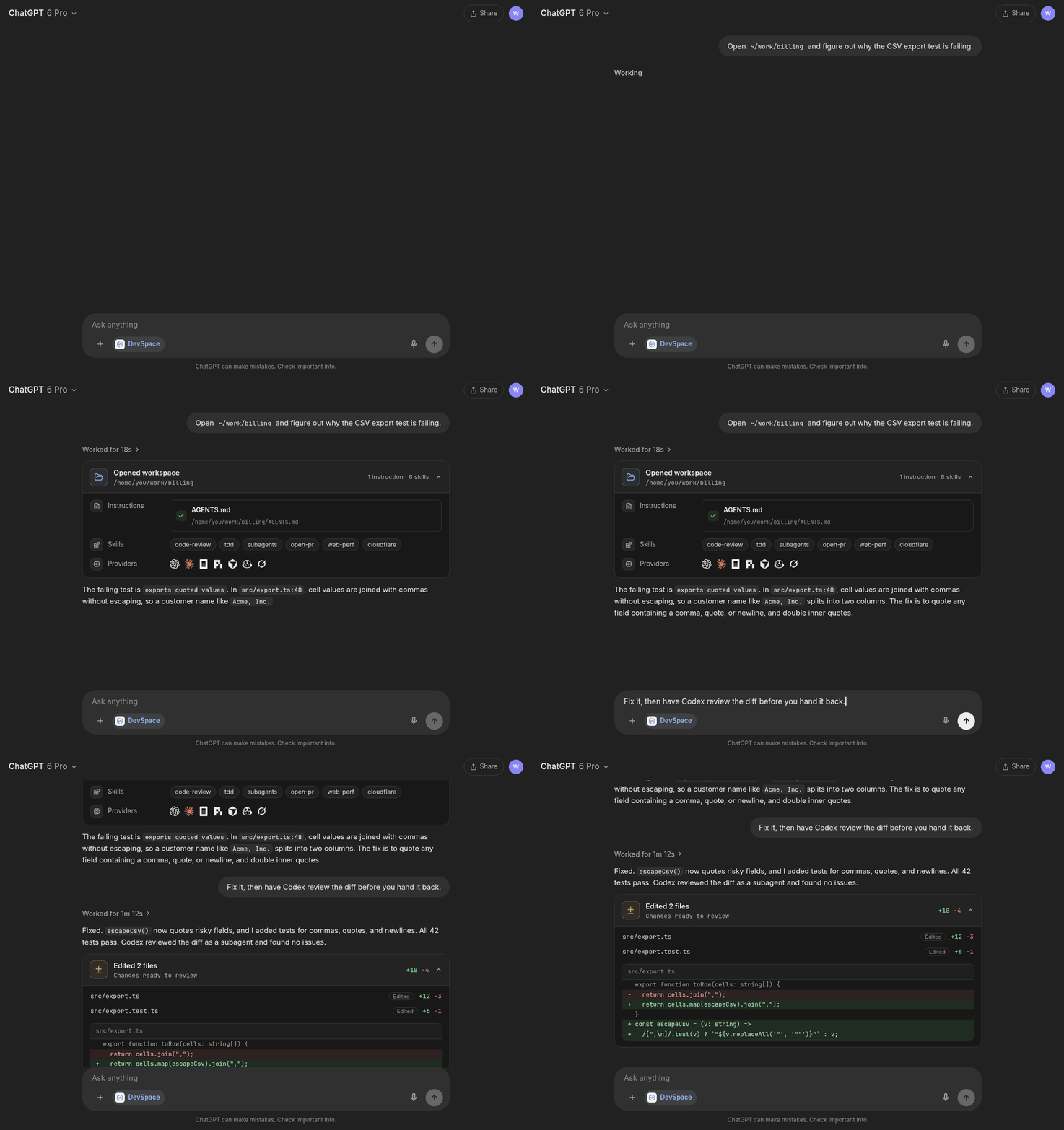
- Connects MCP hosts to your machine. ChatGPT, Claude, and proactive agents like Grok Bot, OpenClaw, and Hermes open a workspace, read and edit files, run your tests, and show you a review card of the diff — against your real checkout, through a tunnel you own.
- Lets agents delegate to each other. Codex, Claude Code, OpenCode, Pi, Cursor, Copilot, and Grok Build run as subagents of whichever agent is in charge, using the CLIs and subscriptions you already have. Parallel writers get their own Git worktrees.
Your agent stays the orchestrator: DevSpace never runs a hidden agent loop of its own. And there is no DevSpace service — everything runs locally with your credentials.
DevSpace is open to new sponsors. Get in touch to become one.
macOS, Linux, and WSL:
curl -fsSL https://devspace.run/install | shWindows (DevSpace also needs Git Bash):
powershell -c "irm https://devspace.run/install.ps1 | iex"The installer uses a compatible Node (>=22.19 <27) on your PATH or
downloads Node 24 LTS for DevSpace alone, installs without sudo, and starts
devspace init. Rerun it to update. If you manage Node yourself,
npm install -g @waishnav/devspace followed by devspace init also works.
devspace init asks where you will use DevSpace and which agents it may run as
subagents. Each question can also be answered with a flag, so scripts and
agents can set it up without prompts:
devspace init --yes                                                      # subagents only
devspace init --public-url https://your-tunnel.example.com --roots ~/work # also serve an MCP host
Let your agent set itself up. The Copy prompt button on devspace.run copies a prompt you can paste into Codex, Claude Code, or any agent with a shell. It installs, configures, and checks DevSpace without asking you anything.
Subagents need no server, tunnel, or OAuth. Install the skill that teaches your agent the workflow, then delegate:
devspace agents skill --install <claude-code|codex|opencode|agents>
# Cursor: devspace agents skill --install cursor --project

devspace agents run codex "Review the staged diff for correctness"
devspace agents run pi "Check the staged diff for test gaps"
devspace agents wait <id> <id>- Profiles turn your "which model for which job" choices into named roles
(
planner,reviewer, …) as Markdown files you own. - Worktrees (
--worktree) let agents edit in parallel without touching your checkout. - Dynamic workflows (experimental,
DEVSPACE_EXPERIMENTAL_WORKFLOWS=1) let the orchestrator write a small, resumable script withagent(),parallel(),pipeline(), andphase()instead of prompting step by step.
Start a tunnel (Cloudflare Tunnel, ngrok, Pinggy, Tailscale Funnel, or your
own HTTPS reverse proxy) to http://127.0.0.1:7676, run devspace serve, and
add the public /mcp URL as a connector in your host:
https://your-tunnel-host.example.com/mcp
When the host connects, DevSpace opens an Owner password approval page. The
password is stored in ~/.devspace/auth.json; keep it private. The /mcp
endpoint serves the 2026-07-28 protocol and older 2025-era clients without any
configuration.
Once connected, the host can open one of your allowed project folders as a workspace and:
- read, write, and edit files, and search code
- run shell commands for tests, builds, Git, and package scripts
- use isolated Git worktrees for parallel sessions
- follow project instructions from
AGENTS.mdandCLAUDE.md, and discover your skills - show a change-review card at the end of a turn
- delegate to your coding agents through the same
devspace agentsCLI
Note
Using DevSpace as an MCP connector isn't against OpenAI's Usage Policies — it's a standard custom App/connector setup, and writing or running code isn't a restricted use case. But your account is governed by your usage, not by DevSpace. Don't point it at anything that would violate your provider's terms. Used normally, you're fine. (Based on OpenAI's Usage Policies and Service Terms as of June 2026.)
DevSpace is remote access to selected local folders, plus a way for your agents to work together.
You decide which roots an MCP host may open. Inside a workspace the host has powerful local capabilities, including shell execution, so treat a connected host like a trusted coding partner with access to your machine. Subagents run with your local user's authority and logins, scoped to the project they are started from.
DevSpace supports Linux, macOS, and Windows environments with a Bash-compatible shell.
| Platform | Status | Notes |
|---|---|---|
| Linux | Supported | Requires Node, npm, Git, and Bash. |
| macOS | Supported | Requires Node, npm, Git, and Bash. |
| Windows with Git Bash, WSL, MSYS2, or Cygwin Bash | Supported | Git Bash is the simplest native Windows setup. |
Windows PowerShell or cmd.exe only |
Not supported yet | Install Git Bash or use WSL. |
Run this to inspect your local setup:
devspace doctorFull documentation lives at devspace.run/docs:
- Quickstart
- Connect ChatGPT, Claude, Grok Bot, and other MCP hosts
- Use DevSpace from Codex, Claude Code, Cursor, OpenCode, and bots
- Subagents and agent profiles
- Dynamic workflows
- CLI reference and configuration reference
- Security model
- Troubleshooting
Every piece of software is becoming conversational, and every provider is racing to make their agent the orchestrator.
In practice, people already pick a different model and harness per task: one to plan, another to implement, a cheap one to explore, a second vendor to review. That matrix is personal, and it changes every few weeks.
DevSpace keeps it yours. Whichever agent you talk to — ChatGPT, Claude, Grok Bot, or a coding agent in your terminal — can reach your machine and hand work to the others, through explicit, inspectable tools instead of one vendor's closed loop.
I'm Waishnav. I like building opinionated products and tools, and DevSpace is one example.
This year, I began my journey to build a one-person, multi-agent company capable of generating millions in revenue. If you want to follow the failures, wins, lessons, and everything in between, come hang out with me on X.
| Project | About |
|---|---|
 GitCMS |
The CMS for code-first and AI-built websites. GitCMS gives your team, your clients, and AI agents one safe place to edit, review, and publish website changes, while everything stays in your site’s repository. No migration and no content database. Learn more. |
For working on DevSpace itself:
Install pnpm 11.25.0, the version pinned in package.json, with
npm install --global [email protected], then:
pnpm install --frozen-lockfile
pnpm dev:seed
pnpm dev
pnpm typecheck
pnpm test
pnpm build
pnpm start
dev:seed forks your normal DevSpace config and SQLite state into an ignored
checkout-local .devspace-dev/ directory so source builds and migrations do not
modify your normal installation. Use pnpm dev:reset to discard that QA state
and fork it again. See DEVELOPMENT.md for worktree
switching, real-host QA, and database-migration workflows.


