


中文 | English | 日本語 | 한국어 | Español | Français | Deutsch | Português (Brasil) | Русский
Connect AI to Your Code.
An AI-native engineering workspace for direct execution and governed multi-agent planning.








Adnify brings code editing, AI execution, asset generation, and browser verification into one desktop workspace. Use Agent Mode for direct implementation or Plan Mode for requirement clarification, reviewed task graphs, dependency-aware execution, and result validation. Manage commands and background services across windows, and receive task results through system notifications or your own webhook receiver.

"Behind every line of code in Adnify, there's a spark of energy from our community!" ⚡️
A huge thank you to our generous supporters. Your coffee, milk tea, and energy drinks are what keep Adnify evolving! Names are in no particular order. If there are any errors or omissions, please contact the author.
| Supporter | Method | Honorary Title | Date | Message |
|---|---|---|---|---|
| okay. | 🧋 Milk Tea | Joy Source Injector | 2026-03-07 | A cup of joy for bug-free code! ✨ |
| Mr. Tang | ☕ Coffee | Focus Fuel Sponsor | 2026-04-17 | A fresh cup for the next build. |
| . | 🥤 Cola | Summer Ice Coke | 2026-07-21 | An iced coke to fuel the next build. |
| *Han | ☕ Coffee | Coffee Power Sponsor | 2026-07-27 | An Americano to keep the code flowing! ✨ |
Join our community to discuss Adnify usage and development!
| WeChat Group | QQ Group | Author WeChat |
|---|---|---|
 |
 |
 |
| Scan to join WeChat group | QQ Group: 1076926858 |
WeChat ID: adnaan_worker |
💡 For issues or suggestions, submit them on Gitee Issues or Github Issues
- Architecture Design
- Core Features
- Asset Generation
- Browser Verification
- Execution Management
- Notifications & Background Tasks
- What Makes Adnify Different
- Quick Start
- Brand Assets
- Feature Details
- Keyboard Shortcuts
- Project Structure
- Contributing
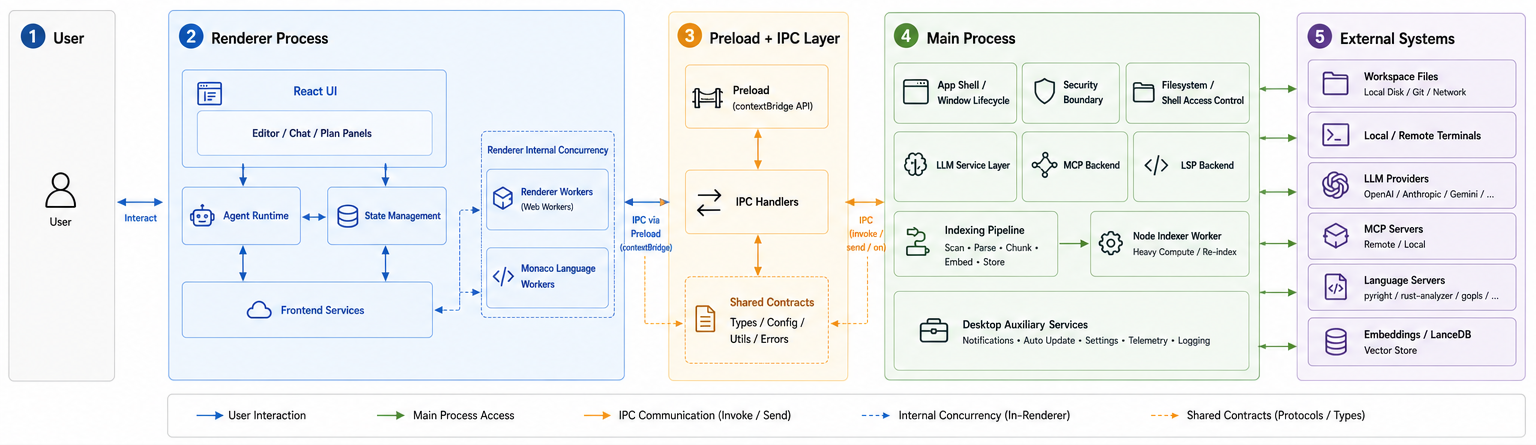
Renderer UI
- React components in
src/rendererown the editor, Agent surfaces, Plan Workbench, terminal, previews, and user-facing interaction flows.
Agent Runtime
src/renderer/agentprovides the shared execution kernel for Agent and Plan task workers, including model routing, context flow, tool policies, approvals, budgets, and recovery.
Plan Runtime
- The Plan domain models requirements, task dependencies, execution state, artifacts, validation, and history independently from the UI, while reusing the same proven Agent kernel for each task.
State and Session
- Renderer-side stores manage UI state, threads, checkpoints, branches, and session lifecycle. A dedicated session-storage process persists SQLite history, while hot/cold message windows bound the amount of history loaded into the UI.
Frontend Services
- Lightweight client services in the renderer coordinate terminal UX, completions, workspace/session helpers, and requests that cross into Electron APIs.
Renderer Workers
- Browser workers handle compute-heavy renderer work such as text/diff processing, while Monaco language workers keep editor language features off the UI thread.
Preload Bridge
src/main/preload.tsexposes a typedcontextBridgesurface so the renderer can access privileged features without direct Node access.
IPC Handlers
src/main/ipc/*.tsis the contract boundary where renderer requests are validated and routed into main-process capabilities.
Shared Contracts
src/sharedcontains cross-process types, config, utilities, and shared error definitions used by both renderer and main code.
Main Process Services
src/mainowns window/app lifecycle, filesystem and shell permissions, command scheduling, LLM and MCP backends, LSP management, notifications, and coordination of isolated services.
Isolated Service Processes
- Code indexing, session storage, asset storage, and content processing run in Electron utility processes started on demand. Each workspace has an index service shared by its windows; parsing and SQLite workers run inside that service. See Process Isolation.
Process Isolation
- The renderer stays focused on UX and orchestration, while the main process contains privileged operations behind explicit IPC boundaries.
Background Work
- Renderer workers handle UI-side computation, while service processes handle indexing, databases, embeddings, and large-document parsing. Service startup, deadlines, shutdown, and recovery share a managed lifecycle.
Operational Safety
- The preload bridge, shared contracts, and main-process security layers keep capability exposure narrow and auditable.
-
Multi-Theme Support: 4 carefully designed built-in themes
Adnify Dark- Default dark theme, soft and eye-friendlyMidnight- Deep midnight blue, focused codingCyberpunk- Neon cyberpunk styleDawn- Bright daytime theme
-
Glassmorphism Design: Global frosted glass style with subtle glowing borders and dynamic shadows
-
Immersive Layout: Frameless window, Chrome-style tabs, breadcrumb navigation


Adnify intentionally exposes two modes. The former standalone Chat mode has been merged into Agent, so questions, investigation, and implementation share one continuous context instead of forcing users to choose between conversation and action.
-
Agent Mode 🤖 — execute directly
- Ask questions, inspect a codebase, edit files, run commands, search documentation, and verify results in one thread.
- Permission-aware tools, checkpoints, diagnostics, loop detection, and recovery keep autonomous work observable and reversible.
- Progressive context compression and summary/handoff support long-running tasks without losing key decisions.
-
Plan Mode 🧠 — review the work before it runs
- A four-stage workbench guides Requirement Review → Plan Review → Run Center → Result Review.
- The planner produces dependency-aware tasks with expected artifacts, priorities, role/model allocation, and sequential or parallel execution paths.
- Structural checks catch dependency cycles, missing prerequisites, and parallel write conflicts before execution.
- Each task runs in an isolated worker thread on the shared Agent kernel. You can inspect progress, open task threads, handle approvals, pause/resume execution, request changes, and accept the final result.

- Workspace operations: read, create, edit, move, and delete files with scoped authorization and diff previews.
- Code intelligence: text/regex search, LanceDB semantic search, symbols, definitions, references, hover information, and diagnostics through LSP.
- Terminal execution: foreground/background commands, live output, interactive input, cancellation, and reliable exit-code capture.
- Research and integrations: web search, URL reading, MCP tools/resources/prompts, and reusable Skills.
- Smart context references: mention files plus
@codebase,@git,@terminal,@symbols, and@web; files and folders can also be dragged into the thread. - Model freedom: switch between OpenAI, Anthropic, Google, DeepSeek, Ollama, and OpenAI-compatible providers, including reasoning controls and provider-specific options.

- Bring your own service: connect HTTP JSON APIs for images, video, audio, and files under Settings → Extensions → Asset Capabilities. Generate a configuration draft from API documentation, edit it manually, or import JSON.
- Generate within a task: enabled capabilities become Agent tools, including reference-image inputs when supported by the service. Synchronous results and asynchronous jobs are supported, with pending status checks restored after restart.
- Preview and reuse results: enlarge images, switch between outputs, play video and audio, locate files, and export from the conversation. Browse saved results and reference-image history in the asset library.
- Control storage: choose global or project-specific output directories and retry failed downloads without regenerating assets. Credentials use secure storage and are excluded from configuration exports.
See Asset Capabilities for setup and API examples.
- Verify frontend changes in the editor: the Agent can open a development preview or HTTP(S) page, inspect the DOM, styles, layout, console, and network diagnostics, and capture screenshots for a configured vision model.
- Interact with the page: click, fill forms, press keys, scroll, navigate, and wait for elements to appear as part of a verification task.
- Check responsive layouts: switch between desktop, phone, and tablet views, including portrait and landscape. Device changes preserve the page and form input, and the preview scales to fit the panel.
- Keep project sessions separate: each project has persistent browser storage shared by its windows. Different projects remain isolated even when using the same localhost address.
Device emulation uses Chromium. After upgrading to project-specific sessions, sign in again in each project's preview. See Browser Preview.
- One view across windows: open the execution manager from the terminal panel or Settings → Editor to inspect commands, background services, terminal sessions, capacity usage, waiting reasons, and exit codes.
- Manage work and history: cancel queued commands, stop running jobs, view or export logs, and pin or delete archived output. Saved history remains available after restarting the app.
- Host development services: explicitly host a running local background service to keep it available after all windows close, with controls in the system tray. Quitting Adnify stops hosted services; restarting restores logs without restarting the service.
- Set resource limits: configure concurrency and queues by window and task, plus output, disk-log, and history budgets. Ordinary commands and background services have separate budgets; history does not consume process slots.
- Reclaim selected idle sessions: mark a local Agent terminal disposable to permit idle recycling. Manually controlled, occupied, unknown, and child-bearing sessions remain protected.
- Review missed messages: the persistent message center in the bottom-right corner keeps editor messages and workspace task events accessible, with unread filtering, mark-as-read, delivery status, and links back to tasks.
- Choose what needs attention: use recommended alerts, task-results-only, or selected events for completion, failures, input requests, approvals, Plan execution, indexing, and assets. System notifications support background-window-only delivery and opening the related conversation.
- Send results to your tools: configure up to five generic webhook channels with event filters, headers, JSON message templates, and test delivery. Messages contain event summaries; webhook configuration is encrypted and kept out of ordinary settings exports.
- Follow long-running work: taskbar or Dock progress reflects Agent and Plan activity where supported. Optional sleep prevention applies while tasks run, and wake-up checks report selected-model endpoint reachability and existing MCP connection status.
- Investigate performance: export process memory snapshots or capture a ten-second trace under Settings → Logs & Diagnostics to correlate resource usage with windows and service processes.
Setup details: Notifications, Background Tasks, and Performance Diagnostics.
- Skills: install from the marketplace or GitHub, create project/global instruction packages, and load them automatically or explicitly.
- MCP: discover and install npm, PyPI, Docker/OCI, Cargo, NuGet, MCPB, HTTP, and SSE servers with hot-reload and OAuth support where required.
- Cross-editor migration: discover and import compatible MCP servers, Skills, and Rules from Claude Desktop/Code, Codex, and Cursor instead of rebuilding your setup manually.
- Project memory: keep project-specific conventions and knowledge behind an approval-aware write path.
- Governed planning, not a longer prompt: Plan Mode turns requirements into an inspectable task graph, requires a plan review, projects execution onto a live TaskBoard, and ends with explicit result validation.
- Real task orchestration: dependency scheduling, bounded concurrency, per-task role/model selection, artifact contracts, isolated task threads, and consolidated results are built into the runtime.
- Worktree isolation for concurrent edits: writable parallel tasks use separate Git checkouts and branches, with a merge queue and recovery controls for conflicts. See Worktree Execution Lanes.
- Long-session architecture: four-level context compression, summary/handoff, SQLite-backed thread persistence, and hot/cold message loading keep extended work usable.
- Reliable terminal state: OSC 633 shell integration captures command boundaries and exit codes, with a piped-shell fallback when native integration is unavailable.
- Implementation through verification: generate assets, edit the frontend, and inspect or interact with its live preview in the same task, including phone and tablet layouts.
- Visible background execution: manage commands and hosted services across windows, preserve their logs, and receive completion or approval alerts through system notifications and webhooks.
- Resilient editing: nine matching strategies handle formatting drift; streaming diffs, checkpoints, and thread branches make changes reviewable and reversible.
- Execution verification: Agent tasks can use LSP diagnostics and project commands to validate their own changes before reporting completion.
- Monaco Editor: Same editor core as VS Code with complete editing features
- Multi-Language LSP Support: TypeScript/JavaScript, Java (JDK 21+), Python, Go, Rust, C/C++, HTML/CSS/JSON, Vue, Zig, C#, and 10+ languages
- Complete LSP Features: Intelligent completion, go to definition, find references, hover info, code diagnostics, formatting, rename, etc.
- Smart Root Detection: Auto-detect monorepo sub-projects, start independent LSP for each
- AI Code Completion: Context-based intelligent code suggestions (Ghost Text) with real-time AI suggestions
- Inline Edit (Ctrl+K): Let AI modify selected code directly without leaving the editor
- Diff Preview: Show diff comparison before AI modifies code, support accept/reject for each change
- Built-in Debug Panel: Breakpoints, variables, call stacks, debug console, and launch configuration for supported adapters

- Quick Open (Ctrl+P): Fuzzy search to quickly locate files with path matching support
- Global Search (Ctrl+Shift+F): Support regex, case-sensitive, whole word match with real-time results
- Semantic Search: AI Embedding-based codebase semantic search understanding code meaning
- Hybrid Search: Combines semantic and keyword search, uses RRF algorithm to merge results
- Integrated Terminal:
- Based on xterm.js + node-pty, supports multiple shells (PowerShell, CMD, Bash, Zsh)
- Supports split view, multiple tabs, terminal reuse
- Shell Integration tracks command boundaries, working directories, and exit codes with a fallback for unsupported shells
- 🌐 Remote SSH Terminal: Built-in native SSH client for direct remote server connection with key authentication support
- Remote file browsing, upload/download, and automatic shell integration over SSH
- Local Server Preview:
- Detects dev-server URLs and candidate ports from terminal activity
- Opens local applications in isolated Webview tabs and tracks them in a Local Servers panel
- Supports Agent browser inspection and interaction, phone/tablet layouts, and persistent sessions isolated by project
- Git Version Control:
- Complete Git operation interface with change management, commit history, diff view
- Visual branch management and conflict resolution
- Supports Git subcommand whitelist for secure control
- File Management:
- Virtualized rendering supports 10k+ files for smooth large project browsing
- Real-time Markdown preview, image preview
- File tree drag & drop, context menu
- Code Outline: Show file symbol structure (functions, classes, variables) for quick navigation
- Problems Panel: Real-time diagnostics showing errors and warnings with one-click jump

Security Features
- Workspace isolation, sensitive path protection (.ssh, .aws, .gnupg, etc.)
- Permission-aware command execution and shell injection detection
- Explicit authorization for files outside the workspace
- Protected Webview navigation and narrowly scoped Electron IPC capabilities
Multi-Window & Workspace
- Supports multiple windows for different projects simultaneously
- Multi-workspace management with quick workspace switching
- Automatic workspace state save and restore
- Supports monorepo multi-root workspaces
Other Features
- Command Palette (Ctrl+Shift+P) for quick access to all features
- SQLite-backed thread history with checkpoints, branches, plan history, and crash-safe recovery
- Token statistics with real-time consumption display
- Complete Chinese and English support with automatic system language detection
- Custom shortcuts supporting VSCode-style keybindings
- Onboarding wizard for beginner-friendly experience
- Tree-sitter parsing for 20+ languages with precise code analysis
- Auto-update with silent download of new versions
| Tool | Version | Notes |
|---|---|---|
| Node.js | 24.19.0+ within 24.x (^24.19.0) |
Repository baseline pinned in .nvmrc and .node-version; Node 22 and 25+ are outside the supported engine range. |
| pnpm | 11.22.0 (exact) | Must match packageManager / engines.pnpm. Enable Corepack with corepack enable. |
| Git | any recent | — |
| Python | optional | Needed only when native addons must compile from source |
The engines and packageManager fields in package.json declare the required versions, while preinstall (scripts/ensure-pnpm.js) rejects other package managers. Use the pinned Node version and pnpm 11.22.0 before installing.
# 1. Clone project
git clone https://github.com/ad-naan/adnify.git
# or: git clone https://gitee.com/adnaan/adnify.git
cd adnify

# 2. Use the repo-pinned Node (pick one)
# nvm use          # reads .nvmrc
# fnm use          # reads .node-version
# mise install     # reads mise.toml

# 3. Enable Corepack so pnpm matches packageManager
corepack enable

# 4. Install dependencies
pnpm install

# 5. Start dev server
pnpm dev
If Electron reports failed to install correctly, delete node_modules/electron and re-run pnpm install on Node 24.19.0+.
# 1. Replace brand assets
# Put them under public/brand/:
# icons/ app icons, logos/ in-app logos, ip/ character assets, welcome/ splash/welcome assets

# 2. Build installer
pnpm dist

# Generated files in release/ directoryAdnify keeps its brand resources in public/brand/. The README hero, welcome screens, app icons, and assistant IP assets all reference this folder, so future brand replacements stay in one predictable place.

Dark Logo |

Light Logo |

App Icon |


| Folder | Purpose | Notes |
|---|---|---|
public/brand/logos/ |
In-app logos | app.png for dark surfaces, app-light.png for light surfaces |
public/brand/icons/ |
System and platform icons | Windows .ico, macOS .icns, Linux .png, and generated multi-size PNG outputs |
public/brand/ip/ |
AI assistant and IP assets | Optimized WebP illustrations for README, welcome screens, and assistant identity |
public/brand/welcome/ |
Welcome visuals | dark.webp and light.webp for dark/light theme presentation |
Icons are generated from public/brand/logos/*.png. After replacing the logo source files, run:
pnpm assets:iconsSee public/brand/README.md for more details.
- Click settings icon in bottom-left or press
Ctrl+, - Select AI provider in Provider tab and enter API Key
- Select model and save
Supports OpenAI, Anthropic, Google, DeepSeek, Ollama, and custom APIs
Agent Mode is the default workspace for questions and implementation. Ask about the project, attach context with @, or describe a change; Agent can inspect files, use tools, generate diffs, run verification, and report the result in the same thread. There is no separate Chat mode.
Plan Mode is designed for larger or higher-risk work. Use it when you want to review requirements, dependencies, ownership, models, artifacts, and execution order before any task runs.
Context References: Type @ to select files, or use @codebase, @git, @terminal, @symbols, and @web for special context.
Inline Edit: Select code and press Ctrl+K, then describe the change without leaving the editor.
Open Settings → Index tab, select Embedding provider (recommend Jina AI), configure API Key and start indexing. After completion, AI can use semantic search.
- Requirement Review — describe the goal and answer focused clarification questions. Adnify turns the discussion into a structured brief with scope and acceptance criteria.
- Plan Review — inspect the task graph, dependencies, artifacts, parallelism, and per-task role/model configuration. Structural checks surface unsafe plans before they run.
- Run Center — approve the plan and follow each isolated task thread on the live TaskBoard. Handle tool approvals or pause/resume the run when needed.
- Result Review — review the consolidated outcome and failed-task status, then accept the result or request another revision.
Skills are instruction packages that give AI specialized capabilities (e.g., optimization for specific frameworks, complex test writing).
- Browse & Install:
- Open Settings → Skills tab.
- Search Market: Click "Search Market" to find community-contributed skills on
skills.sh. - GitHub Install: Enter a GitHub repo URL containing a
SKILL.mdfile to clone it directly. - Create Manually: Create an exclusive skill for the current project and edit the generated
SKILL.mdtemplate. - Use Existing Local Skills: Open the project or global Skills directory from settings, place an existing skill folder there, then refresh the Skills list.
- How it Works:
- Enabled skills are automatically injected into the AI's System Prompt.
- When a task touches on the skill's domain, the AI will automatically follow the expert instructions in the skill package.
- Management:
- You can enable/disable specific skills in settings at any time, or click the "Folder" icon to edit the skill's source code directly.
- Recognized local skills use a dedicated folder per skill with a
SKILL.mdfile plus optional supporting files such asscripts/,templates/, ordata/.
| Category | Shortcut | Function |
|---|---|---|
| General | Ctrl + P |
Quick open file |
Ctrl + Shift + P / F1 |
Command palette | |
Ctrl + , |
Open settings | |
Ctrl + L |
Toggle AI panel | |
Ctrl + backtick |
Toggle terminal | |
Ctrl + Shift + D |
Toggle debug panel | |
| Editor | Ctrl + S |
Save file |
Ctrl + K |
Inline AI edit | |
Ctrl + W |
Close active file | |
F12 |
Go to definition when the editor is focused | |
| Search | Ctrl + F |
In-file search |
Ctrl + Shift + F |
Global search | |
| AI | Enter |
Send instruction |
Shift + Enter |
New line | |
@ |
Reference context | |
/ |
Slash commands | |
| Debug | F5 |
Start debugging |
F9 |
Toggle breakpoint |
Work Modes: Agent 🤖 (execute directly) / Plan 🧠 (review and orchestrate)
adnify/
├── resources/           # Icon resources
├── scripts/             # Build scripts
├── src/
│   ├── main/            # Electron main process
│   │   ├── ipc/         # IPC unified security intercept layer
│   │   ├── lsp/         # LSP service gateway and lifecycle governance
│   │   ├── memory/      # AI memory pool and multi-level caching engine
│   │   ├── security/    # Sandbox isolation and terminal whitelist defense net
│   │   ├── indexing/    # Per-workspace index service process (parsing, embeddings, LanceDB)
│   │   └── services/    # Core main stack subsystems
│   │       ├── agent/   # Agent log analysis and auto-correction
│   │       ├── debugger/# Node/VSCode protocol deep debugging core
│   │       ├── llm/     # LLM dynamic distribution gateway (routing, proxies)
│   │       ├── mcp/     # Model Context Protocol backend registry and auth
│   │       └── updater/ # Highly controllable silent updater module
│   ├── renderer/        # Frontend render process
│   │   ├── agent/       # Client AI brain core (engine queue, tools, instruction flow)
│   │   ├── components/  # Fully decoupled, modular UI component blocks
│   │   │   ├── editor/  # Editor components
│   │   │   ├── sidebar/ # Sidebar components
│   │   │   ├── panels/  # Bottom panels
│   │   │   ├── dialogs/ # Dialogs
│   │   │   └── settings/# Settings components
│   │   ├── modes/       # Agent and Plan mode definitions
│   │   ├── services/    # Frontend services
│   │   │   └── TerminalManager.ts # Terminal manager
│   │   ├── store/       # Zustand state management
│   │   └── i18n/        # Internationalization
│   └── shared/          # Shared code
│       ├── config/      # Configuration definitions
│       │   ├── providers.ts # LLM provider configs
│       │   └── tools.ts     # Unified tool configs
│       ├── constants/   # Constants
│       └── types/       # Type definitions
└── package.json
- Framework: Electron 43.6.0 + React 18 + TypeScript 5
- Build: Vite 8 + electron-builder; pnpm 11.22.0
- Process Architecture: Electron utility processes for code indexing, session/asset storage, and content processing
- Editor: Monaco Editor
- Terminal: xterm.js + node-pty + WebGL Addon
- State Management: Zustand
- Styling: Tailwind CSS
- LSP: Multi-server LSP manager (TypeScript/JavaScript, Java, Python, Go, Rust, C/C++, Vue, Zig, C#, and more)
- Git: dugite
- Vector Storage: LanceDB (high-performance vector database)
- Code Parsing: tree-sitter
- Validation: Zod
Many thanks to all the developers who have contributed to Adnify! You guys are the best 🎉





Issues and Pull Requests are welcome!
If you like this project, please give it a ⭐️ Star!
If Adnify helps you, feel free to buy the author a coffee ☕️

Scan to support, thank you for your encouragement!
Your support is my motivation to keep developing ❤️
This project uses a custom license with main terms:
✅ Permitted Use
- Personal learning, research, non-commercial use
- Personal development projects (not for external sale)
- Team distribution and use (teams with more than 5 members)
- Commercial use (including but not limited to: external sales, paid services, integration into commercial products)
- Enterprise internal use (companies, organizations, legal entities)
❌ Strictly Prohibited
- Unauthorized modification and distribution or sale
- Bundling into other products for sale
- Removing or modifying software name, author copyright, repository address, etc.
- Claiming as your own work or concealing original author information
📧 Authorization Request
- Commercial licensing contact: [email protected]
- Team usage authorization contact: [email protected]
- Please specify use case, team size, business model, etc.
See LICENSE file for details
Q: Why so many requirements in your license? Looks more complex than MIT?
A: Because I've been hurt before 😭
Seriously, I've seen too many of these operations:
- Fork an open-source project, change the name and skin, claim it's "independently developed"
- Delete author info and repo address completely, as if the code appeared from nowhere
- Sell it for money, take outsourcing projects, don't give the original author a penny, won't even give a star
- Even worse, some use it as training materials, students think the teacher wrote it
- Companies directly bundle it into their products for sale without mentioning the original author
I'm not against commercialization, really. Want to use it commercially? Come on, send an email, maybe we can even collaborate. But sneakily erasing my name to make money? That's too much, right?
Q: Will I accidentally violate the rules if I use it for personal learning?
A: No! Personal learning, research, graduation projects, side projects—use it freely! As long as you:
- Don't delete my name and repo address
- Don't sell it or provide paid services
- Don't bundle it into other products for sale
That simple, I'm not trying to make things difficult 😊
Q: If I want to use it internally at my company/team, does that count as commercial use?
A:
- Small teams (≤5 people) internal use: If it's a startup team or small studio internal tool, not sold externally, generally okay, but recommend sending an email to notify
- Company/large team use: Requires written authorization, even for internal tools
- External services: Regardless of team size, if providing paid services or selling products externally, commercial authorization is required
If unsure, send me an email, I'm easy to talk to (really). Authorization process is simple, fees are reasonable.
Q: Can I modify the code? Can I distribute it?
A:
- Personal modification: Yes, but for personal use only
- Distribute modified version: No, unless you get written authorization
- Contribute code: Welcome to submit PRs to the official repository, this is encouraged!
Q: Why not just use GPL or MIT?
A:
- MIT is too permissive: Allows anyone to use commercially freely, can't protect author's rights
- GPL is too strict: Requires derivative works to also be open source, limits reasonable commercial cooperation
- Custom license: Protects author's rights while allowing reasonable commercial cooperation, it's a balance
My license core is one thing: You can use it, you can learn from it, but commercial use and team distribution require authorization, don't pretend you wrote it.
Simply put, open source isn't "free for you to abuse," it's "I'm willing to share, but please respect my work."
If you agree with this philosophy, welcome to star ⭐️, that's more important than anything.