

One drawing in. Game-ready sprites out — as an atlas, or as transparent motion loops.
English · 한국어 · 日本語 · 简体中文 · Español · Français
Help cover the model API costs of developing sprite-gen with an optional GitHub sponsorship. Choose your amount and a one-time or monthly contribution.
Please wishlist Dungeon Sookuma on Steam, a game in development by the creator of sprite-gen with part of the game art made using this tool.
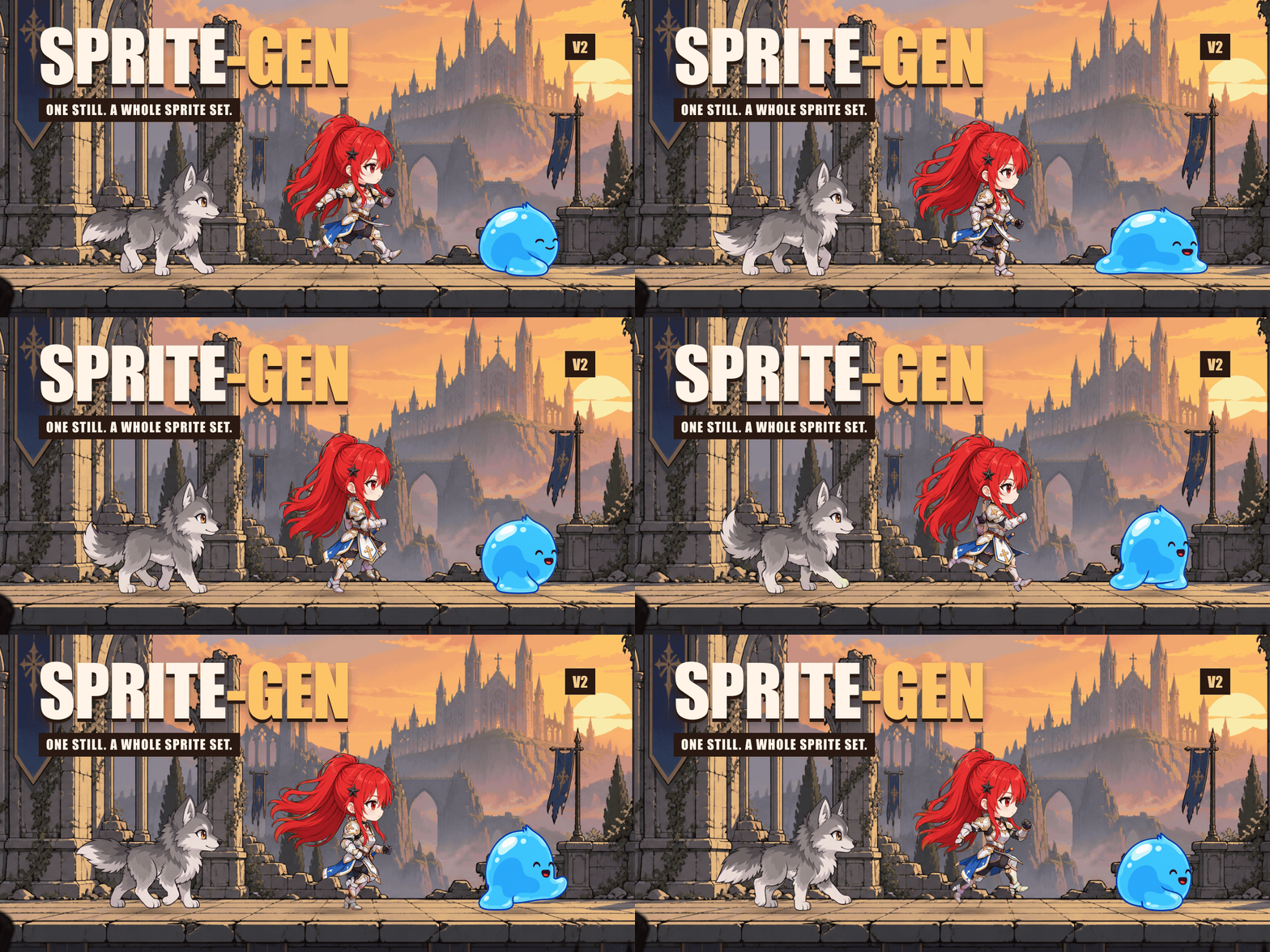
Each character started as one still image. Grok Imagine brought it to life; sprite-gen extracted the transparent loops, and HyperFrames assembled this showcase.

A separate village composition made from sprite-gen assets. This GIF preserves the 10-second video at 20 fps with a 256-colour palette.
Ask an image model for a "sprite sheet" and you know what you get: a character whose face changes every frame, a background that won't key out, poses that overlap and drift off-grid, and a PNG your game engine can't actually consume. Cute demo, useless asset.
sprite-gen is a Codex/Claude skill and a Python CLI that closes that gap. Give it one base image — it drives generation row by row, locks the character's identity, strips the chroma background to real alpha, extracts each pose as a clean transparent frame, and bakes a runtime atlas with a machine-readable manifest.json.frame_layout. Or hand the same still to a video model and get back a seamless, transparent loop per motion state. For the last 10% that generation never gets right, a curation webview lets you compare, reject, nudge and watch the loop live before you bake.
For side sprites, video-set uses --facing right|left consistently across canvas placement and clip prompts. Its direction detector is record-only by default (--facing-fix none) and can be wrong even at high confidence. Use gen --ref image.png --facing right to request orientation in the generation prompt; gen otherwise preserves orientation. Prompts request direction but cannot guarantee the result. Correction is opt-in: --facing-fix mirror, or gen --facing-fix regen; review the still before using either. See facing options.


v2.5.3 attack loops straight out of the video pipeline: one still each, Grok Imagine clip, frames gate, automatic loop selection. No manual cut points.
Ask for sprites or an image. The agent checks access, asks only for missing provider/motion choices, runs the existing pipeline, and delivers the files. The curation view is optional. Save your choices once to reuse separate sprite and image defaults; a one-off request does not overwrite them. User workflow and defaults.
The two sprite pipelines are ordered generation flows. Tool groups contain independent commands; scene creation is an optional workflow that consumes finished assets. sprite-gen --help prints this map and groups commands by the code domain that owns them.
flowchart LR
    subgraph A["A · atlas rows"]
        direction LR
        a1[prepare] --> a2["gen · gen-set"] --> a3[extract] --> a5[compose-atlas]
        a5 -.-> a4["curation (optional)"]
        a4 --> a5
    end
    subgraph B["B · video → loop"]
        direction LR
        b1[video-canvas] --> b2[video] --> b3[video-frames] --> b4[video-loop]
    end
    subgraph C["C · utilities"]
        direction LR
        c1[cutout] ~~~ c2[slice-sheet] ~~~ c3[unpack-atlas]
    end
    subgraph D["D · post-processing"]
        direction LR
        d1[recolor] ~~~ d2[export-*]
    end
    subgraph E["E · asset tools (independent)"]
        e1[background-tile] ~~~ e2[shadow] ~~~ e3[inspect-motion]
    end
    subgraph S["S · scene (optional)"]
        s1["existing assets + scene.json"] --> s2[scene-render]
        s1 --> s3[scene-inspect]
    end
| Pipeline / tool group / workflow | What goes in → what comes out | Docs |
|---|---|---|
| A · atlas rows | one still + a list of states → sprite-sheet-alpha.png + manifest.json.frame_layout, with Breathe baked on idle poses |
run-contract · breathing |
| B · video → loop | one still → per state, a seamless transparent GIF / WebP / strip, animated by Grok Imagine and cut at its true period | video-pipeline · video |
| C · utilities | an imported image or grid sheet → clean transparent cuts; a finished atlas → a curator-ready run | sheet-slicing · curation |
| D · post-processing | a finished sheet → deterministic colourways, Aseprite / Phaser / Flame exports | recolor · engine-export |
| E · asset tools | independent PNGs or animations → repeating tiles, projected shadows, motion/contact measurements | asset-tools |
| S · scene | existing assets + placement, camera and lighting → PNG frames, MP4/GIF, inspection and placement metadata | scene |
Full index: docs/README.md. Architecture with domain and pipeline diagrams: docs/architecture.md.
- A transparent sprite atlas (
sprite-sheet-alpha.png) — real alpha, no leftover chroma fringe, verified against white backgrounds (why the extractor unmixes instead of peeling). - A runtime manifest (
manifest.json.frame_layout) — absolute frame rectangles, per-state fps and loop flags. Your engine samples rectangles; it never guesses a grid. - Breathe — a still idle becomes a living loop, deterministic squash & stretch baked on your curated frames from one sidecar field, anatomy-aware and pixel-true (details).
- Pixel-art that stays on grid — the Backbone Lattice measures one grid for the whole subject and holds every cut to it (details).
- Motion loops from video — jumps get a tall canvas, attacks a wide one, the loop point is the clip's own period, and a one-shot action is cut rest → action → rest. Walk cycles count foot crossovers into a clean two-step loop with smoothed seams (details).
- Deterministic colourways —
recolorbakes N variant sheets from a palette map; same input, same output bytes (details). - QA you can watch — per-state GIFs and contact sheets, so motion is judged as motion before anything ships. Cyclic locomotion (walk/run) stays experimental unless motion QA actually passes.
- Independent asset tools — build repeating backgrounds, project shadows from a foot anchor, and inspect timing, duplicate poses and contact evidence. Ambiguous feet produce an unverified measurement (details).
- Optional scene creation — place existing PNGs, external frame sequences, loop strips or runtime atlases on named planes, with camera motion and shared shadow projection. Sprite generation can finish before this step (details).
# install (Pillow, NumPy) into a fresh virtualenv — the venv is the only supported interpreter
python3 -m venv .venv && source .venv/bin/activate
pip install -e .
sprite-gen --help
A · atlas rows — one still to a runtime atlas.
sprite-gen prepare --out-dir <run> --character-id <id> --base-image base.png   # request, guides, prompts
sprite-gen gen-set --run-dir <run> --provider codex                            # every state row, 4 at a time
sprite-gen extract --run-dir <run>                                             # chroma → transparent frames
sprite-gen compose-atlas --run-dir <run>                                       # sprite-sheet-alpha.png + manifest.json
sprite-gen curation --run-dir <run>                                            # (optional) pick, nudge, breathe
B · video → loop — one still to transparent loops (needs ffmpeg, img2webp, and your own grok login or XAI_API_KEY). Walk and run loops have their jump frames repaired and a direction set shares one cycle length through RIFE: install it once with sprite-gen rife install. Without it those loops are cut as filmed, with a warning (loop-repair).
sprite-gen video-set --base side=still.png --states idle,walk,run,jump,attack --out-dir set/
# per item: video-canvas → video → video-frames → video-loop; set/table.md names every result
Making clips through a video MCP connected to your agent? With ZCRE's (지크), the agent makes the clip on your own ZCRE account and sprite-gen cuts it: sprite-gen video-prompt --direction side --state walk --no-last-frame prints the prompt, then video-frames and video-loop take the mp4, and video-cycle-align gives a walk cut in several directions one cycle length. Walk, run and jump only, because ZCRE's Grok Imagine 1.5 has no end frame (how).
A watch on one wrist, a pin on one side of the head? Turned over, a right-facing view puts it on the other side, so draw the left-facing views instead: sprite-gen gen --direction side --facing left --handed "the black smartwatch=left wrist" says where the item is in that view, video-set --facing right,left --handed … films each side and diagonal view both ways from its own still, and sprite-gen handed-check checks, frame by frame, that a colour-marked item is on the right side. Mirroring stays the default, since drawing the left views costs as much again (how).
A title logo whose letters the model draws freely? sprite-gen logo --provider codex --text "STARFALL" --style "painted fantasy" --out-dir logo/ letters the title into a title screen first, redraws only its lettering on a chroma key and cuts it out with its glow kept, then reads the text back and refuses a misspelt logo (logo).
C · utilities — each stands alone.
sprite-gen cutout icon.png --white-check              # white/ivory → matte, magenta/green → chroma engine
sprite-gen slice-sheet --sheet sheet.png --chroma-key magenta --grid 3x2   # multi-figure sheet → per-cell cuts
sprite-gen unpack-atlas --atlas sheet.png             # finished atlas → curator-ready run (or --pngs-dir folder/)
D · post-processing — refine a finished sheet without regenerating.
sprite-gen recolor-palette --base <run>/sprite-sheet-alpha.png --out palette.draft.json
sprite-gen recolor --run-dir <run> --spec recolor.spec.json      # → <run>/variants/
sprite-gen export-aseprite --run-dir <run>                       # Aseprite JSON for Phaser / Flame
E · asset tools — each accepts existing assets, including artwork from other tools.
sprite-gen background-tile --source background.png --period 512 --overlap 32 --out tile.png
sprite-gen shadow --source walk.strip.json --out-dir shadows/
sprite-gen inspect-motion --source walk.strip.json --out motion.json
# Only with known same-foot contact and an isolated foot ROI:
sprite-gen inspect-motion --source walk.strip.json --contacts 0:4 --foot-box 20,70,32,10 --out stance.json
S · scene — an optional composition workflow. The scene contract includes a complete spec.
sprite-gen scene-render --spec scene.json --out-dir render/ --formats png,mp4 --export-layers
sprite-gen scene-inspect --spec scene.json --out scene-check.json
The agent-facing workflow, gates and contracts live in SKILL.md.
python3 ~/.codex/skills/.system/skill-installer/scripts/install-skill-from-github.py \
  --repo aldegad/sprite-gen --path . --name sprite-gen
Image generation is part of this engine (sprite_gen.gen, providers codex and grok on a subscription you already pay for, plus an openai provider for servers and SaaS that bills per call and runs only when you chose it; the general image-gen skill is a thin shuttle over it). Every call uses your own credential, the subscription login first and an API key only without one, and nothing is shipped with the repo:
| Calls | First | Without it | Docs |
|---|---|---|---|
gen --provider codex |
the codex ChatGPT login |
(a codex signed in with an API key bills that key) | gen |
gen --provider grok, video* |
the grok CLI login |
XAI_API_KEY |
gen, video |
pixel-draw |
the claude (Claude Code) subscription login |
ANTHROPIC_API_KEY |
pixel-draw |
gen --provider openai |
— | OPENAI_API_KEY, only when you chose it |
gen |
A call on an API key is billed per call and says so on stderr before the request leaves, also inside gen-set and video-set. A call that names no provider runs on codex; when codex cannot run (not signed in, or its usage used up) it stops and asks (exit 75) — or runs what you chose for that with sprite-gen defaults save --codex-unavailable grok|openai (gen). logo makes its images and its text checks through gen's providers, on the same credentials.
sprite-gen supports CPython 3.11+; CI runs only 3.14. Python 3.10 is no longer supported. The quickstart needs a Python with working venv/ensurepip.
The component-row workflow is inspired by the Apache-2.0 licensed hatch-pet skill, but targets generic game sprite atlases and includes no pet packages or pet visual assets.
Community contributions, experiments, and their originating pull requests are documented in CONTRIBUTORS.md.
Apache-2.0

