


On the "steerability" of generative adversarial networks.
Ali Jahanian*, Lucy Chai*, Phillip Isola
- Linux
- Python 3
- CPU or NVIDIA GPU + CUDA CuDNN
Table of Contents:
- Setup
- Visualizations - plotting image panels, videos, and distributions
- Training - pipeline for training your own walks
- Notebooks - some jupyter notebooks, good place to start for trying your own transformations
- PyTorch/Colab Demo - pytorch implementation in a colab notebook
- Clone this repo:
git clone https://github.com/ali-design/gan_steerability.git- Install dependencies:
- we provide a Conda
environment.ymlfile listing the dependencies. You can create a Conda environment with the dependencies using:
- we provide a Conda
conda env create -f environment.yml- Download resources:
- we provide a script for downloading associated resources (e.g. stylegan). Fetch these by running:
bash resources/download_resources.shPlotting image panels:

- Run
python vis_image.py -hto list available visualization options. The key things to provide are a model checkpoint and a config yml file. We added some pretrained weights in the./models_pretrained, but you can also use the models you train yourself.
python vis_image.py \
	models_pretrained/biggan_zoom_linear_lr0.0001_l2/model_20000_final.ckpt \
	models_pretrained/biggan_zoom_linear_lr0.0001_l2/opt.yml \
	--gpu 0 --num_samples 50 --noise_seed 20 --truncation 0.5 --category 207

python vis_image.py \
        models_pretrained/stylegan_color_linear_lr0.0001_l2_cats_w/model_2000_final.ckpt \
        models_pretrained/stylegan_color_linear_lr0.0001_l2_cats_w/opt.yml \
--gpu 1 --num_samples 10 --noise_seed 20 - By default this will save generated images to
<output_dir>/imagesspecified in the config yml, unless overwritten with the--output_diroption
To make a videos:

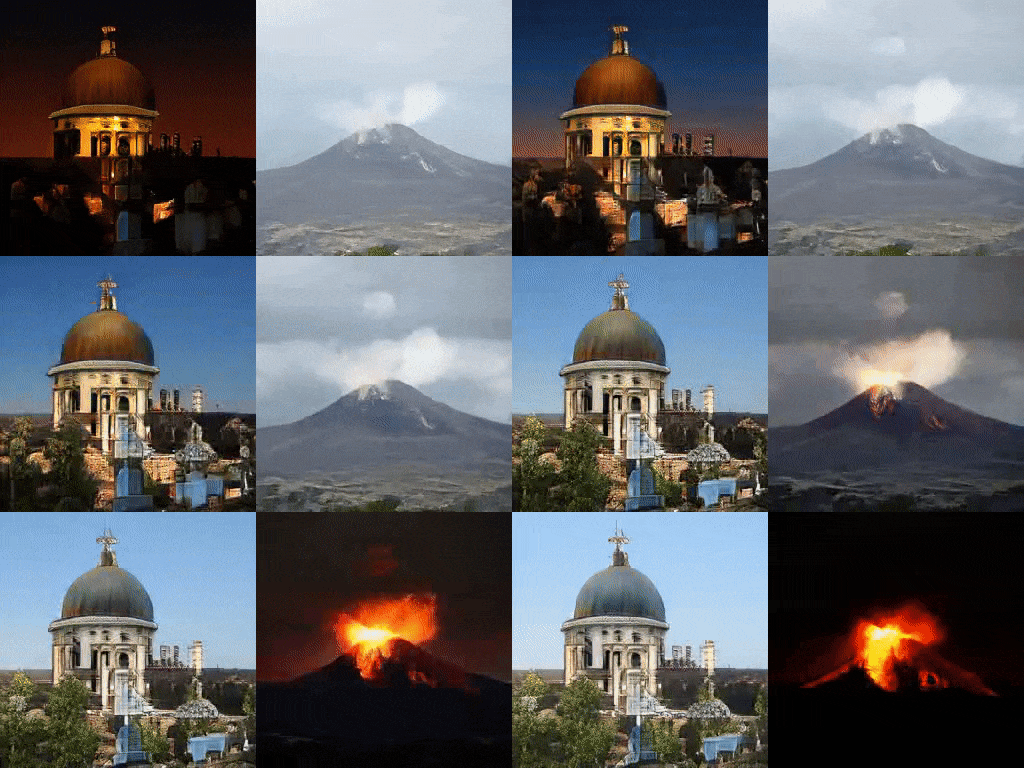
python vis_video.py [CHECKPOINT] [CONFIG] --gpu [GPU] --noise_seed [SEED] --sample [SAMPLE]

python vis_video.py models_pretrained/biggan_color_linear_lr0.001_l2/model_20000_final.ckpt \
	models_pretrained/biggan_color_linear_lr0.001_l2/opt.yml  --gpu 0 --sample 10 \
--noise_seed 20 --truncation 0.5 --category 538 --min_alpha -1 --max_alpha 0- By default this will save output to
<output_dir>/videospecified in the config yml, unless overwritten with the--output_dirand--filenameoptions
To draw distributions:
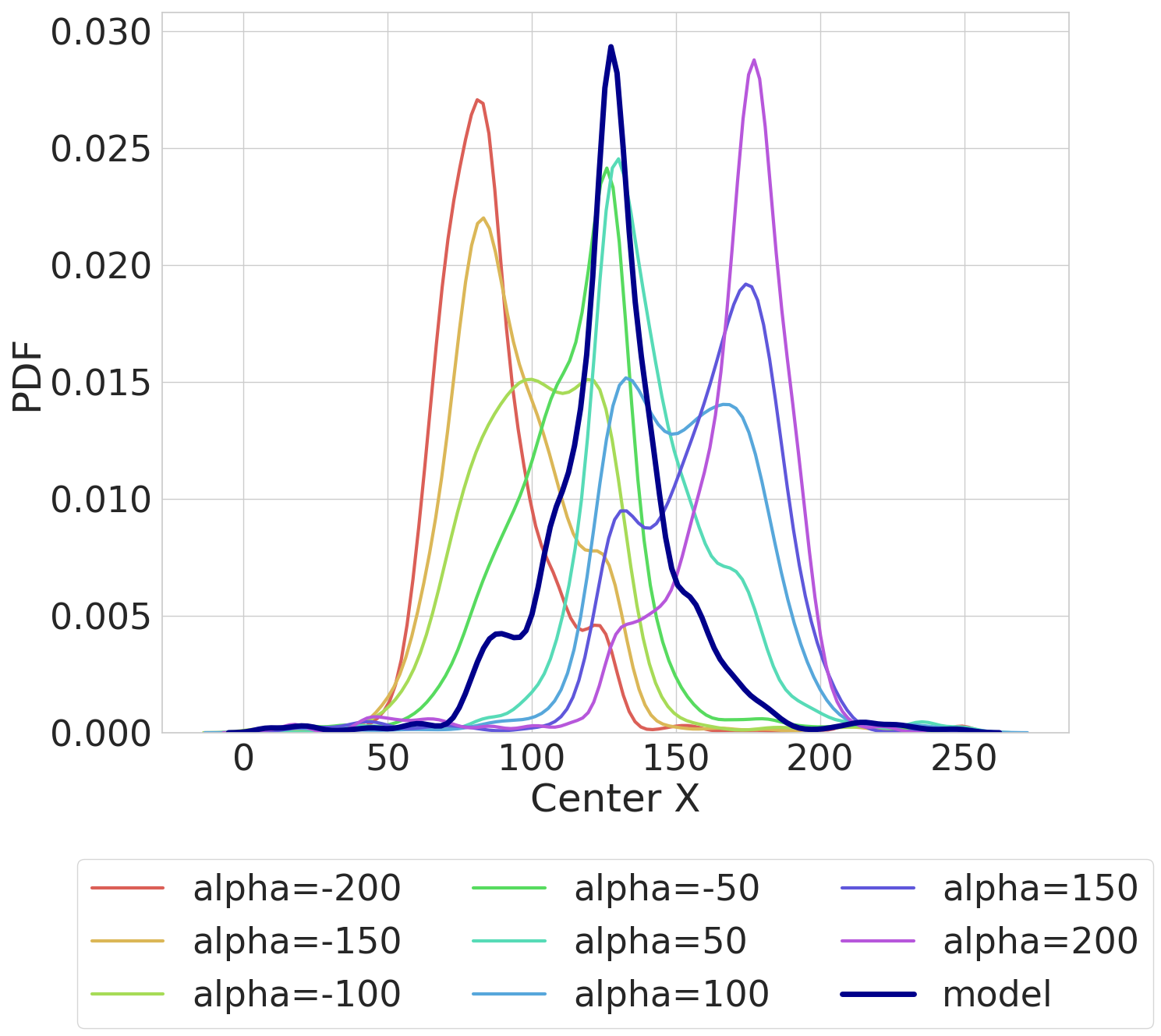
To draw distributions, you will need to have downloaded the object detector through resources/download_resources.sh (for objects) or installed dlib through environment.yml (for faces).
python vis_distribution.py [CHECKPOINT] [CONFIG] --gpu [GPU]

python vis_distribution.py models_pretrained/biggan_shiftx_linear_lr0.001_l2/model_20000_final.ckpt \
models_pretrained/biggan_shiftx_linear_lr0.001_l2/opt.yml --gpu 0- By default this will save output to
<output_dir>/distributionspecified in the config yml, unless overwritten with the--output_diroption
- The current implementation covers these variants:
- models: biggan, stylegan, pgan
- transforms: color, colorlab, shiftx, shifty, zoom, rotate2d, rotate3d
- walk_type: linear, NNz
- losses: l2, lpips
- Some examples of commands for training walks:
# train a biggan NN walk for shiftx with lpips loss
python train.py --model biggan --transform shiftx --num_samples 20000 --learning_rate 0.0001 \
	--walk_type NNz --loss lpips --gpu 0 --eps 25 --num_steps 5

# train a stylegan linear walk with l2 loss using the w latent space
python train.py --model stylegan --transform color --num_samples 2000 --learning_rate 0.0001 \
	--walk_type linear --loss l2 --gpu 0 --latent w --model_save_freq 100

# train a pgan linear walk with l2 loss
python train.py --model pgan --transform color --num_samples 60000 --learning_rate 0.0001 \
--walk_type linear --loss l2 --gpu 0 --dset celebahq --model_save_freq 1000-
Currently for pgan we only support the celebahq dataset, but you can easily train walks using other pretrained models by downloading the weights to
resources/pgan_pretrainedand adding the model information tographs/pgan/constants.py -
Alternatively you can train using a config yml file, for example:
python train.py --config_file config/biggan_color_linear.yml-
Each training run will save a config file called
opt.ymlin the same directory as the weights, which can be used for rerunning experiments with the same settings. You may need to use the flag--overwrite_configfor overwriting existing weights and config files. -
Run
python train.py -hto list available training options -
You can use these walks that you train yourself for the above visualizations, by specifying the path to the corresponding model checkpoint and
opt.ymlconfig file.
- We provide some examples of jupyter notebooks illustrating the full training pipeline. See notebooks.
- It might be easiest to start here if you want to try your own transformations! The key things to modify are
get_target_npand to scale alpha appropriately when feeding to graph. - If using the provided conda environment, you'll need to add it to the jupyter kernel:
source activate gan_steerability
python -m ipykernel install --user --name gan_steerability- You can find a google colab notebook implementation here. This uses a pytorch port of the tensorflow BigGAN-deep weights.
- An earlier version is on the pytorch BigGAN model is here.
If you use this code for your research, please cite our paper:
@inproceedings{gansteerability,
  title={On the "steerability" of generative adversarial networks},
  author={Jahanian, Ali and Chai, Lucy and Isola, Phillip},
  booktitle={International Conference on Learning Representations},
  year={2020}
 }