


Connect any AI copilot or autonomous agent to your enterprise tools — through a single, secure MCP gateway with built-in identity, access control, and full observability.


Jarvis Registry is an open-source, enterprise-grade MCP (Model Context Protocol) and A2A Agent Gateway and Workflow Orchestration platform built by ASCENDING Inc.
It solves one of the hardest problems in enterprise AI: giving AI copilots and autonomous agents secure, governed access to internal tools and data — without fragmented integrations or security blind spots.
| Capability | Description |
|---|---|
| MCP Gateway & Reverse Proxy | Single authenticated entry point for all AI clients and agents using MCP over SSE or Streamable HTTP |
| AI Copilot Integration | Connect Cursor, Claude Desktop, GitHub Copilot, VS Code, and any MCP-compatible copilot to enterprise tools |
| A2A Agent Orchestration | Register and manage autonomous agents; orchestrator agents coordinate worker agents through the same secure gateway |
| Identity & Access Management | OAuth 2.0/OIDC with Keycloak, Amazon Cognito, and Microsoft Entra ID — no custom auth code needed |
| Access Control | Role scopes and resource ACLs control registered-server access; server-wide tool disabling is a separate gateway setting |
| Skill & Context-Based Discovery | Semantic search over skills, descriptions, and tags so agents and copilots find the right MCP server or A2A agent at runtime |
| Audit & Observability | Full request logging, OpenTelemetry tracing, and Prometheus metrics |
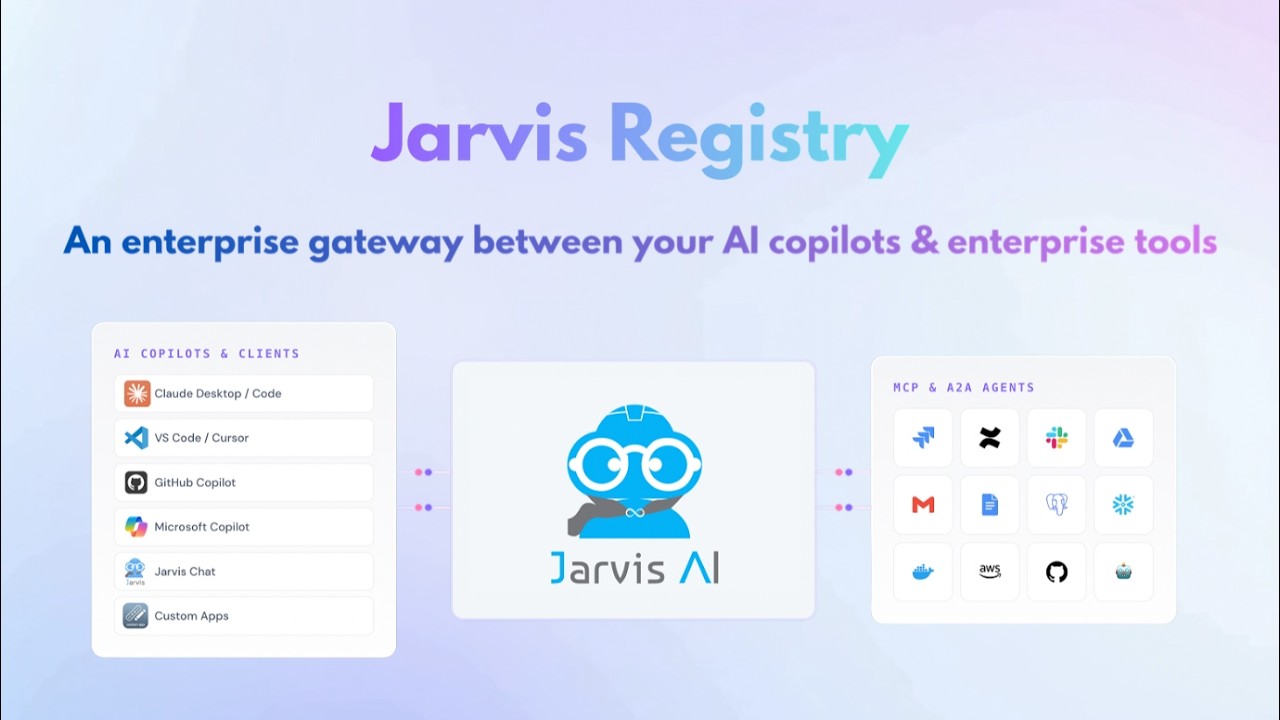
▶ Watch the demo — click to open on YouTube
# Clone the repository
git clone https://github.com/ascending-llc/jarvis-registry.git
cd jarvis-registry

# Copy and configure environment
cp .env.example .env
# Edit .env with your identity provider credentials

# Setup Python Virtual Environment
uv sync --all-packages
source .venv/bin/activate

# Start all services
docker compose --profile full up -d

# Open the registry UI
open http://localhost:80
See the full Get Started guide for detailed instructions.
Jarvis Registry also includes Skill Gateway, a private catalog for approved agent skills. Keep source review in your Git provider, import an approved revision, and share the resulting skill through Registry access controls. The Jarvis Registry CLI delivers accessible skills to supported coding-client directories.
| Engineering question | Guide |
|---|---|
| Is Git enough, or do we need per-skill sharing and central distribution? | Git repository or private agent skill registry? |
| Does MCP server access stop a caller who already knows the server ID and tool name? | MCP access control: test user permissions |
| How do approved private skills reach developers, receive updates and lose access? | Private skill import, updates and access removal |
These guides include concrete checks and sample files. Skill delivery is separate from MCP tool authorization; removing Registry access does not erase independent downloaded copies.
Full documentation is available at jarvisregistry.com:
| Section | Description |
|---|---|
| Why Use Registry | Benefits, use cases, and competitive advantages |
| Get Started | Installation, configuration, and first run |
| Core Features | IDP integration, MCP/A2A registry, federation |
| Architecture & Design | Security, RBAC, ACL, agent workflow, federation |
| Project | Contributing, license, and code of conduct |
Cloud-native deployment guides are available for:
- AWS — EKS
- Azure — AKS
- GCP — GKE
- Docker Compose — Full local stack in under 5 minutes
We welcome contributions! Please read our Contributing Guide and Code of Conduct before submitting pull requests.
For security vulnerabilities, contact [email protected] — do not open a public issue.
Jarvis Registry builds upon the excellent foundational work of the agentic-community/mcp-gateway-registry project. We are grateful to those contributors for establishing the core MCP gateway patterns that made this enterprise evolution possible.
Licensed under the Apache 2.0 License — see the LICENSE file for details.
⭐ Star this repository if it helps your organization!
Get Started | Documentation | Website | YouTube | LinkedIn


