

A Processing library for the OpenCV computer vision library.
OpenCV for Processing is based on OpenCV's official Java bindings. It attempts to provide convenient wrappers for common OpenCV functions that are friendly to beginners and feel familiar to the Processing environment.
See the included examples below for an overview of what's possible and links to the relevant example code. Complete documentation is available here:
OpenCV for Processing reference
OpenCV for Processing is based on the officially supported OpenCV Java API, currently at version 2.4.5. In addition to using the wrapped functionality, you can import OpenCV modules and use any of its documented functions: OpenCV javadocs. See the advanced examples (HistogramSkinDetection, DepthFromStereo, and Marker Detection) below for details. (This style of API was inspired by Kyle McDonald's ofxCv addon for OpenFrameworks.)
Contributions welcome.
OpenCV for Processing currently supports Mac OSX, 32-bit and 64-bit Windows, 32- and 64-bit Linux. Android support is hopefully coming soon (pull requests welcome).
NB: When running on the Mac, make sure you have Processing set to 64-bit mode in the Preferences
See here for the latest release.
Access a live camera and do image processing on the result, specifically face detection.
Code: LiveCamTest.pde
Note: There's a bug that prevents live camera access in current versions of Processing 2.0 on machines with a Retina display.
Detect faces in images.

Code: FaceDetection.pde
Adjust the brightness and contrast of color and gray images.

Code: BrightnessContrast.pde
Basic filtering operations on images: threshold, blur, and adaptive thresholds.

Code: FilterImages.pde
Find contours in images and calculate polygon approximations of the contours (i.e., the closest straight line that fits the contour).
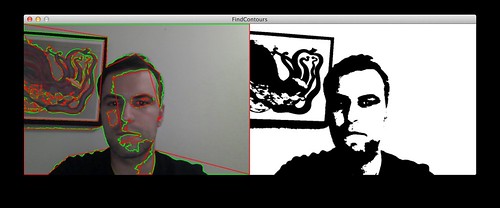
Code: FindContours.pde
Three different edge-detection techniques: Canny, Scharr, and Sobel.

Code: FindEdges.pde
Find straight lines in the image using Hough line detection.

Code: HoughLineDetection.pde
Find the brightest point in an image.

Code: BrightestPoint.pde
Assign a sub-section (or Region of Interest) of the image to be processed. Video of this example in action here: Region of Interest demo on Vimeo.

Code: RegionOfInterest.pde
Find the difference between two images in order to subtract the background or detect a new object in a scene.

Code: ImageDiff.pde
Thin (erode) and expand (dilate) an image in order to close holes. These are known as "morphological" operations.

Code: DilationAndErosion.pde
Detect moving objects in a scene. Use background subtraction to distinguish background from foreground and contour tracking to track the foreground objects.

Code: BackgroundSubtraction.pde
Demonstration of what you can do color images in OpenCV (threshold, blur, etc) and what you can't (lots of other operations).

Code: WorkingWithColorImages.pde
Separate a color image into red, green, blue or hue, saturation, and value channels in order to work with the channels individually.

Code: ColorChannels
Demonstrates use of the findHistogram() function and the Histogram class to get and draw histograms for grayscale and individual color channels.

Code: FindHistogram.pde
Detect objects based on their color. Demonstrates the use of HSV color space as well as range-based image filtering.

Code: HueRangeSelection.pde
An example of the process involved in calibrating a camera. Currently only detects the corners in a chessboard pattern.

Code: CalibrationDemo.pde
A more advanced example. Detecting skin in an image based on colors in a region of color space. Warning: uses un-wrapped OpenCV objects and functions.

Code: HistogramSkinDetection.pde
An advanced example. Calculates depth information from a pair of stereo images. Warning: uses un-wrapped OpenCV objects and functions.

Code: DepthFromStereo.pde
Un-distort an object that's in perspective. Coming to the real API soon.

Code: WarpPerspective.pde
An in-depth advanced example. Detect a CV marker in an image, warp perspective, and detect the number stored in the marker. Many steps in the code. Uses many un-wrapped OpenCV objects and functions.

Code: MarkerDetection.pde
Open and close an image, or do more complicated morphological transformations.

Code: MorphologyOperations.pde


