

This extension request latest SD webui v1.6.x, update it before using this extension. And also re-lanuch SD webui after installing(not just reload UI). If you have an issue, check console log window's detail and read common issue part
You can also try following forks of this project, which is updating when I'm busy on other projects.
https://github.com/zixaphir/Stable-Diffusion-Webui-Civitai-Helper
or
https://github.com/blue-pen5805/Stable-Diffusion-Webui-Civitai-Helper
Also, invokeAI 3.x and ComfyUI are wonderful choices for SD. Try them.
Stable Diffusion Webui Extension for Civitai, to handle your models much more easily.
Civitai: Civitai Url
- Scans all models to download model information and preview images from Civitai.
- Link local model to a civitai model by civitai model's url
- Download a model(with info+preview) by Civitai Url into SD's model folder or subfolder.
- Downloading can resume at break-point, which is good for large file.
- Checking all your local model's new version from Civitai
- Download a new version directly into SD model folder (with info+preview)
- Modified Built-in "Extra Network" cards, to add the following buttons on each card:
- 🌐: Open this model's Civitai url in a new tab
- 💡: Add this model's trigger words to prompt
- 🏷: Use this model's preview image's prompt
Go to SD webui's extension tab, go to Install from url sub-tab.
Copy this project's url into it, click install.
Alternatively, download this project as a zip file, and unzip it to Your SD webui folder/extensions.
Everytime you install or update this extension, you need to shutdown SD Webui and Relaunch it. Just "Reload UI" won't work for this extension.
Done.
Update SD webui before using this extension!
Go to extension tab "Civitai Helper". There is a button called "Scan model".

Click it and the extension will scan all your models to generate SHA256 hashes, using them to retreive model information and preview images from Civitai.
Scanning takes time, just wait it finish
For each model, it will create a json file to save all model info from Civitai. This model info file will be "Your_model_name.civitai.info" in your model folder.

If a model info file already exists, it will be skipped. If a model cannot be found in Civitai, it will create an empty model info file, so the model won't be scanned twice.
When you have some new models, just click scan button again, to get new model's information and preview images. It won't scan the same model twice.
(Use this only after scanning finished)
Go to a Model's tab to show model cards.
Move your mouse on to the Top of a model card. It will show 3 additional icon buttons:
- 🌐: Open this model's Civitai url in a new tab
- 💡: Add this model's trigger words to prompt
- 🏷: Use this model's preview image's prompt

If these additional buttons are not there, click the Refresh Civitai Helper button to bring them back.

Everytime after Extra Network tab refreshed, it will remove all these additional buttons. So, you need to click Refresh Civitai Helper button to bring them back.
To download a model by Civitai Model Page's Url, you need 3 steps:
- Fill url, click button to get model info
- It will show model name and type automatically. Just choose sub-folder and model version
- Click download.
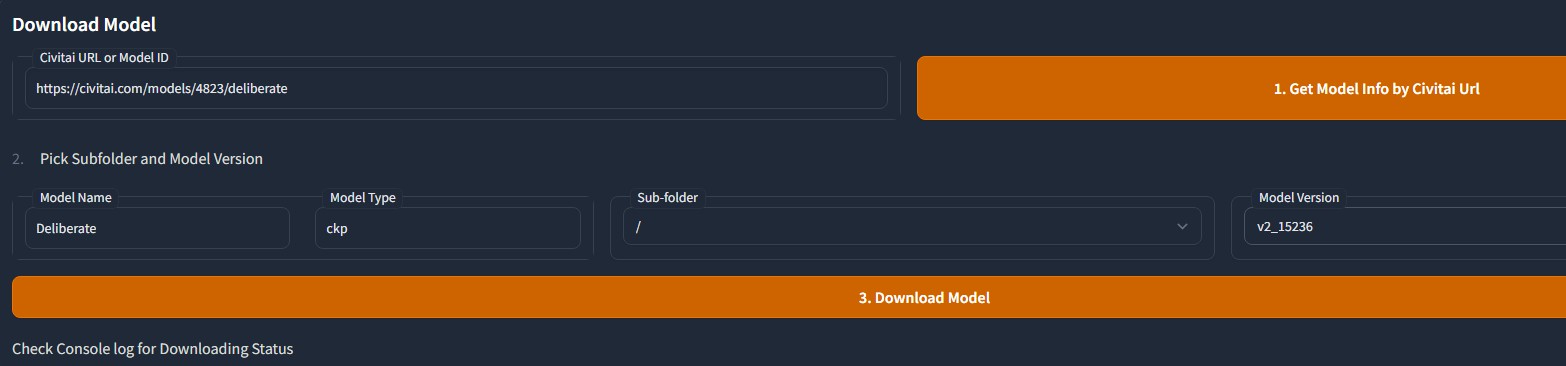

Detail will be displayed on console log, with a progress bar.
Downloading can resume from break-point, so no fear for large file.
You can checking your local model's new version from civitai by model types. You can select multiple model types.

The checking process has a "1 second delay" after each model's new version checking request. So it is a little slow.
This is to protect Civitai from issue like DDos from this extension. Some cloud service provider has a rule as "no more than 1 API request in a second for free user". Civitai doesn't have this rule yet, but we still need to protect it. There is no good for us if it is down.
After checking process done, it will display all new version's information on UI.
There are 3 urls for each new version.
- First one is model's civitai page.
- Second one is new version's download url.
- Third one is a button to download it into your SD's model folder with python.
With this one, output information is on "Download Model" section's log and console log. One task at a time.

This is used to force a local model links to a Civitai model. For example, you converted a model's format or pruned it. Then it can not be found on civitai when scanning.
In that case, if you still want to link it to a civitai model. You can use this funcion.
Choose this model from list, then offer a civitai model page's url.
After clicking button, extension will download that civitai model's info and preview image for the local file you picked.

Now all settings are moved into Setting tab->civitai helper section.
For some sock5 proxy, need to be used as "socks5h://127.0.0.1:port".

You need to login civitai to download some models. To do this with Civitai API, you need to create an API Key in your account settings on Civitai's website.
zixaphir created a detailed tutorial for this: wiki.
Here is a simple tutorial:
- Login civitai.com
- go to your account's setting page
- At the bottom of that page, find the "API Keys" section.
- Click "Add API Key" button, give a name.
- Copy the api key string, paste to this extension's setting page -> Civitai API Key section.
- Save setting and Reload SD webui
On your civitai account's setting page, there are sections for "Content Controls" and "Content Moderation".
If you hide some content types there, then you won't be able to get those models with this extension.
To get all kinds of models, you need to
-
Set your Civitai API Key like above.
-
And turn on all content types on civitai's account setting like following:


Extra network uses both model_file.png and model_file.preview.png as preview image. But model_file.png has higher priority, because it is created by yourself.
When you don't have the higher priority one, it will use the other automatically.
When you click the button "Use prompt from preview image", it does not use the prompt from your own preview image. It uses the one from civitai's preview image.
On civitai, a model's preview images may not has prompt. This extension will check this model's all civitai preview images' information and use the first one has prompt in it.
To create a file SHA256, it need to read the whole file to generate a hash code. It gonna be slow for large files.
Also, extension uses Memory Optimized SHA256, which won't stuck your system and works with colab.
There are 2 cases this hash code can not find the model on civitai:
- Some old models, which do not have SHA256 code on civitai.
- The model's owner changed file on civitai, but does not change version name and description. So, the file on civitai is actually not the one on your manchine.
In these cases, you can always link a model to civitai by filling its URL in this extension.
No new feature for v1.x after v1.5. All new feature will go to 2.x.
2.x will focus on custom model information and may change name to "Model Info Helper", because it is not just focus on Civitai anymore.
From v1.5, v1.x goes into maintenance phase.
Enjoy!
Turn off cloud based localization extension, use normal localization extension.
First of all, make sure you clicked "Refresh Civitai Helper" button.
If issue is still there, then only reason is you are not using the latest SD webui. So, Make sure you updated it.
Your update could be failed if you have modified SD webui's file. You need to check git command's console log to make sure it is updated.
In many cases, git will just refuse to update and tell you there are some conflicts need you to handle manually. If you don't check the consloe log, you will think your SD webui is updated, but it is not.
This extension is stable. So, the reason for this most likely is your internet connection to Civitai API service.
Civitai is not as stable as those rich websites, it can be down or refuse your API connection.
Civitai has a connection pool setting. Basicly, it's a max connection number that civitai can have at the same time. So, if there are already too manny connections on civitai, it will refuse your API connection.
In those cases, the only thing you can do is just wait a while then try again.
A bad news is, some models are saved with a wrong sha256 in civitai's database. Check here for more detail:
civitai/civitai#426
So, for those models, this extension can not get the right model info or preview images.
In this case, you have to remove the model info file and get the right model info by a civitai url on this extension's tab page.
Also, you can report those models with wrong sha256 to civitai at following page:
https://discord.com/channels/1037799583784370196/1096271712959615100/1096271712959615100
Please report that model to civitai, so they can fix it.
First of, search your error message with google. Most likely, it will be a colab issue.
If you are sure it is a out of memory issue when scanning models, and you are using this extension's latest version, then there is nothing we can do.
Since v1.5.5, we've already optimized the SHA256 function to the top. So the only 2 choices for you are:
- try again
- or use a pro account of colab.
- Add "Civitai Domain" to Options on Setting page, since now civitai has 2 domains:
.comand.red..redis for nsfw things.
- Add "install.py" to install package "pysocks" for using socks for proxy.
- Merged PR #299 to work with latest sd v1.10.1
- Added a new checkbox option "When checking model's new version, checking new version existing under all model folders". When this value is False, it gonna only checking that model's current folder.
- Fix a bug about model path parsing when using custom model folder
- Bring back this addon's green refresh button to SD webui v1.8.x
- Handle model path cases for linux
- Support SD webui v1.8.x
- With SD webui v1.8.x, this extension's refresh function is added to Official Extra Network's refresh button. There is no need another green fresh button anymore.
- Ignore video preview from civitai
- support civitai API key for downloading. Check document for detail
- fix a bug of removing model when model name has space in it.
- fix downloading issue when connection failed
- fix nsfw is not a bool issue
- fix http headers' utf8 issue for downloading
- Add remove model button
- Catch up with latest sd webui
- Move all settings to Setting tab
- Add "Download All files" checkbox for downloading model section. Uncheck means only download 1 file.
- Support downloading multiple files, not avaiable when checking new version.
- when parsing civitai url, remove query string by PR
- When downloading, re-name file if file already exists
- Support bilingual localization extension by PR
- Fix Localization issue for 4 addtional buttons on cards. (Forgot that again...)
- Fix some UI issues to work with gradio 3.23.0
- Support Proxy when connecting to civitai. Check document for detail.
- check realpath when opening file, to fix error when using junction
- Fix multiple addtional buttons issue after switching tabs.
- Fix Localization issue for 4 addtional buttons on cards
- update error msg when can not connect to civitai API service
- update thumb mode for SD webui new version's metadata button
- update SHA256 function, now it just use the code from pip
- set sys.stdout to utf-8
- Add default header for requests to prevent from being blocked by civitai.
- merge other v1.5.x change log to v1.5.4
- When downloading a model by url, check if target model version is already existed in user selected sub-folder.
- Support scanning only selected model types.
- Force TI scanning delay 1 second to prevent from civitai treating this extension's requests as attacking.
- Download a model by Civitai model page's url
- Resume downloading from break-point
- Download new version into SD Webui's model folder
- Addtional button now works on thumbnail mode
- Option to always show addtion button, for touch screen.
- ignore .vae file in model folder when scanning
- When checking new versions, also searching and ignore already existed ones.
- Add version number to the bottom of this extension's tab
- Support checking model's new version, display the result in UI and offer download url
- Remove addintional sub tabs on extension tab. make ui simpler.
- Open url at client side
- Link selected model to civitai by url or model id
- Save and load extension setting to file
- Show button action's output to UI
- Code refactoring
- Add more error checking to work with different versions of SD webui.
- Support customer model folder
- Support readable model info file
- Support download preview image with max size
- Remove card buttons when extra network is in thumbnail mode
- Support subfolders
- Check if refresh is needed when clicking "Refresh Civitai Helper"
- Add space when adding trigger words
- Add memory Optimized sha256 as an option


