





Cboard is an augmentative and alternative communication (AAC) web application, allowing users with speech and language impairments (autism, cerebral palsy) to communicate with symbols and text-to-speech.

The app uses the browser's Speech Synthesis API to generate speech when a symbol is clicked. There are thousands of symbols from the most popular AAC symbol libraries to choose from when creating a board. Cboard is available in 40 languages (support varies by platform - Android, iOS, Windows).
We're using Discord to collaborate, join us at: https://discord.gg/TEH8uxh
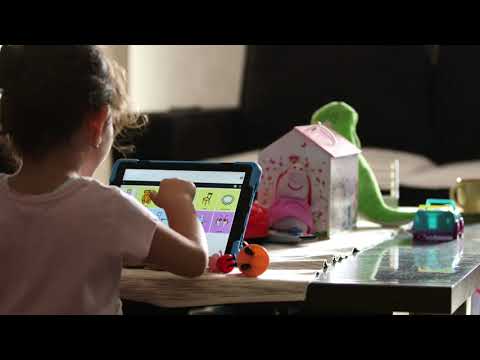
This video shows Srna. She is one of the children who have received the Cboard Communicator thanks to UNICEF’s "For every child, a voice" project.
Cboard is available in +50 languages, but almost all of them were machine translated and have never been reviewed by a human speaker. There are no official translators on the team: for most languages, the first person to proofread them is a volunteer from the community or a special translator chosen for that language.
You do not need to be a programmer! Machine translation gets the words roughly right and the meaning often wrong — a speaker who knows the language and sees the app in context produces something no automatic translation can match. For a child using Cboard to communicate, that difference is the difference between a board that makes sense and one that does not.
Ongoing translation work is tracked in issue #89 — comment there to claim a language or to ask for one to be added.
Translation happens on Crowdin, our localization platform. No installation and no code required.
- Create a free Crowdin account.
- Open the Cboard project and join it, selecting the language you want to work on. If your language is not listed, ask for it in issue #89.
- Say on issue #89 which language you are taking, so two people don't review the same strings, and ask there for proofreader rights on it. Do this before you start: only proofreaders can approve strings, and approved strings are the ones shipped to the app.
- Translate empty strings and proofread the existing machine-translated ones. Watch for context: many strings are symbol labels (single words that must read as a child would say them), others are settings and buttons. Crowdin shows the source string.
- Approve each string as you review it, so your pass through the language leaves nothing to redo later.
- Work in manageable batches — a partially reviewed language is already an improvement, and approved strings reach users on the next release.
A maintainer pulls approved translations into the codebase periodically, so there is nothing else you need to do to publish your work.
To add support to a new language, follow this guide. The language must also exist in the Crowdin project. If it doesn't, ask a maintainer on issue #89 to add it.
In order to pull the latest translations from CrowdIn into the codebase, you can run npm run translations:pull. This will update all language files such as en.json as well as the central cboard.json file. Please note that this requires the CrowdIn API key to be available in the .private config file. Refer to Secrets Management. After the script completes, changes to the translation files will need to be committed to the repo by the usual process.
Runs the app in development mode.
Open http://localhost:3000 to view it in the browser.
The page will reload if you make edits.
You will see the build errors and lint warnings in the console.
Runs the test watcher in an interactive mode.
By default, runs tests related to files changed since the last commit.
Builds the app for production to the build folder.
It correctly bundles React in production mode and optimizes the build for the best performance.
The build is minified and the filenames include the hashes.
By default, it also includes a service worker so that Cboard loads from local cache on future visits.
Cboard is ready to be deployed.
Use this to produce non-minified build for use in debugging within Cordova. It uses craco & craco.config to customize webpack operation without ejecting react.
See CCBoard repo for packaging this CBoard application within Cordova.
Creates a Docker image with cboard built for production. The image is tagged as cboard:latest.
Runs the cboard:latest Docker image on port 5000.
Some external services have APIs we need to access, and these require API keys. To prevent open disclosure of these keys in the public repository, while still tracking them with the code, we encrypt some secrets into a GPG file. These files are env/local-private.gpg and env/prod-private.gpg.
In order to access the secrets, you must request the ENCRYPTION_KEY from @shaycojo and then run the decrypt script: ENCRYPTION_KEY={key-goes-here} npm run decrypt:local (or prod), which will create the file .private/local.js with the secrets in plain text where the scripts can access them. The files in .private should never be committed to the repository.
If you need to add or change a secret, make the change to the .private/local.js file, and then run the encryption script: ENCRYPTION_KEY={key-goes-here} npm run encrypt:local (or prod).
Note: These keys/secrets are not required to run or develop Cboard. They are used with scripts by some team members.


 CSS Tricks - for providing feedback and support from the early stage.
This project exists thanks to all the people who contribute. [Contribute].

Thank you to all our backers! 🙏 [Become a backer]

Support this project by becoming a sponsor. Your logo will show up here with a link to your website. [Become a sponsor]



Copyright © 2017-2024, Assistive Technology LLC & Cboard contributors.
This program is free software: you can redistribute it and/or modify it under the terms of the GNU General Public License version 3 as published by the Free Software Foundation.
- Code - GPLv3
- Mulberry Symbols - CC BY-SA 4.0
- ARASAAC Symbols - CC BY-NC-SA 4.0


