Top AI Repos — open-source AI, indexed and scored
Top AI Repos tracks AI repositories on GitHub and answers two different questions about each one: is it moving right now, and would you bet a product on it.
单缺口/多缺口滑块验证码识别,pip安装使用, 可本地/服务器部署API,点击下方链接在线体验 ⬇⬇⬇
| Date | Stars |
|---|---|
| 2026-07-24 | 610 |
| 2026-07-25 | 612 |
| 2026-07-28 | 615 |
| 2026-07-30 | 616 |
| 2026-08-06 | 616 |
Today
— stars today
This week
— stars this week
This month
— stars this month
Momentum
0.0
growth rate 0.00%/day
简体中文 | [English](https://github.com/chenwei-zhao/captcha-recognizer/blob/main/README_en.md)
# Captcha-Recognizer
Captcha-Recognizer是一个易用的通用滑块验证码识别库,通过深度学习训练通用的缺口检测模型,基于训练的结果,识别出验证码中的滑块缺口位置,并返回缺口的坐标与可信度。
# 支持的验证码类型
- 单缺口验证码背景图
- ~~多缺口验证码背景图 (1.0.0及之后版本移除)~~
- 验证码全图(图片包含滑块和背景图)
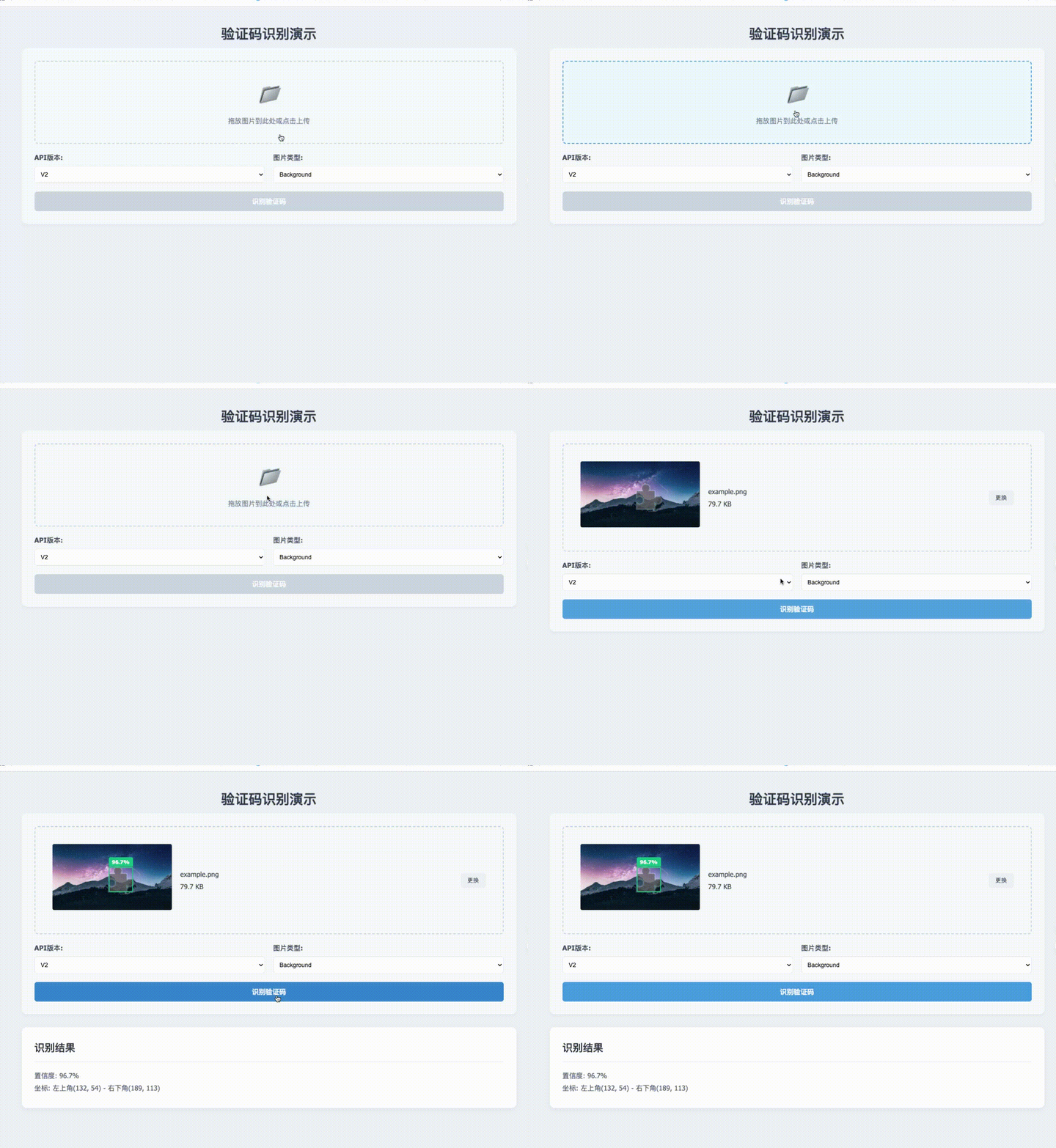
# 在线演示
- [在线演示](http://47.94.198.97/)
<p>
<img
src="https://raw.githubusercontent.com/chenwei-zhao/captcha-recognizer/main/images_example/online-demo.gif"
alt="https://captcha-slider.oss-cn-beijing.aliyuncs.com/slider/online-demo.gif"
>
</p>
# 版本要求
* ``Python`` >= 3.6.0
* ``opencv-python``
* ``shapely``
* ``onnxruntime``
* Works on Linux, Windows, MacOS
# 使用方式
- Pypi
- [HTTP API](https://github.com/chenwei-zhao/captcha-api)
## Pypi
### 从 Pypi 安装
```bash
pip install captcha-recognizer
```
## HTTP API
请移步: [captcha-api](https://github.com/chenwei-zhao/captcha-api)
# 使用示例
支持以下类型验证码的识别
1. 单缺口验证码背景图(不含滑块的背景图)
2. 单缺口、多缺口验证码全图(图片含滑块和背景图)
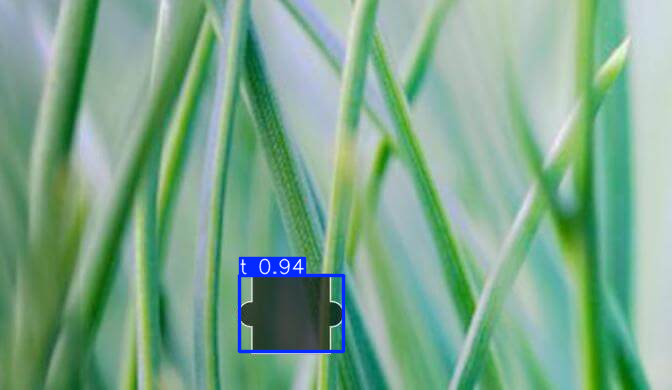
## 单缺口验证码背景图 识别示例
<p>示例图 4</p>
<p>尺寸 672*390</p>
<img src="https://raw.githubusercontent.com/chenwei-zhao/captcha-recognizer/main/images_example/example4.png"
alt="https://captcha-slider.oss-cn-beijing.aliyuncs.com/slider/example4.png"
>
<p>识别效果示例图4</p>
<img src="https://raw.githubusercontent.com/chenwei-zhao/captcha-recognizer/main/images_predict/predict4.png"
alt="https://captcha-slider.oss-cn-beijing.aliyuncs.com/slider/predict4.png"
>
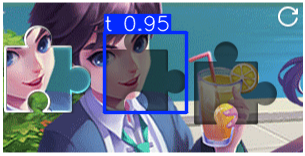
## 单缺口、多缺口验证码全图 识别示例
<p>示例图 8</p>
<p>尺寸 305*156</p>
<img
src="https://raw.githubusercontent.com/chenwei-zhao/captcha-recognizer/main/images_example/example8.png"
alt="https://captcha-slider.oss-cn-beijing.aliyuncs.com/slider/example8.png"
>
<p>识别效果示例图 8</p>
<img src="https://raw.githubusercontent.com/chenwei-zhao/captcha-recognizer/main/images_predict/predict8.png"
alt="https://captcha-slider.oss-cn-beijing.aliyuncs.com/slider/predict8.png"
>
## 代码示例
```python3
from captcha_recognizer.slider import Slider
# source传入待识别图片,支持数据类型为 Union[str, Path, bytes, np.ndarray]
# show为布尔值,默认值为False, 为True表示展示图片识别效果,线上环境请缺省,或设置为False
box, confidence = Slider().identify(source=f'images_example/example8.png', show=True)
print(f'缺口坐标: {box}')
print('置信度', confidence)
```
# 注意事项
## 偏移量
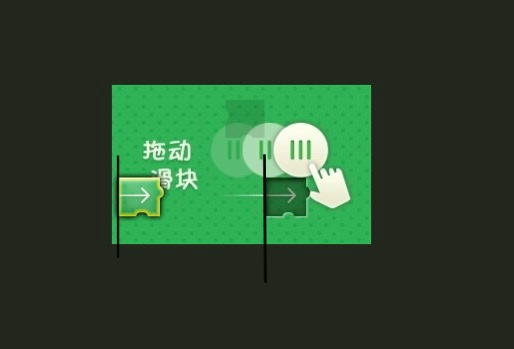
某些种类的滑块验证码,滑块初始位置存在一定偏移,以下面图中的滑块初始位置为例:
<p>示例图 9</p>
<img
src="https://raw.githubusercontent.com/chenwei-zhao/captcha-recognizer/main/images_example/offset2.png"
alt="https://captcha-slider.oss-cn-beijing.aliyuncs.com/slider/offset2.png"
>
如示例图9中:
- 第一条黑线位置为滑块初始位置,距离图片边框有大概有8个像素的偏移量(offset为8)
- 识别结果的缺口坐标为 [x1, y1, x2, y2] 对应缺口的左上角和右下角坐标(坐标原点为图片左上角)
- 第二条黑线的X轴坐标值对应缺口识别结果左上角的X轴坐标值,此处值为154(x1为154)
- 因此实际滑块的距离为 x1-offset (154-8=146)
- 也就是说,实际的滑块距离为缺口的x1值减去滑块距离图片边框的偏移量(offset)
### 获取偏移量
通常某一类的滑块验证码,滑块偏移量是固定的,可直接通过截图工具或测量工具获取
如果是动态的偏移量,可通过 identify_offset 方法获取偏移量
```python3
from captcha_recognizer.slider import Slider
offset, confidence = Slider().identify_offset(source='example.png')
print(f'偏移量: {offset}')
print('置信度', confidence)
```
## 图片缩放
某些验证码,前端渲染时会对图片进行缩放,因此实际的滑块距离也要按照图片缩放比例进行计算。
<p>示例图 10</p>
<img
src="https://raw.githubusercontent.com/chenwei-zhao/captcha-recognizer/main/images_example/rendered_size.png"
alt="https://captcha-slider.oss-cn-beijing.aliyuncs.com/slider/rendered_size.png"
>
## opencv-python与numpy的兼容性问题
兼容版本1:
```
opencv-python==4.12.0.88
numpy==2.2.6
```
兼容版本2:
```markdown
opencv-python==4.8.0.74
numpy==1.23.0
```
更多兼容的版本请自行尝试
# 了解更多
[点击此处进入DeepWiki文档](https://deepwiki.com/chenwei-zhao/captcha-recognizer)
DeepWiki文档内可通过底部AI对话框进行交流,自由了解本项目。
# 版本历史:
[Pypi 版本历史](https://pypi.org/project/captcha-recognizer/#history)
[Github 版本历史](https://github.com/chenwei-zhao/captcha-recognizer/blob/main/HISTORY.md)
# 项目维护
- 感谢 Star 支持;
- 项目长期维护;
- 有任何疑问或问题,欢迎提[issue](https://github.com/chenwei-zhao/captcha-recognizer/issues)。
# 更多联系方式
- Gmail: [email protected]
- 163/网易: [email protected]
# 免责声明
本项目不针对任何一家验证码厂商,项目所有内容仅供学习交流使用,不用于其他任何目的,严禁用于非法用途。
# 许可证
MIT license
# 感谢你的支持
## Stargazers
[![Stargazers repo roster forExcerpt of 4,564 characters
Read on GitHub55
Would you bet a product on this? Bounded 0–100 and slow moving.
matched fp:358d6e3e9690cdcd, topic:yolo