

smart-llm-loader is a lightweight yet powerful Python package that transforms any document into LLM-ready chunks. It handles the entire document processing pipeline:
- 📄 Converts documents to clean markdown
- 🔍 Built-in OCR for scanned documents and images
- ✂️ Smart, context-aware text chunking
- 🔌 Seamless integration with LangChain and LlamaIndex
- 📦 Ready for vector stores and LLM ingestion
Spend less time on preprocessing headaches and more time building what matters. From RAG systems to chatbots to document Q&A, SmartLLMLoader handles the heavy lifting so you can focus on creating exceptional AI applications.
SmartLLMLoader's chunking approach has been benchmarked against traditional methods, showing superior performance particularly when paired with Google's Gemini Flash model. This combination offers an efficient and cost-effective solution for document chunking in RAG systems. View the detailed performance comparison here.
- Support for multiple LLM providers
- In-built OCR for scanned documents and images
- Flexible document type support
- Supports different chunking strategies such as: context-aware chunking and page-based chunking
- Supports custom prompts and custom chunking
First, install Poppler if you don't have it already (required for PDF processing):
Ubuntu/Debian:
sudo apt-get install poppler-utilsmacOS:
brew install popplerWindows:
- Download the latest Poppler for Windows
- Extract the downloaded file
- Add the
bindirectory to your system PATH
You can install SmartLLMLoader using pip:
pip install smart-llm-loaderOr using Poetry:
poetry add smart-llm-loadersmart-llm-loader package uses litellm to call the LLM so any arguments supported by litellm can be used. You can find the litellm documentation here. You can use any multi-modal model supported by litellm.
from smart_llm_loader import SmartLLMLoader


# Using Gemini Flash model
os.environ["GEMINI_API_KEY"] = "YOUR_GEMINI_API_KEY"
model = "gemini/gemini-1.5-flash"

# Using openai model
os.environ["OPENAI_API_KEY"] = "YOUR_OPENAI_API_KEY"
model = "openai/gpt-4o"

# Using anthropic model
os.environ["ANTHROPIC_API_KEY"] = "YOUR_ANTHROPIC_API_KEY"
model = "anthropic/claude-3-5-sonnet"


# Initialize the document loader
loader = SmartLLMLoader(
    file_path="your_document.pdf",
    chunk_strategy="contextual",
    model=model,
)
# Load and split the document into chunks
documents = loader.load_and_split()

# See first chunk of the splitted document
documents[0].page_content
documents[0].metadataclass SmartLLMLoader(BaseLoader):
"""A flexible document loader that supports multiple input types."""
def __init__(
self,
file_path: Optional[Union[str, Path]] = None, # path to the document to load
url: Optional[str] = None, # url to the document to load
chunk_strategy: str = 'contextual', # chunking strategy to use (page, contextual, custom)
custom_prompt: Optional[str] = None, # custom prompt to use
model: str = "gemini/gemini-2.0-flash", # LLM model to use
save_output: bool = False, # whether to save the output to a file
output_dir: Optional[Union[str, Path]] = None, # directory to save the output to
api_key: Optional[str] = None, # API key to use
**kwargs,
):Let's see SmartLLMLoader in action! We'll compare it with PyMuPDF (a popular traditional document loader) to demonstrate why SmartLLMLoader's intelligent chunking makes such a difference in real-world applications.
We'll process this sample invoice that includes headers, tables, and complex formatting:
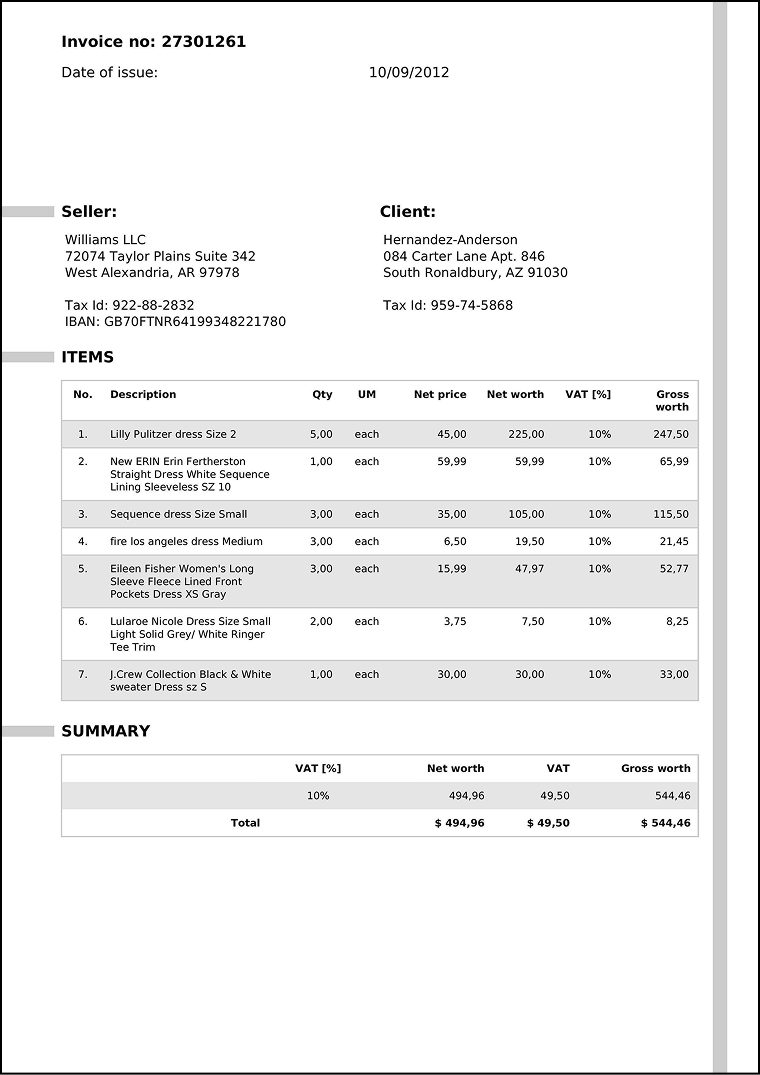
SmartLLMLoader intelligently breaks down the document into semantic chunks, preserving structure and meaning (note that the json output below has been formatted for readability):
[
  {
    "content": "Invoice no: 27301261\nDate of issue: 10/09/2012",
    "metadata": {
      "page": 0,
      "semantic_theme": "invoice_header",
      "source": "data/test_ocr_doc.pdf"
    }
  },
  {
    "content": "Seller:\nWilliams LLC\n72074 Taylor Plains Suite 342\nWest Alexandria, AR 97978\nTax Id: 922-88-2832\nIBAN: GB70FTNR64199348221780",
    "metadata": {
      "page": 0,
      "semantic_theme": "seller_information",
      "source": "data/test_ocr_doc.pdf"
    }
  },
  {
    "content": "Client:\nHernandez-Anderson\n084 Carter Lane Apt. 846\nSouth Ronaldbury, AZ 91030\nTax Id: 959-74-5868",
    "metadata": {
      "page": 0,
      "semantic_theme": "client_information",
      "source": "data/test_ocr_doc.pdf"
    }
  },
  {
    "content":
    "Item table:\n"
    "| No. | Description                                               | Qty  | UM   | Net price | Net worth | VAT [%] | Gross worth |\n"
    "|-----|-----------------------------------------------------------|------|------|-----------|-----------|---------|-------------|\n"
    "| 1   | Lilly Pulitzer dress Size 2                               | 5.00 | each | 45.00     | 225.00    | 10%     | 247.50      |\n"
    "| 2   | New ERIN Erin Fertherston Straight Dress White Sequence Lining Sleeveless SZ 10 | 1.00 | each | 59.99     | 59.99     | 10%     | 65.99       |\n"
    "| 3   | Sequence dress Size Small                                 | 3.00 | each | 35.00     | 105.00    | 10%     | 115.50      |\n"
    "| 4   | fire los angeles dress Medium                             | 3.00 | each | 6.50      | 19.50     | 10%     | 21.45       |\n"
    "| 5   | Eileen Fisher Women's Long Sleeve Fleece Lined Front Pockets Dress XS Gray | 3.00 | each | 15.99     | 47.97     | 10%     | 52.77       |\n"
    "| 6   | Lularoe Nicole Dress Size Small Light Solid Grey/White Ringer Tee Trim | 2.00 | each | 3.75      | 7.50      | 10%     | 8.25        |\n"
    "| 7   | J.Crew Collection Black & White sweater Dress sz S        | 1.00 | each | 30.00     | 30.00     | 10%     | 33.00       |",
    "metadata": {
      "page": 0,
      "semantic_theme": "items_table",
      "source": "data/test_ocr_doc.pdf"
    }
  },
  {
    "content": "Summary table:\n"
    "| VAT [%] | Net worth | VAT    | Gross worth |\n"
    "|---------|-----------|--------|-------------|\n"
    "| 10%     | 494,96    | 49,50  | 544,46      |\n"
    "| Total   | $ 494,96  | $ 49,50| $ 544,46    |",
    "metadata": {
      "page": 0,
      "semantic_theme": "summary_table",
      "source": "data/test_ocr_doc.pdf"
    }
  }
]
Key Benefits:
- ✨ Clean, structured chunks
- 🎯 Semantic understanding
- 📊 Preserved table formatting
- 🏷️ Intelligent metadata tagging
PyMuPDF provides a basic text extraction without semantic understanding:
[
  {
    "page": 0,
    "content": "Invoice no: 27301261  \nDate of issue: \nSeller: \nWilliams LLC \n72074 Taylor Plains Suite 342 \nWest
     Alexandria, AR 97978 \nTax Id: 922-88-2832 \nIBAN: GB70FTNR64199348221780 \nITEMS \nNo. \nDescription \n2l \nLilly
      Pulitzer dress Size 2 \n2. \nNew ERIN Erin Fertherston \nStraight Dress White Sequence \nLining Sleeveless SZ 10
       \n3. \n Sequence dress Size Small \n4. \nfire los angeles dress Medium \nL \nEileen Fisher Women's Long \nSleeve
        Fleece Lined Front \nPockets Dress XS Gray \n6. \nLularoe Nicole Dress Size Small \nLight Solid Grey/ White
        Ringer \nTee Trim \nT \nJ.Crew Collection Black & White \nsweater Dress sz S \nSUMMARY \nTotal \n2,00 \n1,00
         \nVAT [%] \n10% \n10/09/2012 \neach \neach \nClient: \nHernandez-Anderson \n084 Carter Lane Apt. 846 \nSouth
         Ronaldbury, AZ 91030 \nTax Id: 959-74-5868 \nNet price \n Net worth \nVAT [%] \n45,00 \n225,00 \n10% \n59,99
         \n59,99 \n10% \n35,00 \n105,00 \n10% \n6,50 \n19,50 \n10% \n15,99 \n47,97 \n10% \n3,75 \n7.50 \n10% \n30,00
         \n30,00 \n10% \nNet worth \nVAT \n494,96 \n49,50 \n$ 494,96 \n$49,50 \nGross \nworth \n247,50 \n65,99 \n115,50
          \n21,45 \n52,77 \n8,25 \n33,00 \nGross worth \n544,46 \n$ 544,46 \n",
    "metadata": {
      "source": "./data/test_ocr_doc.pdf",
      "file_path": "./data/test_ocr_doc.pdf",
      "page": 0,
      "total_pages": 1,
      "format": "PDF 1.5",
      "title": "",
      "author": "",
      "subject": "",
      "keywords": "",
      "creator": "",
      "producer": "AskYourPDF.com",
      "creationDate": "",
      "modDate": "D:20250213152908Z",
      "trapped": ""
    }
  }
]Let's see how this difference affects a real Question-Answering system:
question = "What is the total gross worth for item 1 and item 7?"

# SmartLLMLoader Result ✅
"The total gross worth for item 1 (Lilly Pulitzer dress) is $247.50 and for item 7
(J.Crew Collection sweater dress) is $33.00.
Total: $280.50"

# PyMuPDF Result ❌
"The total gross worth for item 1 is $45.00, and for item 7 it is $33.00.
Total: $78.00"
Why SmartLLMLoader Won:
- 🎯 Maintained table structure
- 💡 Preserved relationships between data
- 📊 Accurate calculations
- 🤖 Better context for the LLM
You can try it yourself by running the complete RAG example to see the difference in action!
This project is licensed under the MIT License - see the LICENSE file for details.
Contributions are welcome! Please feel free to submit a Pull Request.
- David Emmanuel (@drmingler)