

Davinci Resolve is one of the most powerful free video editing software out there. But installing and using the software on Linux can be quite painful at first. This guide will help you to get started with Davinci Resolve on Linux (Ubuntu) in no time.
- Prerequisites
- Installation
- Media Import
- Media Export
- Uninstall Resolve
- Handle Common Issues
- Install NVIDIA driver
- Debian-bases Linux distribution
- NVIDIA graphics card
- NVIDIA driver
Method 1 (recommended)
-
Head to https://www.blackmagicdesign.com/products/davinciresolve
-
Click on "Download"
-
Select the free Linux version
-
Unzip
DaVinci_Resolve_XX.Y.Z_Linux.ziparchive -
Double click
DaVinci_Resolve_XX.Y.Z_Linux.runand follow installation guide- or run
./DaVinci_Resolve_XX.Y.Z_Linux.run
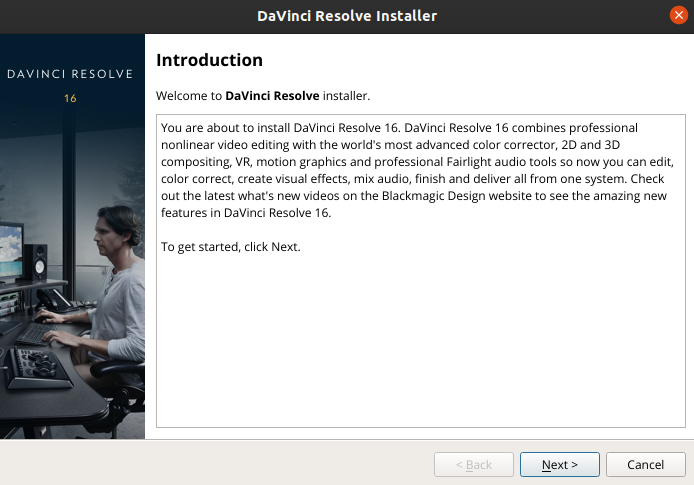
- or run
-
Start Resolve by searching for it in your applications
- or run
/opt/resolve/bin/resolve
- or run

Method 2
- Head to https://www.blackmagicdesign.com/products/davinciresolve
- Click on "Download"
- Select the free Linux version
- Unzip
DaVinci_Resolve_XX.Y.Z_Linux.ziparchive - Head to https://www.danieltufvesson.com/makeresolvedeb
- Download script with same version as your downloaded Resolve
- Unzip
makeresolvedeb_XX.Y.Z-X.sh.tar.gz
- Your folder should now include the following files:
DaVinci_Resolve_Studio_XX.Y.Z_Linux.run
Linux_Installation_Instructions.pdf
makeresolvedeb_XX.Y.Z-X.sh
- Run the
makeresolvedebscript while passing the filename of DaVinci Resolve's .run file.
./makeresolvedeb_XX.Y.Z-X.sh DaVinci_Resolve_Studio_XX.Y.Z_Linux.run
- Optionally you can avoid installing the Blackmagic RAW Player / Speed Test apps by adding the
--skip-braw.
- Install the Resolve via the created
.debfile
-
Double click and click "Install"
-
Or run in terminal:
sudo dpkg -i davinci-resolve_XX.Y.Z-X_amd64.deb
- If you get an error saying "Sorry. Need 'xyz' to continue", just install it
-
For example if the error is: "Sorry. Need 'xorriso' to continue", you should run:
sudo apt-get install xorriso
Unfortunately DaVinci Resolve's free version doesn't support .mp4 import on Linux. Both version also neither supports the AAC audio codec. But we can work around this issue:
Convert your footage to a supported format
There is a really powerful tool called FFmpeg for converting video file formats. You can install it by running sudo apt install ffmpeg.
Then you can convert almost any video format to something, that can be imported into DaVinci Resolve by running:
ffmpeg -i input.mp4 -c:v prores_ks -profile:v 3 -qscale:v 9 -acodec pcm_s16le output.mov
| Flag | Explanation |
|---|---|
-i <input> |
input video file (e.g. -i my-movie.mp4) |
-c:v prores_ks |
video codec to be ProRes Kostya |
-profile:v 3 |
profile (value ranges from 0 to 3, where a higher number results in better quality) |
-qscale:v 9 |
quality scale (value can be 5, 9 or 13, where 5 is best and 13 worst quality) |
-acodec pcm_s16le |
audio codec to be pcm_s16le |
<output.mov> |
output video file (e.g. my-movie-converted.mov) |
Batch converting videos
for i in *.mp4; do ffmpeg -i "$i" -c:v prores_ks -profile:v 3 -qscale:v 9 -acodec pcm_s16le "${i%.*}.mov"; done
Converting audio
ffmpeg -i input.mp3 -c:a pcm_s16le output.wav
Batch Converting audio
for i in *.mp3; do ffmpeg -i "$i" -c:a pcm_s16le "${i%.*}.mp3"; done
Record your footage as a supported format with Open Broadcaster Software
- Go to "Settings" 🠪 "Output" 🠪 "Recording"
- Change "Type" to "Custom Output (FFmpeg)"
- Set "Container Format" to "mov"
- Set "Video Encoder" to "mpeg4"
- Set "Audio Encoder" to "pcm_s16le"

The resulting .mov can now be imported into DaVinci Resolve without any issues.
When exporting your edited video, I'd recommend:
- Head to your "Render Settings"
- Under Video, choose "QuickTime" as "Format"
- Under Video, choose "MPEG" as "Format"
- Under Audio, enable "Export Audio" if you want sound

With the above settings, you don't need to compress or convert the final file again.
If you want to install the free sound library from Davinci resolve, follow these steps
Head over to the fairlight section of Davinci resolve > Sound Library and click "Download"

You'll be sent to the Sound Library Download page for linux, put in all your info and download it.
Once downloaded, go to where the file is located
- Left click on the file
- Click on properties
- Go on the Permissions tab
- Check on "Allow executing file as program"
- Double click on the file and choose "run in terminal"
- If done correctly you will see the sound library download open
- Go through all the steps and install!

If you want to see all your sounds on the Sound Library, go to Davinci resolve and type "***"
Method 1 (recommended)
Run the same script, you used for installing Resolve (DaVinci_Resolve_XX.Y.Z_Linux.run) and choose "Uninstall DaVinci Resolve" in the second step.

Method 2
sudo rm -f -r /opt/resolve
sudo rm -f -r ~/Documents/BlackmagicDesign
If the installation doesn't work, you probably need to research any errors from the log output.
If DaVinci Resolve doesn't start after installing you might try the following:
- Boot resolve by running
/opt/resolve/bin/resolveand check the log output for errors - Open
~/.local/share/DaVinciResolve/logs/and search for errors in the log files - Make sure you have CUDA and OpenCL libraries installed
- If you're getting an error saying, that you need
ibOpenCL.sothen just runsudo apt install ocl-icd-opencl-dev
If nothing fixed your issue, you can always get fast help on the Blackmagic Forum
Determine recommended driver by running
ubuntu-drivers devices | grep recommended
The output will look like this:
driver : nvidia-driver-440 - third-party free recommended
Install recommended driver by running:
sudo apt install nvidia-driver-440
You can also install it in the user interface by opening "Additional Drivers":

Then reboot your computer.
Alternatively you can use this excellent guide