

IEEE/CVF Conference on Computer Vision and Pattern Recognition (CVPR) 2022
Markus Worchel*
·
Rodrigo Diaz*
·
Weiwen Hu
·
Oliver Schreer
·
Ingo Feldmann
·
Peter Eisert
*Equal contribution
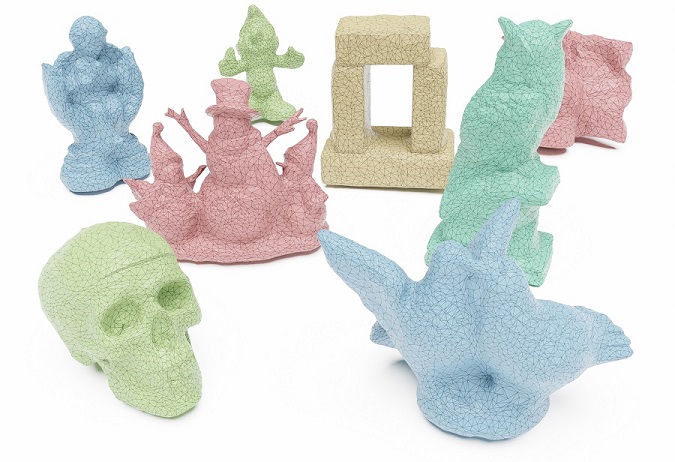
Official code for the CVPR 2022 paper "Multi-View Mesh Reconstruction with Neural Deferred Shading", a method for fast multi-view reconstruction based on differentiable mesh rendering and neural shading.
Create a virtual environment and install the dependencies using pip:
pip install -r requirements.txtIf you are working with conda, you can directly create an environment named nds with all dependencies:
conda env create -f environment.yml
conda activate ndsDownload the full dataset (2.3 GB) or two samples (300 MB) and unzip the content into the main directory. For example, after unzipping you should have the directory ./data/65_skull.
To start the reconstruction for the skull, run:
python reconstruct.py --input_dir ./data/65_skull/views --input_bbox ./data/65_skull/bbox.txtor for a general scan:
python reconstruct.py --input_dir ./data/{SCAN-ID}_{SCAN-NAME}/views --input_bbox ./data/{SCAN-ID}_{SCAN-NAME}/bbox.txtYou will find the output meshes in the directory ./out/{SCAN-ID}_{SCAN-NAME}/meshes.
The DTU dataset in the NDS format is derived from the dataset in IDR format (found here), which includes masks for a selection of objects. After downloading the dataset from IDR, you can convert it from the IDR format to the NDS format by calling the import script as:
import_dtu_from_idr.py PATH/TO/IDR/DATASET/DIRECTORY PATH/TO/OUTPUT/DIRECTORYOur pipeline expects the input data in a specific structure, which you have to follow for your own scenes.
The main input is a folder with views, where each view consists of an RGB(A) image and the corresponding camera pose and camera intrinsics. An example folder with N views could look like this (the views do not have to be numbered and can have any file names):
📂views
├─🖼️1.png
├─📜1_k.txt
├─📜1_r.txt
├─📜1_t.txt
⋮
├─🖼️N.png
├─📜N_k.txt
├─📜N_r.txt
└─📜N_t.txt
If present, the alpha channel of the image is used as object mask.
The files ..._k.txt, ..._r.txt, and ..._t.txt contain numpy-readable arrays with the camera pose (R, t) and intrinsics (K) in the standard OpenCV format, so K and R are 3x3 matrices and t is a 3-dimensional column vector, such that
The image-space coordinates (x, y) are in pixels, so the top left of the image is (x, y) = (0, 0) and the bottom right is (x, y) = (width, height).
Another input to our pipeline is a bounding box of the scene. The bounding box is described by a single text file, which contains a numpy-readable array of size 2x3. The first row has the world space coordinates of the minimum point and the second row those of the maximum point.
For example, if the bounding box is a cube with side length 2 centered at (0, 0, 0), then bbox.txt would simply contain
-1 -1 -1
1 1 1If you would like to start your reconstruction from a custom initial mesh instead of using one of the pre-defined options, you need to provide its path. The mesh file can have any standard format (obj, ply, ...). We use trimesh for loading, so check their list of supported formats.
If you want to tinker with our data loading routines to adapt them to your format, have a look at nds.utils.io.read_views() and nds.core.view.View.load().
We provide an interactive viewer based on OpenGL to inspect the reconstructed meshes and their learned appearance. Before you can launch the viewer, install the additional dependencies with
conda activate nds
pip install glfw==2.5.3 moderngl==5.6.4 pyrr==0.10.3 pyopengl==3.1.6
The pycuda dependency needs to be build from source with OpenGL support. In your preferred directory, run
git clone --recursive https://github.com/inducer/pycuda.git
cd pycuda
git checkout v2022.1

conda activate nds
python ./configure.py --cuda-enable-gl
python setup.py install
The viewer is launched by running the python script view.py, providing the mesh, the neural shader and a bounding box as input. For example, the reconstruction results for the DTU skull can be viewed by running
python .\view.py --mesh .\out\65_skull\meshes\mesh_002000.obj --shader .\out\65_skull\shaders\shader_002000.pt --bbox .\out\65_skull\bbox.txtFor the runtime experiments, we added a profiling mode to our reconstruction script that benchmarks individual parts of the code. Since the profiling mode is rather invasive, we have provided it in a separate profiling branch.
The reconstruction can be started in profiling mode by passing the --profile flag to reconstruct.py.
After reconstruction, the output directory will contain the additional file profile.json with the (hierarchical) runtimes.
If you find this code or our method useful for your academic research, please cite our paper
@InProceedings{worchel:2022:nds,
      author    = {Worchel, Markus and Diaz, Rodrigo and Hu, Weiwen and Schreer, Oliver and Feldmann, Ingo and Eisert, Peter},
      title     = {Multi-View Mesh Reconstruction with Neural Deferred Shading},
      booktitle = {Proceedings of the IEEE/CVF Conference on Computer Vision and Pattern Recognition (CVPR)},
      month     = {June},
      year      = {2022},
      pages     = {6187-6197}
}The reconstruction can be quite heavy on GPU memory and in our experiments we used a GPU with 24 GB.
The memory usage can be reduced by reconstructing with a smaller image resolution. Try passing --image_scale 2 or --image_scale 4 to reconstruct.py, which uses 1/2th or 1/4th of the original resolution. Expect lower memory consumption and better runtime but degraded reconstruction accuracy.
Remeshing can take some time especially at higher mesh resolutions, but it sometimes hangs indefinitely (the function remesh_botsch never returns) or it produces NaN vertex positions.
For now, the reconstruction has to be aborted and restarted.