

[ICCV 2021- Oral] PyTorch Implementation of Generic Attention-model Explainability for Interpreting Bi-Modal and Encoder-Decoder Transformers


Demo: You can check out a demo on Huggingface spaces or scan the following QR code.

- Please notice that the notebook assumes that you are using a GPU. To switch runtime go to Runtime -> change runtime type and select GPU.
- Installing all the requirements may take some time. After installation, please restart the runtime.
Notice that we have two jupyter notebooks to run the examples presented in the paper.
The notebook for LXMERT contains both the examples from the paper and examples with images from the internet and free form questions. To use your own input, simply change the URL variable to your image and the question variable to your free form question.
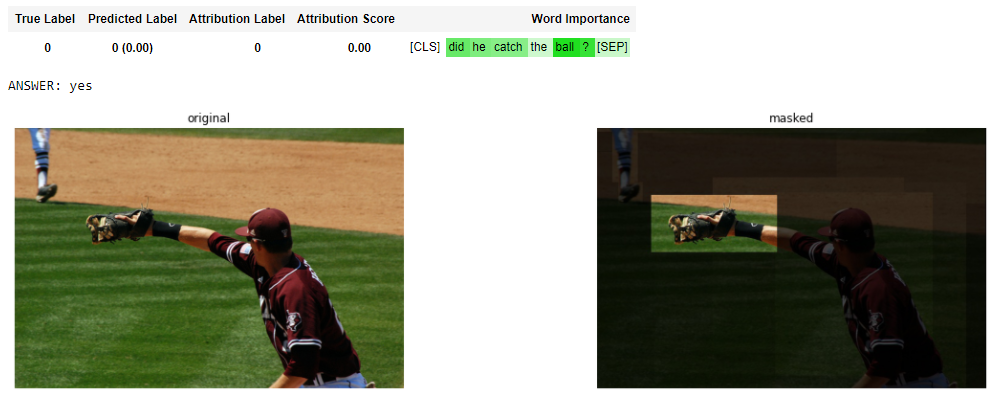
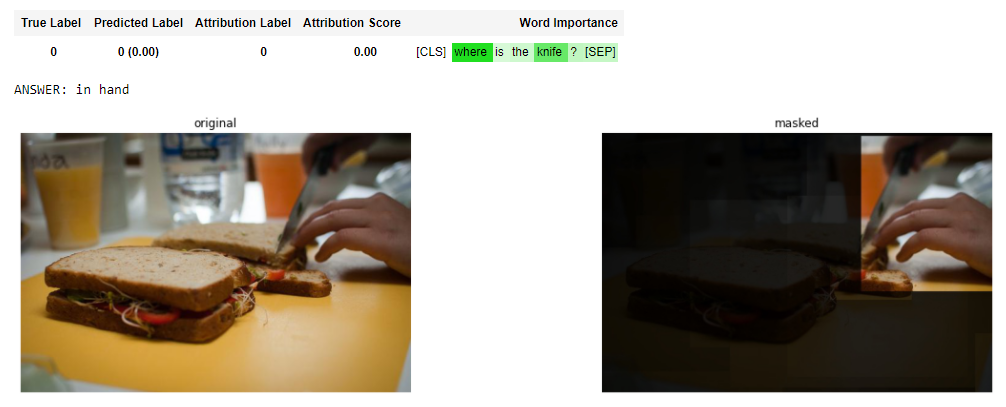
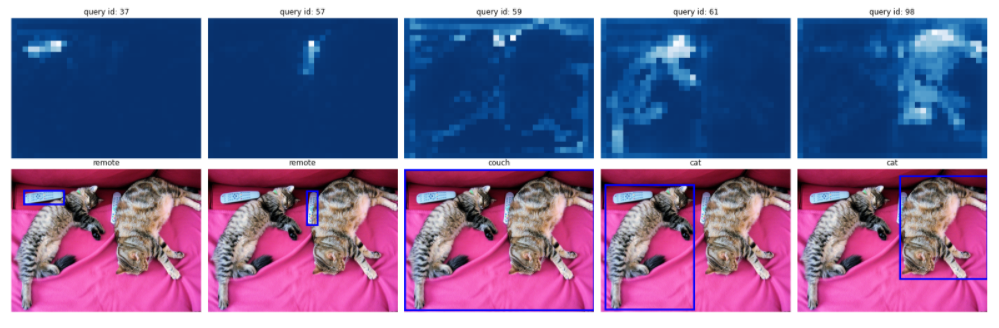
The notebook for DETR contains the examples from the paper. To use your own input, simply change the URL variable to your image.


Run the run.py script as follows:
CUDA_VISIBLE_DEVICES=0 PYTHONPATH=`pwd` python VisualBERT/run.py --method=<method_name> --is-text-pert=<true/false> --is-positive-pert=<true/false> --num-samples=10000 config=projects/visual_bert/configs/vqa2/defaults.yaml model=visual_bert dataset=vqa2 run_type=val checkpoint.resume_zoo=visual_bert.finetuned.vqa2.from_coco_train env.data_dir=/path/to/data_dir training.num_workers=0 training.batch_size=1 training.trainer=mmf_pert training.seed=1234Note
If the datasets aren't already in env.data_dir, then the script will download the data automatically to the path in env.data_dir.
Download valid.json:
pushd data/vqa
wget https://nlp.cs.unc.edu/data/lxmert_data/vqa/valid.json
popd
Download the COCO_val2014 set to your local machine.
Note
If you already downloaded COCO_val2014 for the VisualBERT tests, you can simply use the same path you used for VisualBERT.
Run the perturbation.py script as follows:
CUDA_VISIBLE_DEVICES=0 PYTHONPATH=`pwd` python lxmert/lxmert/perturbation.py --COCO_path /path/to/COCO_val2014 --method <method_name> --is-text-pert <true/false> --is-positive-pert <true/false>
Download the COCO dataset as described in the DETR repository. Notice you only need the validation set.
Lower the IoU minimum threshold from 0.5 to 0.2 using the following steps:
Locate the cocoeval.py script in your python library path:
find library path:
import sys
print(sys.path)
find cocoeval.py:
cd /path/to/lib
find -name cocoeval.py
Change the self.iouThrs value in the setDetParams function (which sets the parameters for the COCO detection evaluation) in the Params class as follows:
insead of:
self.iouThrs = np.linspace(.5, 0.95, int(np.round((0.95 - .5) / .05)) + 1, endpoint=True)
use:
self.iouThrs = np.linspace(.2, 0.95, int(np.round((0.95 - .2) / .05)) + 1, endpoint=True)
Run the segmentation experiment, use the following command:
CUDA_VISIBLE_DEVICES=0 PYTHONPATH=`pwd` python DETR/main.py --coco_path /path/to/coco/dataset --eval --masks --resume https://dl.fbaipublicfiles.com/detr/detr-r50-e632da11.pth --batch_size 1 --method <method_name>
If you make use of our work, please cite our paper:
@InProceedings{Chefer_2021_ICCV,
   author    = {Chefer, Hila and Gur, Shir and Wolf, Lior},
   title     = {Generic Attention-Model Explainability for Interpreting Bi-Modal and Encoder-Decoder Transformers},
   booktitle = {Proceedings of the IEEE/CVF International Conference on Computer Vision (ICCV)},
   month     = {October},
   year      = {2021},
   pages     = {397-406}
}
- VisualBERT implementation is based on the MMF framework.
- LXMERT implementation is based on the offical LXMERT implementation and on Hugging Face Transformers.
- DETR implementation is based on the offical DETR implementation.
- CLIP implementation is based on the offical CLIP implementation.
- The CLIP huggingface spaces demo was made by Paul Hilders, Danilo de Goede, and Piyush Bagad from the University of Amsterdam as part of their final project.


