

This code is part of the paper arxiv, abstract of the paper is provided at the bottom of this page. It consists of three parts:
-
Code to generate Multi-structure region of interest (MSROI) (This uses CNN model. A pretrained model has been provided)
-
Code to use MSROI map to semantically compress image as JPEG
-
Code to train a CNN model (to be used by 1)
Requirements:
- Tensorflow
- Numpy
- Pandas
- Python PIL
- Python SKimage
For detailed requirements list please see requirements.txt
Recomended:
- Imagemagick (for faster image operations)
- VQMT (for obtaining metrics to compare images)
- How to use this code ?
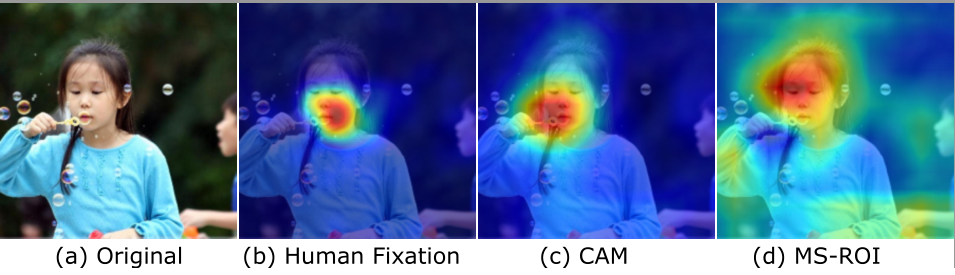
- Multi-Structure Region-of-interest
- FAQ about image compression
- Credits
- Abstract
```
python generate_map.py <image_file>
```
Generates Map and overlay file inside 'output' directory.
If you get this error
```
InvalidArgumentError (see above for traceback): Unsuccessful TensorSliceReader constructor:
Failed to get matching files on models/model-50: Not found: models
```
It means you have not downloaded the model file or it is not accesible. Code assumes a model files inside models directory.
Model has been uploaded to Github, but if it does not download due to GH's restriction you may download it from here
https://www.dropbox.com/s/izfas78534qjg08/models.tar.gz?dl=0
```
python combine_images.py -image <image_file> -map <map_file>
```
Map file is the file generated by aforementioned step. Default name for map is output/msroi_map.jpg
There are several other command line options. Please check the code for the more details.
IMPORTANT: Current default setting has threshold of 20%, i.e the compressed filesize is allowed to be 20% more than the standard JPEG. This is done so that difference in 'semantic object' compression can be visually examined. For fair comparison use '-threshold_pct 1'.
To train your model, you will need class labelled training examples, like CIFAR, Caltech or Imagenet. There is no need for 'localization' ground truth.
- Generate the data pickles
python prepare_data.py
Make sure that self.images point to the directory containing images.
-
It is not required to use pretrained VGG weights, but if you do training will be faster. You may download pretrained weights referred in Params file as vgg_weights from here.
-
Use train.py to train the model. Models will be saved in 'models' directory after every 10 epoch. All the parematers and hyper-paramter can be adjusted at param.py
- Use the '-print_metrics' command while calling 'combine_images.py'. This will print the metrics on STDOUT with this format --
jpeg_psnr,jpeg_ssim,our_ssim,our_q,jpeg_psnrhvs,png_size,model_number,our_size,filename,jpeg_vifp,jpeg_q,jpeg_msssim,our_psnrhvsm,jpeg_psnrhvsm,our_vifp,our_psnr,our_msssim,our_psnrhvs,jpeg_size
- Pass the file which contains one line of metrics (as shown above) to the file 'read_log.py'. This will print various stats, and also plot the graphs as shown in the paper.
 Only our model identifies the face of the boy on the right as well the hands of both children at the bottom.
- Find all semantic regions in an image in a single pass
- Train without the localization data
- Maximize the number of objects detected (maybe all?)
- Need not be precise
- It is used for image compression because we need less precision but more generic information about the content of the image
-
Not an object detector. For that checkout-
-
Not a weakly labelled class detector or Class activation Map. For that checkout -
*CAM
-
Not saliency map or guided backprop. For that checkout -
-
Not Semantic segmentation. For that checkout -
-
Tensorflow 3D convolutions for class invariant features
-
Multi-label nn.softmax instead of nn.sparse (non-exclusive classes)
-
Argsort and not argmax to obtain top-k class information
-
Is the final image really a standard JPEG?
Yes, the final image is a standard JPEG as it is encoded using standard JPEG.
-
But how can you improve JPEG using JPEG ?
Standard JPEG uses a image level Quantization scaling Q. However, not all parts of the image be compressed at same level. Our method allows to use variable Q.
-
Don't we have to store the variable Q in the image file?
No. Because the final image is encoded using a single Q. Please see Section 4 of our paper.
-
Cannot import Image (in util.py) Resolution: Change it to
from PIL import Image -
ValueError: setting an array element with a sequence. Resolution: The image file you are passing does not exist
-
UserWarning: Possible precision loss when converting from float32 to uint8 Resolution: This is only a warning from skimage. Nothing needs to be done
-
No message or nothing Default behaviour of the program is such that there is no message unless there is an error, or verbose is set to True. Check "output" directory for output files. If there is no output directory then make one and run the code again.
- CNN structure based on VGG16, https://github.com/ry/tensorflow-vgg16/blob/master/vgg16.py
- Channel independent feature maps (3D features) using https://www.tensorflow.org/versions/r0.11/api_docs/python/nn.html#depthwise_conv2d_native
- GAP based on https://github.com/jazzsaxmafia/Weakly_detector/blob/master/src/detector.py
- Conv2d layer based on https://github.com/carpedm20/DCGAN-tensorflow/blob/master/ops.py
My sincere thanks to @jazzsaxmafia, @carpedm20 and @metalbubble from whose code I learned and borrowed heavily.
========================================================================================================================
It has long been considered a significant problem to improve the visual quality of lossy image and video compression. Recent advances in computing power together with the availability of large training data sets has increased interest in the application of deep learning cnns to address image recognition and image processing tasks. Here, we present a powerful cnn tailored to the specific task of semantic image understanding to achieve higher visual quality in lossy compression. A modest increase in complexity is incorporated to the encoder which allows a standard, off-the-shelf jpeg decoder to be used. While jpeg encoding may be optimized for generic images, the process is ultimately unaware of the specific content of the image to be compressed. Our technique makes jpeg content-aware by designing and training a model to identify multiple semantic regions in a given image. Unlike object detection techniques, our model does not require labeling of object positions and is able to identify objects in a single pass. We present a new cnn architecture directed specifically to image compression, which generates a map that highlights semantically-salient regions so that they can be encoded at higher quality as compared to background regions. By adding a complete set of features for every class, and then taking a threshold over the sum of all feature activations, we generate a map that highlights semantically-salient regions so that they can be encoded at a better quality compared to background regions. Experiments are presented on the Kodak PhotoCD dataset and the MIT Saliency Benchmark dataset, in which our algorithm achieves higher visual quality for the same compressed size.