


An all-in-one hub for AI coding agents, keeping your vibe flow around.
Desktop Download | CLI npm | Demo | Wiki | Discord | WeChat | 简体中文
|
|
VibeAround keeps AI coding work together without making you rebuild the environment you already have.
- Work with the coding agents you already use, including Claude Code, Codex CLI, Gemini CLI, Pi, OpenCode, Claude Desktop, Codex Desktop, and more.
- Launch agents directly or through third-party AI APIs, without hand-editing each agent's config files back and forth.
- Bridge different AI API protocols so agents and model providers can work together even when their native APIs do not match.
- Continue the same sessions across desktop, CLI, messaging apps, mobile browsers, web browsers, and a Web Terminal.
- Preview dev servers, HTML, and rendered Markdown locally or through time-scoped remote links while execution stays on your own computer.
- Provide host-side tools like web search when the selected model provider does not offer them natively.
- Add these capabilities around your existing configs, project permissions, and workflows while keeping them as untouched as possible.
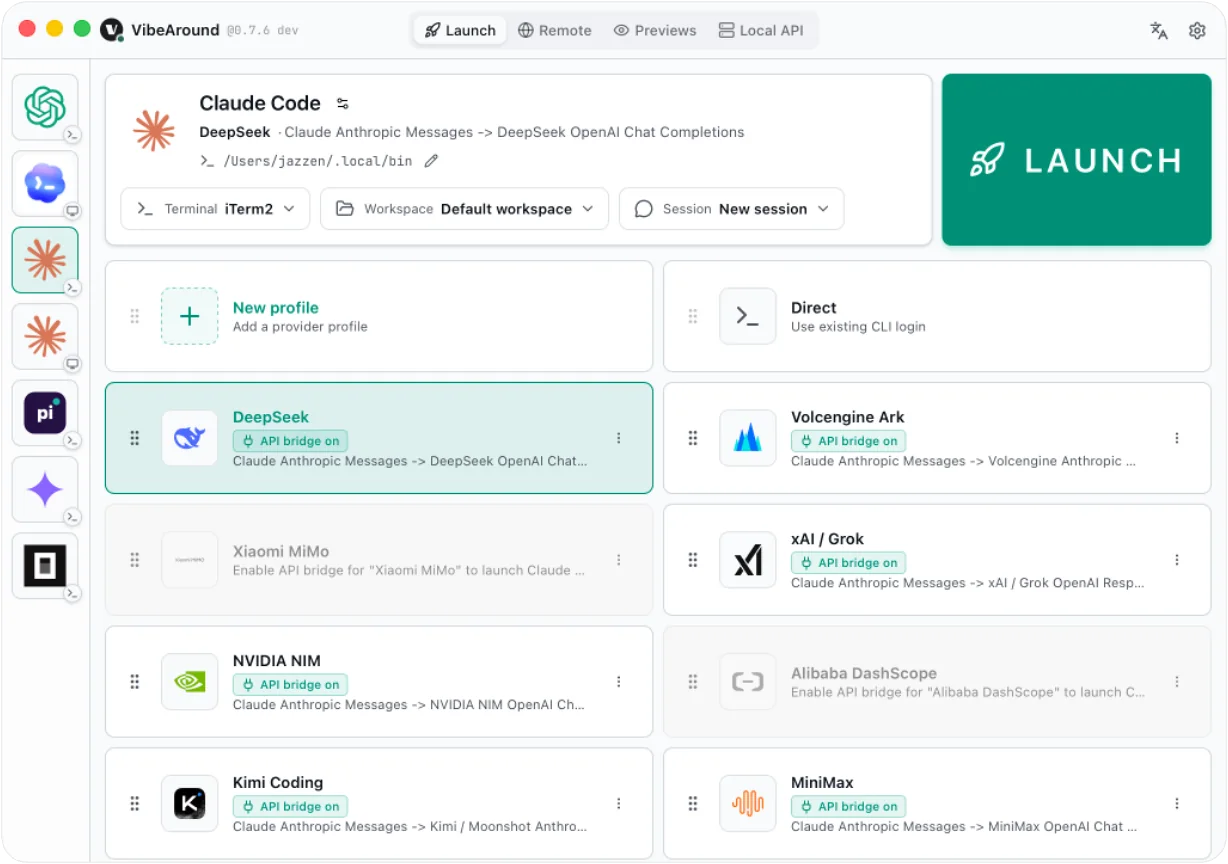
Launch the right agent with the right model.
Pick an AI agent, model profile or API endpoint, and workspace. VibeAround launches Claude Code, Codex CLI, Gemini CLI, Pi, OpenCode, Claude Desktop, Codex Desktop and more with third-party AI APIs.
- Launch AI coding agents and desktop apps like Claude and Codex from one desktop UI.
- Choose agent, model profile, API endpoint, workspace, terminal, and session before launch.
- Start new sessions or continue previous sessions.
- Use direct launch or profile-based launch, including profile overlays for Claude Desktop and Codex Desktop.
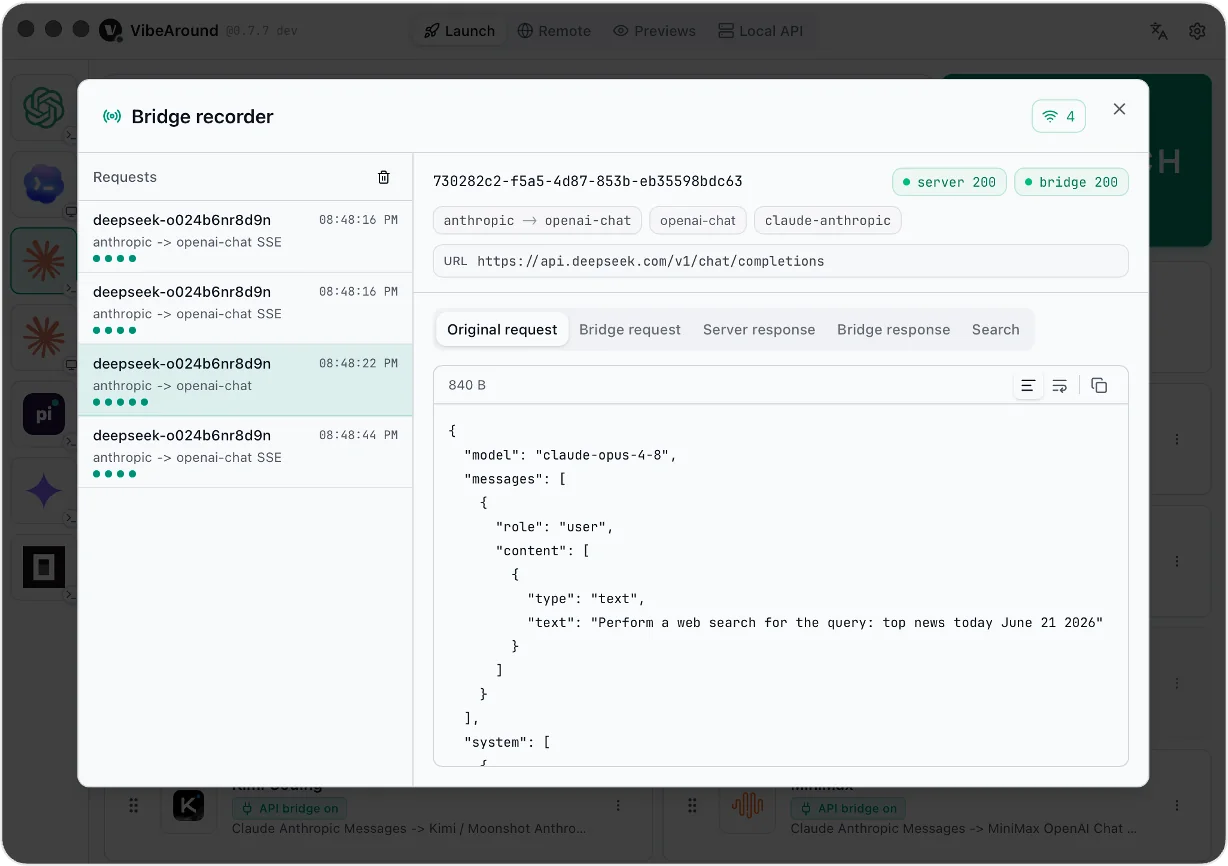
- Record and inspect launch-scoped API traffic, including original request, bridge request, raw response, bridge response, and search tool contents.
- Refresh VibeAround-reserved project skills and the VibeAround MCP entry before launch without replacing unrelated agent configuration.
VibeAround vs CC Switch
| Area | VibeAround | CC Switch |
|---|---|---|
| Agents | ✅ Claude Code, Codex CLI, Gemini CLI, Pi, OpenCode, Claude Desktop, Codex Desktop, Cursor CLI, Kiro CLI, Qwen Code, Trae (coming soon) | ✅ Claude Code, Claude Desktop, Codex, Gemini CLI, OpenCode, OpenClaw, and Hermes |
| Agent launch | ✅ One-click launch for both CLI and desktop agents, with selected profile, API endpoint, workspace, terminal, and session | |
| Run multiple providers at once | ✅ Run the same agent with different API profiles across sessions | ❌ Must switch profiles / active configs |
| API bridge | ✅ OpenAI Responses, Chat Completions, Anthropic Messages, and Gemini Generate Content | ✅ OpenAI Responses, Chat Completions, Anthropic Messages, and Gemini Generate Content |
| Live request inspect | ✅ Original request, bridge request, raw response, bridge response, and search tool contents | ❌ Not currently supported |
| Session resume | ✅ Resume and launch both CLI and desktop agents on macOS, Windows, and Linux | |
| Workspace selection | ✅ Launch agents from a specified directory | |
| IM Chat | ✅ Remote Messaging & Session Continuity through Feishu/Lark, Discord, Slack, and more | ❌ Not currently supported |
| Web Terminal | ✅ Web Terminal for remote CLI control | ❌ Not currently supported |
| Web Hub | ✅ Web Hub for browser-based launch, sessions, and chat | ❌ Not currently supported |
| Remote preview | ✅ Paired owner links + 10-minute code-gated Server/Markdown shares | ❌ Not currently supported |
| Host-side web search | ✅ Host-side Web Search via va-search-tool when providers do not expose native search |
❌ Not currently supported |
| MCP and Skills | ❌ Not currently supported | ✅ Unified MCP and Skills management across supported apps |
| Usage and cost tracking | 🚧 Roadmap | ✅ Built-in usage dashboard |
This usually means the agent is still reading API settings written by CC Switch or another config-switching tool. Those settings can point the agent to a local proxy that is no longer running, so the agent refuses the connection before VibeAround can route the request.
Remove the conflicting fields from the corresponding agent config file, then launch the agent again from VibeAround. For Claude Code, check ~/.claude/settings.json and remove stale provider fields such as an env block that sets a base URL, API key, or proxy endpoint. If you also have project-level Claude config files, check those as well.
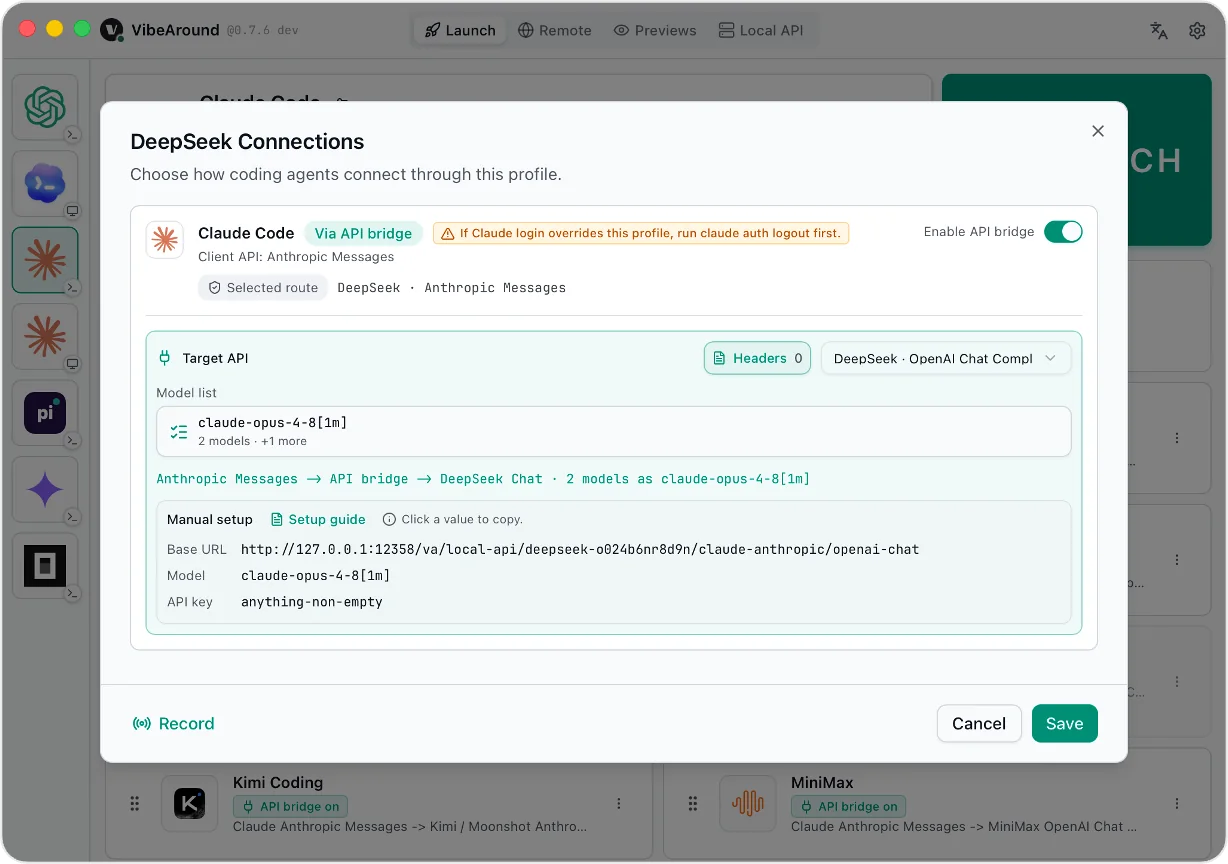
Use more model providers with the AI agents you prefer. Save provider keys, base URLs, models, and aliases as profiles; when an agent and a provider speak different API shapes, VibeAround's local bridge translates between them.
Agent-facing API shapes             VibeAround API Bridge               Provider API shapes
+-------------------------+         +-----------------------------+      +-------------------------+
| OpenAI Responses        | ----\   | profile-scoped local routes |  /-> | OpenAI Responses        |
| OpenAI Chat Completions | -----\  | model aliases and metadata  | /--> | OpenAI Chat Completions |
| Anthropic Messages      | ------> | request/response translate  | ---> | Anthropic Messages      |
| Gemini Generate Content | -----/  | va-ai-api-bridge (VAAAB)    | \--> | Gemini Generate Content |
+-------------------------+         +-----------------------------+      +-------------------------+
The bridge is powered by va-ai-api-bridge, the standalone VAAAB project behind VibeAround's API translation.
| API shape | Common endpoint |
|---|---|
| OpenAI Responses | /v1/responses |
| OpenAI Chat Completions | /v1/chat/completions |
| Anthropic Messages | /v1/messages |
| Gemini Generate Content | /v1beta/models/{model}:generateContent |
Built-in provider presets include DeepSeek, Alibaba DashScope, Moonshot / Kimi, MiniMax, Xiaomi MiMo, xAI / Grok, NVIDIA NIM, Z.AI / GLM, Google Gemini, OpenRouter, Azure OpenAI, and custom endpoints.
- Save API settings with keys, base URLs, models, aliases, and metadata.
- Bridge OpenAI Responses, OpenAI Chat Completions, Anthropic Messages, and Gemini Generate Content shapes.
- Run the same AI agent with different API profiles across sessions.
Give agents web search even when the selected model provider does not expose native server-side search.
VibeAround can replace provider-native web_search with a local search runtime, then feed normalized results back into the model through the bridge. Search sources are configured in Settings and run through the va-search-tool project. The same search SDK/runtime can also run standalone from the command line for local smoke tests or custom integrations.
va-search-tool is the standalone search runtime behind VibeAround host-side web search. It can run as a supervised VibeAround plugin over stdio, as a CLI for one-off searches, or as a small local HTTP service with /v1/search. It currently supports Exa, Tavily, Grok / xAI, and Brave Search.
- Use Exa, Tavily, Grok / xAI, and Brave Search as host-side sources.
- Run standalone CLI checks with
va-search-toolsearch ...or expose a local/v1/searchservice when you want the search runtime outside VibeAround. - Test search settings before saving from the Web Search settings page.
- Inspect search requests and source-separated results in the Bridge recorder.
- Keep API keys in local settings while the AI provider only receives normalized search results.
Use local AI coding agents as API endpoints for development and local testing.
VibeAround can expose enabled local agents as OpenAI / Anthropic-compatible APIs, so you can test app integrations against Claude Code, Codex CLI, Gemini CLI, OpenCode, and other local agents without deploying a production gateway.
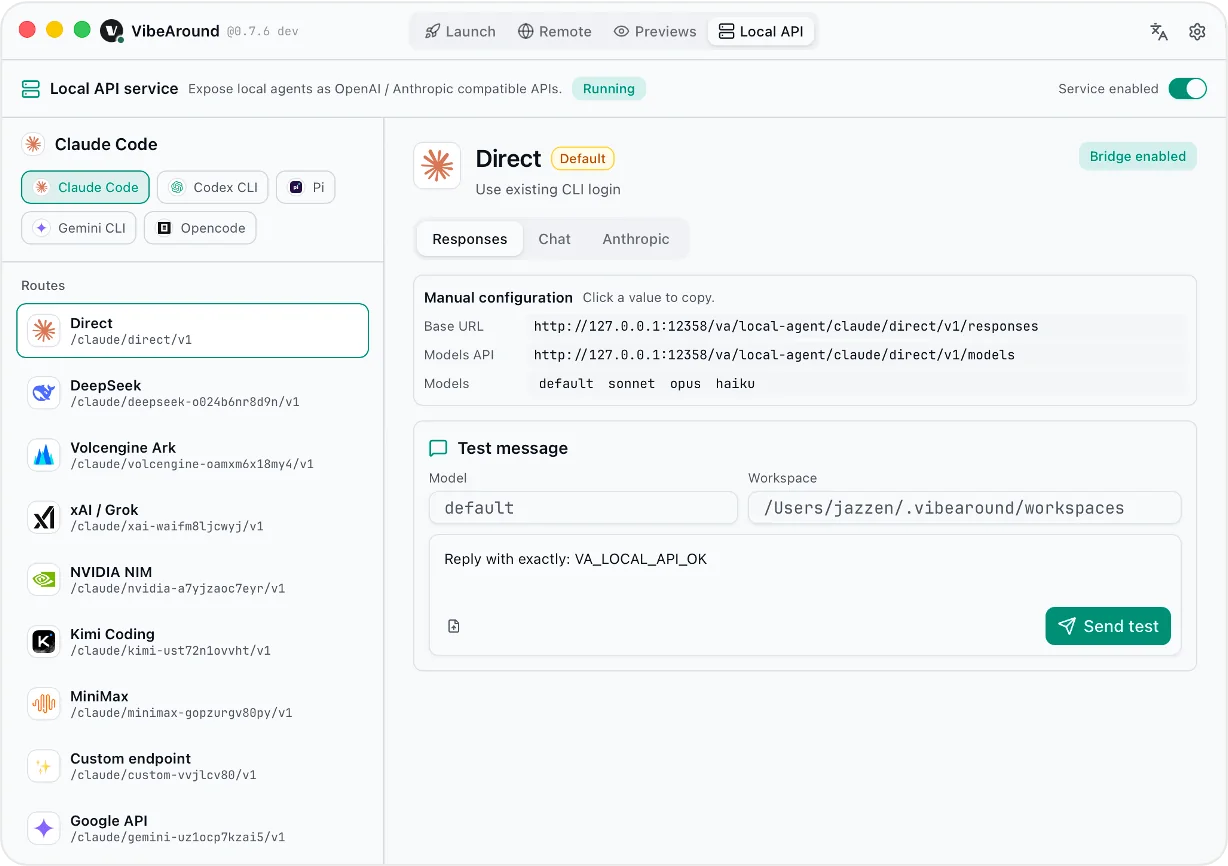
| API shape | Local agent endpoint |
|---|---|
| OpenAI Responses | /local-agent/{agent_id}/{profile_id}/v1/responses |
| OpenAI Chat Completions | /local-agent/{agent_id}/{profile_id}/v1/chat/completions |
| Anthropic Messages | /local-agent/{agent_id}/{profile_id}/v1/messages |
| Models | /local-agent/{agent_id}/{profile_id}/v1/models |
- Test local agents from the Local API Workbench before wiring them into your app.
- Select the agent and profile through VibeAround, then call the matching local endpoint.
- Pass
x-vibearound-cwdto run the request in a specific workspace directory. - Use streaming or non-streaming requests with the supported API shapes.
- Keep this for dev and local test usage; VibeAround is not trying to be a hosted production API gateway.
Hand over a running coding session, then pick it up from anywhere.
VibeAround can prepare a /pickup command for the current desktop or CLI session. Paste that command into any connected IM channel to continue the same session with the same agent; the pickup is not tied to the channel where it was created.
IM integrations are built through the VibeAround Channel SDK and plugin system, so each messaging platform can run as a managed plugin around the same session and command model instead of being hard-coded into the core app.
VibeAround Channel SDK is the SDK for building IM channel plugins. It handles the VibeAround agent/session lifecycle and command bridge, while each plugin focuses on the platform-specific transport and rendering, such as Feishu/Lark, Telegram, Slack, Discord, DingTalk, WeCom, or QQ Bot.
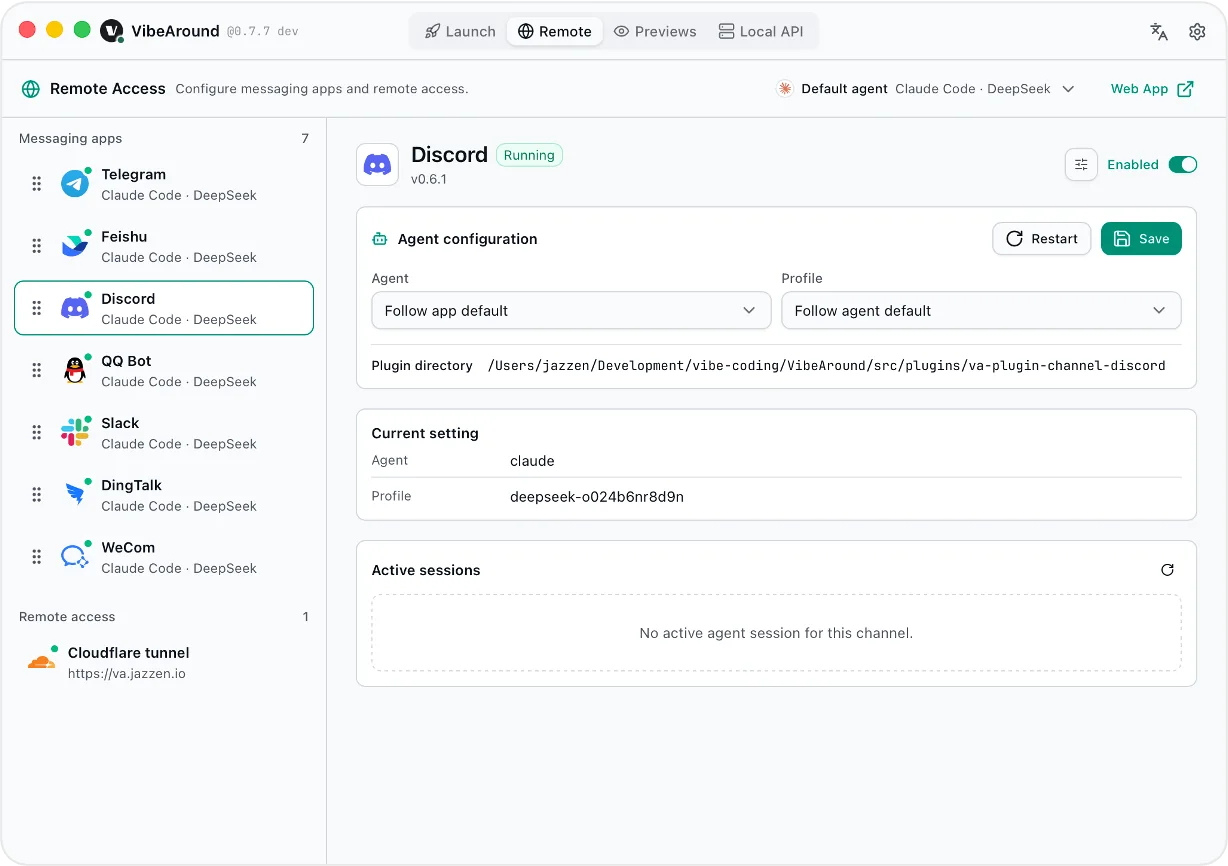
- Hand over the current session from desktop, CLI, or Web Hub.
- Pick it up from Feishu/Lark, Discord, Slack, or another configured messaging channel.
- Add or update messaging channels through SDK-based plugins.
- Continue the same agent session remotely without losing context.
- Chat directly with AI agents from messaging apps after pickup.
- Switch workspaces and agents with
/switch. - Open preview links from the same conversation.
VibeAround vs cc-connect
| Area | VibeAround | cc-connect |
|---|---|---|
| Handover / pickup | ✅ Generate a /pickup command from the current session and resume it in any connected IM channel |
❌ Not currently supported |
| Chat platforms | ✅ Feishu/Lark, Discord, Slack, Telegram, WeChat, DingTalk, WeCom, QQ Bot | ✅ Feishu/Lark, WPS Xiezuo, DingTalk, Telegram, Slack, Discord, LINE, WeCom, Weibo, Weixin, QQ, QQ Bot, Matrix |
| Agent connection | ✅ Works with VibeAround-launched agents and their selected profiles/workspaces | ✅ Works with 10+ agents and ACP-compatible agents |
| Session commands | ✅ /session --list, /session --switch, /new, and /pickup |
✅ /new, /list, /switch, and /current |
| Agent / profile switch | ✅ /switch, /agent --switch, and /profile --switch |
❌ Not currently supported |
| Workspace commands | ✅ /workspace --list and /workspace --switch |
✅ /dir and /cd |
| Remote preview | ✅ Sends paired owner links and code-gated Server/Markdown shares | ❌ Not currently supported |
| IM file attachments | ✅ Send and receive files/images on supported platforms | |
| Web Terminal | ✅ Browser terminal for controlling local AI agent CLIs remotely | ❌ Not currently supported |
| Web Hub | ✅ Browser launch, session continuation, and chat | |
| Scheduling and rich IM commands | ❌ Not currently supported | ✅ /timer, /cron, /cancel, /ps, provider/model/mode commands |
Control local AI agents from desktop or mobile browsers.
VibeAround exposes local terminal sessions through the web dashboard so you can drive AI agent CLIs from desktop or mobile browsers while execution stays on your computer.
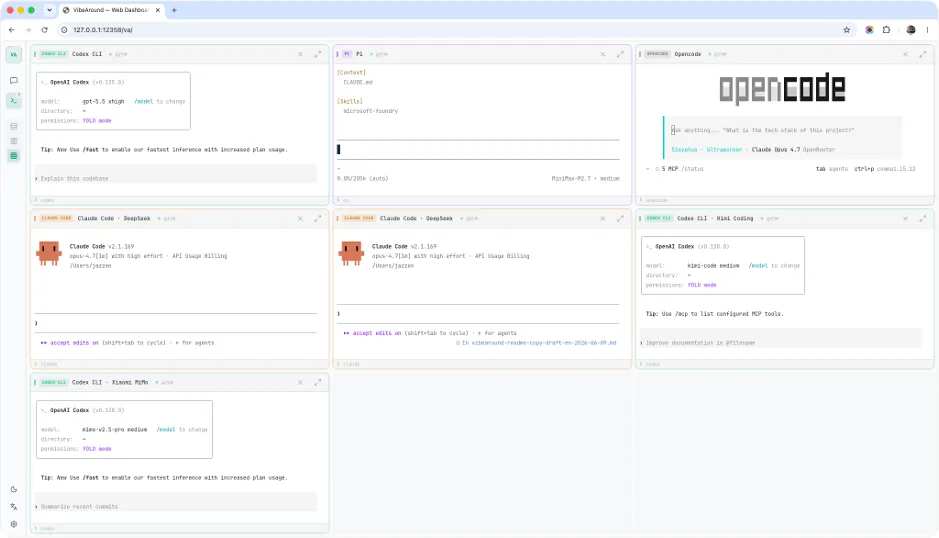
- Access local AI agent CLIs through Web Terminal from desktop or mobile browsers.
- Use tunnels for remote access while the daemon stays local.
- Keep local project permissions and terminal environment in control.
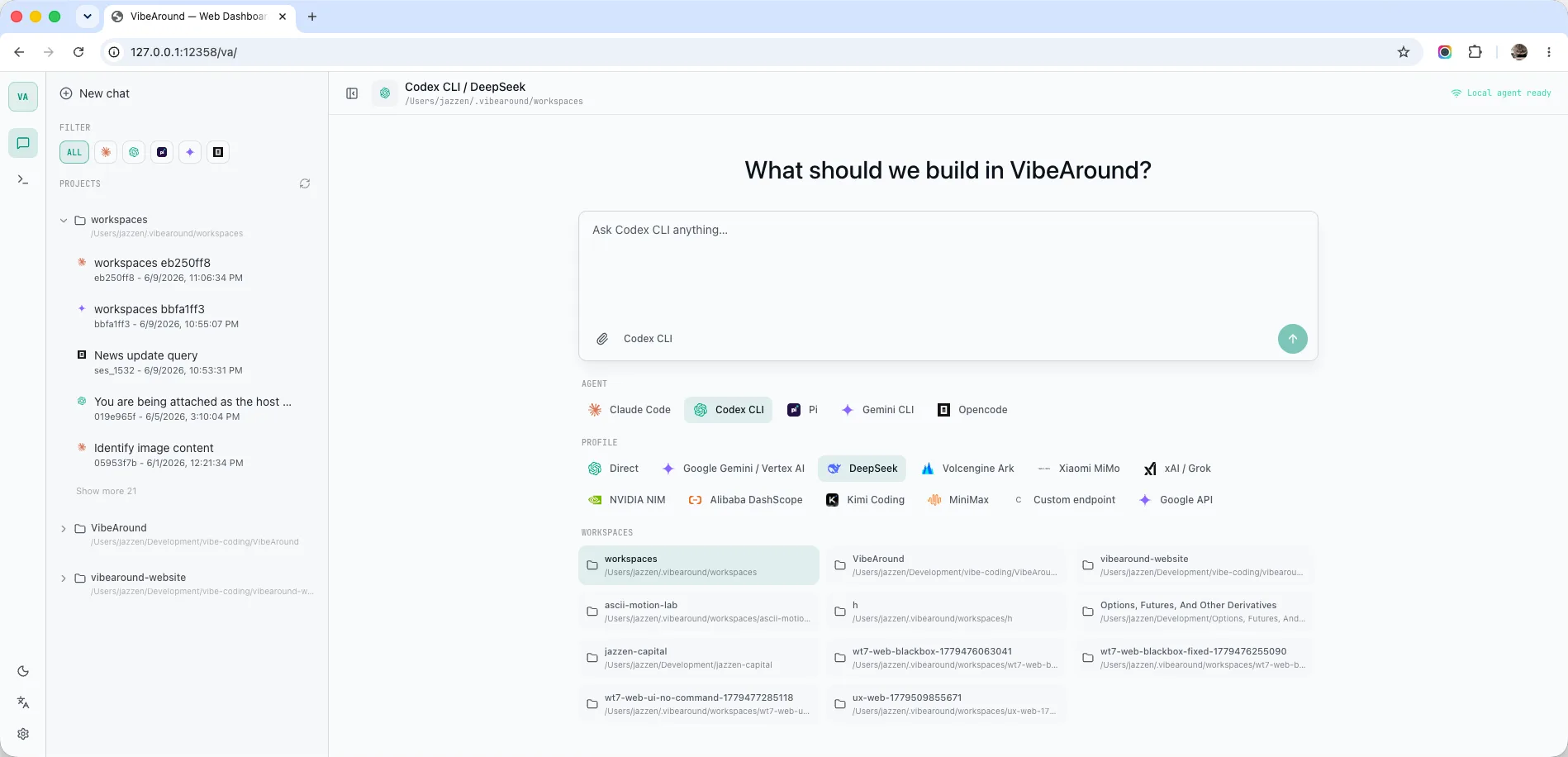
Launch and continue sessions from desktop or mobile browsers.
VibeAround Web Hub gives you a browser interface for choosing agents, API profiles, workspaces, and sessions, then continuing the same work across devices.
 |
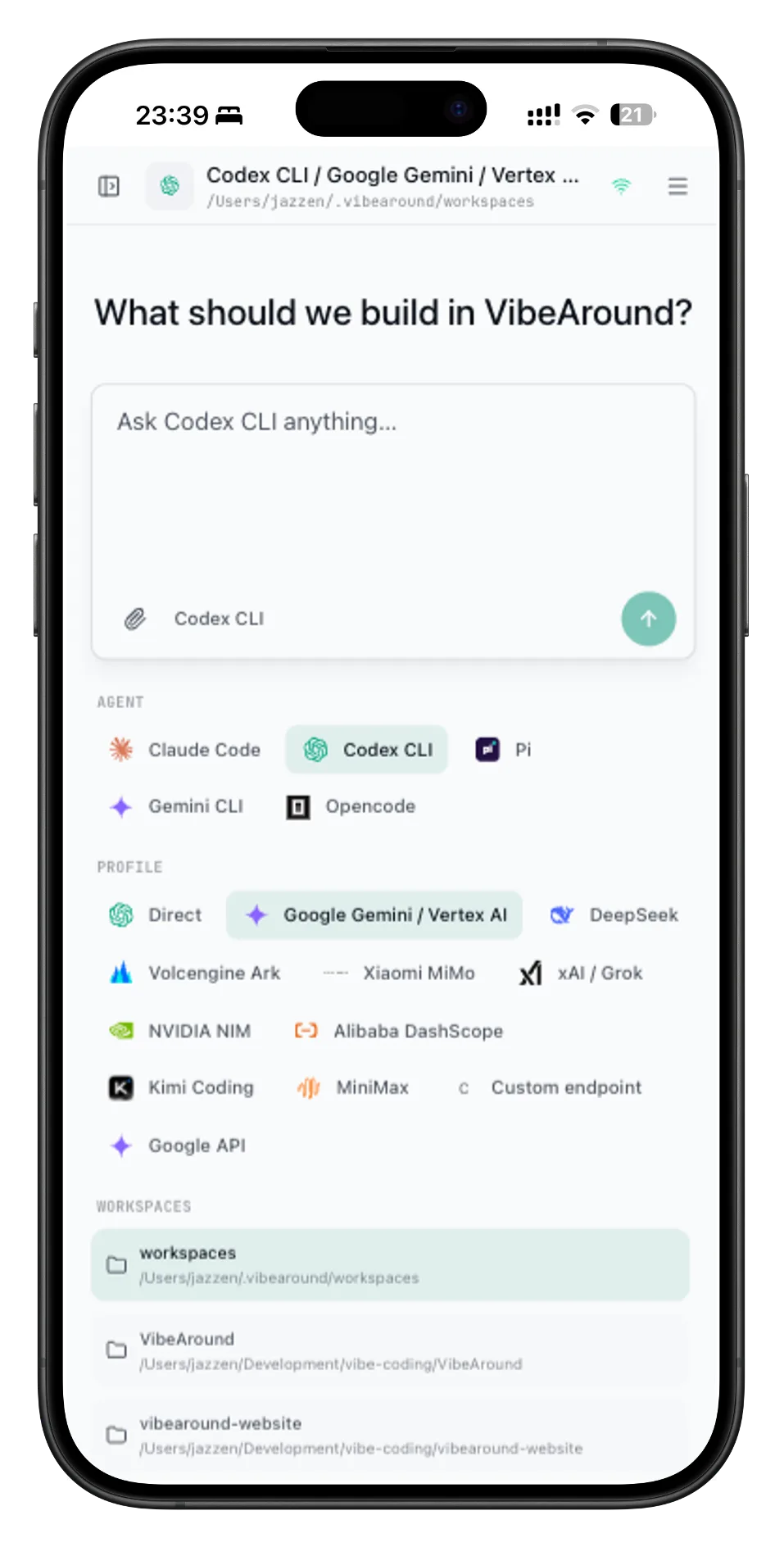 |
- Start new browser sessions or continue existing ones.
- Pick agents, API profiles, workspaces, and sessions from the browser.
- Use desktop and mobile browsers without moving execution to a cloud server.
Expose VibeAround's local web surfaces only when you choose to.
Remote tunnels are used by Web Hub, Web Terminal, and Preview links. VibeAround keeps the daemon local and starts the selected tunnel provider; owner surfaces require browser pairing, while each Server or Markdown Share transaction uses its own time-scoped access code.
| Tunnel option | Status | Notes |
|---|---|---|
| Local only | ✅ Supported | No public tunnel; the daemon listens on loopback. |
| Localtunnel | ✅ Supported | Quick public URL through the managed localtunnel npm package or system npx. |
| Cloudflare Tunnel | ✅ Supported | Named tunnel via cloudflared, tunnel token, and configured hostname. |
| ngrok | ✅ Supported | Uses the ngrok SDK with auth token and optional reserved/static domain. |
| Tailscale Funnel | ✅ Supported | Public .ts.net URL through an installed and signed-in Tailscale client. |
Preview what AI agents are building.
VibeAround opens dev servers and Markdown in one owner page with a collapsible workspace/Preview picker. A local Server owner loads the dev server directly from its loopback origin; tunneled owners remain pairing-protected. Both Server and Markdown targets can mint 10-minute Share transactions protected by reusable six-digit access codes.
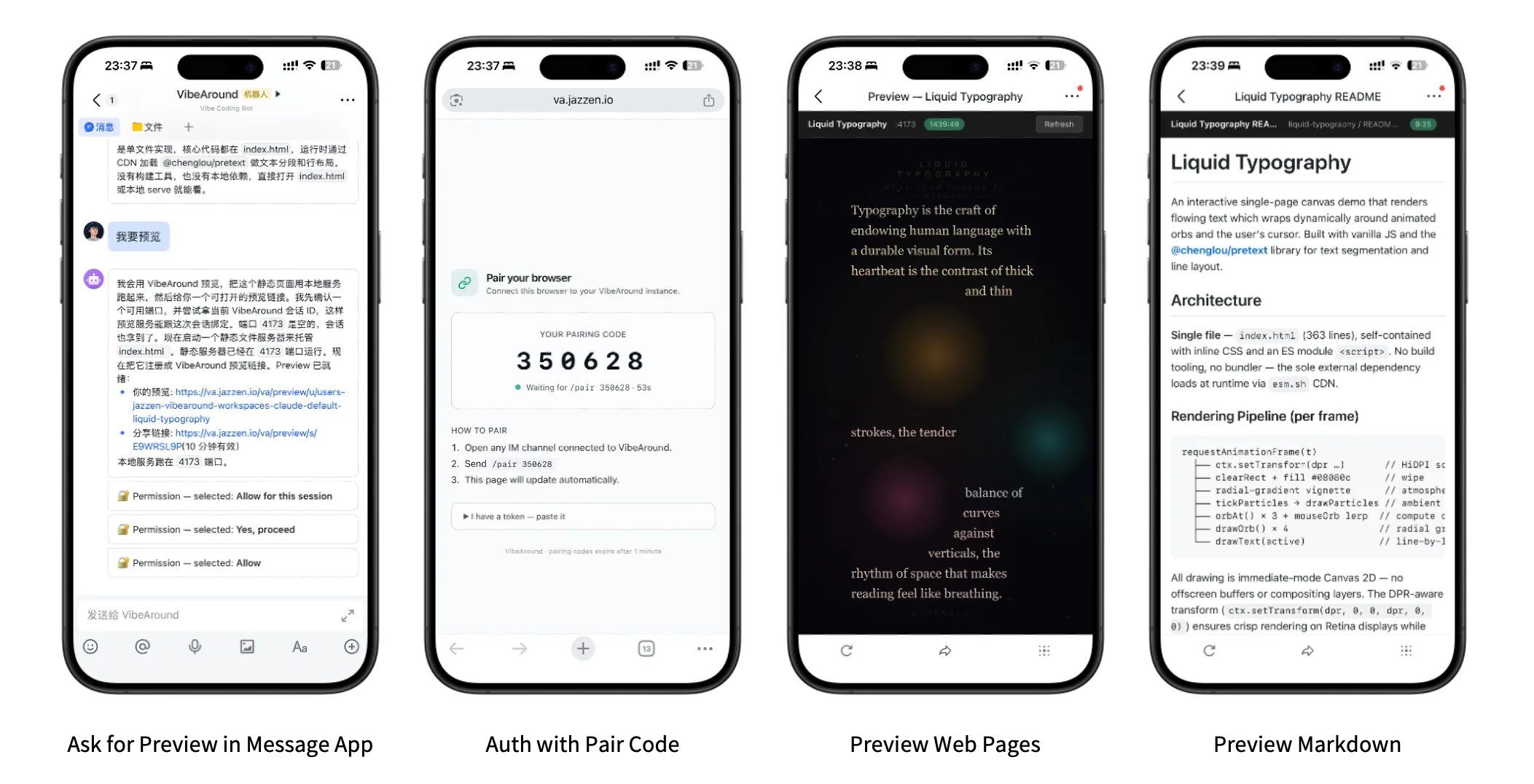
- Preview dev servers on their native loopback origin locally, preserving their own fetch, WebSocket, and HMR behavior.
- Reach an owner page through a tunnel after browser pairing.
- Generate copyable Server and Markdown Share messages containing the public URL, access code, and expiry.
- Share a Server page through a page-preview proxy that forwards authenticated GET/HEAD paths, including page data reads; writes, protocol upgrades, service workers, WebSockets, and HMR are unsupported.
/va/*, owner pages, chat, and review controls are excluded.
Supported AI Agents
| Agent | Launch | Continue / handover | Profile routing |
|---|---|---|---|
| Claude Code | ✅ | ✅ | ✅ |
| Claude Desktop | ✅ | — | ✅ |
| Codex CLI | ✅ | ✅ | ✅ |
| Codex Desktop | ✅ | — | ✅ |
| Pi | ✅ | ✅ | ✅ |
| Gemini CLI | ✅ | ✅ | ✅ |
| OpenCode | ✅ | ✅ | |
| Cursor CLI | ➜ | ✅ | — |
| Kiro CLI | ➜ | ✅ | — |
| Qwen Code | ➜ | ✅ | — |
✅ Supported ·
Supported Providers
Preset profiles cover common official and compatible providers. Custom endpoints are available when your provider speaks a supported API shape.
| Provider | Notes |
|---|---|
| DeepSeek | OpenAI-compatible and bridge routes, model aliases, Claude suffix normalization |
| Alibaba DashScope | Coding Plan and Token Plan endpoints |
| Moonshot / Kimi | OpenAI-compatible and Anthropic-style bridge flows |
| MiniMax | OpenAI-compatible and Anthropic-style bridge flows |
| Xiaomi MiMo | Token Plan and regional endpoints with provider quirks handled |
| xAI / Grok | Responses and Chat variants |
| NVIDIA NIM | OpenAI-compatible Chat Completions |
| Z.AI / GLM | Built-in compatible endpoint |
| Google Gemini | Native Gemini API profile |
| OpenRouter | OpenAI-compatible profile |
| Azure OpenAI | Responses and Chat deployment routing |
| Custom endpoint | Bring your own base URL, headers, models, and API kinds |
Messaging Channels
Channel plugins are built with the VibeAround Channel SDK, then installed and managed by VibeAround.
| Channel | Setup style | Typical use |
|---|---|---|
| Telegram | BotFather token | Personal bot and mobile chat |
| Feishu / Lark | App credentials | Team IM and enterprise bot |
| Discord | Bot token | Server and DM workflows |
| Slack | Bot/App token with Socket Mode | Workspace DM workflows |
| QR login through OpenClaw-compatible bridge | Chinese personal chat | |
| DingTalk | Stream API credentials | Enterprise chat |
| WeCom | WebSocket bot credentials | Enterprise WeChat workflows |
| QQ Bot | Guild bot credentials | QQ bot workflows |
Security Model
VibeAround keeps AI coding work on your computer by default.
- Agents run on your computer.
- Provider credentials stay in local VibeAround settings/profile storage.
- The daemon listens on loopback unless you explicitly enable a tunnel.
- Dashboard APIs and WebSocket routes require a local auth token.
- Protected public tunnel surfaces, including Preview owner links, require browser pairing.
- Server and Markdown Share transactions instead use their own six-digit access codes; each Share URL, code, and browser grant expires together after 10 minutes.
- Server Shares are a page-preview transport, not general API compatibility or an API-isolation sandbox: they forward authenticated GET/HEAD paths, including page data reads, while writes, protocol upgrades, service workers, WebSockets, and HMR are unsupported.
/va/*, owner pages, chat, and review controls are excluded. - Agent CLIs use your local project permissions.
- Install the desktop app for the full GUI, or install the CLI with
npm i @vibearound/cli. - Open VibeAround Desktop, or run
va serveand visithttp://127.0.0.1:12358/va/. - Complete onboarding and enable the agent CLIs you use.
- Add API profiles if you want VibeAround to route model traffic.
- Pick an agent, model profile, terminal, workspace, and session from Launch or Web Hub.
- Continue from desktop, Web Hub, Web Terminal, CLI, or a configured messaging channel.
Detailed guides live in the Wiki.
Latest desktop release: VibeAround v0.7.25.
| Platform | Recommended download |
|---|---|
| macOS Apple Silicon | VibeAround-macOS-arm64-0.7.25.dmg |
| Windows x64 | Setup EXE, MSI, or portable ZIP |
| Linux x64 | AppImage or deb |
Windows and Linux packages are built by GitHub Actions. The macOS package is currently Apple Silicon only.
The npm package installs both va and vibearound commands:
npm i @vibearound/cliva serve
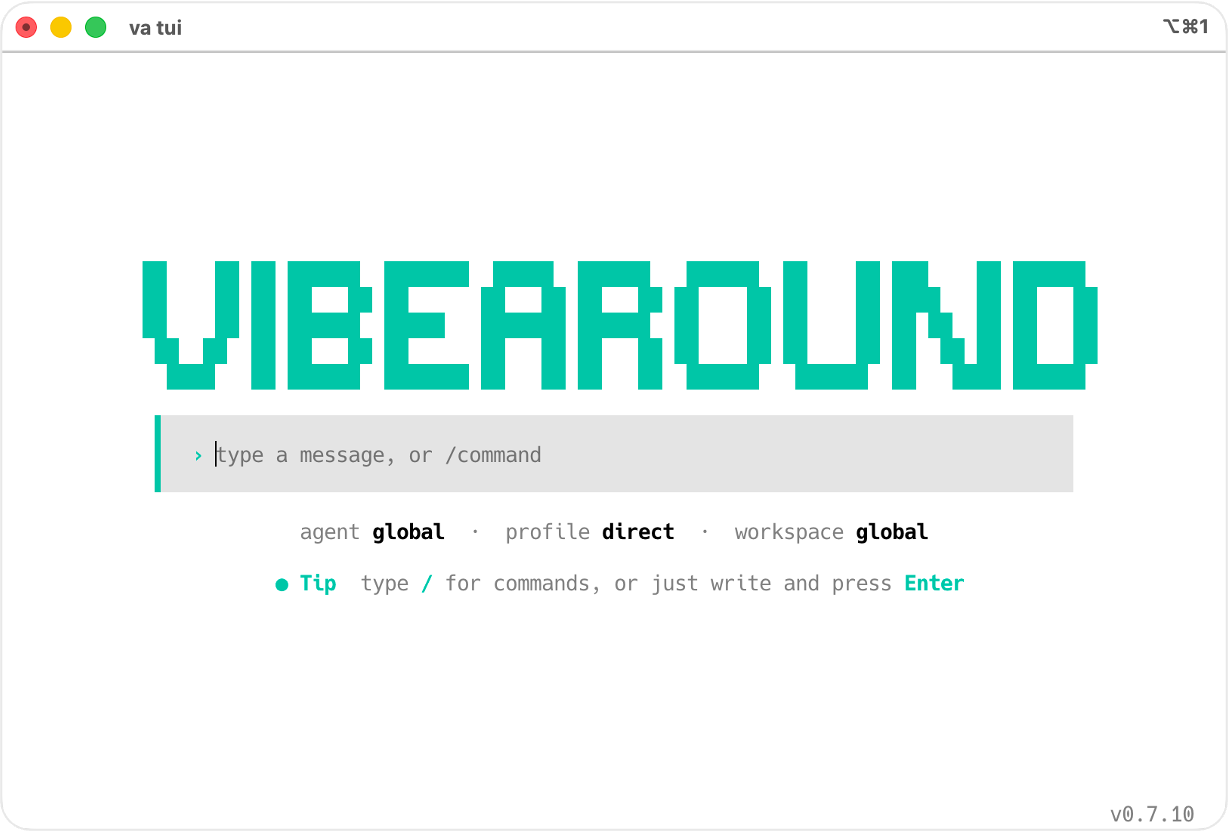
va tui
va launch --profile codex-workAfter starting the server, open http://127.0.0.1:12358/va/ in your browser.
Latest CLI package on npm: @vibearound/[email protected], with matching platform payloads in VibeAround CLI 0.0.13.
cd src
bun install
bun run prebuild
bun run dev
Prerequisites: Rust 1.82+, Bun 1.3+, and Node.js 24 LTS recommended. macOS also needs Xcode command line tools; Linux needs the WebKitGTK/Tauri system dependencies for your distribution.
- Setup Guide
- Launch, Profiles, And Models
- Supported Agents
- Channels
- Configuration Model
- Tunnels And Previews
- Architecture
- Build And Packaging
- FAQ And Troubleshooting
VibeAround is still early, moving fast, and mostly one-person work. My goal is to build an all-in-one agent hub that helps more people embrace AI with less friction and more clarity. Some edges are still rough, from test coverage to interaction details, and I sincerely hope VibeAround can be shaped together with the community. Discussions, code contributions, ideas, shared workflows, and bug reports are always welcome.


Friendly community: LINUX DO
WeChat group for Chinese-language discussion:
This WeChat QR code is valid until September 7, 2026. Use Discord or GitHub Issues to ask for the latest one if it has expired.


