


Search local conversations from Codex, Claude Code, Cursor, and 13 other coding agents in one Mac app. Read the transcript, find supported image outputs, and resume supported CLI sessions. For Codex and Claude, see which sessions are burning through your quota.
Open source. Your session history stays on your Mac. No telemetry.
Download Agent Sessions 6.3 · See the product page · All releases
brew install --cask jazzyalex/agent-sessions/agent-sessions

Search 16 local agent histories, resume supported sessions, and track Codex and Claude quota burn.
- Find past work. Search prompts, responses, tool calls, command output, errors, file paths, and supported image references across local agent histories.
- Pick up where you left off. Copy a resume command or open a supported CLI session in Terminal.app, iTerm2, Warp, or Ghostty. Ghostty requires AppleScript support (verified with 1.4.0).
- See which session is burning your quota. Track live per-session Codex and Claude burn against 5-hour and weekly windows, plus each OpenCode session's token or cost rate; switch between quota, tokens, and estimated API-equivalent cost. Weekly local estimates show pace without a run-out time.
- See what a session used. Session Info opens beside every supported agent transcript, showing immediate provider-neutral metadata and detailed model, token, activity, or pricing data when the source records it.
- Keep transcripts on your Mac. Agent Sessions builds its search index locally and does not upload session history.
- Resume in Ghostty. Choose Ghostty under Preferences → General → Terminal App, and Resume opens a new Ghostty window in the session folder, for Codex and the other supported CLIs. Requires a Ghostty build with AppleScript support (verified with 1.4.0). Contributed by @buildfolk.
- Pressing Esc in OpenCode no longer hides its rate. An interrupted step with no output now counts as no usage, so the session keeps its Quota Meter rate and a complete Session Info total.
- OpenCode sessions show their own burn rate. Each running OpenCode 2.x session in the Quota Meter shows its token rate, or its API-equivalent cost in the $ lens; free routes read Free. A row keeps its last rate for 5 minutes after a turn ends, with the same load bar as Codex and Claude.
- OpenCode in the Quota Meter shows the session you are in. Each OpenCode terminal shows its open conversation by its real title, working or idle, and closed conversations no longer show as live. Setup is automatic; the plugin's status is in Settings → OpenCode. Also: Codex limits recover within a minute after a connection drop.
- Crash reports name only Agent Sessions crashes. A crash in a tool the app starts, such as a Claude Code hook, no longer shows up as ours, and each report shows its crash time. Stopped Claude replies are now marked in the transcript.
- OpenCode in the Quota Meter. Running OpenCode sessions appear under the OpenCode logo, below Codex and Claude, each marked working or idle. Limits and burn rate are not there yet; if you use OpenCode Go and want to help add them, open an issue.
- Fixes. A live session in a folder inside your home or temp folder keeps its own title, and crash reports you choose to send carry the exception message.
- Every agent's latest format, checked. Current Codex, Claude Code, OpenCode, Copilot, Cursor, Hermes, OpenClaw, Kimi, Pi, Grok, Cline and DeepSeek Harness sessions read cleanly. OpenClaw 2026.10.5 sessions are back, Claude transcripts stop repeating each turn, and fx 0.0.8+ sessions open.
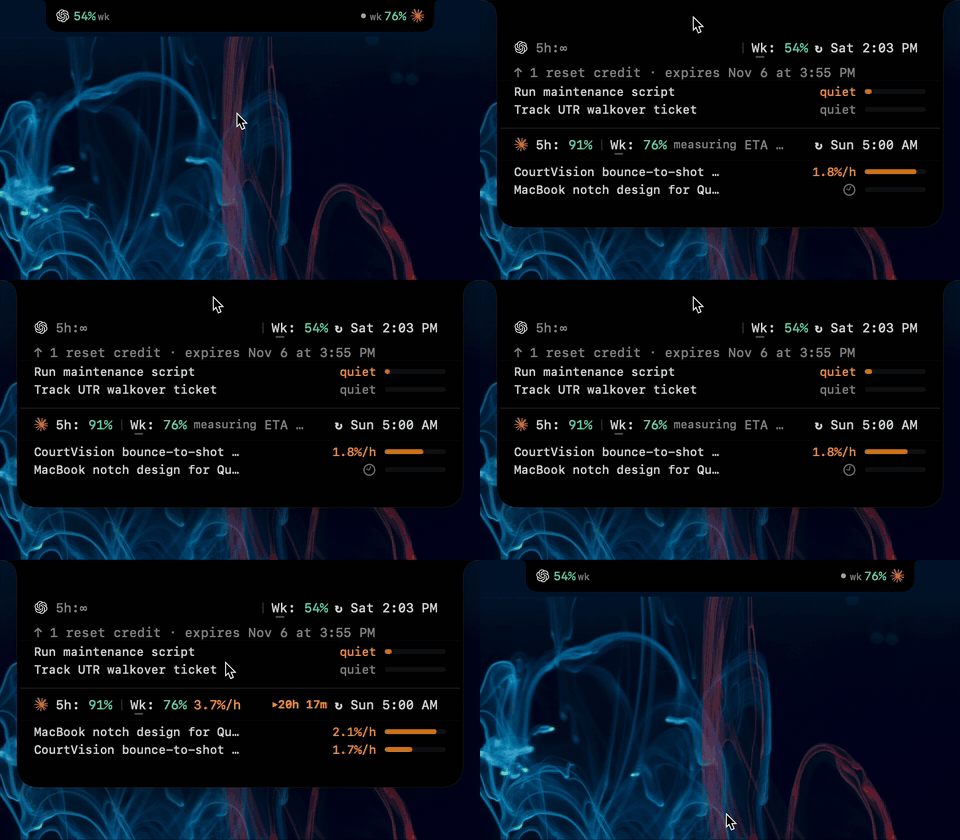
- Quota Meter in the notch. Codex and Claude limits sit beside the MacBook camera, or in a small virtual notch on displays without one. Hover and it opens into the full Quota Meter with live session burn; move away and it folds back. Pick Notch, Desktop or Automatic, and Wings or Minimal, in Settings.
- OpenCode 2.x sessions. Sessions started in OpenCode 2.0 and later now reach the list, and sessions carried over from 1.x keep their full history.
- Also: the notch takes over the menu bar limits item, free models read as Free in Session Info, and OpenCode prompts that recorded file changes no longer go missing.
- Compressed Codex sessions stay in the list. The Codex desktop app now packs sessions idle for 7 days into
.jsonl.zstfiles and deletes the originals. Agent Sessions reads them as before: transcripts, search, Session Info, images, stars and pins keep working, and the files are never changed. - API-equivalent cost for eight more agents. Session Info prices OpenCode, OpenClaw, Hermes, Kimi, Cline, Qwen, Antigravity and DeepSeek Harness sessions from first-party list prices, and says why when a session lacks the evidence.
- Fixes. The Codex usage meter no longer stalls on Codex's update prompt, Claude 5.5 prices are corrected, and Copilot cache tokens are counted once.
- Session Info for every agent. Open the inspector beside any supported agent transcript. Provider, current model or configuration, and title metadata appear immediately when recorded, with detailed telemetry staying honest about each source's limits.
- Broader provider detail. Antigravity, Kimi, Grok, fx, Cline, Droid, DeepSeek Harness, Cursor, Qwen Code, and Devin now contribute their audited Session Info fields where their local records support them.
- Clearer loading and empty states. Indexing, transient refresh, failures, filters, and a genuinely empty library are now distinct, and slow detailed scans time out with a retry path.
- Session Runway recognizes GPT-6.1 Sol. Published rates cover cached input, fast mode, and long context, so mixed Sol/Astra activity contributes to dollar estimates and shared weekly calibration.
- Current agent formats stay compatible. Agent Sessions recognizes the latest observed session fields from Claude 2.1.285, Copilot 1.0.89, Kimi 2.1.1, and Codex 0.159.
- DeepSeek Harness 0.2 histories remain browseable. Native v4 sessions open alongside v0-v3 history, including developer messages and first-class tool results.
- More transcript detail survives parsing. OpenClaw shows current tool arguments and nested results, while role-less Cursor turn failures appear as visible errors.
- DeepSeek Harness history browsing. The local, read-only integration discovers immutable session directories, selects the highest supported generation, and browses/searches supported v0-v3 plain JSONL and independently framed, checksum-validated Zstandard histories. Incomplete or corrupt artifacts stay invisible. Compatibility evidence comes from checked-in sanitized fixtures, the pinned event catalog, and a local manual UI smoke test; broad real-world coverage remains unverified.
- A clearer weekly Session Runway. The Quota Meter combines measurable active-session burn with an estimate of time left at that pace, keeps the weekly reset visible, and reports measuring, unavailable, or exhausted states instead of inventing a value.
- Codex runway follows the configured sessions root. The meter honors the Preferences override, process-inherited
CODEX_HOME, and the default path, with a GUI-launch caveat for shell-only environment settings.
- Cline CLI and Cline Desktop support. Browse and search local prompts, responses, thinking, and tool activity from both Cline surfaces, with clear origin labels and Cline-specific Settings controls.
- More reliable session retrieval. Project filtering distinguishes same-named clones, active searches refresh cleanly, displayed titles remain searchable, and cache hydration preserves confirmed sessions when a source is temporarily unavailable.
- Clearer session titles. Claude, OpenClaw, OpenCode, and Droid keep recognizable source-aware titles after full transcript loading and search prewarming.
The current source registry contains 16 active agent formats plus legacy Droid sessions. Agent Sessions 5.6 adds Session Info for every source; capabilities differ by source and installed CLI version.
| Source | Browse and search | Resume |
|---|---|---|
| Codex | Yes | Supported sessions |
| Claude Code | Yes | Supported sessions |
| Cursor | Yes | Supported sessions |
| GitHub Copilot CLI | Yes | Supported sessions |
| OpenCode | Yes | Supported sessions |
| Antigravity | Yes | Supported sessions |
| Pi | Yes | Supported sessions |
| Kimi Code | Yes | Supported sessions |
| Grok CLI | Yes | Supported sessions |
| Hermes | Yes | Supported sessions |
| OpenClaw | Yes | No |
| Qwen Code | Yes | Active sessions; end-to-end unverified |
| Devin CLI | Yes | Supported active sessions |
| fx | Yes | Command plan tested; interactive reopen unverified |
| Cline CLI and Desktop | Yes | No |
| DeepSeek Harness | Yes | No |
| Droid | Legacy sessions | No active monitoring |
DeepSeek Harness support is an independent integration, not an official partnership or endorsement. Its checked-in decoder vendors the selected official Zstandard 1.5.7 decompression/common sources under the upstream BSD license; provenance and the archive checksum are recorded in ThirdParty/DSHZstd/README.md.
Format-maintenance owners, verification dates, and tested versions are in STEWARDS.md. Session-Bench compares ten agents across 20 evidence-backed format gates.
An account meter can tell you that 60% is used. Agent Sessions shows which active Codex or Claude session is spending it.
- Per-session burn against available 5-hour and weekly windows.
- Four views: 5-hour, weekly, tokens per hour, and estimated API-equivalent dollars per hour.
- Per-model pricing when one session uses more than one model.
- Explicit unavailable states when a provider does not expose a usable limit.
The dollar view is an API-equivalent estimate, not your subscription bill.

Open Session Info beside any supported agent transcript with ⇧⌘I or the gauge button in the toolbar. It starts with provider-neutral metadata from the loaded session row, then reads the session's own records when detailed telemetry is supported.
- Quick info for every source — provider, current model or configuration, and title when recorded.
- Detailed telemetry where available — price at published API rates, total tokens, request count, token mix, model history, and activity.
- Honest boundaries — unsupported cost, quota, token, and history fields stay labeled unavailable instead of being inferred.
The price is an API-equivalent estimate, not your subscription bill.

Download AgentSessions-6.3.dmg, open it, and drag Agent Sessions.app into Applications.
Or use Homebrew:
brew install --cask jazzyalex/agent-sessions/agent-sessionsUpdates are signed, notarized, and delivered through Sparkle.
- Find and search old Codex CLI, Desktop, and VS Code sessions
- Find and search Claude Code JSONL history
- Search Cursor Agent transcripts
- Browse OpenCode SQLite history
- Browse GitHub Copilot CLI history
- Browse Antigravity CLI history
- Browse Hermes Agent history
- Browse OpenClaw history
See the changelog, privacy policy, and security notes.
- Transcript discovery, parsing, indexing, search, and navigation happen locally.
- Agent session folders are read rather than rewritten.
- Explicit actions can open resume commands or manage saved copies.
- Optional network access checks for signed Sparkle updates and fetches a public model-price list. Neither request contains transcript data.
Missing your agent? Use the new source form. You can contribute a sanitized fixture without writing Swift, adopt an existing format as a steward, or follow the contribution guide.
Build locally with Xcode 16 or later:
xcodebuild -project AgentSessions.xcodeproj -scheme AgentSessions -configuration Debug -destination 'platform=macOS' buildRun the stable test wrapper:
./scripts/xcode_test_stable.shFound a session you thought you had lost? Star Agent Sessions to help other developers find it.
MIT. See LICENSE.


