


Control Rhino 3D and Grasshopper with AI, in plain language.
RhinoMCP connects Rhino to AI agents through the Model Context Protocol, so assistants like Claude and Cursor can model geometry, read your document, and build Grasshopper definitions for you, just by chatting.





Quick start · What it can do · Usage · Examples · Tool reference
English · 简体中文
For development of the autonomous improvement experiments, start with the continuation guide.
- Describe what you want and the assistant builds it in Rhino.
- It reads your document and can capture the viewport, so it works from what is actually on screen.
- It scripts Grasshopper for you: finding components, wiring them, setting sliders, and solving.
- A single plugin and a single config entry cover both Rhino and Grasshopper.
- When you need more control, it can run native Rhino commands, RhinoScript-Python, or RhinoCommon C#.
Note
RhinoMCP targets Rhino 8 on Windows and macOS.
|
Two-way interaction: the AI both creates and reads geometry. |
Custom scripts: the AI writes and runs scripts inside Rhino. |
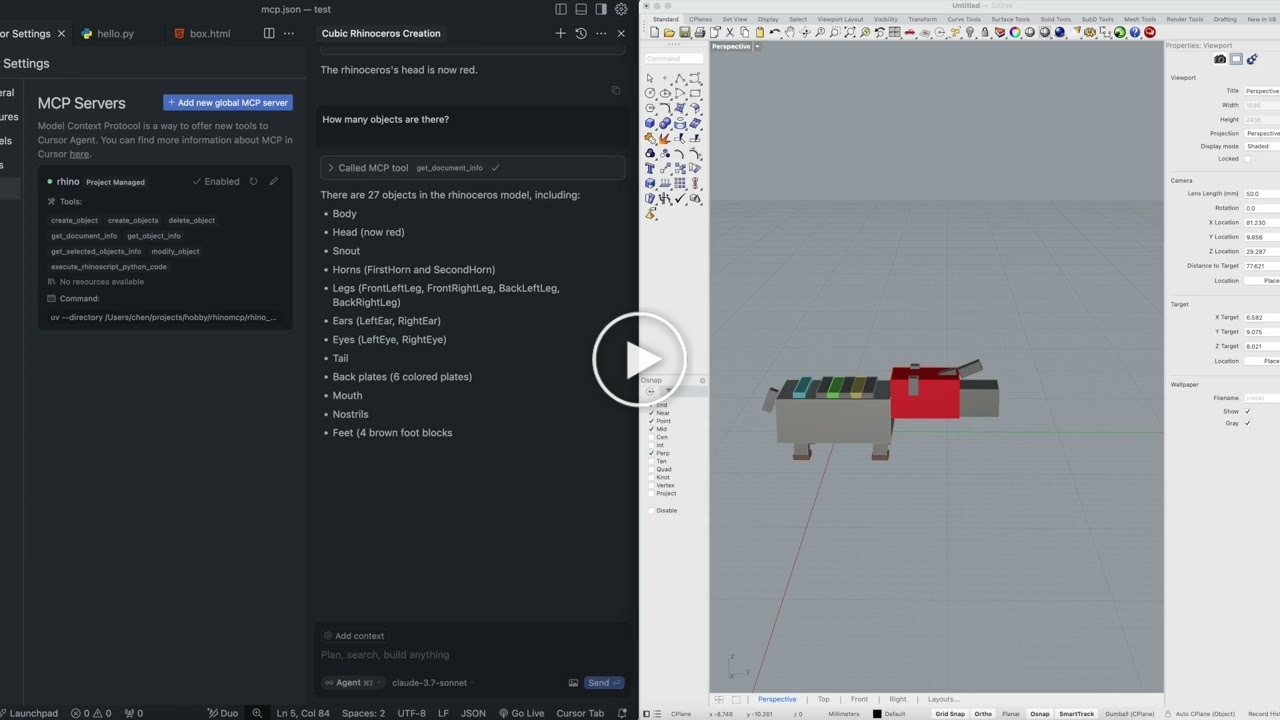
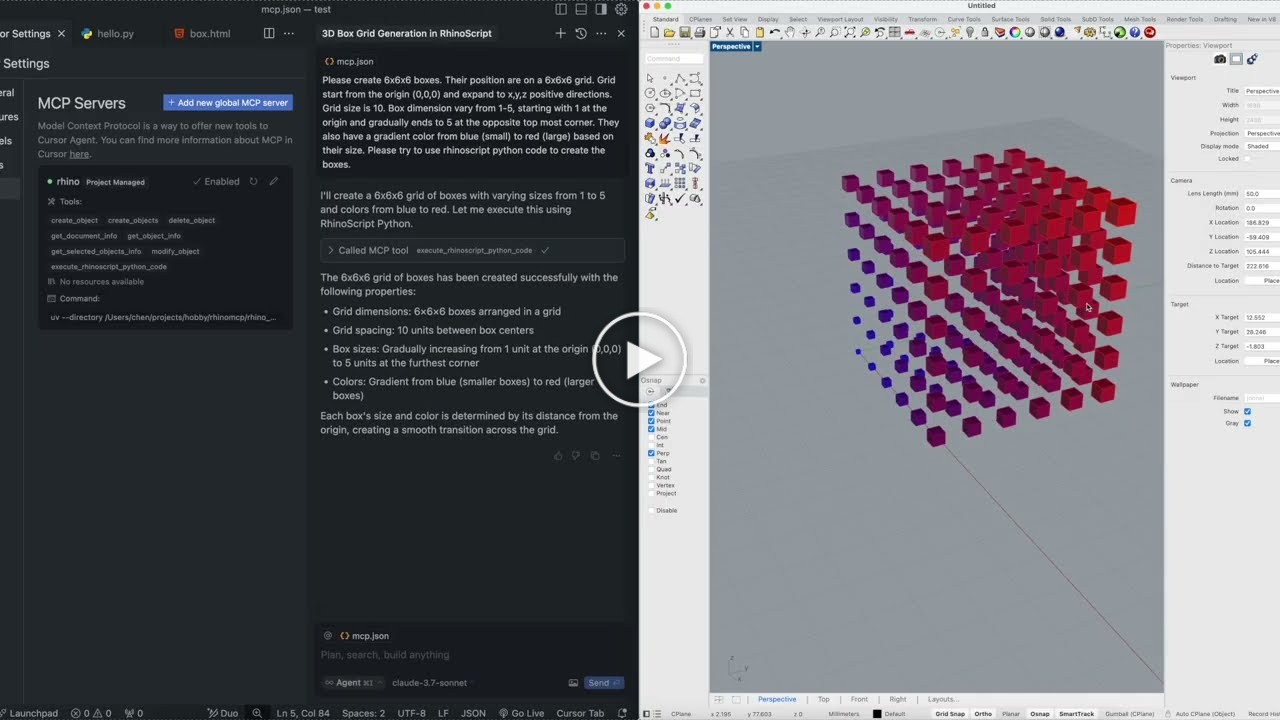
Prefer a walkthrough? Nate made a showcase and install tutorial on YouTube.

| Area | What the AI can do |
|---|---|
| Create geometry | Points, lines, polylines, circles, arcs, ellipses, curves, boxes, spheres, cones, cylinders, and surfaces, one at a time or in batches |
| Transform & edit | Move, rotate, scale, recolor, rename, and delete objects |
| Advanced modeling | Loft, extrude, sweep, offset, pipe; boolean union, difference, and intersection |
| Curve operations | Project, intersect, and split curves |
| Layers & attributes | Create, delete, and switch layers; read and write object attributes |
| Inspect & select | Document summaries, object info, and filtered selection (by name, color, or category, with AND / OR logic) |
| See the model | Capture the viewport so the AI gets visual feedback |
| Analyze | Measure length, area, volume, bounding boxes, and more |
| Go deeper | Run any Rhino command, execute RhinoScript-Python, or run RhinoCommon C#, with built-in RhinoScript docs lookup |

| Area | What the AI can do |
|---|---|
| Find components | Search the installed component library and inspect a component's inputs and outputs before placing it |
| Build canvases | Add, position, lay out, update, and delete components |
| Wire it up | Connect and disconnect parameters between components |
| Set & read values | Drive sliders, toggles, panels, and value lists; read structured data back out of outputs |
| Solve | Run the solution and surface runtime warnings and errors |
| Build in one shot | Construct and wire a whole graph, or mutate an existing one, in a single batched operation |
Three steps: install the Rhino plugin, connect your AI client, then start the bridge in Rhino.
In Rhino, open Tools → Package Manager, search for rhinomcp, and click Install. Restart Rhino.
If you use an agentic assistant (Codex, Claude Code, Cursor, Cline, and the like), paste this prompt:
Please install https://github.com/jingcheng-chen/rhinomcp as a local MCP server named `rhino`.
Codex, in one command:
codex mcp add rhino --env RHINO_MCP_HOST=127.0.0.1 -- uvx rhinomcp@latestClaude Code, in one command:
claude mcp add rhino -- uvx rhinomcp@latestChatGPT: use Codex for the local setup above. ChatGPT apps/MCP connectors currently connect
to remote MCP servers, not local stdio commands like uvx rhinomcp. If you want to build a
ChatGPT app around RhinoMCP, use ChatGPT developer mode with a remote or tunneled MCP endpoint.
You can also manually edit the config yourself:
{
  "mcpServers": {
    "rhino": {
      "command": "uvx",
      "args": ["rhinomcp@latest"],
      "env": {
        "RHINO_MCP_HOST": "127.0.0.1"
      }
    }
  }
}
Important
The launcher uvx comes from uv. If you don't have it yet:
macOS brew install uv · Windows powershell -c "irm https://astral.sh/uv/install.ps1 | iex"
Run only one RhinoMCP server at a time (Codex, Claude, Cursor, etc. — not several at once).
Auto-restart the server with your AI client (optional)
To clean up a stale rhinomcp process each time your client launches:
macOS / Linux
{
  "mcpServers": {
    "rhino": {
      "command": "sh",
      "args": ["-c", "killall rhinomcp 2>/dev/null; uvx rhinomcp@latest"]
    }
  }
}
Windows
{
  "mcpServers": {
    "rhino": {
      "command": "cmd",
      "args": ["/c", "taskkill /F /IM rhinomcp.exe 2>nul & uvx rhinomcp@latest"]
    }
  }
}With Rhino open, type mcpstart in the command line. This starts the TCP bridge the server
connects to (mcpstop ends it). Run it once per Rhino session.
mcpstatus prints the port, the document and the connected clients. On Windows, mcpwindow opens
the tray window that lists every running Rhino (see "Several Rhino instances at once").
Several Rhino instances at once
Each Rhino runs its own bridge on its own port. Without a port, mcpstart takes the first free one
from 1999 to 2008, so the first Rhino keeps 1999 and the next one gets 2000. To pin a port, use
-mcpstart Port=2000 (in a startup macro: _-mcpstart _Port=2000 _Enter), or start Rhino with the
RHINO_MCP_PORT environment variable set. The port appears in the command line, in mcpstatus
and, on Windows, at the start of the window title ([MCP:2000] Rhinoceros 8).
Give the MCP client one server entry per instance, differing only in RHINO_MCP_PORT:
{
  "mcpServers": {
    "rhino":   { "command": "uvx", "args": ["rhinomcp"], "env": { "RHINO_MCP_PORT": "1999" } },
    "rhino-2": { "command": "uvx", "args": ["rhinomcp"], "env": { "RHINO_MCP_PORT": "2000" } }
  }
}
If the port is taken, mcpstart says so and starts nothing rather than reaching the wrong Rhino.
On Windows, mcpstart also puts a RhinoMCP icon in the notification area. One icon serves every
Rhino: click it (or run mcpwindow) for a list of the running instances with their port, the MCP
entry that reaches each one (read from ~/.claude.json), the open Rhino and Grasshopper documents,
and the connected clients with their latest command. Clicking an instance brings that Rhino to the
front. Each Rhino writes its state to %LOCALAPPDATA%\RhinoMCP\instances; the icon goes away once
no Rhino runs a server.
RhinoMCP has three parts that update separately:
- Python server.
uvx rhinomcp@latestasks PyPI for the newest release every time your client starts the server; plainuvx rhinomcpkeeps the first version it downloaded. If you work offline, install it once withuv tool install rhinomcpand runuv tool upgrade rhinomcpwhen convenient. - Rhino plugin. Installed through the Package Manager, Rhino checks for updates at startup and
installs them when "Automatically update packages when Rhino starts" is enabled; the new version
loads on the next restart. A plugin installed by dragging a
.rhpinto Rhino is not updated. - AI client. It reads the tool list when it launches the server, so restart the client (or reconnect the server) after an update.
The server reads the plugin's version when it connects and warns in its log when the two differ.
A tool that needs a newer plugin fails with an update instruction instead of silently doing
something else, and describe_capabilities reports both versions.
With the bridge running and your client connected, you'll see the RhinoMCP tools. From there, just chat: ask the assistant to model something, inspect your scene, or build a Grasshopper graph.


For Grasshopper, you only need Rhino open with mcpstart running. The assistant can open or create
the Grasshopper document itself, then build the definition. For example: "create a point attractor
pattern with cylinders that have different heights."
Create 6×6×6 boxes on a 10-unit grid from the origin, sizes ramping from 1 to 5, with a blue-to-red gradient color based on size. Use RhinoScript Python.
Make a Rhinoceros animal out of cubic blocks in cartoon colors. Then change its head to red, and rotate the selected object 90° around the Z axis.
Create a point attractor pattern in Grasshopper: a grid of cylinders whose heights change with their distance from an attractor point, with a slider to move the point.
Rhino tools
| Tool | Purpose |
|---|---|
create_object / create_objects |
Create one or many objects |
modify_object / modify_objects |
Transform or edit one or many objects |
delete_object |
Delete an object |
boolean_union / boolean_difference / boolean_intersection |
Boolean operations |
loft / extrude_curve / sweep1 / offset_curve / pipe |
Advanced surface and solid modeling |
project_curve / intersect_curves / split_curve |
Curve operations |
analyze_objects |
Measure length, area, volume, bounding boxes, and more |
select_objects |
Select by filters (name, color, category; AND / OR) |
get_objects / get_object_info / get_selected_objects_info |
Query objects |
get_object_attributes / update_object_attributes |
Read and write object attributes |
create_layer / delete_layer / get_or_set_current_layer |
Layer management |
get_document_summary |
Overview of the current document |
capture_viewport |
Screenshot the viewport for visual feedback |
run_command |
Run any native Rhino command |
execute_rhinoscript_python_code |
Execute RhinoScript-Python |
execute_rhinocommon_csharp_code |
Execute RhinoCommon C# |
search_rhinoscript_functions / get_rhinoscript_docs / list_rhinoscript_modules / get_module_functions |
RhinoScript API docs lookup |
get_commands |
List available commands |
undo / redo |
Undo and redo |
Grasshopper tools
| Tool | Purpose |
|---|---|
gh_create_document / gh_get_document_info / gh_get_canvas_state |
Document and canvas inspection |
gh_search_components / gh_batch_search_components |
Search the component library |
gh_list_component_categories / gh_get_available_components |
Browse installed components |
gh_get_component_type_info / gh_get_component_info |
Inspect a component type or instance |
gh_list_components |
List components on the canvas |
gh_add_component / gh_update_component / gh_delete_component |
Add, update, or delete components |
gh_layout_components |
Auto-lay-out the canvas |
gh_clear_canvas |
Clear the canvas |
gh_connect_components / gh_disconnect_components |
Wire or unwire parameters |
gh_set_parameter_value / gh_get_parameter_value |
Drive inputs, read outputs |
gh_run_solution / gh_expire_solution |
Solve or expire the solution |
gh_build_graph / gh_mutate_graph |
Build or mutate a whole graph in one batched call |
gh_get_graph / gh_clear_graph |
Inspect or clear objects by graph id |
AI client ──MCP (stdio)──► rhinomcp (Python) ──TCP 127.0.0.1:1999──► Rhino plugin ──► Rhino + Grasshopper
server/: a Python MCP server (official Python SDK 2.x) that exposes each tool and forwards it to Rhino.plugin/: a RhinoCommon C# plugin that runs a TCP listener inside Rhino and executes commands on the main thread. Start and stop it with themcpstart/mcpstopRhino commands.contracts/: JSON Schema definitions that keep the wire protocol between the two tiers in sync.
IMPLEMENTATION.md has a deeper tour of the code.
The Python server and the Rhino plugin talk over an unauthenticated TCP loopback link
(127.0.0.1:1999). Tools such as run_command, execute_rhinoscript_python_code, and
execute_rhinocommon_csharp_code give the model an open execution surface inside Rhino. This is
fine for local agent use. Do not expose it beyond the loopback interface without adding
authentication.
Operator switches (environment variables)
| Variable | Default | Effect |
|---|---|---|
RHINO_MCP_HOST |
127.0.0.1 |
Connect target. Refuses non-loopback hosts unless RHINO_MCP_ALLOW_REMOTE=1. |
RHINO_MCP_PORT |
1999 |
TCP port. Also read by mcpstart in Rhino. |
RHINO_MCP_ENABLE_RUN_COMMAND |
1 |
Set 0 to disable the run_command tool. |
RHINO_MCP_ENABLE_RHINOSCRIPT |
1 |
Set 0 to disable RhinoScript-Python execution. |
RHINO_MCP_ENABLE_CSHARP |
1 |
Set 0 to disable RhinoCommon C# execution. |
RHINO_MCP_VALIDATE |
warn |
Pre-flight schema validation: off / warn / strict. |
RHINO_MCP_TIMEOUT |
15.0 |
Socket timeout in seconds. |
RHINO_MCP_DEBUG |
0 |
Verbose logging. |
Build, test, and publish
Python server (run from server/)
uv venv && uv pip install -e ".[dev]"   # set up
uv run pytest                            # run tests (no Rhino needed; uses a mock server)
uv run ruff check src/rhinomcp           # lint
uv run python ../contracts/test_schemas.py   # validate JSON schemas
uv build && uv publish                   # publish to PyPI
C# plugin
dotnet restore plugin/rhinomcp.sln
dotnet build plugin/rhinomcp.sln --configuration Release
To publish the plugin: build in Release, copy manifest.yml into bin/Release, then run
yak build and yak push rhinomcp_xxxx.yak.
Contributions are welcome. Feel free to open an issue or submit a pull request.
This is a third-party integration and is not made by McNeel. Built by Jingcheng Chen.
The Python package includes reusable guidance for transforms, planar regions,
organization, verification and recovery. Use get_modeling_guidance("overview"),
the asset_general_strategy MCP prompt, or the rhinomcp://guidance/{topic} resource.
Essential tool semantics stay in tool descriptions. No local experiment folder or
separate skill is needed. See packaged guidance
for available topics and release details.


