






Core AI is Apple's on-device ML runtime in iOS 27 / macOS 27 and the successor to Core ML: PyTorch models are exported with Apple's coreai-torch (LLMs: coreai.llm.export) into .aimodel bundles that run on the GPU or the Neural Engine, e.g. Qwen3-8B 4-bit decodes at 94 tok/s on an M4 Max GPU, MLX 90 under the same protocol (apple-silicon-llm-bench, macOS 27 beta 26A5353q, 2026-06-11).
Converted models + conversion recipes for Apple Core AI (.aimodel, iOS 27 / macOS 27):
every model here is downloadable, gated against the original model before it ships, and carries
the recipe that produced it in models/<model>/recipe.toml — rerun it
(zoo_convert.py run <name>), check the published bundle against its source model
(zoo_verify.py), or adapt it for your own port. Don't take the gates on faith — they are run
here, and everything needed to re-run them is published. Each card states what was measured on
which hardware (iPhone tier is device-measured; the large models are Mac-only and say so) and how
strong that model's parity proof is, because it differs per model.
Where the shipped configuration could not be recovered from the repository, the recipe says so
rather than guessing. Model ports are open to everyone — the catalog serves
community ports from the contributor's own Hugging Face namespace, credited by name
(who).
Successor to CoreML-Models.
CoreAIKit 0.4.1: requirements, install and first answer →
Start with qwen3-0.6b in the release's built-in catalog. CoreAIKit downloads the matching
platform bundle once and caches it; your prompts and inference stay on the device.
The first download is about 352 MB on Mac (the separate iPhone variant is about
456 MB). Follow the Kit README for the exact tested OS/SDK and current device
verification. A Mac run is not evidence for the iPhone variant.
import CoreAIKit

guard let modelID = ModelCatalog.builtin.entry(id: "qwen3-0.6b")?.modelID else {
    throw CoreAIKitError.modelNotAvailableOnPlatform(id: "qwen3-0.6b")
}
let chat = try await ChatSession(model: modelID)
let reply = try await chat.respond(to: "What is the capital of Japan?")
print(reply)
The same published release includes the ChatDemo app and CLI:
git clone --branch 0.4.1 --depth 1 https://github.com/john-rocky/coreai-kit
cd coreai-kit/Examples/ChatDemo
export DEVELOPER_DIR=/Applications/Xcode-27.0.0-Beta.5.app/Contents/Developer
swift run -c release chat-cli --model qwen3-0.6b --prompt "What is the capital of Japan?"
Adjust DEVELOPER_DIR to your installed beta 5 app if its name differs.
Expect a text answer mentioning Tokyo after the initial download and model load.
For a conversation, keep one ChatSession and call respond(to:) again. The GUI is
in ChatDemo.xcodeproj; use My Mac or a physical iPhone with the required OS and SDK.
After that first success, try text-to-speech with Speak and VoxCPM 0.5B from the same release (a separate download, about 1.37 GB on Mac). Each model card below links its own runner, minimal Swift function and integration requirements.
For FoundationModels apps, KitLanguageModel(model: modelID) supplies a chat
model to LanguageModelSession. Tool calling depends on the model's dialect; guided
generation also needs a compatible sequential engine. Check the
capability matrix.
The catalog includes non-chat tasks, which use their own Kit APIs.
If a run fails, start with the Kit README's troubleshooting links and the observed error index. For details about using Apple's adapter directly, see FoundationModels integration notes.
Every published bundle carries the configuration that produced it in
models/<model>/recipe.toml, and one command runs it:
python3 conversion/zoo_convert.py list                    # what can be rebuilt
python3 conversion/zoo_convert.py show  qwen3.5-0.8b      # the command + everything it needs
python3 conversion/zoo_convert.py run   qwen3.5-0.8b --dry-run
python3 conversion/zoo_convert.py run   qwen3.5-0.8b      # do it
show prints four kinds of prerequisite, and the run-time ones matter as much as the rest — an
export that skips them still succeeds, and the bundle then misbehaves inside the app:
| line | means |
|---|---|
overlay |
the interpreter needs coreai_models with conversion/overlay/ applied — zoo_convert.py doctor checks it |
needs |
something the export cannot run without: a checkpoint download, a gather-table dump, a package patch |
runtime |
what the app needs to run the result: an engine patch from apps/, an environment variable such as COREAI_CHUNK_THRESHOLD=1 |
device |
the AOT compile step for the iPhone bundle |
uv |
this script declares its own dependencies — no venv, no overlay, nothing to install |
Ports whose exporter is self-contained need no setup at all:
uv run conversion/export_da3.py --variant small --dtype float16 --res 504Paths never assume a machine: python3 conversion/_paths.py prints where downloads, exports and
the Hugging Face cache resolve, and ZOO_WORK_ROOT / ZOO_EXPORTS / ZOO_CODE_ROOT /
HF_HUB_CACHE move them.
A recipe marked unverified refuses to run without --force. It means the repository does
not record which configuration produced the published bundle, and it prints the exact question
it cannot answer. Running it anyway yields a bundle, not the bundle.
Do not expect a checksum match. Conversion is not byte-deterministic here: the same recipe
run twice on the same machine produces bundles that differ from each other (measured:
main.mlirb by 7 bytes, main.hash entirely). A rebuild is judged by the gates the export
runs — and by checking the published artifact itself:
python3 conversion/zoo_verify.py mlboydaisuke/Gemma-4-12B-CoreAI     # one repo
python3 conversion/zoo_verify.py --all --json models/_VERIFY.json    # the whole catalog, minutes
That compares a bundle's tokenizer, chat template, context length and declared precision against
the source model it names in its own metadata.json — no oracle, no device, no weights.
The numerical check is a different command. zoo_verify.py checks that a bundle is described
correctly; it does not check that the bundle still computes the right thing. That is
conversion/coreai_gate.py, which rebuilds the reference model in fp32 and compares a greedy
decode token for token:
python3 conversion/coreai_gate.py <bundle-dir> Qwen/Qwen3.5-2B --revision <sha> \
    --transcript models/qwen3.5-2b/gate.json
It runs outside this working tree — point --runner / ZOO_LLM_RUNNER at your llm-runner and
--python / ZOO_CONVERT_PYTHON at an interpreter that has the export overlay, and it tells you
which one is missing rather than failing obscurely. It currently covers the decode
architectures in --arch (the oracle is a per-architecture transcription of that model's export,
so it grows one port at a time, not all at once).
--transcript is the part worth publishing: the pinned revision, the exact input_ids, both
sides' generated tokens, the tie margins, and the verdict. Rebuilding the oracle is expensive;
re-running the engine side against a published transcript is not — it needs the bundle,
llm-runner, and the recorded input_ids, and the output must match engine.gen_text.
New ports publish one. For models ported before the flag existed,
conversion/backfill_gate_transcripts.py prints what can still be gated and, with --run, gates
it — preferring the published bundle out of the CoreAIKit cache over a local export, so the
transcript describes the bytes apps download at the revision the catalog pins. Nothing
reconstructs a transcript from a card's prose after the fact: a model that cannot be re-gated
keeps a card that says what was gated, without a file claiming to prove it.
Results land in models/_INVENTORY.md; models/index.json
is the same catalog machine-readable, which is where an agent should start. Each recipe entry
there carries status (does the repository record what produced this bundle) and
gate_transcript (is the numerical check against the original published, and where) — two
different questions, kept as two fields so neither has to be inferred from prose.
Ported by people outside this repo, published under their own Hugging Face namespace, and carrying their name on the card, on the row below, and in the release notes:
| Port | Contributor | PR |
|---|---|---|
| pocket-tts — Kyutai's streaming TTS; the zoo's first Kyutai model and first Mimi conversion, 7.8× real-time on iPhone 17 Pro Max at 169 MB | Rahul Rachuri | #12 |
| Parakeet-TDT-0.6B-v2 — the English-only sibling of the v3 port; 175.3× real-time over 66 minutes of audio on iPhone 17 Pro Max, 20376/20376 tokens exact | Rahul Rachuri | #13 |
| Bonsai 2 27B — PrismML's ternary Qwen3.8-27B read straight from the PQ2_0 GGUF onto custom Metal kernels; 23.6 tok/s decode on an M4 Pro at ~7.5–8 GB, generations matching PrismML's MLX runtime token for token on three prompts | Rahul Rachuri | #37 |
| Nanbeige4.2-3B — looped Llama, 22 physical blocks × 2 passes; the zoo's first community port | Vadim Smirnov | #6 |
Thank you both — each of these arrived gated, and each one found a bug in this repo on the way
in. CONTRIBUTING.md is the path to the next row.
Measured by people outside this repo on their own devices, from the Bench tab of the CoreAI Zoo app, and credited here by name:
- @jarrodpr — iPhone 18 Pro Max (A20 Pro,
iPhone19,7):qwen3.5-2b,minicpm5-1b - @Lancelotbronner — MacBook Pro 16-inch 2024 (M4 Pro,
Mac16,7):qwen3-0.6b,qwen3-4b,qwen3.5-0.8b,qwen3.5-2b,minicpm5-1b,minicpm5-2b,qwen3.6-27b,qwen3.8-27b - @LinkedWrong — iPhone 17 (A19,
iPhone18,3):minicpm5-1b - @minato-devv — iPhone 17 Pro (A19 Pro,
iPhone18,1):minicpm5-2b
The table they built: BENCHMARKS.md. Add your device from the Bench tab of CoreAI Zoo.
| Model | Download (.aimodel) |
Run in app | License |
|---|---|---|---|
| Qwen3.5-0.8B | 🤗 qwen3.5-0.8B-CoreAI | ChatDemo ↗ | Apache-2.0 |
| Qwen3.5-2B | 🤗 qwen3.5-2B-CoreAI | ChatDemo ↗ | Apache-2.0 |
| Qwen3.6-35B-A3B (MoE, Mac-only) | 🤗 Qwen3.6-35B-A3B-CoreAI | ChatDemo ↗ | Apache-2.0 |
| Qwen3.6-27B (dense, Mac-only) | 🤗 Qwen3.6-27B-CoreAI | ChatDemo ↗ | Apache-2.0 |
| Qwen3.8-27B (dense VLM, Mac-only — the Qwen3.8 generation's only open compact model, text ported on release day + full vision path: fp16 ViT tower, embeddings-input mRoPE decoder, S=16 chunked prefill at 86 tok/s) | 🤗 Qwen3.8-27B-CoreAI | ChatDemo ↗ | Apache-2.0 |
| Ornith-1.0-9B (zoo's first agentic-coding model — self-scaffolding coder, Qwen3.5 arch, DeepReinforce; Mac-only, 48 tok/s int8 / 59 int4) | 🤗 Ornith-1.0-9B-CoreAI | CoreAIChatMac | MIT |
| GLM-4.7-Flash (MoE + MLA, Mac-only — zoo's first MLA) | 🤗 GLM-4.7-Flash-CoreAI | ChatDemo ↗ | MIT |
| 🔧 Gemma 4 E2B (text, incl. official-QAT int4) | 🤗 gemma-4-E2B-CoreAI | ChatDemo ↗ | Gemma |
| Gemma 4 E2B ⚡raw-Metal (hand-written mixed-bit int2/int4 kernels, ~55 tok/s on iPhone 17 Pro = LiteRT-LM parity, lossless) | raw-metal/ in 🤗 gemma-4-E2B-CoreAI |
CoreAIChat | Gemma |
| 🔧 Gemma 4 E4B (text, official-QAT int4) | 🤗 gemma-4-E4B-CoreAI | ChatDemo ↗ | Gemma |
| 🔧 Gemma 4 12B (dense, Mac-only — custom flash-decode kernel) | 🤗 Gemma-4-12B-CoreAI | ChatDemo ↗ | Gemma |
| 🔧 Gemma 4 31B (dense, Mac-only — custom flash-decode kernel) | 🤗 Gemma-4-31B-CoreAI | ChatDemo ↗ | Gemma |
| LFM2.5-1.2B-Instruct | 🤗 LFM2.5-1.2B-CoreAI | ChatDemo ↗ | LFM Open License v1.0 |
| LFM2.5-2.6B (reasoning; int4lin clears the cliff this family usually hits) | 🤗 LFM2.5-2.6B-CoreAI | ChatDemo ↗ | LFM Open License v1.0 |
LFM2.5-8B-A1B (MoE, custom gather_qmm kernel — first iPhone MoE) |
🤗 LFM2.5-8B-A1B-CoreAI | ChatDemo ↗ | LFM Open License v1.0 |
LFM3-1.7B (reasoning, tool calls in XML, LiquidAI — 13 short-conv + 11 gated attention layers, 5 of them on a 256-token sliding window; Mac: int8 with a 64-token prefill function beside main in one asset, 169.5 tok/s decode and the first token in 0.83 s from a 1,024-token prompt on M4 Max on the kit's path; iPhone 18 Pro: a static Neural Engine bundle — 8-bit palettized, AOT h19p, 47.2 tok/s decode, a 768 + 256 turn in 6.71 s) |
🤗 LFM3-1.7B-CoreAI | lfm3-1.7b in CoreAIKit's catalog on main (not yet in a release) |
LFM Open License v1.0 |
| Granite 4.0-H 1B / 350M | 🤗 granite-4.0-h-CoreAI | ChatDemo ↗ (1B) · 350M: CoreAIChat | Apache-2.0 |
| Nanbeige4.1-3B (dense reasoning/agentic, iPhone — 32B-class @ 3.93B) | 🤗 Nanbeige4.1-3B-CoreAI | ChatDemo ↗ | Apache-2.0 |
| Nanbeige4.2-3B (looped Llama: 22 physical blocks × 2 passes, 44 KV layers; int8 46.4 tok/s on M4 Max; port by Vadim Smirnov) | 🤗 Nanbeige4.2-3B-CoreAI | ChatDemo ↗ | Apache-2.0 |
| MiniCPM5-1B (1B-class on-device LLM, hybrid Think/No-Think, 128K, OpenBMB; GPU int8 and a Neural Engine bundle — stock static iOS export, 8-bit palettized, AOT h18p, device gate 3/3) | 🤗 MiniCPM5-1B-CoreAI | ChatDemo ↗ | Apache-2.0 |
| MiniCPM5-2B (2B-class on-device LLM, the 1B's 42-layer sibling — hybrid Think/No-Think, tool calling, 128K; released 2026-09-06, OpenBMB; GPU int8 and a Neural Engine bundle — Apple's stock static iOS export, 4-bit palettized, AOT h18p, device gate 3/3) | 🤗 MiniCPM5-2B-CoreAI | ChatDemo ↗ | Apache-2.0 |
| Youtu-LLM-2B (dense MLA — zoo's first iPhone MLA & first dense MLA; DeepSeek-V2-style latent-KV attention at 1.96B with an absorbed flash-decode kernel, reasoning + agentic; Tencent) | 🤗 Youtu-LLM-2B-CoreAI | ChatDemo ↗ | Other (youtu-llm) |
| BitCPM-8B (zoo's first 1.58-bit ternary LLM — every weight is {-1,0,+1}; MiniCPM4-8B arch, custom 2-bit packed-GEMM Metal kernel; 8B running in ~2.1 GB on iPhone GPU; OpenBMB) | 🤗 BitCPM-8B-CoreAI | CoreAIChat ‡ | Apache-2.0 |
| Bonsai 2 27B (PrismML's ternary Qwen3.8-27B — group-128 trits in a blockwise-Hadamard basis, read straight from the PQ2_0 GGUF; the 64-layer GDN hybrid on custom Metal kernels, 23.6 tok/s decode on an M4 Pro at ~7.5–8 GB; Mac, text-only; port by Rahul Rachuri) | 🤗 ternary-bonsai-2-27b-coreai | bonsai-swift ↗ (kit enrollment pending) | Apache-2.0 |
LLaDA-8B dLLM (zoo's first diffusion LLM — masked-diffusion decode: fills a canvas of [MASK] tokens in parallel, not left-to-right AR; bidirectional LLaMA-dense 8B, d3LLM-distilled; int4 ~4.9 GB, Mac) |
🤗 LLaDA-8B-dLLM-CoreAI | DiffuseChat ↗ | Other |
| BitVLA (zoo's first Vision-Language-Action / robotics model + first ternary multimodal — image+instruction → 7-DoF robot action; 1.58-bit BitNet-2B LLM + BitSigLIP vision, shared ternary kernel; runs on iPhone GPU; arXiv 2506.07530) | 🤗 BitVLA-CoreAI | CoreAIChat ‡ | MIT |
| Qwen3-VL (vision-language) | 🤗 2B · 4B · 8B | VLChat ↗ | Apache-2.0 |
| Holo2-4B (GUI-grounding / computer-use VLM — screenshot + instruction → click coordinates; Qwen3-VL-4B backbone, H Company; zoo's first computer-use model) | 🤗 Holo2-4B-CoreAI | VLChat ↗ | Apache-2.0 |
| MiniCPM-V 4.6 (vision-language, sub-2B — strongest tiny VLM) | 🤗 MiniCPM-V-4.6-CoreAI | VLChat ↗ | Apache-2.0 |
| MiniCPM-V 4.7-1B (vision-language, 1B — 4.6's tower with canvas M-RoPE derived in the graph; iPhone 18 Pro 98.0 tok/s decode) | 🤗 MiniCPM-V-4.7-1B-CoreAI | VLChat (coreai-kit #72) · Look ↗ | Apache-2.0 |
| WeVisOne-VL-2B (vision-language with a pixel decoder, Tencent — boxes, counts, points, OCR and alpha mattes of what you name in a photo; built upon Qwen3-VL, plus a 9.5M-parameter pixel decoder, as four graphs; iPhone 18 Pro 0.99–1.00 s per cut-out) | 🤗 WeVisOne-VL-2B-CoreAI | Cutout ↗ (coreai-kit #79) | Apache-2.0 |
| LFM2.5-VL-450M (vision-language, 658 MB — the smallest VLM here; SigLIP2-NaFlex + the shipped LFM2 decoder, 112 tok/s on iPhone 17 Pro) | 🤗 LFM2.5-VL-450M-CoreAI | VLChat ↗ | LFM Open License v1.0 |
| North-Micro-Vision (vision-language, 2.4B, 11 languages incl. Japanese — Cohere; iPhone 24/24 token-exact vs fp32) | 🤗 North-Micro-Vision-CoreAI | VLChat ↗ | Apache-2.0 |
| LFM2.5-VL-3B (vision-language, Mac-only — the detail tier of the same family; int4 costs it nothing, unlike the 450M) | 🤗 LFM2.5-VL-3B-CoreAI | VLChat ↗ | LFM Open License v1.0 |
Shieldstral-1.0-3B (safety classifier — you write the policy in plain language at call time; ships as ONE forward → probs[1,2], no decode loop; 12 languages, 123.6 ms/verdict on a Mac and 371.9 ms on an iPhone 17 Pro, 9/9 vs fp32 at int4 on both) |
🤗 Shieldstral-CoreAI | — | Apache-2.0 |
| 🔧 Gemma 4 E2B vision (VL) (image+text) | vl/ in 🤗 gemma-4-E2B-CoreAI |
CoreAIChat | Gemma |
| Unlimited-OCR (document OCR → markdown: tables→HTML, formulas→LaTeX; zoo's first doc-OCR — stock runtime, no patch, flat-latency R-SWA) | 🤗 Unlimited-OCR-CoreAI | ReadDoc ↗ | MIT |
| GLM-OCR (document OCR → Markdown; GLM-4.V small 0.9B, single-pass, tables→Markdown; iPhone + Mac, ~4 s/page) | 🤗 GLM-OCR-CoreAI | ReadDoc ↗ | MIT |
MinerU2.5-Pro (whole-page document parsing → structured Markdown; zoo's first whole-page auto-structuring — 2-stage layout + per-region recognition in one stock Qwen2-VL 1.2B, tables→<table> HTML; Mac) |
🤗 MinerU2.5-Pro-CoreAI | ReadDoc ↗ | Apache-2.0 |
| Qwen2.5-Omni-3B Audio (audio understanding — describes sounds, not a transcript; iPhone + Mac, zoo's first audio model) | 🤗 Qwen2.5-Omni-3B-Audio-CoreAI | AudioChat ↗ | Apache-2.0 |
| Whisper large-v3-turbo (speech→text — 100 languages, auto-detect; stock runtime, iPhone AOT + Mac) | 🤗 whisper-large-v3-turbo-CoreAI-official | Transcribe ↗ | MIT |
| Qwen3-ASR-1.7B (speech→text — the zoo's first ASR; AuT encoder + Qwen3 decoder, 52 languages; iPhone + Mac) | 🤗 Qwen3-ASR-1.7B-CoreAI | Transcribe ↗ | Apache-2.0 |
| Fun-ASR-Nano-2512 (speech→text — Chinese with 7 dialects incl. Cantonese, English, Japanese; hotword list in the prompt; SAN-M encoder + fine-tuned Qwen3-0.6B, 1.2 GB; 150/155 token-exact vs the fp32 oracle, rest knife-edge; iPhone 18 Pro RTF 0.075, M4 Max 0.022) | 🤗 Fun-ASR-Nano-2512-CoreAI | FunASRGate (kit enrollment pending) | Apache-2.0 |
| EmbeddingGemma 2 Transcribe (speech→text, English — the audio encoder of Google's EmbeddingGemma 2, frozen, and a 19.6 M-parameter reader trained on the 960 h of LibriSpeech that reads each 40 ms token as the closest of 200,000 words or blank; greedy CTC, no language model; fp16 encoder + fp16 reader with its word table, 30 s windows; test-clean WER 4.21 %; M4 Max 54-min recording in 6.33 s (×515) with the reader on the Neural Engine, iPhone 18 Pro encoder 59.6 ms per 30 s window) | 🤗 EmbeddingGemma-2-Transcribe-CoreAI (reader v2 upload pending) | SwiftUI app in the eg2-transcribe repository (kit enrollment pending) | Apache-2.0 |
| Parakeet-TDT-0.6B (speech→text — zoo's first transducer / TDT (RNN-T); NVIDIA FastConformer + LSTM predictor + joint, 3 graphs + host greedy loop, 25 EU languages; iPhone 47.9× real-time) | 🤗 Parakeet-TDT-0.6B-CoreAI | Transcribe ↗ | CC-BY-4.0 |
| Parakeet-TDT-0.6B-v2 (speech→text — the English-only sibling of the v3 port; same FastConformer TDT, vocab 1025; iPhone 17 Pro Max 175.3× real-time over 66 min of audio at 20376/20376 tokens exact; port by Rahul Rachuri) | 🤗 parakeet-tdt-0.6b-v2-coreai | parakeet-swift ↗ (kit enrollment pending) | CC-BY-4.0 |
| Nemotron 3.5 ASR Streaming 0.6B (speech→text — the zoo's first STREAMING ASR: live-mic transcription in 320 ms chunks, cache-aware FastConformer + pure RNN-T with explicit KV/conv cache I/O; 40 locales in one checkpoint via a run-time language input, punctuation built in, any-length audio) | 🤗 Nemotron-3.5-ASR-Streaming-CoreAI | coreai-audio | OpenMDW-1.1 |
| Streaming Sortformer 4-spk v2 (speaker diarization — the zoo's first "who spoke when", up to 4 speakers; NeMo core as a Core AI graph + Swift host streaming loop + AOSC speaker-cache compression; pairs with any zoo ASR for a diarized transcript; iPhone + Mac, 100% activity-agree vs NeMo) | 🤗 Streaming-Sortformer-Diar-CoreAI | coreai-audio | CC-BY-4.0 |
| Nemotron-3-Diarization (speaker diarization, the 8-speaker successor of the row above: "who spoke when" for up to 8 speakers at 10 ms, streaming in three latency modes or offline; NVIDIA's streaming Sortformer as one Core AI graph + a Swift host whose speaker cache follows transformers line by line; Mac GPU and iPhone 17 Pro GPU 99.9987 % activity-agree vs transformers fp32 on 97.6 s, 30 ms per 0.72 s chunk on the iPhone) | 🤗 Nemotron-3-Diarization-CoreAI | — (Swift host: NemotronDiarizer) | OpenMDW-1.1 |
| S1-mini by Superwhisper (ASR text normalizer — the zoo's first post-ASR model: raw transcript → clean written text, fillers and false starts resolved, punctuation and casing applied, spoken numbers/dates/currency/emails written out; a Qwen3-0.6B finetune on the stock graph, steered by a control line. Completes the dictation path behind Parakeet / Nemotron-ASR, all on-device; iPhone 17 Pro 62.4 tok/s, 276/276 token-exact, chunk input to ~450–500 tok) | 🤗 S1-mini-CoreAI | — (kit enrollment pending) | Apache-2.0 + naming clause |
| Kokoro-82M (text-to-speech — zoo's first TTS; StyleTTS2 + iSTFTNet, 28 English voices, runs on any text) | 🤗 Kokoro-82M-CoreAI | Speak ↗ | Apache-2.0 |
| VoxCPM-0.5B (text-to-speech — diffusion TTS: MiniCPM4 LM + LocDiT flow-matching + AudioVAE; iPhone + Mac, int8 LM) | 🤗 VoxCPM-0.5B-CoreAI | Speak ↗ | Apache-2.0 |
| VoxCPM2 2B (text-to-speech — 2B successor at 48 kHz: MiniCPM4 28L LM + LocDiT-12L flow-matching + 48 kHz AudioVAE; iPhone + Mac, int8 LM) | 🤗 VoxCPM2-CoreAI | Speak ↗ | Apache-2.0 |
| VibeVoice-Realtime-0.5B (text → multi-speaker dialogue — the zoo's first multi-speaker / podcast-style TTS: dual Qwen2.5 LM (4L context + 20L speech) + next-token diffusion head (DPMSolver++ v-pred, CFG) + causal-conv acoustic VAE, 24 kHz; host turn-switching for N-speaker conversations, pairs with Sortformer for a generate → diarize loop; iPhone + Mac, all-fp16, 10.6 tok/s ≈ 1.4× real-time on iPhone 17 Pro) | 🤗 VibeVoice-Realtime-0.5B-CoreAI | coreai-audio | MIT |
| pocket-tts (text-to-speech — Kyutai's 109M streaming TTS, the zoo's first Kyutai model and first Mimi conversion: AR flow-matching LM over Mimi latents + one-step flow decoder + streaming Mimi decoder, 8 voices, takes text directly so there is no G2P layer to degrade; iPhone 17 Pro Max 7.8× real-time at 169 MB peak; port by Rahul Rachuri) | 🤗 pocket-tts-coreai | pocket-tts-swift ↗ (kit enrollment pending) | CC-BY-4.0 |
| Audio8-TTS-Preview-0.6b (text-to-speech — 11 languages incl. ja / zh / yue / en / ko, zero-shot voice cloning from a 0.5–30 s reference; DualAR of the Fish Audio S2 Pro design: Qwen2.5-shaped slow AR + 4-layer fast AR + 44.1 kHz DAC-style codec, 601M + codec; the zoo's first semantic-token TTS and first sampler inside the graph — one call per frame; int8 slow AR + fp16 fast AR 876 MB + codec 261 MB (+ 416 MB encoder for voice registration); ASR round trip ja CER 2.3 % / en WER 0.9 % / zh 0 % vs the oracle's 6.5 / 0.0 / 0.0; iPhone 18 Pro RTF 0.92 whole utterance / 1.5 streaming (device JIT, load 6.1 s → 0.5 s), M4 Max 0.70 / 0.81) | 🤗 Audio8-TTS-Preview-0.6b-CoreAI | Audio8Gate (kit enrollment pending) | Apache-2.0 |
| Mel-Band RoFormer (song → vocals + instrumental stems — the zoo's first source separation: band-split mel RoFormer with STFT/iSTFT folded into the graph as constant DFT matmuls, so the host only frames and overlap-adds; iPhone + Mac, fp16, 6.5× real-time on iPhone 17 Pro) | 🤗 MelBandRoformer-Vocal-CoreAI | coreai-audio | MIT |
| Stable Audio Open Small (text → music / audio — the zoo's first generative audio; latent diffusion: T5 encoder + DiT (8-step rectified-flow) + Oobleck VAE, ~11s 44.1 kHz stereo; fp16 ~1 GB, ~0.4 s / 11 s on M4 Max ≈ 30× real-time; Stability AI + Arm) | 🤗 Stable-Audio-Open-Small-CoreAI | Music ↗ | Stability Community |
| V-JEPA 2 (ViT-L, SSv2 — the zoo's first world model: Meta's self-supervised video encoder (JEPA, predicts in representation space) + action-recognition head, 174 physical-interaction classes; 16-frame clip → action, fp16 ~675 MB, ~160 ms/clip on M4 Max; Meta AI, MIT) | 🤗 VJEPA2-ViTL-SSv2-CoreAI | ActionCamera ↗ | MIT |
| EmbeddingGemma 300M (text embeddings — on-device RAG / semantic search) | 🤗 embeddinggemma-300m-CoreAI | DocChat ↗ | Gemma |
| Qwen3-Embedding 0.6B (multilingual text embeddings, last-token pooling + MRL) | 🤗 Qwen3-Embedding-0.6B-CoreAI | DocChat ↗ | Apache-2.0 |
| Qwen3-Reranker 0.6B (cross-encoder reranker — yes/no relevance score) | 🤗 Qwen3-Reranker-0.6B-CoreAI | DocChat ↗ | Apache-2.0 |
| Granite-Embedding-97M-Multilingual-R2 (multilingual text embeddings, IBM — the zoo's smallest embedder (97M, 390 MB fp32) and first ModernBERT encoder: 384-d CLS unit vectors, S=128/512, iPhone 17 Pro AOT 5.5 / 21.0 ms per embedding, 35/35 vs HF on device; optional w8 305 MB) | 🤗 Granite-Embedding-97M-Multilingual-R2-CoreAI | host tokenizer in the repo (kit enrollment pending — pad/SEP/ignore_merges contract) |
Apache-2.0 |
| decider-0.8b (System One decision model, Mapika — typed Choice / Score / Noul questions answered by calibrated option-letter probabilities in one pass, no text generation; the zoo's first decision model: probability parity vs the author's fp32 readout max |Δp| 0.0084 on 44 rows, argmax 44/44, M4 Max decode 193.6 tok/s) | 🤗 decider-0.8b-CoreAI | readout gates in conversion/decider/; in CoreAIKit as decider-0.8b (CoreAI.decide) |
Apache-2.0 |
| decider-2b-vision (image-input decision model, Mapika — an image (photo, diagram, game frame) plus lettered questions answered by option-letter probabilities in one pass, no text generation; a fixed-grid tower at 256×256 / 448×448 + an ids-input Qwen3.5 hybrid decoder with M-RoPE in the graph; vs the author's fp32 readout max |Δp| 0.0094 on 157 fixture slots and 0.0146 on 500 held-out photo runs, argmax equal on all; M4 Max 0.32 s per 256×256 decision in Swift, iPhone 18 Pro 0.75 s (device JIT, 108/108 = the Mac's)) | 🤗 decider-2b-vision-CoreAI | DeciderVision (Swift package + Mac CLI) + DeciderVisionGate (iPhone / Mac gate); in CoreAIKit as decider-2b-vision (CoreAI.decide(image:…)) |
Apache-2.0 |
clef-flash (typed-decision model, Cloudflare — a state (text, JSON or an image) plus noul / choice / score questions answered with a probability for every option in one prefill, no text generation, in the SystemOne-compatible request shape; a 9B Qwen3.5 hybrid decoder that returns hidden rows + the author's joint schema head as its own graph + the untied lm_head as a host table, fixed-grid towers at 256×256 / 448×448; vs the author's fp32 readout max |Δp| 0.0112 on 401 fixture questions and 0.0085 on 188 held-out ones, argmax equal on every question with a margin above 0.02; M4 Max 0.95 s per 436-token decision in Swift; Mac only) |
🤗 clef-flash-CoreAI | ClefFlash (Swift package + Mac CLI); in CoreAIKit as clef-flash (KitClefDecider) |
Apache-2.0 |
Kev-0.8B (typed-decision model, Jared Palmer — a state (text or JSON) plus noul / choice / score questions answered with a probability for every option, one row per question, no text generation, in the SystemOne-compatible request shape; a rank-16 LoRA merged into Qwen3.5-0.8B-Base as a decoder that returns hidden rows, 128 tokens a call with an fp32 Metal kernel for the linear-attention recurrence, + the author's pointer head on the host; vs the author's fp32 readout max |Δp| 0.0124 on 434 fixture questions and 0.0058 on 130 held-out ones, argmax equal on every question with a margin above 0.02; M4 Max 29.9 ms per 94-token question in Swift, iPhone 18 Pro 37.8 ms (device JIT, default memory limit, 420/420)) |
🤗 Kev-0.8B-CoreAI | Kev (Swift package + Mac CLI) + KevGate (iPhone / Mac gate); in CoreAIKit as kev-0.8b (KitKevDecider) |
Apache-2.0 |
Kev-4B (typed-decision model, Jared Palmer — the same readout on Qwen3.5-4B-Base: a state plus noul / choice / score questions, a probability for every option, no text generation; 128 tokens a call with an fp32 Metal kernel for the linear-attention recurrence; vs the author's fp32 readout max |Δp| 0.0153 on 434 fixture questions and 0.0096 on 130 held-out ones, argmax equal on every question with a margin above 0.02; M4 Max 100.2 ms per 94-token question in Swift; Mac only) |
🤗 Kev-4B-CoreAI | Kev (Swift package + Mac CLI); in CoreAIKit as kev-4b (KitKevDecider) |
Apache-2.0 |
d1-3B (typed-decision model with pictures, Liquid AI — a state (text, JSON or pictures) plus noul / choice / score questions answered with a probability for every option, one row per question, no text generation, in the System One request shape; the LFM2.5-VL decoder returning hidden rows at 64 tokens a call, fp16 on the Mac and with the MLP linears int8 on the iPhone, the tied rows of the option tokens on the host, and a SigLIP2 tower per crop; vs the provider's fp32 readout max |Δp| 0.0039 (fp16) / 0.0197 (int8mlp) on 393 fixture questions, 0.0140 on 120 held-out ones and 0.00049 / 0.0024 on 24 picture questions, argmax equal on every question with a margin above 0.02; M4 Max 34.3 ms per question in Swift (the fp16 .aimodel specialized on the Mac), iPhone 18 Pro 48.0 ms (device JIT, increased-memory-limit, 416/416)) |
🤗 d1-3B-CoreAI | D1 (Swift package + Mac CLI) + D1Gate (iPhone / Mac gate) + D1Demo (the iPhone demo app); in CoreAIKit as d1-3b (KitD1Decider, /v1/systemone with images) |
LFM Open License v1.0 |
| OpenThai-SystemOne (Thai + English System One decision model, iapp — Choice / Score / Noul through a 256-way slot head, no text generation; int8lin 1.07 GB, fp32-oracle option argmax 50/50, max |Δp| 0.020813; M4 Max S=1 prefill proxy 252.7 tok/s pipelined / 197.1 sequential) | 🤗 OpenThai-SystemOne-CoreAI | coreai-kit sequential: tokens / slots / option argmax 50/50; SemIf authored144 mean family balanced accuracy 0.7249 |
Apache-2.0 |
| laya multilingual (encoder-type System One decision model, Convai Innovations — mmBERT-base 322M with a typed decision head, Choice / Score / Noul read at option markers in one forward pass, no prefill, no text generation; wfp16 645 MB (fp16 weights, fp32 compute), official-model argmax 81/81 and max |Δp| 4.5e-6 on 201 rows × 2 windows; M4 Max GPU 12.1 / 19.5 ms per question at S=256 / 512, iPhone not yet measured) | 🤗 Laya-Multilingual-CoreAI | coreai-kit encoder backend (Decision.Format.encoder): tokens / markers 201/201, argmax 81/81, 11.5 ms per decision on the Mac GPU; SemIf authored144 mean family balanced accuracy 0.6114 (the model's own) |
Apache-2.0 |
| Julia-1 (encoder-type decision model, Supersonic Labs — mmBERT-small 144M with a typed decision head, the laya design at half the width; Choice / Score / Noul read at option markers in one forward pass, no text generation; fp32 582 MB, S=512 / 1024; the bundle's argmax gives the publisher's typed-decisions CPU totals 426/542/483, and all 2,120 rows at S=1024 match the publisher's model within max |Δp| 8.6e-5; M4 Max GPU 8.3 / 16.0 ms per question, the Neural Engine not used, iPhone not measured) | 🤗 Julia-1-CoreAI | Python and Swift reference hosts in conversion/julia/ (not a CoreAIKit catalog model) |
Apache-2.0 |
d1-omni-600M (decision model with an image and an audio tower, Liquid AI — a bidirectional LFM2.5-Encoder-350M trunk with a typed decision head plus a SigLIP2 vision tower and a 17-layer FastConformer audio tower, 587M; a state (text or JSON, with images or one voice clip) plus noul / choice / score questions, a probability for every option read at option markers in one forward pass, no text generation; three fp16 graphs: the decision graph at seven static lengths 64–4,096, vision per crop, audio per 5 / 10 / 20 / 30 s bucket; vs the publisher's fp32 model max |Δp| ≤ 0.0117 and mean ≤ 0.0011 on every bucket, argmax equal on every question with a margin above 0.02; M4 Max GPU 7.35 ms per short question at L64, 38.3 ms with a 384 px image, 24.9 ms with 9.6 s of audio; iPhone 18 Pro 10.8 / 57.7 / 27.0 ms, parity 78/78 on the device) |
🤗 d1-omni-600M-CoreAI | D1Omni (Swift package + Mac CLI, text / image / audio) + D1OmniGate (iPhone / Mac gate); Python reference host in conversion/d1_omni/; in CoreAIKit as d1-omni-600m (KitD1OmniDecider, /v1/systemone with images or audio) |
LFM Open License v1.0 |
| APUS-Decision-v1-4B (Qwen3.5-4B decision model, apus-ailab — browser actions / workflow routing / proposition judgments through A–P letter probabilities; LM head retained; int8hu 5.77 GB, fp32-oracle option argmax 48/48, max |Δp| 0.005302; M4 Max S=1 prefill proxy 81.8 tok/s pipelined / 69.4 sequential) | 🤗 APUS-Decision-v1-4B-CoreAI | Measured through coreai-kit sequential: tokens / slots / option argmax 40/40 choice+noul; SemIf authored144 mean family balanced accuracy 0.906 | Apache-2.0 |
| Qwen3.5-2B-Decision (source chaoliangUNSW/Jev-Style-Qwen3.5-2B-Decision-MLX-bf16; English Choice / Bool / Score from space-prefixed letter probabilities; int8hu 3.05 GB, fp16 reference 3.79 GB; Mac GPU argmax 58/58, max |Δp|0.007586 int8hu /0.005788 fp16; S=1 prefill proxy 164.1 / 130.0 tok/s, contended=False) | 🤗 Qwen3.5-2B-Decision-CoreAI | Measured through coreai-kit: tokens/slots/argmax 58/58 both; SemIf authored144 mean family balanced accuracy 0.798 | Apache-2.0 |
| System One scorer — Qwen3.5-4B (source pngwn/system-one-qwen3.5-4b-scorer; per-option scalar Choice / noul / Score, T=1.75; int8lin 5.10 GB, fp16 reference 8.44 GB; Mac GPU argmax 48/48 both, max |Δp|0.010874 int8lin /0.003684 fp16; S=1 prefill proxy 89.347 / 76.039 tok/s, contended=false) | 🤗 system-one-qwen3.5-4b-scorer-CoreAI | measured through coreai-kit: tokens/slots 280/280 and question argmax 48/48 both; int8lin max |Δp| 0.0110, 1,016 ms/question (contended); SemIf authored144 mean family balanced accuracy 0.844; kit catalog entry pending the Hub revision | cc-by-nc-4.0 |
| ColModernVBERT (visual document retrieval — late-interaction MaxSim over page images, no OCR; zoo's first multi-vector retriever) | 🤗 ColModernVBERT-CoreAI | DocSearch ↗ | MIT |
| GLiNER2-PII (information extraction / NER — the zoo's first NER / schema-driven extraction & first DeBERTa-v3 port; zero-shot PII detection + redaction, any label set at call time; mDeBERTa-v3 fused graph + Swift host collator/decode, iPhone + Mac, byte-identical to GLiNER2) | 🤗 GLiNER2-PII-CoreAI | InfoExtract ↗ | Apache-2.0 |
GLiNER2.5-Decide (zero-shot text classification, Fastino — name the labels at call time and get a probability for each: an intent, a queue, a severity, a yes/no, several tasks about one text in one forward pass; the DeBERTa-v3-large encoder and label head as one fp16 graph at S = 256 / 512, the schema layout and softmax / sigmoid in the host; decisions equal the fp32 gliner2 library's on all 787 decisions over 454 texts, on the Mac GPU and the iPhone 18 Pro GPU, 37.8 / 92.9 ms per call there at S = 256 / 512) |
🤗 GLiNER2.5-Decide-CoreAI (upload pending) | coreai-kit TextClassifier (branch gliner-decide): token ids 454/454, decisions 787/787 on the Mac GPU |
Apache-2.0 |
| RF-DETR nano/small/medium/large (object detection, no NMS) | 🤗 RF-DETR-CoreAI | DetectCamera ↗ | Apache-2.0 |
| RF-DETR-Seg nano→2xlarge (instance segmentation, 6 sizes) | 🤗 RF-DETR-CoreAI | DetectCamera ↗ | Apache-2.0 |
| YOLOX-S (object detection — dense anchor-free, host NMS) | 🤗 YOLOX-CoreAI | DetectCamera ↗ | Apache-2.0 |
| AdcSR ×4 (super-resolution — zoo's first; one-step diffusion-GAN, on-device) | 🤗 AdcSR-CoreAI | UpscaleDemo ↗ | Apache-2.0 + OpenRAIL++ |
| Depth Anything 3 (monocular depth — zoo's first depth model; small + base, fp16/fp32) | 🤗 Depth-Anything-3-CoreAI | DepthCamera ↗ | Apache-2.0 |
TripoSplat (single image → 3D Gaussian splats — the zoo's first 3D; DINOv3 ViT-H + 20-step flow-matching DiT + octree sampler + Gaussian decoder, Mac GPU ~1 min; .ply/.splat → RealityKit / MetalSplatter; VAST) |
🤗 TripoSplat-CoreAI | TripoSplatMac | MIT |
| LTX-Video 2B distilled (text → video — the zoo's first video model; T5-XXL + 8-step flow-matching DiT + causal video VAE, host FlowMatch sampler; 512×768×49f ~14 s Mac GPU; Lightricks) | 🤗 LTX-Video-2B-CoreAI | CoreAIVideo | Other (LTXV) |
| FLUX.2 klein 4B (text → image + in-context editing — the zoo's first image-generation & editing model; step-distilled flow-matching DiT (4 steps, guidance 1.0) + Qwen3 text encoder, 1024²; native in-context edit — add/replace/combine while keeping the subject, unlike strength-based SDEdit — plus multi-reference compose, both exported as edit-sequence transformers (output latent T=0 concatenated with reference tokens T=10·i) in the 2026-07 fork era; since 2026-10-10 the app runs the stock apple/coreai-models 97a14be: fp16 (10.9 s per 1024² image on M4 Max) and int8 (11.6 s) folders, Edit = the stock one-reference image-to-image (24.4 s), the fork-era edit transformers were removed from the HF main on 2026-10-10 (still at revision 216f2841); Mac; Black Forest Labs) | 🤗 FLUX.2-klein-4B-CoreAI | CoreAIImageGen | Apache-2.0 |
| GLM-Image (text → image — the zoo's first AR + diffusion hybrid; a 9B GLM-4 AR model samples the image as discrete visual prior tokens like an LLM (~36 tok/s), then a 7B flow-matching DiT denoises conditioned on them + 16ch VAE; composition from the AR, texture from the DiT; 1024² native + 512² fast, int8, Mac; ZhipuAI) | 🤗 GLM-Image-CoreAI | CoreAIImageGen | MIT |
| Z-Image-Turbo (text → image — a 6B Single-Stream DiT (S3-DiT): Qwen3-4B text encoder → 34-block DiT (8-step FlowMatchEuler + CFG) → 16ch VAE; photoreal by default. One graph covers 256²/512²/1024² and any prompt length (dynamic image + caption axes, ~5–9 % cost). bf16 and near-lossless — PSNR 42.6 dB vs the fp32 reference; 18 s @512² / 70 s @1024² on M4 Max. fp16 NaNs this model, so Mac-only: AOT will not take a bf16 module; Alibaba Tongyi-MAI) | 🤗 Z-Image-Turbo-CoreAI | CoreAIImageGen | Apache-2.0 |
RGBA-Image-2.1 (text → RGBA image — the Core AI port of Qwen-Image-2.1, Built with Qwen: the Qwen3-VL-8B text path (bf16 weights, fp32 compute) → a 7B single-stream block-causal DiT (40 FlowMatch Euler steps, no CFG, bf16) → a 64ch VAE with four output channels, so a prompt that asks for a transparent background gets a real alpha. 256² / 512² / 1024² from one DiT graph (dynamic text + image axes); 46.72 / 35.49 dB vs the fp32 reference at 256² / 512², the 40 DiT steps at 1024² in 190 s on M4 Max. Mac-only, runs after an --expect-frequent-reshapes AOT compile; research / evaluation use only; Alibaba Qwen) |
🤗 RGBA-Image-2.1-CoreAI | — (Python engine: pipeline_engine.py) | Qwen Research (non-commercial) |
RGBA-Image-2.1-Turbo (text → RGBA image — the Core AI port of Qwen-Image-2.1-Turbo, Built with Qwen: the distilled checkpoint of the same 7B block-causal DiT, 8 FlowMatch Euler steps on the checkpoint's own sigma grid, no CFG, bf16 or int8 (the same speed); RGBA-Image-2.1's text encoder and fp32 VAE bundles, whose weights the Turbo checkpoint shares (the text encoder byte for byte, the VAE as a bf16 copy). 256² / 512² / 1024² from one DiT graph; 43.79 / 42.45 / 42.50 dB vs the fp32 Turbo reference, the 8 DiT steps at 1024² in 37.8 s on M4 Max. Mac-only, runs after an --expect-frequent-reshapes AOT compile; research / evaluation use only; Alibaba Qwen) |
🤗 RGBA-Image-2.1-Turbo-CoreAI | — (Python engine: pipeline_engine.py --turbo) |
Qwen Research (non-commercial) |
| TimesFM 2.5 200M (time-series forecasting — the zoo's first forecasting foundation model; decoder-only patched transformer, any univariate series → 128-step point + 10-quantile forecast; one stateless graph + host RevIN/flip DSP, fp16 ~463 MB, ~14 ms/forecast M4 Max / ~25 ms iPhone 17 Pro device-verified; Google) | 🤗 TimesFM-2.5-200M-CoreAI | Forecast ↗ | Apache-2.0 |
| Timestral-209M (time-series forecasting, Mistral AI — a patch transformer with time and variate attention; one univariate series → 21 quantiles for up to 1,024 steps from up to 8,192 steps of history, the released forecaster's symmetric averaging and refine frame in the host; Neural Engine graphs, 9.44 ms per forecast on the iPhone 18 Pro and 9.46 ms on the M4 Max from a 2,048-step history; every shipped graph within 1 % of the released forecaster's MASE and CRPS on an 84-window fixture) | 🤗 Timestral-209M-CoreAI | TimestralGate (iPhone / Mac gate) | Modified MIT (Mistral AI; revenue condition) |
▸ Run in app — apps in apps/ live in this repo; ↗ links a
CoreAIKit example app; ‡ = app
wiring in progress. 🔧 = the bundle still carries coreai-torch 0.4.0-era IR, which every
OS 27 build from beta 2 on refuses at load (measured through macOS 26A428, 2026-09-15); it
is queued for the in-place strip_debug_info repair (see the
recovery note at the end).
Full app list: apps/README.md.
GA validation (the badge at the top) is staged, not assumed: on the day the release OS
lands, the most-downloaded bundles are downloaded and loaded through the runtime on that build
(python3 conversion/zoo_smoke.py --top 20), and the rest of the catalog follows over the next
week. The badge counts only bundles checked on the current release build; per-bundle status and
the build that checked it are in models/_INVENTORY.md.
A bundle that fails there is repaired or re-exported, not relabelled.
Projects outside this repo that carry code ported from the zoo, read its model index, or follow one of its conversion recipes:
- RF-DETR — Roboflow's real-time object detection and
segmentation model. Its
RFDETR.export(format="coreai")(since 1.11.0) was ported from the zoo's RF-DETR conversion (pull request). - Archon — a local-first Swift SDK for building AI
features on Apple platforms. Its
CoreAIModelZooCatalogfetches the zoo'smodels/index.jsonand turns the recipes markedverifiedinto entries in its model catalog (source). - Slurper — a macOS CLI that transcribes YouTube or
audio files and splits them into stems. Its Mel-Band RoFormer conversion script follows the
zoo's recipe: the STFT and inverse STFT become constant
DFT matmuls inside the graph. The script targets Core ML (
coremltools), not Core AI (source).
Built something? Open a showcase issue — a name, a link, and one line is all it takes.
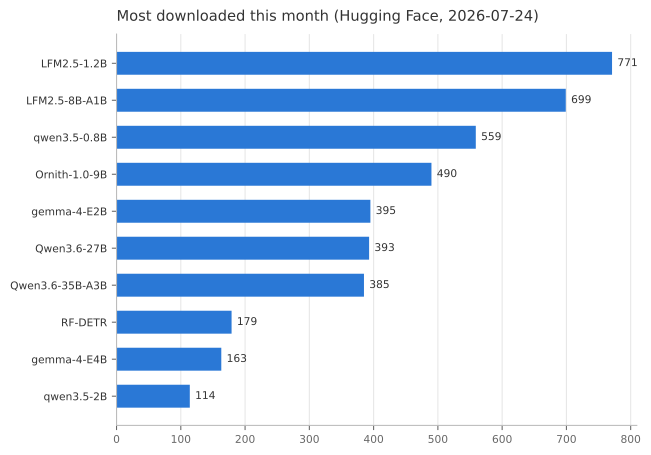
(auto-updated weekly from Hugging Face download counts)
| iPhone 17 Pro · GPU | iPhone 17 Pro · ANE | M4 Max · GPU | |
|---|---|---|---|
| Qwen3.5-0.8B | 71.9 | 14.7 | 210 |
| Qwen3.5-2B | 29 | — | 161 |
| LFM2.5-1.2B | 45.4 | — | 276.5 |
| LFM2.5-2.6B (reasoning; int8hu / int4lin 2.0 GB) | not measured | — | 116.7 / 139.2 |
LFM3-1.7B (reasoning; Mac: int8, 64-token chunked prefill, the .aimodel on the kit's path, macOS 27.0, first token 0.83 s from a 1,024-token prompt; iPhone: an iPhone 18 Pro Neural Engine bundle only — 8-bit palettized static, AOT h19p, a 768 + 256 turn in 6.71 s) |
— | 47.2 (iPhone 18 Pro, Neural Engine) | 169.5 |
| Granite 4.0-H 1B | 36.3 | — | 136.5 |
| Nanbeige4.1-3B | 15.9 | — | 114.5 |
| Nanbeige4.2-3B (22 physical / 44 executed+cache layers; int8) | pending | — | 46.4 |
| S1-mini (Superwhisper, ASR text normalizer, int8lin — device 276/276 + 27/27 token-exact; |
62.4 | — | 268.4 |
| MiniCPM5-1B (OpenBMB, int8 per-block-32 since 2026-09-09 — 24/24 + 6/6-incl.-stop on device, 16/16 on Mac; the earlier per-channel bundle never halted) | 61.7 | — | 246.6 |
| MiniCPM5-1B, Neural Engine (OpenBMB, 8-bit palettized static iOS export, AOT h18p — device gate PASS 3/3 vs fp32 HF, Apple's 4-bit preset fails it; same-day interleaved A/B p128/g256 vs the int8 GPU row: 76.8 / 76.8 vs 67.1 / 64.4 at equal byte width) | 76.8 / 76.8 | — | — |
| MiniCPM5-2B (OpenBMB, int8 — 16/16 exact vs fp32 HF on Mac, 24/24 + 24/24 on device) | 22.4 | — | 127.6 |
| MiniCPM5-2B, Neural Engine (OpenBMB, 4-bit palettized static iOS export, AOT h18p — device gate PASS 3/3 vs fp32 HF; same-day interleaved A/B p128/g256 vs the int8 GPU row: 55.4 / 51.5 vs 22.8 / 20.6 — half the weight bytes, so not equal precision) | 55.4 / 51.5 | — | — |
| Youtu-LLM-2B (dense MLA, int8 — 16/16 device ≡ Mac ≡ HF) | ~19 (in-app ~24) | — | 102.8 |
| FastContext-1.0-4B (repo-exploration agent, 4bit — AOT h18p; ANE inference unsupported) | 20.4 | ✗ | — |
| BitCPM-8B (1.58-bit ternary, OpenBMB — custom 2-bit packed-GEMM kernel; AOT h18p; ~2.1 GB resident; token-exact 3/3 vs ref) | 17 | ✗ | 62.7 |
| Gemma 4 E2B | 30.3 (QAT 30.7) | 6 | 77.0 (QAT 78.9) |
| Gemma 4 E4B (official QAT) | 15.1 | — | 55.8 |
| Gemma 4 E2B VL (image+text, official QAT) | 25.5 | — | 82.4 |
| MiniCPM-V 4.6 (vision-language, sub-2B) | 53.4 | — | 224.3 |
| MiniCPM-V 4.7-1B (vision-language, int8hu; text-only trial p128 / g256; device 23/23 + 32/32 vs fp32 HF) | 98.0 (iPhone 18 Pro, PipelinedBench, device JIT) | — | 134.4 (Python runtime, one AOT h16c call at a time — not llm-benchmark) |
| LFM2.5-VL-450M (vision-language, int8lin — image buffer bound; vision encode 33.6 ms/image on iPhone, 18.0 on Mac) | 112.0 | — | 387.2 |
| LFM2.5-VL-3B (vision-language, int4 on iPhone / int8 on Mac; vision 75.7 ms/image) | 19.3–22.8 | — | 105.3 |
| North-Micro-Vision (vision-language 2.4B, int8lin — image bound; vision 83.4 ms/image on Mac) | 18.2 | — | 118.6 |
| Qwen3.6-35B-A3B (MoE, 35B/~3B active, Mac-only) | — | — | 64.9 † |
| Qwen3.6-27B (dense, Mac-only) | — | — | 15.9 |
| Qwen3.8-27B (dense VLM, Mac-only; vision 111 ms/image, VLM prefill 86.0 tok/s via pf16) | — | — | 15.7 |
| GLM-4.7-Flash (MoE + MLA, 30B/~3B active, Mac-only) | — | — | 52.4 † |
| Gemma 4 12B (dense, Mac-only) | — | — | 23 int8 / 33 int4 ‡ |
| Gemma 4 31B (dense, Mac-only) | — | — | 17.2 int4 ‡ |
Measured on the iOS 27 / macOS 27 developer betas (June–September 2026 builds; not yet re-measured on the release OS), Apple's coreai-pipelined GPU engine, zero custom
kernels (ANE column + †/‡ excepted). † = MoE bundle using the custom
gather_qmm Metal kernel (reads only the routed
experts). ‡ = dense bundle whose full/global-attention SDPA is a custom flash-decode Metal
kernel — the stock MPSGraph SDPA crashed on the ≥16-head × 512 Q on the OS 27 betas (a GPU scratch-heap overflow, not re-tested on the release OS,
apple/coreai-models#27), so these models are
unrunnable without it. Prefill, sizes, per-model caveats, and the Mac-only big models: models/.

CoreAIChat (apps/) — the zoo's models running on-device on iPhone.
- You're a coding agent (or you're pointing one here) →
AGENTS.md— the porting contract in one file: why conversion isn't conversion, the two gates, the traps agents hit, and what isn't an agent's call. No install needed. One fetch for everything here:llms.txt. - Looking something up about the runtime itself → john-rocky.github.io/coreai-model-zoo — the knowledge base as a page per topic. Apple documents the API surface well; what these notes add is what the runtime does when you run it — the thresholds, the failure modes, the measured numbers — which is not written down anywhere. Plain HTML, so a reader without JS, a search crawler and a coding agent all get the same words.
- Reading start to finish rather than looking one thing up → The Art of Core AI — a free book built from these same measurements (Japanese edition).
- Surveying the whole Core AI ecosystem, not just this catalog → awesome-core-ai — Apple's own tooling, other people's converters and runtimes, sample apps, benchmarks, and learning material.
- Try the app (iOS 27 / macOS 27; the model downloads in-app):
- Demo app, no build → Mac: 2.0 (build 9) .dmg (signed and notarized; Apple silicon, macOS 27) · iPhone: CoreAI Zoo on the App Store Mac quick start: drag the app into Applications, open Chat → Qwen3 0.6B → Download & Load, wait for Ready, then send a message. Release notes and tested beta environment.
- Build it →
apps/— Xcode 27 + xcodegen, thecoreai-modelspatch stack +tokenizer.json
- Use a model in your own app → add CoreAIKit
(SPM) and load the catalog id; the model's card has the complete snippet + a 5-line
integration checklist (golden example:
models/whisper-large-v3-turbo/README.md). Engine-level deep-dive:knowledge/swift-runtime.md - Port a model, end to end →
PORTING.md— the complete walk from HF checkpoint to a verified.aimodelon iPhone (oracle → export → gates → device → publish), with a vision and an LLM worked example. Start here to contribute a port. - Rebuild a published bundle →
models/<model>/recipe.tomlviapython3 conversion/zoo_convert.py run <name>— see Rebuild a bundle - Convert a model (export API + gotchas) →
knowledge/conversion-guide.md - Compress →
knowledge/compression.md - Make it fast →
knowledge/custom-metal-kernels.md·knowledge/performance-ceiling.md - Known issue, still present on 26A428 (in-graph KV-write crash; workarounds + the input-mask escape) →
knowledge/coreai-beta-mpsgraph-kvwrite-bug.md— FB23024751 / apple/coreai-models#5 - Hit an error string (
LLVM ERROR: …,failed assertion …,failedToSpecialize,NSPOSIXErrorDomain Code=2, …) →knowledge/coreai-error-index.md— every exact string this project has observed, verbatim as a heading, with the verified cause, the fix, and the log or Apple issue behind it - Still stuck → conversion clinic — paste the error, get an answer
| Dir | What |
|---|---|
| coreai-kit ↗ | (sibling repo) The Swift package that runs this zoo: 1-line catalog: APIs (ChatSession, KitTranscriber, …), model download + cache, and per-kind example apps in Examples/ — the cards' |
models/ |
One directory per model — the card, the recipe.toml that reproduces its published bundles, and the generated _INVENTORY.md / index.json. Laid out like apple/coreai-models. |
skills/ |
Agent skills — install them and your coding agent can pick a model, reproduce its bundle, and verify the result. |
knowledge/ |
Verified notes on the framework: conversion, compression, stateful KV, custom Metal kernels, AOT, compute-unit rules, the Swift runtime. |
conversion/ |
Re-authored models + convert / verify / compress scripts (PyTorch → .aimodel). |
cli/ |
coreai export / doctor / verify — find a model's export route, lint an artifact against the failure patterns in knowledge/, gate it against an HF oracle. DOCTOR_RULES.md is the table those checks come from: 64 ways a conversion succeeds and the result is quietly wrong. |
swift/ |
CoreAIRunner — a Swift package that drives .aimodel LLM bundles, including architectures beyond the standard runtime. |
apps/ |
Engine showcases — apps for models that need a hand-tuned backend (custom Metal kernels, patch stack: BitCPM, RWKV-7, LLaDA, …) and the device-verification bench behind the published numbers. Want to just run a model? Use the kit examples ↗ instead. |
This repo ships a plugin so a coding agent can use the zoo without being told how: pick a model
from the catalog, reproduce its published bundle with the recorded recipe, and verify the
result against the model it came from. With no plugin mechanism at all, point the agent at
AGENTS.md — the same contract, zero install.
| Skill | Description |
|---|---|
reproduce-a-zoo-model |
Choose a model from models/index.json, rebuild its published bundle with zoo_convert.py and its prerequisites, and check it with zoo_verify.py. |
port-a-model-to-the-zoo |
Port a new model: the oracle-first method, the two gates, compression choices, the device tier, and what a finished port must ship. |
/plugin marketplace add https://github.com/john-rocky/coreai-model-zoo
/plugin install coreai-zoo-skills@coreai-model-zoo
codex plugin marketplace add https://github.com/john-rocky/coreai-model-zoo
then /plugins → coreai-model-zoo → coreai-zoo-skills → Install.
gemini extensions install /path/to/coreai-model-zoo/skills
Apple's own coreai-skills covers the toolchain
itself (authoring, export, compression). These two cover this catalog; install both.
Every model in the table is a conversion recipe anyone could have written — and some are, by people who are not me. Nanbeige4.2-3B (PR #6, by @ukint-vs) is the reference for what a contributed port looks like, and pocket-tts (PR #12, by @RahulRachuri) is the reference for how far the gates can be taken — an ASR round trip and a 302-sentence sweep, because tensor cosine can pass while the audio is unintelligible. The shape of both: pinned checkpoint + immutable bundle revision, the overlay/recipe/gates in the PR, the bundle published under the contributor's own HF namespace (you keep ownership and credit), and the maintainer runs the iPhone hardware gate for you if you don't have the device.
- Port a model —
PORTING.mdwalks the whole path (oracle → export → gates → publish); PRs welcome. - Conversion requests — a model you'd like to see here? Open an issue with the Hugging Face link and what you'd use it for.
- Stuck converting? Open a conversion clinic issue. The error text alone is enough to start; we ask for the rest. On the clinic day after the OS 27 release every ticket gets a same-day answer — a fix, or the reason it cannot be done yet. Search your error string first in
knowledge/coreai-error-index.md; if it is there, so is the fix. - No code needed — run the Bench tab in CoreAI Zoo (App Store) and submit the result: your device becomes a row in
BENCHMARKS.md.
Every model broken by the coreai-torch 0.4.0 debug-location issue has been re-published:
re-converted with 0.4.1 (verification gates re-run), or repaired in place with
strip_debug_info (debug locations removed,
weights byte-identical). Catalog-served apps just re-download. The few 🔧 rows above are the
remaining re-export queue. If you have your own 0.4.0-converted assets, strip_debug_info
fixes them in minutes — no re-conversion needed. (One port, FastContext-1.0-4B, was retired
instead of recovered: Microsoft removed its upstream weights on 2026-06-30, so it cannot be
rebuilt.) Details: knowledge/coreai-torch-041-ir-incident.md.
Daisuke Majima (MLBoy) — the converted models live at huggingface.co/mlboydaisuke; the same maintainer runs devicemark (on-device LLM leaderboard, where zoo ports are measured) and wrote the Japanese textbook The Art of Core AI, drawn from these ports.
BSD-3-Clause (LICENSE). Re-authored model code derives from Apple's BSD-3-Clause
coreai_models and retains its notices. Model weights follow their own licenses (see each
Hugging Face repo).