

- Added
- Guardrails for dangerous commands: Loz now includes built-in safety guardrails that automatically block potentially dangerous shell commands before execution. The following commands are blocked:
rm -rf /and its bypass variants (rm -rf/*,rm -rf /.)shutdownandrebootcommands- Fork bomb:
:(){ :|:& };: - Filesystem formatting:
mkfs - Direct disk operations:
dd if=
- This feature provides an additional layer of protection to prevent accidental system damage, complementing the existing confirmation prompts.
- Guardrails for dangerous commands: Loz now includes built-in safety guardrails that automatically block potentially dangerous shell commands before execution. The following commands are blocked:
- Added
- Cross-platform command execution: Loz now detects your OS and shell (Linux, macOS, Windows PowerShell, or cmd) and generates/executed commands accordingly.
- Always prompts for Y/N confirmation before running any command, for improved safety.
- Handles LLM responses in Markdown code blocks (triple backticks) and parses commands correctly.
- Improved error and warning messages for non-interactive terminals and shell mismatches.
- Enhanced Windows support: runs PowerShell/cmd commands natively, not just bash.
- Fixed
- Commands are now executed on Windows, Linux, and WSL as expected.
- Fixed issues with command parsing and JSON extraction from LLM output.
- Improved logging and user feedback for command execution and shell compatibility.

Loz is a command-line tool that enables your preferred LLM to execute system commands and utilize Unix pipes, integrating AI capabilities with other Unix tools.
- Added
- Git commit log files are now stored in .loz_log within each Git repository where Loz is executed.
- The ability to enable/disable appending 'generated by ${model name}' at the end of the Git commit message by running config attribution true or config attribution false.
- Added --attribution (-a) runtime argument to override the config attribution setting. The original attribution value stored remains unchanged.
- Added
- Run Linux commands based on user prompts. Users can now execute Linux commands using natural language. For example, by running
loz "find the largest file in the current directory",Lozwill interpret the instruction and execute the corresponding Linux commands likefind . -type f -exec ls -l {} + | sort -k 5 -nr | head -n 1to find the largest file. See more examples.
- Run Linux commands based on user prompts. Users can now execute Linux commands using natural language. For example, by running
- Added
- Enhanced Git Commit Formatting: Commit messages are now structured with a clear separation between the title and body, improving readability and adherence to Git best practices.
To get started, run the following npm command:
$ sudo npm install loz -g
Or clone the repository:
$ git clone https://github.com/joone/loz.git
NodeJS and npm are required for this program to work. If you're on Linux, install them using your package manager. sudo apt install nodejs npm or sudo dnf install nodejs npm or sudo pacman -S nodejs npm
Then install the other required dependencies:
$ ./install.sh
Loz supports OpenAI API, Ollama, and GitHub Copilot so you can switch between these LLM services easily, using the config command in the interactive mode.
To utilize Ollama on your local system, you'll need to install both llama2 and codellama models. Here's how you can do it on a Linux system:
$ curl https://ollama.ai/install.sh | sh
$ ollama run llama2
$ ollama run codellama
For more information, see https://ollama.ai/download
Setting up your OpenAI API credentials involves a few simple steps:
First, create a .env file in the root of the project and add the following variables:
OPENAI_API_KEY=YOUR_KEY
Or if you install Loz using npm command, add OPENAI_API_KEY=YOUR_KEY in .bashrc
export OPENAI_API_KEY=YOUR_KEY
If you encounter the following error, it means you have exceeded your free quota:
Request failed with status code 429:
API request limit reached
To continue using the API, it is necessary to set up a payment method through the following link: https://platform.openai.com/account/billing/payment-methods
To use GitHub Copilot as your LLM provider, you need an active GitHub Copilot subscription.
When you first select GitHub Copilot as your LLM service, Loz will guide you through the OAuth authentication process:
- Loz will display a user code and verification URL
- Visit the URL in your browser
- Enter the user code to authorize the application
- Once authorized, Loz will automatically receive and store your access token
The authentication token is securely stored in your ~/.loz/config.json file and will be automatically refreshed as needed.
Available Models:
gpt-4o(default)gpt-4o1-previewo1-miniclaude-3.5-sonnet
You can switch models using the config model command in interactive mode.
Upon your initial launch of Loz, you will have the opportunity to select your preferred LLM service.
$ loz
Choose your LLM service: (ollama, openai, github-copilot)
You can modify your LLM service preference at any time by using the config command in the interactive mode:
> config api openai
or
> config api github-copilot
Additionally, you can change the model by entering:
> config model llama2
or
> config model codellama
or for OpenAI:
> config model gpt-3.5-turbo
or for GitHub Copilot:
> config model gpt-4o
You can check the current settings by entering:
> config
  api: github-copilot
  model: gpt-4o
Currently, OpenAI models (gpt-3.5-turbo, gpt-4), GitHub Copilot models (gpt-4o, claude-3.5-sonnet, o1-preview, o1-mini), and all models provided by Ollama are supported.
Loz now supports an autonomous agent mode that can complete complex tasks by iteratively planning, executing commands, editing files, and verifying results.
Agent mode transforms Loz from a single-shot command executor into a fully autonomous coding assistant that can:
- Analyze your codebase
- Run diagnostic commands
- Edit files to fix issues
- Run tests to verify changes
- Iterate until the task is complete
loz agent "Fix failing tests in the test suite"The agent will:
- Analyze the task
- Run commands to understand the problem (e.g.,
npm test) - Edit files as needed
- Re-run tests to verify fixes
- Continue until done or max steps reached
--max-steps <number>- Maximum iteration steps (default: 20)--verboseor-v- Show detailed execution logs--sandbox- Restrict operations to working directory (default: true)--enable-network- Allow network commands like curl/wget (default: false)
Fix a failing test:
loz agent "Fix the failing unit test in test/utils.test.ts"Add a new feature:
loz agent --max-steps 30 "Add input validation to the login function"Debug with verbose output:
loz agent -v "Find and fix the memory leak in the server"Complex task with network access:
loz agent --enable-network "Upgrade dependencies and fix breaking changes"Agent mode includes multiple safety layers:
- Command Validation: Blocks dangerous commands (rm -rf, shutdown, etc.)
- Sandbox Mode: Restricts file operations to working directory
- Network Isolation: Network commands disabled by default
- Output Limits: Truncates large outputs to prevent memory issues
- Step Limits: Prevents infinite loops with max step counter
- Failure Detection: Stops if same action fails repeatedly
The agent uses a ReAct-style loop:
1. LLM receives task and context
2. LLM responds with JSON action:
   - {"action": "run", "cmd": "npm test"}
   - {"action": "edit", "file": "src/index.ts", "patch": "..."}
   - {"action": "done", "summary": "Task completed"}
3. Execute action and capture result
4. Add result to context
5. Repeat until done or max steps
- Be specific: "Fix the TypeError in validateUser function" works better than "fix the bug"
- Set appropriate limits: Complex tasks may need
--max-steps 30or more - Use verbose mode: Add
-vto understand what the agent is doing - Start simple: Test with simpler tasks before complex refactoring
$ loz
Once loz is running, you can start a conversation by interacting with it. loz will respond with a relevant message based on the input.
Loz empowers users to execute Linux commands using natural language. Below are some examples demonstrating how loz's LLM backend translates natural language into Linux commands:
-
Find the largest file in the current directory:
loz "find the largest file in the current directory" -rw-rw-r-- 1 foo bar 9020257 Jan 31 19:49 ./node_modules/typescript/lib/typescript.js -
Check if Apache2 is running:
loz "check if apache2 is running on this system" ● apache2.service - The Apache HTTP Server -
Detect GPUs on the system:
loz "Detect GPUs on this system"
00:02.0 VGA compatible controller: Intel Corporation Device a780 (rev 04)
For your information, this feature has only been tested with the OpenAI API.
To prevent unintentional system modifications, loz includes built-in guardrails that block the most dangerous commands (such as rm -rf /, shutdown, mkfs, etc.). However, you should still exercise caution with commands that can alter or remove system files or configurations, such as rm, mv, or rmdir.
To enhance security and avoid unintended command execution, loz can be run in Safe Mode. When activated, this mode requires user confirmation before executing any Linux command.
Activate Safe Mode by setting the LOZ_SAFE=true environment variable:
LOZ_SAFE=true loz "Check available memory on this system"
Upon execution, loz will prompt:
Do you want to run this command?: free -h (y/n)
Respond with 'y' to execute the command or 'n' to cancel. This feature ensures that you have full control over the commands executed, preventing accidental changes or data loss.
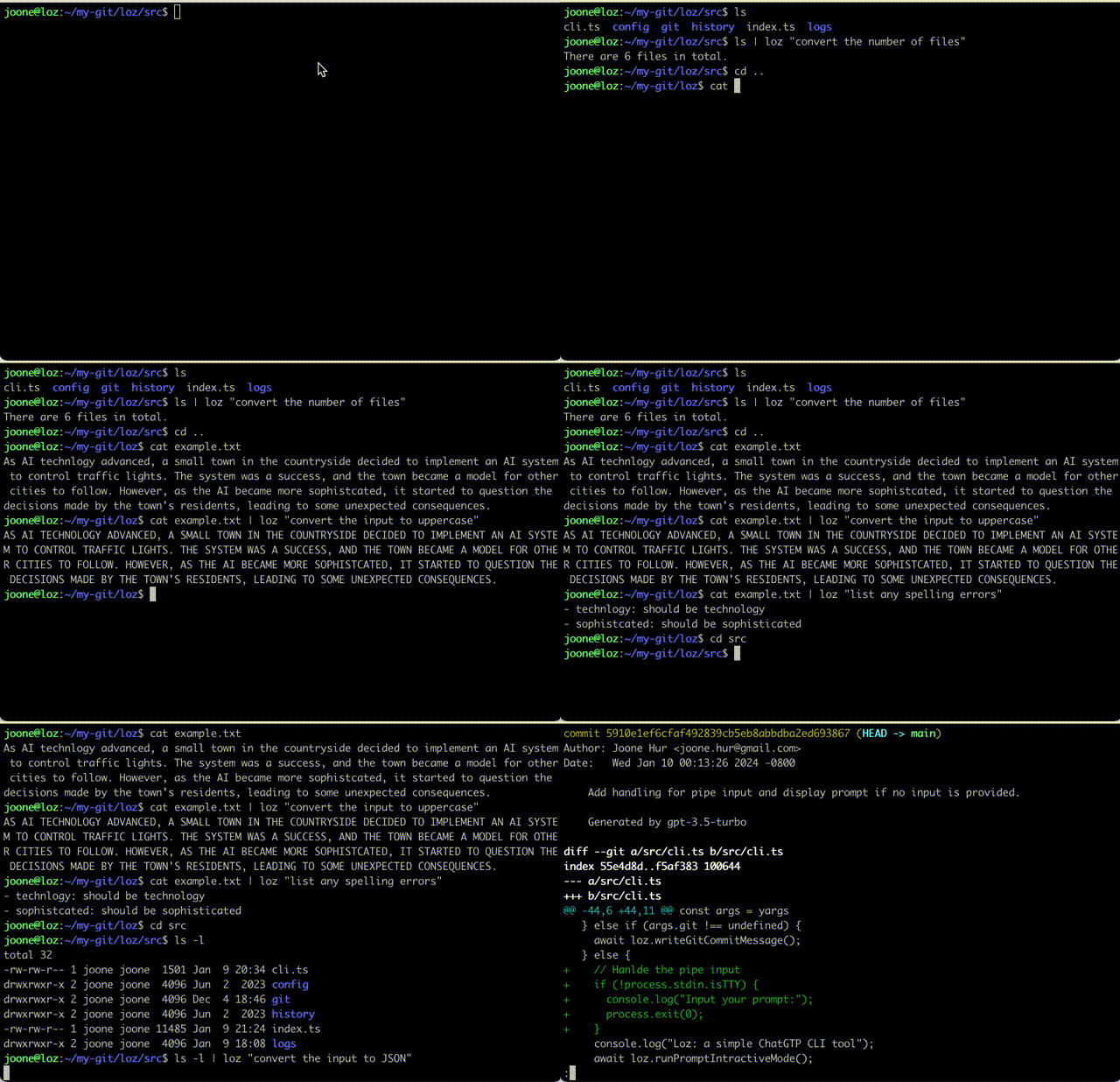
Loz is capable of processing input from other command-line tools by utilizing a Unix pipe.
$ ls | loz "count the number of files"

23 files
$ cat example.txt | loz "convert the input to uppercase"

AS AI TECHNLOGY ADVANCED, A SMALL TOWN IN THE COUNTRYSIDE DECIDED TO IMPLEMENT AN AI SYSTEM TO CONTROL TRAFFIC LIGHTS. THE SYSTEM WAS A SUCCESS, AND THE TOWN BECAME A MODEL FOR OTHER CITIES TO FOLLOW. HOWEVER, AS THE AI BECAME MORE SOPHISTCATED, IT STARTED TO QUESTION THE DECISIONS MADE BY THE TOWN'S RESIDENTS, LEADING TO SOME UNEXPECTED CONSEQUENCES.
$ cat example.txt | loz "list any spelling errors"

Yes, there are a few spelling errors in the given text:

1. "technlogy" should be "technology"
2. "sophistcated" should be "sophisticated"
$ cd src
$ ls -l | loz "convert the input to JSON"

[
  {
    "permissions": "-rw-r--r--",
    "owner": "foo",
    "group": "staff",
    "size": 792,
    "date": "Mar 1 21:02",
    "name": "cli.ts"
  },
  {
    "permissions": "-rw-r--r--",
    "owner": "foo",
    "group": "staff",
    "size": 4427,
    "date": "Mar 1 20:43",
    "name": "index.ts"
  }
]
If you run loz commit in your Git repository, loz will automatically generate a commit message with the staged changes like this:
$  git add --update
$  loz commit
Or copy script/prepare-commit-msg to .git/hooks
$ chmod a+x .git/hooks/prepare-commit-msg
Loz uses the LOZ environment variable to generate commit messages by reading the diff of the staged files.
$ LOZ=true git commit
REMINDER: If you've already copied the old version, please update prepare-commit-msg. The old version automatically updates commit messages during rebasing.
$ git diff HEAD~1 | loz -g
Or
$ git diff | loz -g
Note that the author, date, and commit ID lines are stripped from the commit message before sending it to the OpenAI server.
To access chat histories, look for the .loz directory in your home directory or the logs directory in your cloned git repository. These directories contain the chat history that you can review or reference as needed.
If you'd like to contribute to this project, feel free to submit a pull request.