

Program that enables you to play online chess using real chess boards. Using computer vision it will detect the moves you make on a chess board. After that, if it's your turn to move in the online game, it will make the necessary clicks to make the move.
- Turn off all the animations and extra features to keep chess board of online game as simple as possible. You can skip this step if you enter your Lichess API Access Token.
- Take screenshots of the chess board of an online game at starting position, one for when you play white and one for when you play black and save them as "white.JPG" and "black.JPG" similar to the images included in the source code. You can skip this step if you enable "Find chess board of online game without template images." option or enter your Lichess API Access Token.
- Enable auto-promotion to queen from settings of online game. You can skip this step if you enter your Lichess API Access Token.
- Place your webcam near to your chessboard so that all of the squares and pieces can be clearly seen by it.
- Select a board calibration mode and follow its instructions.
-
Remove all pieces from your chess board.
-
Click the "Board Calibration" button.
-
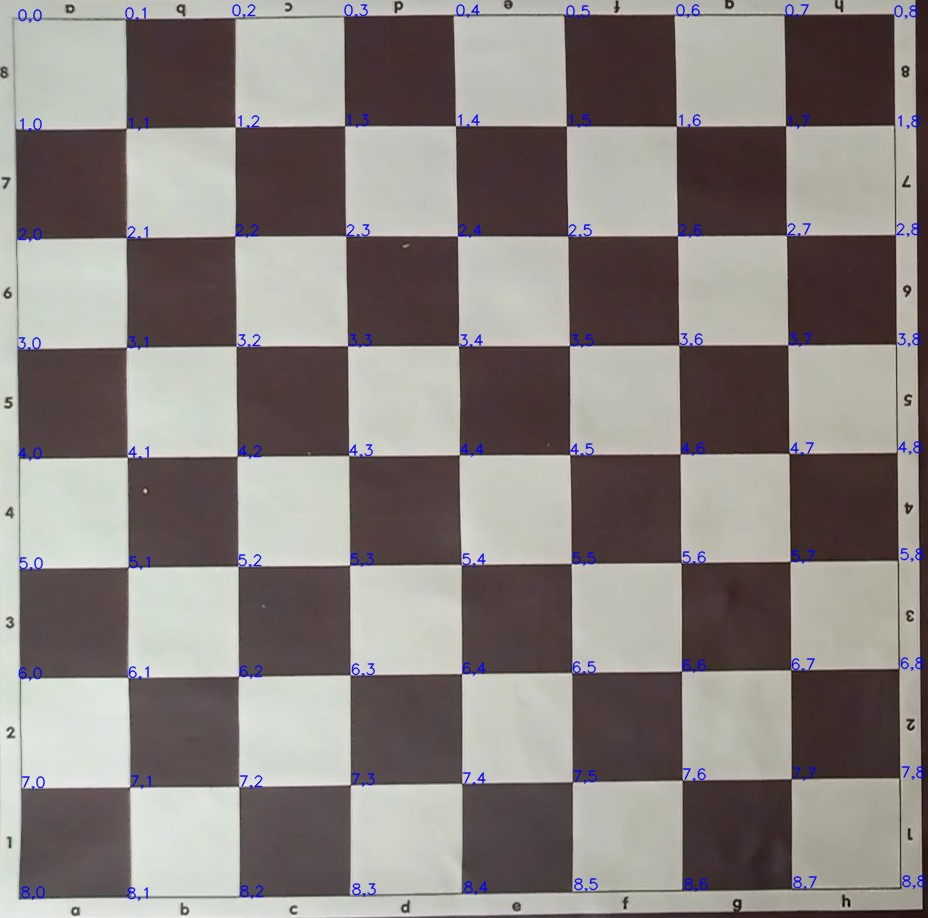
Check that corners of your chess board are correctly detected by "board_calibration.py" and press key "q" to save detected chess board corners. You don't need to manually select chess board corners; it should be automatically detected by the program. The square covered by points (0,0), (0,1),(1,0) and (1,1) should be a8. You can rotate the image by pressing the key "r" to adjust that. Example chess board detection result:

- Place the pieces in their starting positions.
- Click the "Board Calibration" button.
- Please ensure your chess board is correctly positioned and detected. Guiding lines will be drawn to mark the board's edges:
- The line near the white pieces will be blue.
- The line near the black pieces will be green.
- Press any key to exit once you've confirmed the board setup.

- Click the "Start Game" button. The software will calibrate the board just before it begins move recognition.
- Place pieces of chess board to their starting position.
- Start the online game.
- Click the "Start Game" button.
- Switch to the online game so that program detects chess board of online game. You have 5 seconds to complete this step. You can skip this step if you enter your Lichess API Access Token.
- Wait until the program says "game started".
- Make your move if it's your turn , otherwise make your opponent's move.
- Notice that the program actually makes your move on the internet game if it's your turn. Otherwise, wait until the program says starting and ending squares of the opponent's move. To save clock time, you may choose not to wait, but this is not recommended.
- Go to step 6.
You need to run the GUI to do the steps in Setup, Usage and Diagnostic sections. Also, you can enter your Lichess API Access Token via Connection→Lichess (You need to enable "Play games with the board API" while generating the token).

You need to click the "Diagnostic" button to run the diagnostic process. It will show your chessboard in a perspective-transformed form, exactly as the software sees it. Additionally, it will mark white pieces with a blue circle and black pieces with a green circle, allowing you to verify if the software can detect the pieces on the chess board.

In this section you can find video content related to the software.
Play online chess with real chess board and web camera | NO DGT BOARD!
It tracks your chess board via a webcam. You should place it on top of your chess board. Make sure there is enough light in the environment and all squares are clearly visible. When you make a move on your chess board, it understands the move you made and transfers it to the chess GUI by simulating mouse clicks (It clicks the starting and ending squares of your move). This way, using your chess board, you can play chess in any chess program, either websites like lichess.org, chess.com, or desktop programs like Fritz, Chessmaster etc.
Placing a webcam on top of the chess board sounds difficult. Can I put my laptop aside with the webcam on the laptop display?
Yes, you can do that with a small chess board. However, placing a webcam on top of the chess board is recommended. Personally, while using the program I am putting my laptop aside and it gives out moves via chess gui and shows clocks. Instead of using the laptop's webcam, I disable it and use my old android phone's camera as a webcam using an app called DroidCam. I place my phone somewhere high enough (a bookshelf, for instance) so that all of the squares and pieces can be clearly seen by it.
Using this software I am able to make up to 100 moves in 15+10 rapid online game without getting any errors.
The program asked you to redo your move because it understood that you had made a move. However, it failed to figure out which move you made. This can happen if your board calibration is incorrect or the color of your pieces are very similar to the color of your squares. If the latter is the case, you will get this error message when playing white piece to light square or black piece to dark square.
It should detect corners of the chess board almost immediately. Please do not spend any time waiting for it to detect corners of the chess board. If it can't detect corners of the chess board almost immediately, this means that it can't see your chess board well from that position/angle. Placing your webcam somewhere a bit higher or lower might solve the issue.
- opencv-python
- python-chess
- pyautogui
- mss
- numpy
- pyttsx3
- scikit-image
- pygrabber
- berserk