

Zhe Kong · Yong Zhang* · Tianyu Yang · Tao Wang· Kaihao Zhang
Bizhu Wu · Guanying Chen · Wei Liu · Wenhan Luo*
*Corresponding Authors
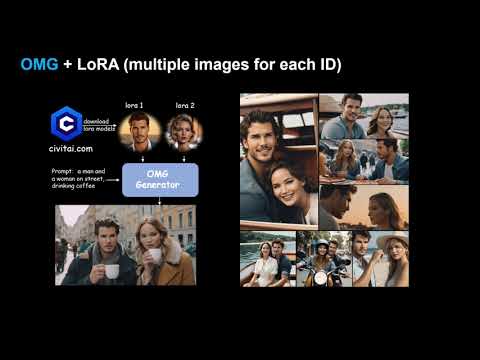
OMG + LORA :

OMG + InstantID:



TL; DR: OMG is a framework for multi-concept image generation, supporting character and style LoRAs on Civitai.com. It also can be combined with InstantID for multiple IDs with using a single image for each ID.

Introduction of OMG: A tool for high-quality multi-character image generation.
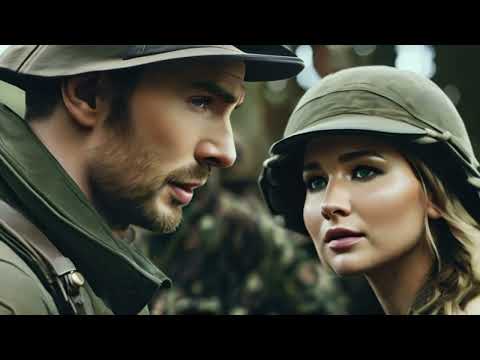
Trailor Demo: A short trailor "Home Defense" created by using OMG + SVD.
- [2023/3/22] 🔥 We release the Hugging space for OMG + InstantID. Support ID personalization with a single image.
- [2023/3/19] 🔥 We release the technical report and Hugging space for OMG-LoRAs
- [2023/3/18] 🔥 We release the source code and gradio demo of OMG.


- The code requires
python==3.10.6, as well aspytorch==2.0.1andtorchvision==0.15.2. Please follow the instructions here to install both PyTorch and TorchVision dependencies. Installing both PyTorch and TorchVision with CUDA support is strongly recommended.
conda create -n OMG python=3.10.6
conda activate OMG
pip install torch==2.0.1 torchvision==0.15.2 torchaudio==2.0.2
pip install -r requirements.txt
pip install git+https://github.com/facebookresearch/segment-anything.git- For Visual comprehension, you can choose
YoloWorld + EfficientViT SAMorGroundingDINO + SAM
-
- (Recommend) YoloWorld + EfficientViT SAM:
pip install inference[yolo-world]==0.9.13
pip install  onnxsim==0.4.35
-
- (Optional) If you can not install
inference[yolo-world]. You can installGroundingDINOfor visual comprehension.
- (Optional) If you can not install
GroundingDINO requires manual installation.
Run this so the environment variable will be set under current shell.
export CUDA_HOME=/path/to/cuda-11.3
In this example, /path/to/cuda-11.3 should be replaced with the path where your CUDA toolkit is installed.
git clone https://github.com/IDEA-Research/GroundingDINO.git

cd GroundingDINO/

pip install -e .
More installation details can be found in GroundingDINO
Download stable-diffusion-xl-base-1.0, controlnet-openpose-sdxl-1.0.
For InstantID + OMG download:
wangqixun/YamerMIX_v8,
InstantID,
antelopev2,
2. For Visual comprehension, you can choose "YoloWorld + EfficientViT SAM" or "GroundingDINO + SAM".
For YoloWorld + EfficientViT SAM:
EfficientViT-SAM-XL1, yolo-world.
For GroundingDINO + SAM:
GroundingDINO, SAM.
For Character LoRAs for man:
Chris Evans,
Gleb Savchenko,
Harry Potter,
Jordan Torres.
For Character LoRAs for woman:
Taylor Swift,
Jennifer Lawrence,
Hermione Granger,
Keira Knightley.
ControlNet, controlnet-canny-sdxl-1.0, controlnet-depth-sdxl-1.0, dpt-hybrid-midas.
Anime Sketch Style, Oil Painting Style, Cinematic Photography Style.
Put the models under checkpoint as follow:
OMG
├── assets
├── checkpoint
│   ├── antelopev2
│   │   └── models
│   │       └── antelopev2
│   │           ├── 1k3d68.onnx
│   │           ├── 2d106det.onnx
│   │           ├── genderage.onnx
│   │           ├── glintr100.onnx
│   │           └── scrfd_10g_bnkps.onnx
│   ├── ControlNet
│   ├── controlnet-canny-sdxl-1.0
│   ├── controlnet-depth-sdxl-1.0
│   ├── controlnet-openpose-sdxl-1.0
│   ├── dpt-hybrid-midas
│   ├── GroundingDINO
│   ├── InstantID
│   ├── lora
│   │   ├── chris-evans.safetensors
│   │   ├── Gleb-Savchenko_Liam-Hemsworth.safetensors
│   │   ├── Harry_Potter.safetensors
│   │   ├── Hermione_Granger.safetensors
│   │   ├── jordan_torres_v2_xl.safetensors
│   │   ├── keira_lora_sdxl_v1-000008.safetensors
│   │   ├── lawrence_dh128_v1-step00012000.safetensors
│   │   └── TaylorSwiftSDXL.safetensors
│   ├── sam
│   │   ├── sam_vit_h_4b8939.pth
│   │   └── xl1.pt
│   ├── stable-diffusion-xl-base-1.0
│   ├── style
│   │   ├── Anime_Sketch_SDXL.safetensors
│   │   ├── Cinematic Hollywood Film.safetensors
│   │   └── EldritchPaletteKnife.safetensors
│   └── YamerMIX_v8
├── example
├── gradio_demo
├── inference_instantid.py
├── inference_lora.py
├── README.md
├── requirements.txt
└── src
Put ViT-B-32.pt (download from openai) to ~/.cache/clip/ViT-B-32.pt.
If using YoloWorld, put yolo-world.pt to /tmp/cache/yolo_world/l/yolo-world.pt.
Or you can manually set the checkpoint path as follows:
python inference_lora.py  \
--pretrained_sdxl_model <path to stable-diffusion-xl-base-1.0> \
--controlnet_checkpoint <path to controlnet-openpose-sdxl-1.0> \
--efficientViT_checkpoint <path to efficientViT-SAM-XL1> \
--dino_checkpoint <path to GroundingDINO> \
--sam_checkpoint <path to sam> \
--lora_path <Lora path to character1|Lora path to character1> \
--style_lora <Path to style LoRA>
For OMG + InstantID:
python inference_instantid.py  \
--pretrained_model <path to stable-diffusion-xl-base-1.0> \
--controlnet_path <path to InstantID controlnet> \
--face_adapter_path <path to InstantID face adapter> \
--efficientViT_checkpoint <path to efficientViT-SAM-XL1> \
--dino_checkpoint <path to GroundingDINO> \
--sam_checkpoint <path to sam> \
--antelopev2_path <path to antelopev2> \
--style_lora <Path to style LoRA>
The <TOK> for Harry_Potter.safetensors is Harry Potter and for Hermione_Granger.safetensors is Hermione Granger.
For visual comprehension, you can set --segment_type 'yoloworld' for YoloWorld + EfficientViT SAM, or --segment_type 'GroundingDINO' for GroundingDINO + SAM.
python inference_lora.py \
    --prompt <prompt for the two person> \
    --negative_prompt <negative prompt> \
    --prompt_rewrite "[<prompt for person 1>]-*-[<negative prompt>]|[<prompt for person 2>]-*-[negative prompt]" \
    --lora_path "[<Lora path for character1|Lora path for character1>]"
For example:
python inference_lora.py \
    --prompt "Close-up photo of the happy smiles on the faces of the cool man and beautiful woman as they leave the island with the treasure, sail back to the vacation beach, and begin their love story, 35mm photograph, film, professional, 4k, highly detailed." \
    --negative_prompt 'noisy, blurry, soft, deformed, ugly' \
    --prompt_rewrite '[Close-up photo of the Chris Evans in surprised expressions as he wear Hogwarts uniform, 35mm photograph, film, professional, 4k, highly detailed.]-*-[noisy, blurry, soft, deformed, ugly]|[Close-up photo of the TaylorSwift in surprised expressions as she wear Hogwarts uniform, 35mm photograph, film, professional, 4k, highly detailed.]-*-[noisy, blurry, soft, deformed, ugly]' \
    --lora_path './checkpoint/lora/chris-evans.safetensors|./checkpoint/lora/TaylorSwiftSDXL.safetensors'
For OMG + LoRA + ControlNet (Human Pose):
python inference_lora.py \
    --prompt "Close-up photo of the happy smiles on the faces of the cool man and beautiful woman as they leave the island with the treasure, sail back to the vacation beach, and begin their love story, 35mm photograph, film, professional, 4k, highly detailed." \
    --negative_prompt 'noisy, blurry, soft, deformed, ugly' \
    --prompt_rewrite '[Close-up photo of the Chris Evans in surprised expressions as he wear Hogwarts uniform, 35mm photograph, film, professional, 4k, highly detailed.]-*-[noisy, blurry, soft, deformed, ugly]|[Close-up photo of the TaylorSwift in surprised expressions as she wear Hogwarts uniform, 35mm photograph, film, professional, 4k, highly detailed.]-*-[noisy, blurry, soft, deformed, ugly]' \
    --lora_path './checkpoint/lora/chris-evans.safetensors|./checkpoint/lora/TaylorSwiftSDXL.safetensors' \
    --spatial_condition './example/pose.png' \
    --controlnet_checkpoint './checkpoint/controlnet-openpose-sdxl-1.0'
For OMG + LoRA + Style:
python inference_lora.py \
    --prompt "Close-up photo of the happy smiles on the faces of the cool man and beautiful woman as they leave the island with the treasure, sail back to the vacation beach, and begin their love story, 35mm photograph, film, professional, 4k, highly detailed, Pencil_Sketch:1.2, messy lines, greyscale, traditional media, sketch." \
    --negative_prompt 'noisy, blurry, soft, deformed, ugly' \
    --prompt_rewrite '[Close-up photo of the Chris Evans in surprised expressions as he wear Hogwarts uniform, 35mm photograph, film, professional, 4k, highly detailed, Pencil_Sketch:1.2, messy lines, greyscale, traditional media, sketch.]-*-[noisy, blurry, soft, deformed, ugly]|[Close-up photo of the TaylorSwift in surprised expressions as she wear Hogwarts uniform, 35mm photograph, film, professional, 4k, highly detailed, Pencil_Sketch:1.2, messy lines, greyscale, traditional media, sketch.]-*-[noisy, blurry, soft, deformed, ugly]' \
    --lora_path './checkpoint/lora/chris-evans.safetensors|./checkpoint/lora/TaylorSwiftSDXL.safetensors' \
    --style_lora './checkpoint/style/Anime_Sketch_SDXL.safetensors'
python inference_instantid.py \
    --prompt <prompt for the two person> \
    --negative_prompt <negative prompt> \
    --prompt_rewrite "[<prompt for person 1>]-*-[<negative prompt>]-*-<path to reference image1>|[<prompt for person 2>]-*-[negative prompt]-*-<path to reference image2>"
For example:
python inference_instantid.py \
    --prompt 'Close-up photo of the happy smiles on the faces of the cool man and beautiful woman as they leave the island with the treasure, sail back to the vacation beach, and begin their love story, 35mm photograph, film, professional, 4k, highly detailed.' \
    --negative_prompt 'noisy, blurry, soft, deformed, ugly' \
    --prompt_rewrite '[Close-up photo of the a man, 35mm photograph, professional, 4k, highly detailed.]-*-[noisy, blurry, soft, deformed, ugly]-*-./example/chris-evans.jpg|[Close-up photo of the a woman, 35mm photograph, professional, 4k, highly detailed.]-*-[noisy, blurry, soft, deformed, ugly]-*-./example/TaylorSwift.png'
For OMG + InstantID + ControlNet (Human Pose):
python inference_instantid.py \
    --prompt 'Close-up photo of the happy smiles on the faces of the cool man and beautiful woman as they leave the island with the treasure, sail back to the vacation beach, and begin their love story, 35mm photograph, film, professional, 4k, highly detailed.' \
    --negative_prompt 'noisy, blurry, soft, deformed, ugly' \
    --prompt_rewrite '[Close-up photo of the a man, 35mm photograph, professional, 4k, highly detailed.]-*-[noisy, blurry, soft, deformed, ugly]-*-./example/chris-evans.jpg|[Close-up photo of the a woman, 35mm photograph, professional, 4k, highly detailed.]-*-[noisy, blurry, soft, deformed, ugly]-*-./example/TaylorSwift.png' \
    --spatial_condition './example/pose.png' \
    --t2i_controlnet_path './checkpoint/controlnet-openpose-sdxl-1.0'
For OMG + InstantID + Style:
python inference_instantid.py \
    --prompt 'Close-up photo of the happy smiles on the faces of the cool man and beautiful woman as they leave the island with the treasure, sail back to the vacation beach, and begin their love story, 35mm photograph, film, professional, 4k, highly detailed, Pencil_Sketch:1.2, messy lines, greyscale, traditional media, sketch.' \
    --negative_prompt 'noisy, blurry, soft, deformed, ugly' \
    --prompt_rewrite '[Close-up photo of the a man, 35mm photograph, professional, 4k, highly detailed, Pencil_Sketch:1.2, messy lines, greyscale, traditional media, sketch.]-*-[noisy, blurry, soft, deformed, ugly]-*-./example/chris-evans.jpg|[Close-up photo of the a woman, 35mm photograph, professional, 4k, highly detailed, Pencil_Sketch:1.2, messy lines, greyscale, traditional media, sketch.]-*-[noisy, blurry, soft, deformed, ugly]-*-./example/TaylorSwift.png' \
    --style_lora './checkpoint/style/Anime_Sketch_SDXL.safetensors'
For OMG + InstantID + Style + ControlNet (Human Pose):
python inference_instantid.py \
    --prompt 'Close-up photo of the happy smiles on the faces of the cool man and beautiful woman as they leave the island with the treasure, sail back to the vacation beach, and begin their love story, 35mm photograph, film, professional, 4k, highly detailed, Pencil_Sketch:1.2, messy lines, greyscale, traditional media, sketch.' \
    --negative_prompt 'noisy, blurry, soft, deformed, ugly' \
    --prompt_rewrite '[Close-up photo of the a man, 35mm photograph, professional, 4k, highly detailed, Pencil_Sketch:1.2, messy lines, greyscale, traditional media, sketch.]-*-[noisy, blurry, soft, deformed, ugly]-*-./example/chris-evans.jpg|[Close-up photo of the a woman, 35mm photograph, professional, 4k, highly detailed, Pencil_Sketch:1.2, messy lines, greyscale, traditional media, sketch.]-*-[noisy, blurry, soft, deformed, ugly]-*-./example/TaylorSwift.png' \
    --style_lora './checkpoint/style/Anime_Sketch_SDXL.safetensors' \
    --spatial_condition './example/pose.png' \
    --t2i_controlnet_path './checkpoint/controlnet-openpose-sdxl-1.0'
If you choose YoloWorld + EfficientViT SAM:
python gradio_demo/app.py --segment_type yoloworld
For GroundingDINO + SAM:
python gradio_demo/app.py --segment_type GroundingDINO
If you choose YoloWorld + EfficientViT SAM:
python gradio_demo/app_instantID.py --segment_type yoloworld
For GroundingDINO + SAM:
python gradio_demo/app_instantID.py --segment_type GroundingDINO
Connect to the public URL displayed after the startup process is completed.

