

Liquid Prompt gives you a carefully designed prompt with useful information. It shows you what you need when you need it. You will notice what changes when it changes, saving time and frustration. You can even use it with your favorite shell – Bash or zsh.
Below are screenshots of typical states that you would see in everyday use.
Using the default theme:

Using the Powerline theme:

Of course, Liquid Prompt may display much more information, depending on the status of your system.
There are many prompt configurations out there, but here is what makes Liquid Prompt stand out:
- UX Design: The Liquid Prompt was very carefully designed from the beginning to allow for the best user experience. That is, it displays meaningful information with minimal visual clutter and maximum readability. While most of the other prompts are focused on aligning as many colored "segments" as possible on top of each other to look fancy, Liquid Prompt focuses on what really matters.
- Ease of use: The Liquid Prompt is written in (heavily optimized) portable Shell, and its installation is as easy as copying files. It also provides predefined themes, enabled by a simple command in your shell configuration. Configuration is as simple as editing a text file with key/value pairs. No complex format to learn.
- Shell features first: The Liquid Prompt helps you be aware of all the powerful features a modern shell can provide. While most of the other prompts focus on covering a lot of (boring) software version tags, Liquid Prompt shows you the features that are actually useful while you actually use the shell.
- Configurability: All aspects of Liquid Prompt are configurable, down to the core.
To see what that entails, see the latest features overview. (which also presents a comparison with other prompt systems).
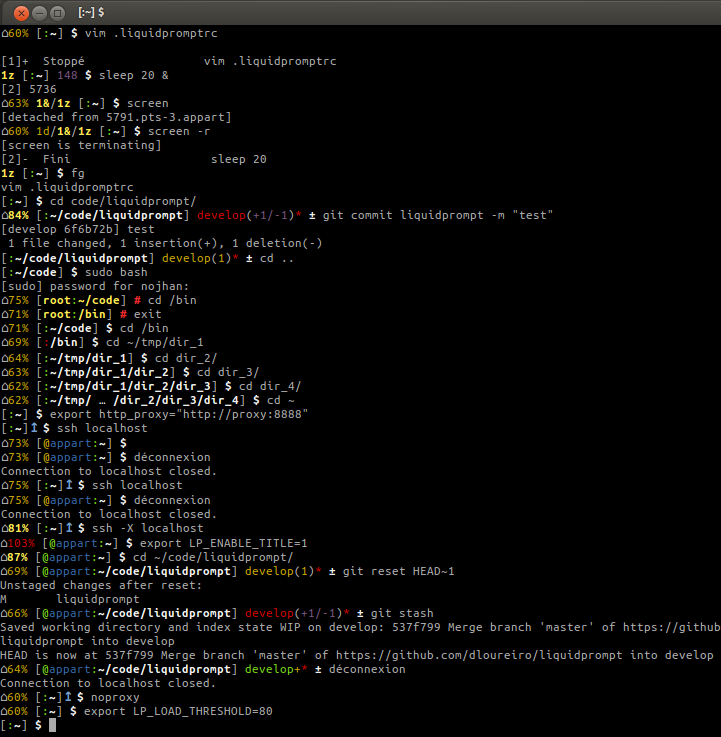
You may also take a closer look at this screenshot of a session showing various features, in the default theme:

See the Liquidprompt documentation for details on installing and configuring Liquidprompt.
Liquid Prompt is distributed under the GNU Affero General Public License version 3.
Current Maintainer: Rycieos. Other main authors: nojhan and dolmen.
And many contributors!


