


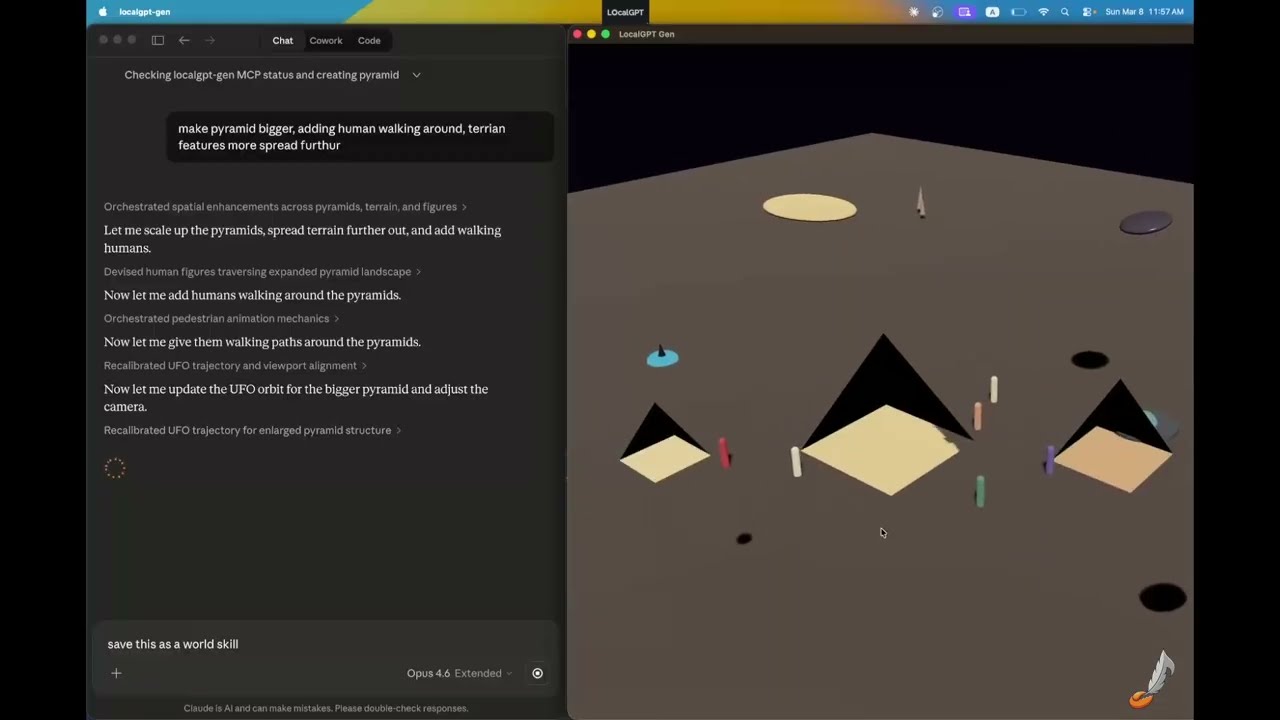
A desktop app where a document, a song, a screenplay or a prompt becomes a .world you can walk through, with your own coding agents in the terminals beside it. A world is a package with a history: people edit it in the window, agents edit it from outside, and every change is logged, attributed, undoable and branchable. LocalGPT runs no model, calls no service and holds no key; the agents bring their own. Open source, Apache 2.0, runs on your machine.
| Where | What | |
|---|---|---|
| LocalGPT, the desktop app | crates/app |
One window, every mode: a world from a prompt (Gen), from a Markdown document (MD) or from a song (Verse), or any .world package opened as a live canvas. |
| LocalGPT Gen, the binary | crates/gen · cargo install localgpt-gen |
The world builder on its own: its 88 tools over MCP for Claude Desktop, Claude Code, Codex, Gemini CLI and editors, a relay so an agent drives the window you are looking at, the live canvas, headless, collaborative sessions on the LAN or through a relay. |
| Previs | crates/previs · cargo install localgpt-previs · localgpt.md |
A screenplay in — PDF, Final Draft, Fountain or Markdown — and per scene a .world with the set, the cast and the coverage, plus a printable board and a shot list. Deterministic, no model; the same code runs in the browser tab. |
localgpt, the world's command line |
crates/cli · cargo install localgpt |
localgpt world: commit, undo, log, tips, verify, screenshot — and localgpt world mcp, the shim that serves an open world's tools to any MCP agent. The assistant that this binary was through 0.4.2 (chat, daemon, memory, heartbeat) went on 2026-11-01 (why); cargo install localgpt --version 0.4.2 keeps it. |
| The world crates | crates/world-* |
world-types, world-bevy, world-audio, world-export, world-sync, world-editor, world-agent: one format for every app, over the Open World Format reference crate. |
| The sites | website*/ |
localgpt.app (hub and the only docs site) · gen.localgpt.app · verse.localgpt.app · localgpt.md (previs) · localgpt.world (gallery and web viewer) · localgpt.rs (devlog) |
# From crates.io
cargo install localgpt-gen       # the world builder: MCP server, the relay, headless, sessions
cargo install localgpt-previs    # a screenplay to a previs board, on the command line
cargo install localgpt           # `localgpt world`, a .world package's command line, and the MCP shim

# From source — the desktop app ships as a build, not a crate
git clone https://github.com/localgpt-app/localgpt.git
cd localgpt
(cd crates/app/ui && npm ci && npm run build)         # the app's interface, once (node 22)
cargo run -p localgpt-app                             # reopens what was opened last
cargo run -p localgpt-app -- --md notes.md            # a document as a world
cargo run -p localgpt-app -- --song track.mp3         # a song as a world that performs it
cargo run -p localgpt-app -- --world scene-1.world    # a package, opened as a live canvas
apps/app-desktop/macos/build-app.sh                   # LocalGPT.app for macOS

# The shared download, once per machine, read by every app
scripts/fetch-assets.sh    # the 522 MB CC0 asset pack (Poly Haven models)
Rust stable (edition 2024, so 1.85 or newer). On Linux the desktop crates need Bevy's system packages: libasound2-dev libudev-dev libwayland-dev libxkbcommon-dev libfontconfig1-dev libdbus-1-dev pkg-config. Full options, feature flags and headless builds: Installation.
localgpt-app is Gen's world in a Bevy viewport with one interface around it — a web page over the window — and your own coding agents in it: each tab is a plain terminal running your login shell, started in the folder of what is open, and you run whichever agent you like in it. The app runs no model, holds no key, knows no agent by name and manages no agent's configuration. Open… at the top of the window takes a document, a song or a world; the launch flags above do the same.
- A document. The outline, the selected section's place and the text in an editor beside the world. The file saves and the world rebuilds shortly after typing stops, in place, changing only the sections whose text changed. The cursor moving into a section flies the camera there, and clicking a thing in the world brings its section into view. Scenery a model authored comes from MD's sidecar beside the document, written by
localgpt-md --generateor by an agent working on the file; the outline labels each section with where its place came from. - A song. Verse's on-device analysis — tempo, a beat grid, sections, an energy curve, a mood — picks and furnishes the world; the soundtrack plays on the shared mixer, the world's modulations follow it, and a transport under the world pauses it. No model, no key, no upload.
- A package. A
.worldfolder opens as a live canvas: the window holds the authority and serves the folder's API, the history is drawn as a graph you step and play through, and agents edit from outside (next section) — from the tabs beside it, or anywhere else.
The interface is macOS's for now; on Windows and Linux the window shows the world alone. A timeline across the window plays the world's clock — the song, the shots, the tour — and trims and moves a package's shots, each drag an entry in the history. Docs: The desktop app. localgpt-gen stays a binary of its own for the MCP server, headless generation and --host/--join; there is one desktop bundle, LocalGPT.app, built by apps/app-desktop/.
A .world is a folder: manifest.json is the world now, ops.jsonl is every change ever made to it, assets/ holds meshes, textures and sounds by content hash, and AGENTS.md tells an agent how to change it. The format is the Open World Format: the state at any revision is a fold of the log over the base, and manifest.json is that fold at the head, written down. Rendering, editing, undo, branches, replay and multiplayer are reads over one history.
Open one as a live canvas. No agent runs in the window:
localgpt-gen --live scene-1.world      # or: localgpt-app --world scene-1.world
# [live] scene-1.world · revision 0 · API http://127.0.0.1:57822 (see scene-1.world/AGENTS.md)
Any agent that can read the folder can change the world — Claude Code, Codex, a script, localgpt itself. It sends a batch of ops to the API in .live/endpoint.json; the batch commits whole, or is refused with a reason per op that the agent can act on:
URL=$(jq -r .url scene-1.world/.live/endpoint.json); TOKEN=$(jq -r .token scene-1.world/.live/endpoint.json)
curl -s -X POST "$URL/ops" -H "Authorization: Bearer $TOKEN" -d '{
  "author": "claude", "message": "a lantern by the door",
  "ops": [{"SpawnEntity": {"entity": {"name": "lantern",
            "transform": {"position": [2.0, 0.5, 1.0]},
            "shape": {"Cylinder": {"radius": 0.1, "height": 1.0}},
            "material": {"emissive": [4.0, 2.8, 1.2, 1.0]}}}},
          {"ModifyEntity": {"id": "bench", "patch": {"transform": {"position": [0.0, 0.0, 3.0]}}}}]}'
The cheapest way to put an MCP agent on it is the shim, which serves the open canvas's tools over stdio:
localgpt world mcp scene-1.world
claude mcp add scene -- localgpt world mcp scene-1.world # then ask Claude Code to change the world- People edit too. Handles in the viewport (move, turn, scale, with snapping), and keys to group, duplicate and delete. Every gesture is one batch through the same authority, one entry in the history, undone with Cmd+Z. Undo is per author, with redo. With
--review, an agent's batch shows on the canvas before it commits and you accept or reject it. - History is a tree. A batch sent
atan earlier entry starts a branch while the head stays put. The desktop app draws the log as a graph, a lane per branch, with a transport that steps, scrubs and plays it, so you watch the world being made.POST /gotomoves the canvas to any point without writing anything.localgpt-gen --replayplays a session back as a time-lapse. - Git, if you want it.
localgpt world init demo.world --gitmakes every batch a commit by whoever sent it; a checkout under the open app is followed;verifychecks that folding the log gives the manifest. - Guards. A direct write to
manifest.jsonis put back and noted; a batch may carry the revision it was decided on and is refused if the world moved; a name nothing has refuses the batch, naming it.
The headless half is localgpt world — the same authority with no window, for scripts and CI:
localgpt world init demo.world --git
localgpt world submit demo.world batch.json --author me --message "lift the cube"
localgpt world submit demo.world batch.json --at <entry-id>     # an earlier entry: a branch
localgpt world log demo.world        # every committed batch, oldest first
localgpt world tips demo.world       # every branch end
localgpt world undo demo.world --author me
localgpt world verify demo.world     # the fold still equals the head
localgpt world history demo.world    # the git history, when the world is in git
Docs: Live canvas · localgpt world · the decisions: docs/rfcs/authoring/.
The first audience is film previsualization: people who previs today by hand, or with a generator that cannot measure. Greybox is the norm there, iteration is the work, and the deliverables — boards, shot lists — are things a .world with a history can produce.
-
Script → board. Drop the script on localgpt.md — the PDF, a Final Draft
.fdx,.fountain, or Markdown script pages. The page draws the board in the tab and offersboard.html,shotlist.csv(scene, shot, size, lens, sensor, aspect, camera height, distance, in and out) and a zip with one.worldper scene: a set, a stand-in per speaking character, a master and a single on everyone, with real lenses and measured camera positions. Nothing is installed and nothing is uploaded. The same draft runs on the command line, with no ceiling on scenes:localgpt-previs script.fdx --out previs/ # previs/scene-1.world/ previs/scene-2.world/ previs/shotlist.csv previs/board.htmlIt is deterministic and model-free: the same pages give the same board, byte for byte, on the page and on the command line, from any of the four file kinds.
-
Board → canvas. Open a scene live and look through any shot (click its card, or press 1–9); drag cards to reorder; open the board from the shot strip.
localgpt-gen --live previs/scene-1.world
-
Revise by asking. Put an agent on the folder (
localgpt world mcp previs/scene-1.world) and ask: "make 1B a 35", "stay on her", "from the doorway". A revision is an ordinary patch on a camera entity'sext-cinematographyblock. A batch sent at an earlier entry is a treatment; two treatments' boards go side by side with the changed shots marked (GET /board?tip=<a>&vs=<b>).
Posing, animatics and a generated look wait until people who previs today have used these two steps on their own pages. Docs: Previs · why previs first: docs/world-strategy.md §15 · the observation sheet: docs/previs-user-test.md.

localgpt-gen is the world builder with the Bevy engine: the window, the 88 tools that build in it, and nothing that prompts them. It runs no model and holds no key; an agent outside the window drives it over MCP or through a live package's API.
localgpt-gen --mcp-relay                            # the window, with a relay beside it for the agent in your terminal
localgpt-gen mcp-server --connect                   # the agent's process: its tool calls reach that window
localgpt-gen mcp-server                             # a window of its own, as the agent's process: Claude Desktop, Codex, Gemini CLI, VS Code, Zed, Cursor
localgpt-gen mcp-server --headless --mcp-http 8765  # no window: CI, batch generation, an HTTP transport
localgpt-gen --world https://localgpt.world/worlds/md-deck.json   # open a world folder, a saved name, a manifest or a URL
localgpt-gen --live demo.world                      # the live canvas (above)
localgpt-gen --host --web                           # host a session; friends join from a browser with the invite link
localgpt-gen --join 192.168.1.5 --pin 482913        # or from their own Gen window
localgpt-gen --host --relay https://relay.example # reach guests beyond the LAN-
What it builds. Parametric shapes (box, sphere, cylinder, cone, capsule, plane, torus, pyramid, wedge and more), PBR materials, point/spot/directional lights, sky and fog, glTF meshes, data-driven behaviors (orbit, spin, bob, look-at, pulse, path-follow, bounce), procedural audio (ambient wind, rain, forest, ocean, cave, stream; spatial emitters), NPCs with dialogue, triggers and collectibles, terrain and water, optional physics, and a blockout-first WorldGen pipeline with a navmesh and a screenshot evaluation loop.
-
Tools. 88
gen_*tools, the same set over every transport: stdio MCP, the streamable HTTP transport (--mcp-http), and the relay. None calls a model or a service. -
Two ways to drive it. A coding agent in a terminal (Claude Code, Codex, Gemini CLI, any MCP client) whose tool calls reach the window you are looking at through the relay —
localgpt-gen --mcp-relaybeside the window,localgpt-gen mcp-server --connectas the agent's MCP server — with the agent's own login and nothing of it in LocalGPT; or an app that runslocalgpt-gen mcp-serveras its own process and gets a window with it.{ "mcpServers": { "localgpt-gen": { "command": "localgpt-gen", "args": ["mcp-server"] } } } -
Together. One machine hosts and owns the world; others join from their own Gen window or from a browser, walk the same world live and chat, and the host's agent builds where they ask.
--web-editlets browser guests move things directly;--relayreaches guests beyond the LAN throughlocalgpt-relay, a small binary that forwards frames and never holds world state. Every session is a package — a base world plus one log — with per-user undo,--resumeand--replay. -
Export.
.worldpackages andworld.ronskills, glTF/GLB for Blender, Unity and Unreal, a self-contained HTML page with the same three.js viewer localgpt.world serves, and screenshots.
Docs: LocalGPT Gen · MCP Server · Collaborative Sessions · Headless Mode. Built something? Share it on Discord or YouTube.
localgpt is a .world package's command line and the services other agents use — not one more coding agent (why). It runs no model, holds no key and has no configuration file.
localgpt world init demo.world          # a folder becomes a package (--git makes every batch a commit)
localgpt world submit demo.world -m "a lantern" <<'EOF'   # a batch of ops, whole or not at all; --at <id> forks
[{"SpawnEntity": {"entity": {"name": "lantern", "shape": {"Cylinder": {"radius": 0.1, "height": 1.0}}}}}]
EOF
localgpt world log | undo | redo | tips  # the history, and every branch end
localgpt world show | get | verify       # the world at an entry; a fold checked against the manifest
localgpt world screenshot | goto | selection | proposals   # with an app showing the world
localgpt world mcp                       # the shim: an open world's tools over stdio, for any MCP client
localgpt completion zsh                  # shell completions
One authority at a time: while an app has the world open and answers at its .live/endpoint.json, every command is a call to that app's API and the package is never opened twice; with nothing open, the command commits to the folder itself. The folder is the first argument, else $LOCALGPT_WORLD_DIR (the desktop app's terminals set it), else the world the shell is in.
The assistant this binary was through 0.4.2 — chat, a daemon, Markdown memory, a heartbeat, a sandbox, the providers — went on 2026-11-01 (why): the agents come from their makers, and nothing here runs one. cargo install localgpt --version 0.4.2 keeps it; its docs are in that release.
Docs: CLI Commands · Quick Start · Architecture.
Every app reads and writes one format, so a document world, a song world and a drafted set are the same kind of file, and a .world made here opens in any viewer of the Open World Format — the spec, the JSON Schema, the conformance worlds and five reference parse-and-fold packages (npm, PyPI, crates.io, SwiftPM, Kotlin) live in their own repository. This workspace consumes the openworldformat crate and adds LocalGPT's own surface on top:
| Crate | What it is |
|---|---|
localgpt-world-types |
The data model: the format's types re-exported unchanged, plus NPCs, behavior libraries, regions and the sync machinery. Serde only; schema writes world.schema.json. |
localgpt-world-bevy |
The one Bevy mapping of the format — meshes, materials, lights, environment, camera, modulations — used by every app. |
localgpt-world-audio |
The one mapping of the format's audio to sound: FunDSP graphs as sources inside a kira mixer, ambience, spatial emitters, soundtracks. |
localgpt-world-export |
The web side with no Bevy: the three.js viewer (vendored from the format's npm package) and self-contained HTML export. |
localgpt-world-sync |
Collaborative rooms: the shared document, validated ops, the wire protocol and the room authority. No Bevy, no I/O. |
localgpt-world-editor |
The non-linear editing model: tips, forks, folds and deltas, fast enough to scrub. No engine, no I/O. |
localgpt-world-agent |
The live authority (LiveWorld), packages, the headless commands behind localgpt world, the Tool trait and the MCP servers (stdio and HTTP) Gen and the shim run on, the environment an agent in a shell reads, and the shared paths for the apps' directories and the asset pack. |
localgpt-previs |
Script to board, deterministic. |
Two renderers draw the conformance worlds, Bevy and three.js; website-world's headless render check runs in CI and is the automated check on the web renderer. The rule inside the workspace: add fields to world-types, never a parallel format.
cargo build                                   # the CLI (default member)
cargo build --workspace                       # everything
cargo test --workspace
cargo clippy --workspace -- -D warnings       # required before commits
cargo fmt --check
cargo run -p localgpt-md -- notes.md          # MD and Verse still run on their own
cargo run -p localgpt-verse
CI runs fmt, clippy and tests, the Bevy crates in their own job, a job for the opt-in feature tier (Verse's ml), the headless render check of the web viewer and the previs page, and cargo-deny. Releases publish every crate to crates.io from a signed vX.Y.Z tag through Trusted Publishing. CLAUDE.md is the map of the workspace, AGENTS.md the tool catalog, docs/ the RFCs, the roadmap and world-strategy.md, where the decisions behind the shape of all this are recorded with their dates.
localgpt.rs is the build-in-public log, in Rust: Why I Built LocalGPT in 4 Nights · Explorable World as Agent Skill.
Rust, Tokio, Axum, Bevy, React and Tailwind, CodeMirror, xterm.js, kira and FunDSP, three.js, wasm-bindgen, Zola, Cloudflare Workers


