
Top AI Repos — open-source AI, indexed and scored
Top AI Repos tracks AI repositories on GitHub and answers two different questions about each one: is it moving right now, and would you bet a product on it.
Top AI Repos tracks AI repositories on GitHub and answers two different questions about each one: is it moving right now, and would you bet a product on it.

alfred-py: A deep learning utility library for **human**, more detail about the usage of lib to: https://zhuanlan.zhihu.com/p/341446046
| Date | Stars |
|---|---|
| 2026-08-04 | 913 |
| 2026-08-06 | 913 |
| 2026-08-13 | 913 |
| 2026-08-14 | 913 |
| 2026-08-18 | 914 |
| 2026-09-28 | 914 |
| 2026-10-05 | 913 |
| 2026-10-06 | 914 |
| 2026-10-15 | 914 |
| 2026-10-21 | 913 |
| 2026-11-04 | 913 |
Today
— stars today
This week
— stars this week
This month
— stars this month
Momentum
0.0
growth rate 0.00%/day
<div align="center">
<img src="https://s2.loli.net/2022/03/14/zLsIBi5xueUmnrw.png">
<h1>alfred-py: Born For Deeplearning</h1>
<p align="center">
<a href="https://pypi.org/project/alfred-py/"><img src="https://img.shields.io/pypi/v/alfred-py.svg" alt="PyPI Version"></a>
<a href="https://pepy.tech/project/alfred-py"><img src="https://static.pepy.tech/personalized-badge/alfred-py?period=total&units=international_system&left_color=grey&right_color=blue&left_text=pypi%20downloads" alt="PyPI downloads"></a>
<a href="https://github.com/jinfagang/alfred/actions/workflows/ci-test.yml"><img src="https://github.com/jinfagang/alfred/actions/workflows/ci-test.yml/badge.svg" alt="CI testing"></a>
<a href="https://github.com/jinfagang/alfred/blob/main/LICENSE"><img src="https://img.shields.io/github/license/jinfagang/alfred?color=dfd" alt="License"></a>
<a href="https://join.slack.com/t/yolort/shared_invite/zt-mqwc7235-940aAh8IaKYeWclrJx10SA"><img src="https://img.shields.io/badge/slack-chat-aff.svg?logo=slack" alt="Slack"></a>
<a href="https://github.com/jinfagang/alfred/issues?q=is%3Aopen+is%3Aissue+label%3A%22help+wanted%22"><img src="https://img.shields.io/badge/PRs-welcome-pink.svg" alt="PRs Welcome"></a>
</p>
</div>
*alfred-py* can be called from terminal via `alfred` as a tool for deep-learning usage. It also provides massive utilities to boost your daily efficiency APIs, for instance, if you want draw a box with score and label, if you want logging in your python applications, if you want convert your model to TRT engine, just `import alfred`, you can get whatever you want. More usage you can read instructions below.
## Functions Summary
Since many new users of alfred maybe not very familiar with it, conclude functions here briefly, more details see my updates:
- Visualization, draw boxes, masks, keypoints is very simple, even **3D** boxes on point cloud supported;
- Command line tools, such as view your annotation data in any format (yolo, voc, coco any one);
- Deploy, you can using alfred deploy your tensorrt models;
- DL common utils, such as torch.device() etc;
- Renders, render your 3D models.
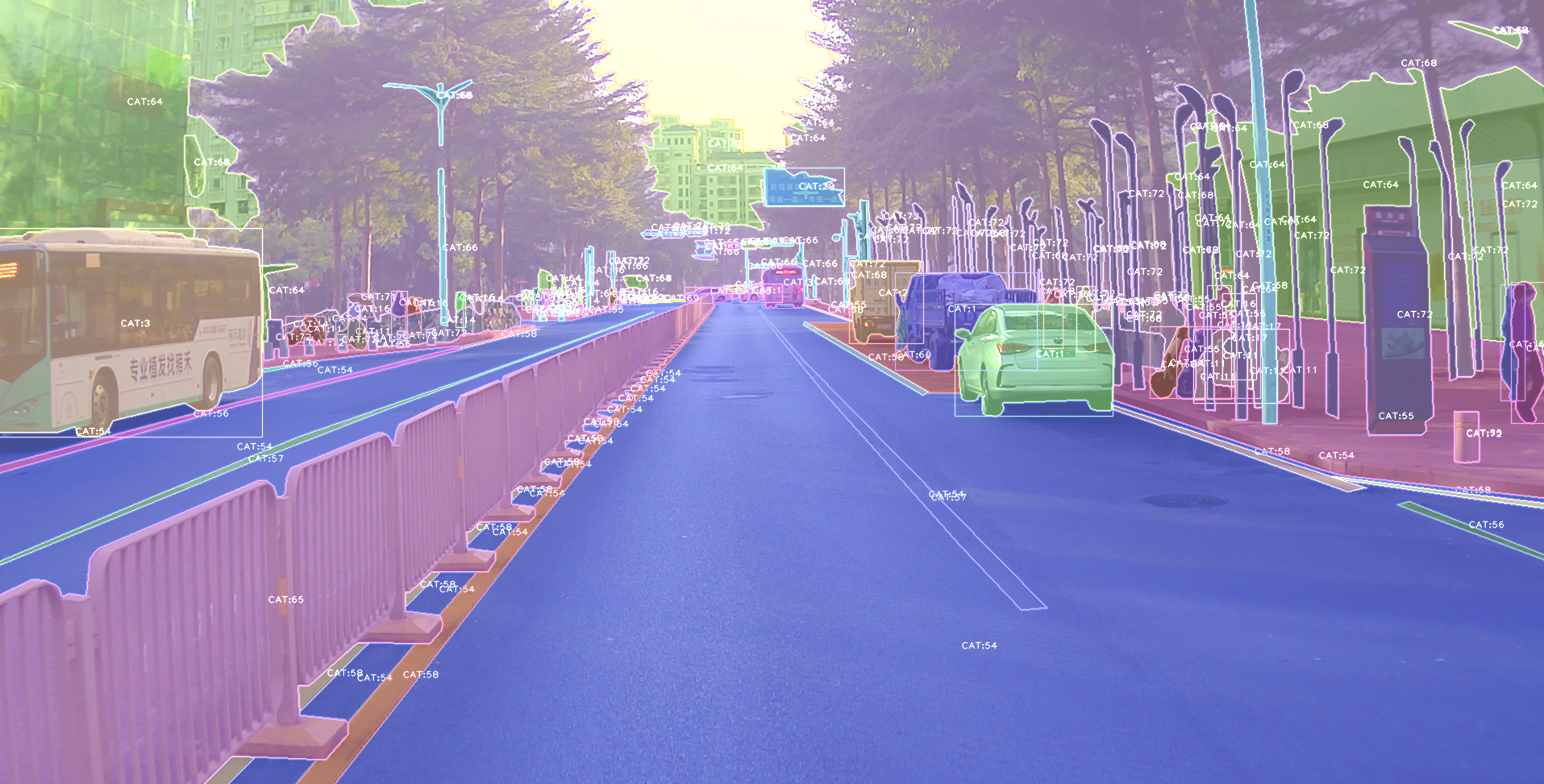
A pic visualized from alfred:
## Install
To install **alfred**, it is very simple:
requirements:
```
lxml [optional]
pycocotools [optional]
opencv-python [optional]
```
then:
```shell
pip install alfred-py
```
**alfred is both a lib and a tool, you can import it's APIs, or you can directly call it inside your terminal**.
A glance of alfred, after you installed above package, you will have `alfred`:
- **`data`** module:
```shell
# show VOC annotations
alfred data vocview -i JPEGImages/ -l Annotations/
# show coco annotations
alfred data cocoview -j annotations/instance_2017.json -i images/
# show yolo annotations
alfred data yoloview -i images -l labels
# show detection label with txt format
alfred data txtview -i images/ -l txts/
# convert coco to voc
alfred data coco2voc -c /path/to/coco -j annotations.json
# show more of data
alfred data -h
# eval tools
alfred data evalvoc -h
```
- **`cab`** module:
```shell
# count files number of a type
alfred cab count -d ./images -t jpg
# split a txt file into train and test
alfred cab split -f all.txt -r 0.9,0.1 -n train,val
```
- **`vision`** module:
```shell
# extract video to images
alfred vision extract -v video.mp4
# combine images to video
alfred vision 2video -d images/
```
- **`-h`** to see more:
```shell
usage: alfred [-h] [--version] {vision,text,scrap,cab,data} ...
positional arguments:
{vision,text,scrap,cab,data}
vision vision related commands.
text text related commands.
scrap scrap related commands.
cab cabinet related commands.
data data related commands.
Excerpt of 5,815 characters
Read on GitHub
25

14

5

4

MagicSource · Google
3

1

1
Would you bet a product on this? Bounded 0–100 and slow moving.
matched fp:6803a824eb3de69d, topic:pytorch