

This is an implementation of Mask R-CNN on Python 3, Keras, and TensorFlow. The model generates bounding boxes and segmentation masks for each instance of an object in the image. It's based on Feature Pyramid Network (FPN) and a ResNet101 backbone.

The repository includes:
- Source code of Mask R-CNN built on FPN and ResNet101.
- Training code for MS COCO
- Pre-trained weights for MS COCO
- Jupyter notebooks to visualize the detection pipeline at every step
- ParallelModel class for multi-GPU training
- Evaluation on MS COCO metrics (AP)
- Example of training on your own dataset
The code is documented and designed to be easy to extend. If you use it in your research, please consider citing this repository (bibtex below). If you work on 3D vision, you might find our recently released Matterport3D dataset useful as well. This dataset was created from 3D-reconstructed spaces captured by our customers who agreed to make them publicly available for academic use. You can see more examples here.
-
demo.ipynb Is the easiest way to start. It shows an example of using a model pre-trained on MS COCO to segment objects in your own images. It includes code to run object detection and instance segmentation on arbitrary images.
-
train_shapes.ipynb shows how to train Mask R-CNN on your own dataset. This notebook introduces a toy dataset (Shapes) to demonstrate training on a new dataset.
-
(model.py, utils.py, config.py): These files contain the main Mask RCNN implementation.
-
inspect_data.ipynb. This notebook visualizes the different pre-processing steps to prepare the training data.
-
inspect_model.ipynb This notebook goes in depth into the steps performed to detect and segment objects. It provides visualizations of every step of the pipeline.
-
inspect_weights.ipynb This notebooks inspects the weights of a trained model and looks for anomalies and odd patterns.
To help with debugging and understanding the model, there are 3 notebooks (inspect_data.ipynb, inspect_model.ipynb, inspect_weights.ipynb) that provide a lot of visualizations and allow running the model step by step to inspect the output at each point. Here are a few examples:
Visualizes every step of the first stage Region Proposal Network and displays positive and negative anchors along with anchor box refinement.

This is an example of final detection boxes (dotted lines) and the refinement applied to them (solid lines) in the second stage.

Examples of generated masks. These then get scaled and placed on the image in the right location.

Often it's useful to inspect the activations at different layers to look for signs of trouble (all zeros or random noise).

Another useful debugging tool is to inspect the weight histograms. These are included in the inspect_weights.ipynb notebook.

TensorBoard is another great debugging and visualization tool. The model is configured to log losses and save weights at the end of every epoch.


We're providing pre-trained weights for MS COCO to make it easier to start. You can
use those weights as a starting point to train your own variation on the network.
Training and evaluation code is in samples/coco/coco.py. You can import this
module in Jupyter notebook (see the provided notebooks for examples) or you
can run it directly from the command line as such:
# Train a new model starting from pre-trained COCO weights
python3 samples/coco/coco.py train --dataset=/path/to/coco/ --model=coco

# Train a new model starting from ImageNet weights
python3 samples/coco/coco.py train --dataset=/path/to/coco/ --model=imagenet

# Continue training a model that you had trained earlier
python3 samples/coco/coco.py train --dataset=/path/to/coco/ --model=/path/to/weights.h5

# Continue training the last model you trained. This will find
# the last trained weights in the model directory.
python3 samples/coco/coco.py train --dataset=/path/to/coco/ --model=last
You can also run the COCO evaluation code with:
# Run COCO evaluation on the last trained model
python3 samples/coco/coco.py evaluate --dataset=/path/to/coco/ --model=last
The training schedule, learning rate, and other parameters should be set in samples/coco/coco.py.
Start by reading this blog post about the balloon color splash sample. It covers the process starting from annotating images to training to using the results in a sample application.
In summary, to train the model on your own dataset you'll need to extend two classes:
Config
This class contains the default configuration. Subclass it and modify the attributes you need to change.
Dataset
This class provides a consistent way to work with any dataset.
It allows you to use new datasets for training without having to change
the code of the model. It also supports loading multiple datasets at the
same time, which is useful if the objects you want to detect are not
all available in one dataset.
See examples in samples/shapes/train_shapes.ipynb, samples/coco/coco.py, samples/balloon/balloon.py, and samples/nucleus/nucleus.py.
This implementation follows the Mask RCNN paper for the most part, but there are a few cases where we deviated in favor of code simplicity and generalization. These are some of the differences we're aware of. If you encounter other differences, please do let us know.
-
Image Resizing: To support training multiple images per batch we resize all images to the same size. For example, 1024x1024px on MS COCO. We preserve the aspect ratio, so if an image is not square we pad it with zeros. In the paper the resizing is done such that the smallest side is 800px and the largest is trimmed at 1000px.
-
Bounding Boxes: Some datasets provide bounding boxes and some provide masks only. To support training on multiple datasets we opted to ignore the bounding boxes that come with the dataset and generate them on the fly instead. We pick the smallest box that encapsulates all the pixels of the mask as the bounding box. This simplifies the implementation and also makes it easy to apply image augmentations that would otherwise be harder to apply to bounding boxes, such as image rotation.
To validate this approach, we compared our computed bounding boxes to those provided by the COCO dataset. We found that ~2% of bounding boxes differed by 1px or more, ~0.05% differed by 5px or more, and only 0.01% differed by 10px or more.
-
Learning Rate: The paper uses a learning rate of 0.02, but we found that to be too high, and often causes the weights to explode, especially when using a small batch size. It might be related to differences between how Caffe and TensorFlow compute gradients (sum vs mean across batches and GPUs). Or, maybe the official model uses gradient clipping to avoid this issue. We do use gradient clipping, but don't set it too aggressively. We found that smaller learning rates converge faster anyway so we go with that.
Use this bibtex to cite this repository:
@misc{matterport_maskrcnn_2017,
  title={Mask R-CNN for object detection and instance segmentation on Keras and TensorFlow},
  author={Waleed Abdulla},
  year={2017},
  publisher={Github},
  journal={GitHub repository},
  howpublished={\url{https://github.com/matterport/Mask_RCNN}},
}
Contributions to this repository are welcome. Examples of things you can contribute:
- Speed Improvements. Like re-writing some Python code in TensorFlow or Cython.
- Training on other datasets.
- Accuracy Improvements.
- Visualizations and examples.
You can also join our team and help us build even more projects like this one.
Python 3.4, TensorFlow 1.3, Keras 2.0.8 and other common packages listed in requirements.txt.
To train or test on MS COCO, you'll also need:
- pycocotools (installation instructions below)
- MS COCO Dataset
- Download the 5K minival and the 35K validation-minus-minival subsets. More details in the original Faster R-CNN implementation.
If you use Docker, the code has been verified to work on this Docker container.
-
Clone this repository
-
Install dependencies
pip3 install -r requirements.txt
-
Run setup from the repository root directory
python3 setup.py install
-
Download pre-trained COCO weights (mask_rcnn_coco.h5) from the releases page.
-
(Optional) To train or test on MS COCO install
pycocotoolsfrom one of these repos. They are forks of the original pycocotools with fixes for Python3 and Windows (the official repo doesn't seem to be active anymore).- Linux: https://github.com/waleedka/coco
- Windows: https://github.com/philferriere/cocoapi. You must have the Visual C++ 2015 build tools on your path (see the repo for additional details)
If you extend this model to other datasets or build projects that use it, we'd love to hear from you.
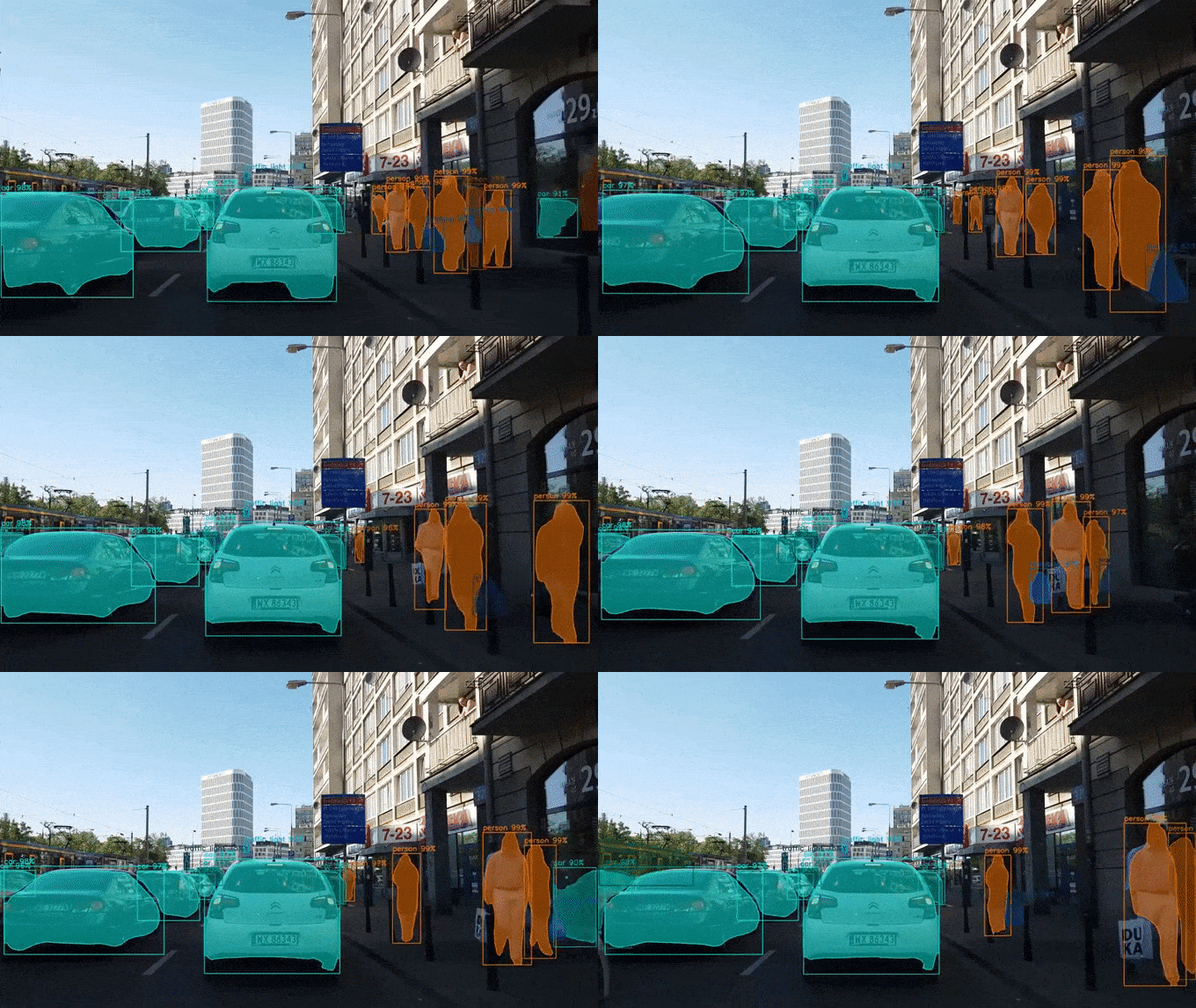
4K Video Demo by Karol Majek.
Images to OSM: Improve OpenStreetMap by adding baseball, soccer, tennis, football, and basketball fields.

Splash of Color. A blog post explaining how to train this model from scratch and use it to implement a color splash effect.

Segmenting Nuclei in Microscopy Images. Built for the 2018 Data Science Bowl
Code is in the samples/nucleus directory.

Detection and Segmentation for Surgery Robots by the NUS Control & Mechatronics Lab.

A proof of concept project by Esri, in collaboration with Nvidia and Miami-Dade County. Along with a great write up and code by Dmitry Kudinov, Daniel Hedges, and Omar Maher.

A project from Japan to automatically track cells in a microfluidics platform. Paper is pending, but the source code is released.


Research project to understand the complex processes between degradations in the Arctic and climate change. By Weixing Zhang, Chandi Witharana, Anna Liljedahl, and Mikhail Kanevskiy.

A computer vision class project by HU Shiyu to apply the color pop effect on people with beautiful results.

Mapping Challenge: Convert satellite imagery to maps for use by humanitarian organisations.

GRASS GIS Addon to generate vector masks from geospatial imagery. Based on a Master's thesis by Ondřej Pešek.


