

There are two parts to the setup,
- Part 1 - Setting up the network infrastructure (VPC, Subnets, Security Groups)
- Part 2 - Create & Configure the Database, Web & Load Balancer Instances
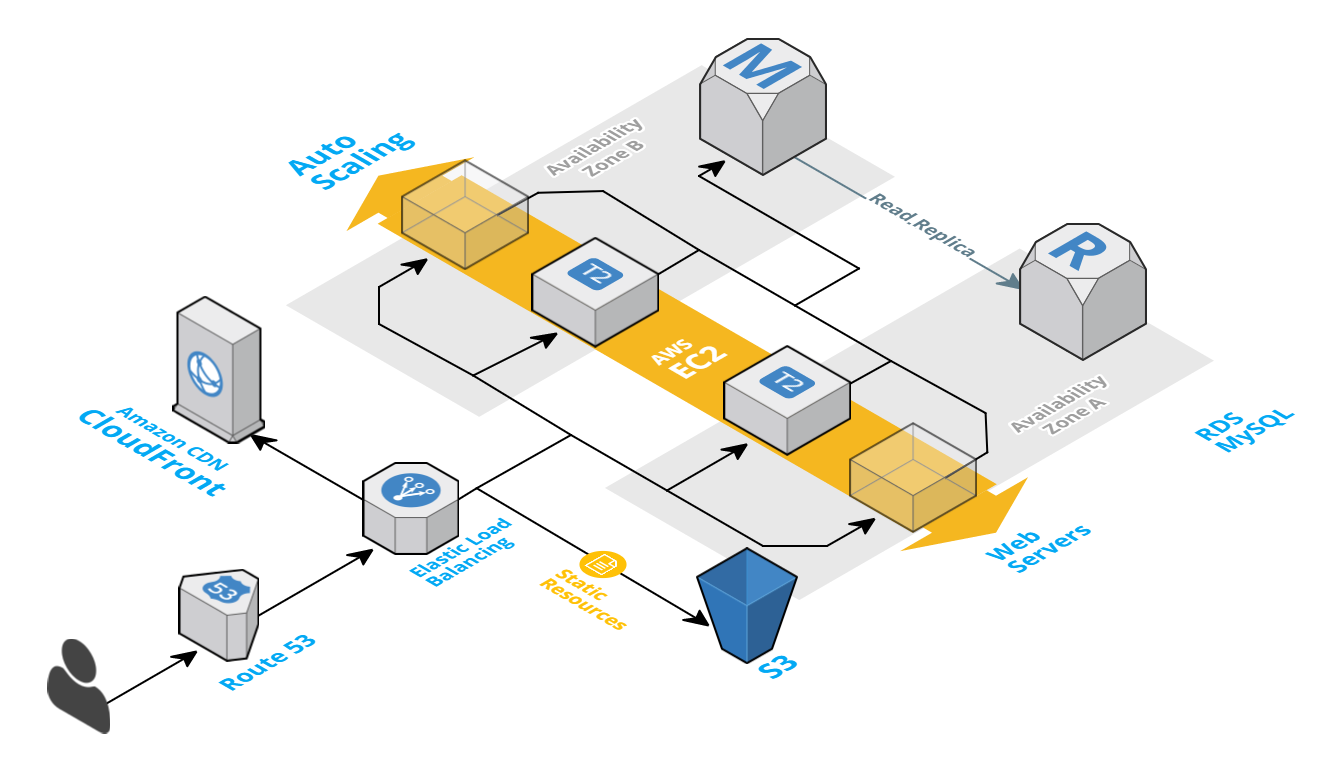 Assuming you have already setup your AWS CLI for Region
 US East (N. Virginia). Lets move forward;
export AWS_DEFAULT_REGION=us-east-1Lets create a Virtual Private Cloud - VPC for our setup with /20 range and get our VPC ID using the query parameter and set the output format to text. Its is a good practice to give meaningful name to the AWS resources, Lets call our VPC tmpVPC
vpcID=$(aws ec2 create-vpc \
      --cidr-block 10.0.0.0/20 \
      --query 'Vpc.VpcId' \
--output text)aws ec2 create-tags --resources "$vpcID" --tags 'Key=Name,Value=tmpVPC'Instances launched inside a VPC are invisible to the rest of the internet by default. AWS therefore does not bother assigning them a public DNS name. This can be changed easily by enabling the DNS support as shown below,
aws ec2 modify-vpc-attribute --vpc-id "$vpcID" --enable-dns-support "{\"Value\":true}"

aws ec2 modify-vpc-attribute --vpc-id "$vpcID" --enable-dns-hostnames "{\"Value\":true}"
Check if internet gateway is set. If it wasn't there then do these,
internetGatewayId=$(aws ec2 create-internet-gateway \
                  --query 'InternetGateway.InternetGatewayId' \
                  --output text) && echo "$internetGatewayId"
aws ec2 attach-internet-gateway --internet-gateway-id "$internetGatewayId" --vpc-id "$vpcID"aws ec2 create-tags --resources $internetGatewayId --tags 'Key=Name,Value=tmpVPC-Internet-Gateway'I have chosen /20 CIDR deliberately to allow us to create different subnets for our db, web instances and reserve some for the future. You might want to choose something else that works better for you. Important: AWS reserves both the first four and the last IP address in each subnet's CIDR block. They're not available for use. The smallest subnet (and VPC) you can create uses a /28 netmask (16 IP addresses), and the largest uses a /16 netmask (65,536 IP addresses). Excellent resources to understand CIDR blocks here & here & my quick help gist
Lets reserve the IP Range to spread across multiple availability zones.
| VPC Range | Availability Zone | Reservation Purpose | IP Ranges | IP Ranges | IP Ranges |
|---|---|---|---|---|---|
| 10.0.0.0/20 | |||||
| AZ1 | US-East-1b | 10.0.0.0/21 | |||
| AZ1 | Private - DB Subnet | 10.0.0.0/22 | |||
| AZ1 | 10.0.4.0/22 | ||||
| AZ1 | Web Subnet | 10.0.4.0/23 | |||
| AZ1 | Spare Subnet | 10.0.6.0/23 | |||
| AZ2 | US-East-1c | 10.0.8.0/21 | |||
| AZ2 | Private - DB Subnet | 10.0.8.0/22 | |||
| AZ2 | 10.0.12.0/22 | ||||
| AZ2 | Web Subnet | 10.0.12.0/23 | |||
| AZ2 | Spare Subnet | 10.0.14.0/23 |
After creating all the subnets, It should look something like this,

USEast1b_DbSubnetID=$(aws ec2 create-subnet --vpc-id "$vpcID" --cidr-block 10.0.0.0/22 --availability-zone us-east-1b --query 'Subnet.SubnetId' --output text)

USEast1b_WebSubnetID=$(aws ec2 create-subnet --vpc-id "$vpcID" --cidr-block 10.0.4.0/23 --availability-zone us-east-1b --query 'Subnet.SubnetId' --output text)

USEast1b_SpareSubnetID=$(aws ec2 create-subnet --vpc-id "$vpcID" --cidr-block 10.0.6.0/23 --availability-zone us-east-1b --query 'Subnet.SubnetId' --output text)aws ec2 create-tags --resources "$USEast1b_DbSubnetID" --tags 'Key=Name,Value=az1-us-east-1b-DB-Subnet'
aws ec2 create-tags --resources "$USEast1b_WebSubnetID" --tags 'Key=Name,Value=az1-us-east-1b-Web-Subnet'
aws ec2 create-tags --resources "$USEast1b_SpareSubnetID" --tags 'Key=Name,Value=az1-us-east-1b-Spare-Subnet'
USEast1c_DbSubnetID=$(aws ec2 create-subnet --vpc-id "$vpcID" --cidr-block 10.0.8.0/22 --availability-zone us-east-1c --query 'Subnet.SubnetId' --output text)

USEast1c_WebSubnetID=$(aws ec2 create-subnet --vpc-id "$vpcID" --cidr-block 10.0.12.0/23 --availability-zone us-east-1c --query 'Subnet.SubnetId' --output text)

USEast1c_SpareSubnetID=$(aws ec2 create-subnet --vpc-id "$vpcID" --cidr-block 10.0.14.0/23 --availability-zone us-east-1c --query 'Subnet.SubnetId' --output text)aws ec2 create-tags --resources "$USEast1c_DbSubnetID" --tags 'Key=Name,Value=az1-us-east-1c-DB-Subnet'
aws ec2 create-tags --resources "$USEast1c_WebSubnetID" --tags 'Key=Name,Value=az1-us-east-1c-Web-Subnet'
aws ec2 create-tags --resources "$USEast1c_SpareSubnetID" --tags 'Key=Name,Value=az1-us-east-1c-Spare-Subnet'Each subnet needs to have a route table associated with it to specify the routing of its outbound traffic. By default every subnet inherits the default VPC route table which allows for intra-VPC communication only.
The following adds a route table to our subnet that allows traffic not meant for an instance inside the VPC to be routed to the internet through our earlier created internet gateway.
routeTableID=$(aws ec2 create-route-table --vpc-id "$vpcID" --query 'RouteTable.RouteTableId' --output text)

aws ec2 create-route --route-table-id "$routeTableID" --destination-cidr-block 0.0.0.0/0 --gateway-id "$internetGatewayId"

aws ec2 associate-route-table --route-table-id "$routeTableID" --subnet-id "$USEast1b_WebSubnetID"

aws ec2 associate-route-table --route-table-id "$routeTableID" --subnet-id "$USEast1c_WebSubnetID"- Group Name -
webSecGrp - Description -
My Web Security Group
webSecGrpID=$(aws ec2 create-security-group --group-name webSecGrp \
            --description "Security Group for Web servers" \
            --vpc-id "$vpcID" \
--output text)aws ec2 authorize-security-group-ingress --group-id "$webSecGrpID" --protocol tcp --port 22 --cidr 0.0.0.0/0
aws ec2 authorize-security-group-ingress --group-id "$webSecGrpID" --protocol tcp --port 80 --cidr 0.0.0.0/0
aws ec2 authorize-security-group-ingress --group-id "$webSecGrpID" --protocol tcp --port 443 --cidr 0.0.0.0/0Interesting reading here about why we need to use security group ID instead of name; AWS Documentation & Github Bug Report
When you specify a security group for a nondefault VPC to the CLI or the API actions, you must use the security group ID and not the security group name to identify the security group.
- DB Subnet - The RDS instances requires the db subnet group to span across (atleast two) availability zones
- DB Security Group - Security group all allows other EC2 instances to connect with this RDS instance
Creates a new DB subnet group. DB subnet groups must contain at least one subnet in at least two AZs in the region.
aws rds create-db-subnet-group \
        --db-subnet-group-name "mysqlDBSubnet" \
        --db-subnet-group-description "Subnet group for my databases instances" \
--subnet-ids "$USEast1b_DbSubnetID" "$USEast1c_DbSubnetID"- Group Name -
dbSecGrp - Description -
My Database Security Group
dbSecGrpID=$(aws ec2 create-security-group \
           --group-name dbSecGrp \
           --description "Security Group for database servers" \
           --vpc-id "$vpcID" \
--output text)aws ec2 authorize-security-group-ingress \
--group-id "$dbSecGrpID" \
--protocol tcp \
--port 3306 \
--source-group \
"$webSecGrpID"aws rds create-db-parameter-group \
--db-parameter-group-name myParamGrp \
--db-parameter-group-family MySQL5.6 \
--description "My new parameter group"
aws rds modify-db-parameter-group --db-parameter-group-name myParamGrp --parameters "ParameterName=general_log, ParameterValue=ON, Description=logParameter,ApplyMethod=immediate"rdsInstID=rds-mysql-inst01
aws rds create-db-instance \
--db-instance-identifier "$rdsInstID" \
--allocated-storage 5 \
--db-instance-class db.t2.micro \
--no-multi-az \
--no-auto-minor-version-upgrade \
--availability-zone us-east-1b \
--vpc-security-group-ids "$dbSecGrpID" \
--db-subnet-group-name "mysqldbsubnet" \
--engine mysql \
--port 3306 \
--master-username dbuser \
--master-user-password dbuserpass \
--db-parameter-group-name myParamGrp \
--db-name wpdb \
--backup-retention-period 3
aws rds modify-db-instance --db-instance-identifier "$rdsInstID" --db-parameter-group-name myParamGrpRefer:
- [1] https://www.linux.com/blog/introduction-aws-command-line-tool-part-2
- [2] http://docs.aws.amazon.com/cli/latest/reference/rds/create-db-instance.html
- [3] Cloning RDS Instances for Testing
aws ec2 create-key-pair --key-name webKey --query 'KeyMaterial' --output text > webKey.pem
chmod 400 webKey.pem

cat >> userDataScript <<EOF
#!/bin/bash
set -e -x

# Setting up the HTTP server
yum update -y
yum install -y httpd php php-mysql mysql
service httpd start
chkconfig httpd on
groupadd www
usermod -a -G www ec2-user


# Download wordpress site & move to http
cd /var/www/
curl -O https://wordpress.org/latest.tar.gz && tar -zxf latest.tar.gz
rm -rf /var/www/html
mv wordpress /var/www/html

# Set the permissions
chown -R root:www /var/www
chmod 2775 /var/www
find /var/www -type d -exec chmod 2775 {} +
find /var/www -type f -exec chmod 0664 {} +

# SE Linux permissive
# needed to make wp connect to DB over newtork
setsebool -P httpd_can_network_connect=1
setsebool httpd_can_network_connect_db on

systemctl restart httpd
# Remove below file after testing
echo "<?php phpinfo(); ?>" > /var/www/html/phpinfo.php
EOFinstanceID=$(aws ec2 run-instances \
--image-id ami-2051294a \
--count 1 \
--instance-type t2.micro \
--key-name wpKey \
--security-group-ids "$webSecGrpID" \
--subnet-id "$webSubnetID" \
--user-data file://userDataScript \
--associate-public-ip-address \
--query 'Instances[0].InstanceId' \
--output text)
instanceUrl=$(aws ec2 describe-instances \
--instance-ids "$instanceID" \
--query 'Reservations[0].Instances[0].PublicDnsName' \
--output text)
# Get the IP address of the running instance:
ip_address=$(aws ec2 describe-instances \
--instance-ids "$instanceID" \
--output text --query 'Reservations[*].Instances[*].PublicIpAddress')Ref: https://aws.amazon.com/articles/1636185810492479
aws elb create-load-balancer \
--load-balancer-name my-load-balancer \
--listeners "Protocol=HTTP,LoadBalancerPort=80,InstanceProtocol=HTTP,InstancePort=80" \
--subnets "$USEast1c_WebSubnetID" \
--security-groups "$webSecGrpID"
[root@ip-172-31-55-78 ec2-user]# ab -n 20000 -c 30 -k http://xx.xx.xx.xx/
This is ApacheBench, Version 2.3 <$Revision: 1430300 $>
Copyright 1996 Adam Twiss, Zeus Technology Ltd, http://www.zeustech.net/
Licensed to The Apache Software Foundation, http://www.apache.org/

Benchmarking xx.xx.xx.xx (be patient)
Completed 2000 requests
Completed 4000 requests
Completed 6000 requests
Completed 8000 requests
Completed 10000 requests
Completed 12000 requests
Completed 14000 requests
Completed 16000 requests
Completed 18000 requests
Completed 20000 requests
Finished 20000 requests


Server Software:        Apache/2.4.6
Server Hostname:        xx.xx.xx.xx
Server Port:            80

Document Path:          /
Document Length:        11951 bytes

Concurrency Level:      30
Time taken for tests:   4684.053 seconds
Complete requests:      20000
Failed requests:        5641
   (Connect: 0, Receive: 0, Length: 5641, Exceptions: 0)
Write errors:           0
Keep-Alive requests:    0
Total transferred:      349703793 bytes
HTML transferred:       344441217 bytes
Requests per second:    4.27 [#/sec] (mean)
Time per request:       7026.079 [ms] (mean)
Time per request:       234.203 [ms] (mean, across all concurrent requests)
Transfer rate:          72.91 [Kbytes/sec] received

Connection Times (ms)
              min  mean[+/-sd] median   max
Connect:        1    2  49.6      1    7014
Processing:   356 7013 3842.2   5067   43302
Waiting:        0 6040 3317.2   4332   40634
Total:        357 7014 3842.9   5069   43303

Percentage of the requests served within a certain time (ms)
  50%   5069
  66%   7997
  75%   9596
  80%  10332
  90%  12134
  95%  13574
  98%  16122
  99%  18490
 100%  43303 (longest request)
[root@ip-172-31-55-78 ec2-user]#
