
Top AI Repos — open-source AI, indexed and scored
Top AI Repos tracks AI repositories on GitHub and answers two different questions about each one: is it moving right now, and would you bet a product on it.
Top AI Repos tracks AI repositories on GitHub and answers two different questions about each one: is it moving right now, and would you bet a product on it.

Image Super-Resolution for Anime-Style Art
| Date | Stars |
|---|---|
| 2026-07-30 | 28209 |
| 2026-08-08 | 28218 |
| 2026-08-16 | 28216 |
| 2026-08-18 | 28217 |
| 2026-08-19 | 28216 |
| 2026-08-20 | 28217 |
| 2026-08-21 | 28214 |
| 2026-08-22 | 28215 |
| 2026-08-23 | 28213 |
| 2026-08-24 | 28212 |
| 2026-08-25 | 28211 |
| 2026-08-26 | 28213 |
| 2026-08-28 | 28214 |
| 2026-08-29 | 28214 |
| 2026-08-30 | 28214 |
| 2026-09-01 | 28214 |
| 2026-09-02 | 28217 |
| 2026-09-03 | 28218 |
| 2026-09-05 | 28215 |
| 2026-09-06 | 28215 |
| 2026-09-07 | 28215 |
| 2026-09-08 | 28219 |
| 2026-09-09 | 28219 |
| 2026-09-10 | 28220 |
| 2026-09-11 | 28225 |
| 2026-09-12 | 28224 |
| 2026-09-13 | 28226 |
| 2026-09-14 | 28224 |
| 2026-09-15 | 28223 |
| 2026-09-16 | 28226 |
| 2026-09-18 | 28226 |
| 2026-09-19 | 28230 |
| 2026-09-20 | 28229 |
| 2026-09-21 | 28230 |
| 2026-09-22 | 28228 |
| 2026-09-23 | 28227 |
| 2026-09-25 | 28229 |
| 2026-09-26 | 28228 |
| 2026-09-27 | 28229 |
| 2026-09-28 | 28230 |
| 2026-09-29 | 28230 |
| 2026-09-30 | 28231 |
| 2026-10-01 | 28230 |
| 2026-10-03 | 28225 |
| 2026-10-04 | 28225 |
| 2026-10-05 | 28222 |
| 2026-10-06 | 28222 |
| 2026-10-08 | 28222 |
| 2026-10-09 | 28223 |
| 2026-10-10 | 28225 |
| 2026-10-11 | 28224 |
| 2026-10-12 | 28223 |
| 2026-10-13 | 28225 |
| 2026-10-14 | 28228 |
| 2026-10-15 | 28226 |
| 2026-10-17 | 28225 |
| 2026-10-18 | 28226 |
| 2026-10-19 | 28228 |
| 2026-10-20 | 28229 |
| 2026-10-21 | 28230 |
| 2026-10-22 | 28232 |
| 2026-10-23 | 28231 |
| 2026-10-24 | 28235 |
| 2026-10-25 | 28235 |
| 2026-10-26 | 28239 |
| 2026-10-27 | 28240 |
| 2026-10-28 | 28241 |
| 2026-10-29 | 28237 |
| 2026-10-30 | 28240 |
| 2026-10-31 | 28241 |
| 2026-11-02 | 28242 |
| 2026-11-03 | 28238 |
| 2026-11-04 | 28241 |
Today
+3 stars today
This week
— stars this week
This month
+19 stars this month
Momentum
0.0
growth rate 0.00%/day
# waifu2x Image Super-Resolution for Anime-style art using Deep Convolutional Neural Networks. And it supports photo. The demo application can be found at https://waifu2x.udp.jp/ (Cloud version), https://unlimited.waifu2x.net/ (In-Browser version). ## 2023/02 PyTorch version [nunif](https://github.com/nagadomi/nunif) waifu2x development has already been moved to the repository above. ## Summary Click to see the slide show. 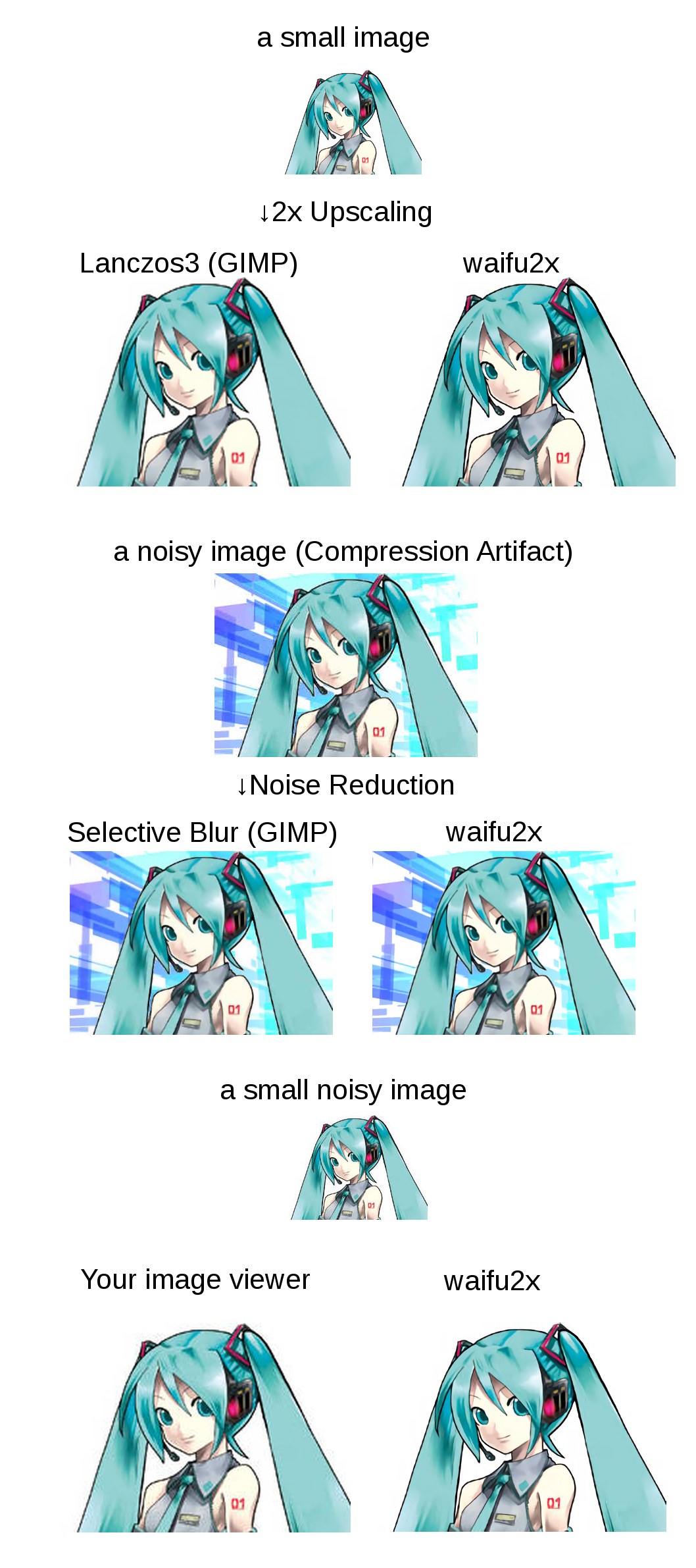 ## References waifu2x is inspired by SRCNN [1]. 2D character picture (HatsuneMiku) is licensed under CC BY-NC by piapro [2]. - [1] Chao Dong, Chen Change Loy, Kaiming He, Xiaoou Tang, "Image Super-Resolution Using Deep Convolutional Networks", http://arxiv.org/abs/1501.00092 - [2] "For Creators", https://piapro.net/intl/en_for_creators.html ## Public AMI TODO ## Third Party Software [Third-Party](https://github.com/nagadomi/waifu2x/wiki/Third-Party) If you are a windows user, I recommend you to use [waifu2x-caffe](https://github.com/lltcggie/waifu2x-caffe)(Just download from `releases` tab), [waifu2x-ncnn-vulkan](https://github.com/nihui/waifu2x-ncnn-vulkan) or [waifu2x-conver-cpp](https://github.com/DeadSix27/waifu2x-converter-cpp). ## Dependencies ### Hardware - NVIDIA GPU ### Platform - [Torch7](http://torch.ch/) - [NVIDIA CUDA](https://developer.nvidia.com/cuda-toolkit) ### LuaRocks packages (excludes torch7's default packages) - lua-csnappy - md5 - uuid - csvigo - [turbo](https://github.com/kernelsauce/turbo) ## Installation ### Setting Up the Command Line Tool Environment (on Ubuntu 16.04) #### Install CUDA See: [NVIDIA CUDA Getting Started Guide for Linux](http://docs.nvidia.com/cuda/cuda-getting-started-guide-for-linux/#ubuntu-installation) Download [CUDA](http://developer.nvidia.com/cuda-downloads) ``` sudo dpkg -i cuda-repo-ubuntu1404_7.5-18_amd64.deb sudo apt-get update sudo apt-get install cuda ``` #### Install Package ``` sudo apt-get install libsnappy-dev sudo apt-get install libgraphicsmagick1-dev sudo apt-get install libssl1.0-dev # for web server ``` Note: waifu2x requires little-cms2 linked graphicsmagick. if you use macOS/homebrew, See [#174](https://github.com/nagadomi/waifu2x/issues/174#issuecomment-384466451). #### Install Torch7 See: [Getting started with Torch](http://torch.ch/docs/getting-started.html). - For CUDA9.x/CUDA8.x, see [#222](https://github.com/nagadomi/waifu2x/issues/222) - For CUDA10.x, see [#253](https://github.com/nagadomi/waifu2x/issues/253#issuecomment-445448928) #### Getting waifu2x ``` git clone --depth 1 https://github.com/nagadomi/waifu2x.git ``` and install lua modules. ``` cd waifu2x ./install_lua_modules.sh ``` #### Validation Testing the waifu2x command line tool. ``` th waifu2x.lua ``` ## Web Application ``` th web.lua ``` View at: http://localhost:8812/ ## Command line tools Notes: If you have cuDNN library, than you can use cuDNN with `-force_cudnn 1` option. cuDNN is too much faster than default kernel. If you got GPU out of memory error, you can avoid it with `-crop_size` option (e.g. `-crop_size 128`). ### Noise Reduction ``` th waifu2x.lua -m noise -noise_level 1 -i input_image.png -o output_image.png ``` ``` th waifu2x.lua -m noise -noise_level 0 -i input_image.png -o output_image.png th waifu2x.lua -m noise -noise_level 2 -i input_image.png -o output_image.png th waifu2x.lua -m noise -noise_level 3 -i input_image.png -o output_image.png ``` ### 2x Upscaling ``` th waifu2x.lua -m scale -i input_image.png -o output_image.png ``` ### Noise Reduction + 2x Upscaling ``` th waifu2x.lua -m noise_scale -noise_level 1 -i input_image.png -o output_image.png ``` ``` th waifu2x.lua -m noise_scale -noise_level 0 -i input_image.png -o output_image.png th waifu2x.lua -m noise_scale -noise_level 2 -i input_image.png -o output_image.png th waifu2x.lua -m noise_scale -noise_level 3 -i input_image.png -o output_image.png ``` ### Batch conve
Excerpt of 8,273 characters
Read on GitHub
Japan
673

Vitaliy Lagunov · Armenia
14

Fire
7

Atsushi Takayama
6

hibiya (김종이)
5

tenyuhuang
4

Minseo Lee · South Korea
3

Thibaut Renaux · France
3

Russia
2

Brazil
2

2

Kamen Mladenov · Bulgaria
2

Izzy Gomez · @stripe · United States
1

マギルゥーベルベット · Austria
1

Eduard Ereza Martínez · Freelance
1

D · Russia
1

1

林博仁 Buo-ren Lin · OSSII · Taiwan
1

Brandon Lin
1

China
1
Would you bet a product on this? Bounded 0–100 and slow moving.
matched fp:4f46ac4a3662914a, topic:super-resolution, readme:upscaling, desc:super resolution