

A free, MIT-licensed starter kit that turns Claude Code or Codex into your personal AI Operating System (AI OS). Audience: anyone building automations — solopreneurs, small business operators, managers, creators, AI consultants. Pairs with a companion masterclass video.
The kit personalizes itself to you via an /onboard interview. Use /grill-me whenever you want to deepen its understanding of your business, preferences, or plans. Use /link to make new information findable, /audit to verify the system, /level-up to close one useful gap at a time, and /3d-brain to explore your saved knowledge as an interactive globe.
AIS-OS stands for AI Automation Society OS — the way Nate designed this AI OS to be set up for members of his community, AI Automation Society. The kit is universal (it works for anyone), but the structure mirrors how AIS members run their own businesses on top of it.
"While you're not at your desk, your AIS-OS observes one real-world event and produces an output that's faster and more accurate than what you'd produce yourself."
Every design decision in this kit rolls up to that test. If a layer, skill, or template doesn't contribute to it, it doesn't ship.
Three felt success indicators tell you the AI OS is actually changing how you work. Not KPIs — there's no objective metric. These are lived experiences that show up in your week.
1. Team-reaches-out:
"A teammate messages you with a question. You realize your AI OS would answer it better, faster, and with exact sources — even if you were awake and free. So you ask your AI OS too. That's the moment you stop being a bottleneck for your own knowledge."
2. Context-switching reduction:
"You stop opening new tabs. You stop launching the desktop app. When something new lands, your first move is to ask the AI OS, not to open six things. The default surface for thought work shifts. Silent. Compounding."
3. Knowledge-leaves-your-head:
"You stop trying to remember business facts. You don't rehearse what you decided last quarter or what your customer said in that meeting. You trust the retrieval. The AI OS holds the truth, you hold the questions."
Personal foundation → company AI-readiness. Once these indicators show up for one person, the same data architecture powers everything else. Custom dashboards on the data you already collect. Automations on top of the connections you already wired. Team rollout where everyone has theirs. A company where every operator runs a personal AI OS is a company that's actually AI-ready.
The kit teaches personal AI OS first. Everything scales from there.
The kit teaches two complementary frameworks. Three Ms first, Four Cs second. Without the brain rewire, the architecture is just a folder structure.
| M | One-liner |
|---|---|
| Mindset | Default Shift, Function Breakdown, Curiosity Rule. To what extent can AI be leveraged here? |
| Method | Find Constraint → EAD (Eliminate, Automate, Delegate) → Map Process → Pick Autonomy Level → Tie to KPI. |
| Machine | Lego Principle, Validation Chain, Bike Method, Intern Rule, Kill Switch. Boring is beautiful. Workflows beat agents. |
Full breakdown in references/3ms-framework.md. The /level-up skill walks you through all three weekly.
The Three Ms of AI™ is a trademark of Nate Herk. © 2026 Nate Herk.
| # | Layer | One-liner | "This layer is in place" test |
|---|---|---|---|
| 1 | Context | Knows your business | Fresh assistant session answers "what does this business do and who works here?" without browsing |
| 2 | Connections | Reaches your stuff | "What's on my calendar tomorrow and what tasks are due?" → live data, no paste |
| 3 | Capabilities | Knows how to do the work | A short phrase triggers a multi-step workflow that produces an artifact |
| 4 | Cadence | Runs without being asked | Laptop closed. A brief lands in the inbox. A teammate messages it and gets a real answer |
Brand line: Context. Connections. Capabilities. Cadence.
The Four Cs of an AI OS™ is a trademark of Nate Herk. © 2026 Nate Herk.
Dependency graph: Context is non-skippable. Connections + Capabilities can build in parallel. Cadence is last — don't automate workflows that don't work manually.
The kit includes setup, ongoing context interviews, routing, verification, a weekly improvement workflow, and a working 3D knowledge explorer. You can extend the structure as your AI OS grows.
| Skill | Type | When to run |
|---|---|---|
/onboard |
Setup wizard (one-time) | Day 1, immediately after clone. 7-question interview. Generates the Day-1 file set and fills the shared CLAUDE.md and AGENTS.md manuals. |
/grill-me |
Saved context interview | Any time you want to unpack a plan or add more context. Asks one question at a time and saves every answer to brainstorms/. |
/audit |
Evidence-based check | After setup, after a meaningful fix, and weekly while building. Checks routing, freshness, and Claude/Codex compatibility, scores verified reliability, and automatically saves a dated report. |
/link |
Routing helper | When adding a project, file, folder, or important source. Adds the smallest useful manual/index route and checks it resolves. |
/level-up |
Recurring thinking skill | Day 14, then weekly. Three Ms interview (Mindset → Method → Machine). One run = one shipped artifact. |
/3d-brain |
Interactive knowledge explorer | Choose your brain's name and categories. Builds a local 3D globe from your selected files, with search, note reading, Cinema, and a branching growth replay. |
/audit checks whether the AI OS can find its information and perform useful work reliably. Rubric v2 awards points for evidence, not folder counts, API keys, or skills named "daily." Missing or unverified layers cap the total; installed skills cannot compensate for absent connections or execution history. The report includes five retrieval probes, stale-cache and source-authority checks, operating-manual differences, skill-package compatibility, and up to three prioritized improvements. It separates confirmed defects, verification gaps, intentional runtime differences, and optional improvements. The score measures verified operational reliability, not overall usefulness. Old rubric scores need a new baseline.
Automatic audit history: Every /audit saves a unique dated Markdown report in audits/ and compares it with relevant prior reports. Findings retain their IDs and are tracked as new, still open, resolved, reopened, not rechecked, or no longer applicable. Resolution requires fresh evidence. Score comparisons distinguish actual fixes from better evidence and changed coverage. Earlier reports are preserved; the inspected system is unchanged apart from the new local report. Audit reports are gitignored because they may contain private project context. An explicit request not to save overrides this default.
/link path/to/project "use for this purpose" makes a new source findable without copying its contents into the manual. It follows the project's existing AGENTS.md/CLAUDE.md conventions and asks only when the target or intended use is unclear. A hot cache is optional and is never created by these skills.
/grill-me "help me explain how my business works" turns what is in your head into saved context. Each answer is checkpointed immediately in a dated Markdown file under brainstorms/, so you can pause and resume. When you ask to build or update AI OS context, confirmed facts are added to the appropriate context pages with links back to the interview. Tentative ideas stay labeled. Captures are gitignored by default. Use /onboard for initial setup, then /grill-me as your business and thinking evolve.
/level-up carries the audit evidence into one improvement. A verified repair to an existing workflow counts; another new skill is not always needed. Run /audit again after the fix. Repeated-use and scheduled-run credit comes from real execution over time.
Turn your growing collection of notes, projects, and assistant memories into one place you can explore. See which ideas connect, search for something you remember, open the original note, and spot knowledge that needs attention. The growth replay also gives you a visual way to show someone what your AI OS contains.
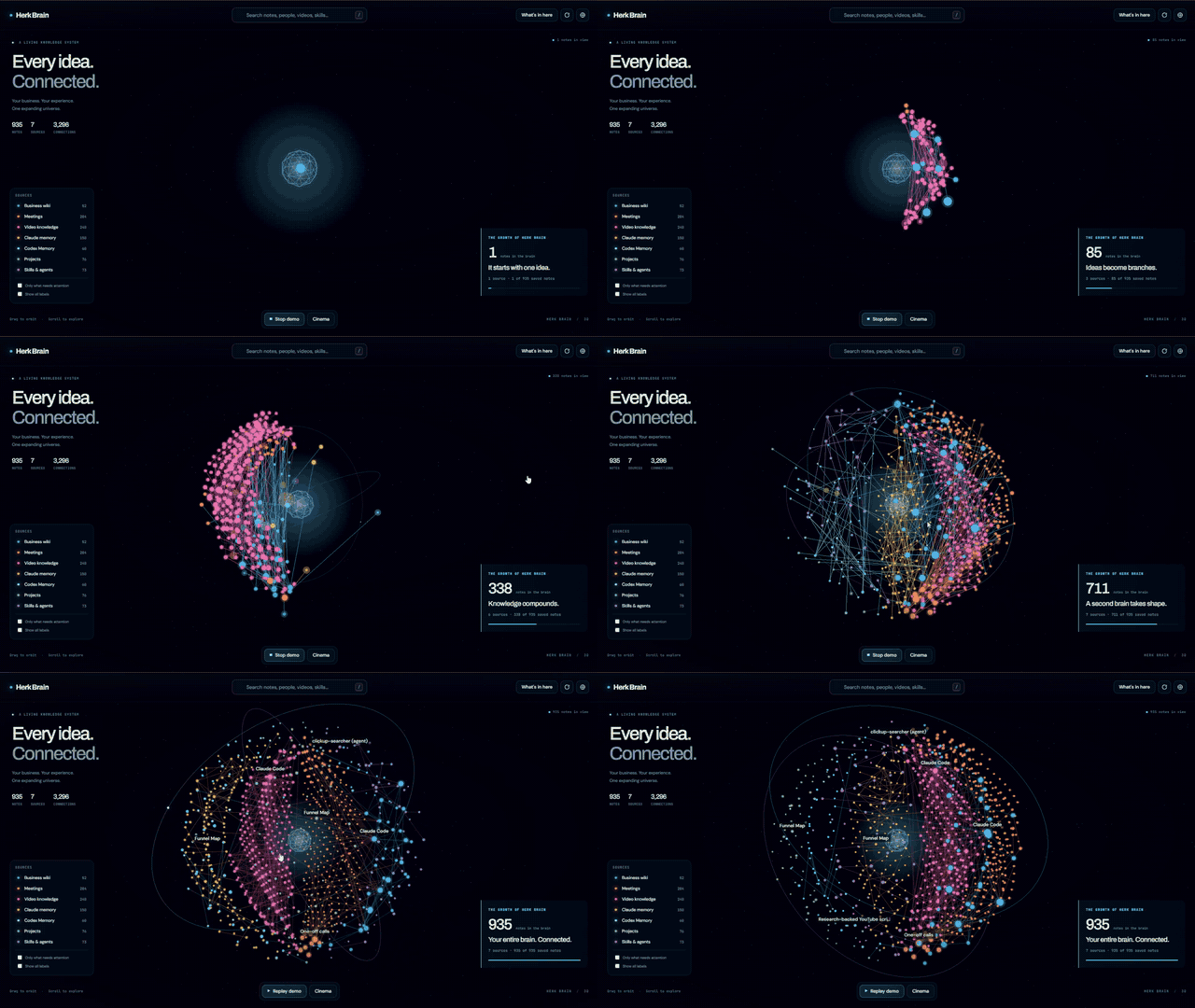
The preview above plays the full growth sequence. Download the original 36-second video for full-resolution playback. This recording shows Nate's HerkBrain. The skill builds yours with the name, categories, and saved knowledge you choose.
Run /3d-brain in Claude Code or $3d-brain in Codex. It asks what to call your brain and which categories to show, with suggested source folders. Then it creates apps/3d-brain/ using the included application template. Your name, categories, colors, and paths live in a local config.
Use Play demo to watch the brain grow from a single idea into connected branches. You can drag to orbit and scroll to zoom throughout playback. Cinema provides a clean presentation view. The replay follows actual note connections; it is not a historical timeline.
Requires Node.js 22 or newer. The renderer is prebuilt, so the app runs with node serve.mjs without installing dependencies. It reads local Markdown/text and optional curated Codex memory. Claude memory, meeting notes, and video knowledge can use selected Markdown folders. Other formats or online services require an export or a tested adapter. The app stays on localhost; personal config and generated data are gitignored.
The complete skill package includes source code, the browser bundle, configuration docs, license notices, and a fictional-data validation script.
The six skills are also installed under .agents/skills/. Use the skill picker (/skills in Codex CLI or the IDE extension), or type $ and select audit, link, onboard, level-up, grill-me, or 3d-brain. Codex normally detects skill updates automatically; restart it if the list does not refresh.
.claude/skills/ remains the authoring source. After editing a skill, run bash scripts/sync-codex-skills.sh <skill-name> to regenerate its Codex copy, supporting files, and menu metadata. The onboard intake template and level-up framework travel with their skills; existing projects retain their own canonical context routes.
- Clone the repo to a working folder on your machine.
- Open it in Claude Code or Codex. Run
/onboardin Claude Code, or select$onboardin Codex. Answer the 7 questions honestly. Voice samples must be pasted, not described. Takes ~15 minutes. Day-1 file set drops at the end. - Use it for a week. Bring real questions. Make real decisions. Ask your assistant to record meaningful decisions in
decisions/log.md. - Day 7: run
/audit. Read the Four-Cs gap report. Pick one gap to close. - Day 14: run
/level-up. The Three Ms interview surfaces one automation worth building. Build it. - As you grow: use
/grill-meto capture new context,/linknew sources, use/level-upfor one improvement, and rerun/auditto verify it.
AIS-OS/
├── README.md
├── CLAUDE.md                        ← Shared operating manual for Claude Code
├── AGENTS.md                        ← Matching operating manual for Codex
├── EXPANSIONS.md                    ← What to add as you grow
├── LICENSE
├── .gitignore
├── aios-intake.md                   ← Source-of-truth for /onboard. Edit + re-run any time.
├── connections.md                   ← Registry of every system your AI OS can reach
├── context/                         ← About you, your business (filled by /onboard)
├── references/
│   └── 3ms-framework.md             ← The operator brain
├── decisions/
│   └── log.md                       ← Append-only record of what was decided and why
├── archives/                        ← Old stuff. Don't delete. Move here.
├── brainstorms/                     ← Created by /grill-me; saved interviews (gitignored)
├── audits/                          ← Created on first audit; dated private reports (gitignored)
├── scripts/sync-codex-skills.sh      ← Regenerates the Codex skill copies
├── .agents/skills/                  ← Codex copies of all six skills and supporting files
└── .claude/
    └── skills/
        ├── onboard/SKILL.md
        ├── audit/SKILL.md
        ├── level-up/SKILL.md
        ├── grill-me/SKILL.md
        ├── 3d-brain/                ← Skill, portable app template, docs, and validation scripts
        └── link/SKILL.md
See EXPANSIONS.md for what to add as you grow (projects/, templates/, scripts/, .claude/agents/, sub-OS folders, etc.).
MIT License. © 2026 Nate Herk.
The Three Ms of AI™ and The Four Cs of an AI OS™ are trademarks of Nate Herk. Both frameworks ship in this repo with attribution. Use freely; don't repackage as your own.
The companion masterclass video walks you through the kit step by step. Link will land here once it ships.
