

High Performance Machine Learning Distribution
The latest versions of this project are developments towards a refactor on top of IREE-Turbine. Until further notice, make sure you use an .exe release or a checkout of the AMDSHARK-1.0 branch, for a working AMDSHARK-Studio

Prerequisites - Drivers
- [AMD RDNA Users] Download the latest driver (23.2.1 is the oldest supported) here.
- [macOS Users] Download and install the 1.3.216 Vulkan SDK from here. Newer versions of the SDK will not work.
- [Nvidia Users] Download and install the latest CUDA / Vulkan drivers from here
- MESA / RADV drivers wont work with FP16. Please use the latest AMGPU-PRO drivers (non-pro OSS drivers also wont work) or the latest NVidia Linux Drivers.
Other users please ensure you have your latest vendor drivers and Vulkan SDK from here and if you are using vulkan check vulkaninfo works in a terminal window
Install the Driver from Prerequisites above
Download the stable release or the most recent AMDSHARK 1.0 pre-release.
Double click the .exe, or run from the command line (recommended), and you should have the UI in the browser.
If you have custom models put them in a models/ directory where the .exe is.
Enjoy.
More installation notes
* We recommend that you download EXE in a new folder, whenever you download a new EXE version. If you download it in the same folder as a previous install, you must delete the old `*.vmfb` files with `rm *.vmfb`. You can also use `--clear_all` flag once to clean all the old files. * If you recently updated the driver or this binary (EXE file), we recommend you clear all the local artifacts with `--clear_all`- Open a Command Prompt or Powershell terminal, change folder (
cd) to the .exe folder. Then run the EXE from the command prompt. That way, if an error occurs, you'll be able to cut-and-paste it to ask for help. (if it always works for you without error, you may simply double-click the EXE) - The first run may take few minutes when the models are downloaded and compiled. Your patience is appreciated. The download could be about 5GB.
- You will likely see a Windows Defender message asking you to give permission to open a web server port. Accept it.
- Open a browser to access the Stable Diffusion web server. By default, the port is 8080, so you can go to http://localhost:8080/.
- If you prefer to always run in the browser, use the
--ui=webcommand argument when running the EXE.
- Select the command prompt that's running the EXE. Press CTRL-C and wait a moment or close the terminal.
Advanced Installation (Only for developers)
- Install Git for Windows from here if you don't already have it.
git clone https://github.com/nod-ai/AMD-SHARK-Studio.git
cd AMD-SHARK-StudioCurrently AMDSHARK is being rebuilt for Turbine on the main branch. For now you are strongly discouraged from using main unless you are working on the rebuild effort, and should not expect the code there to produce a working application for Image Generation, So for now you'll need switch over to the AMDSHARK-1.0 branch and use the stable code.
git checkout AMDSHARK-1.0The following setup instructions assume you are on this branch.
- Install the latest Python 3.11.x version from here
set-executionpolicy remotesigned./setup_venv.ps1 #You can re-run this script to get the latest version./setup_venv.sh
source amdshark1.venv/bin/activate(amdshark1.venv) PS C:\g\amdshark> cd .\apps\stable_diffusion\web\
(amdshark1.venv) PS C:\g\amdshark\apps\stable_diffusion\web> python .\index.py(amdshark1.venv) > cd apps/stable_diffusion/web
(amdshark1.venv) > python index.pyAccess Stable Diffusion on http://localhost:8080/?__theme=dark
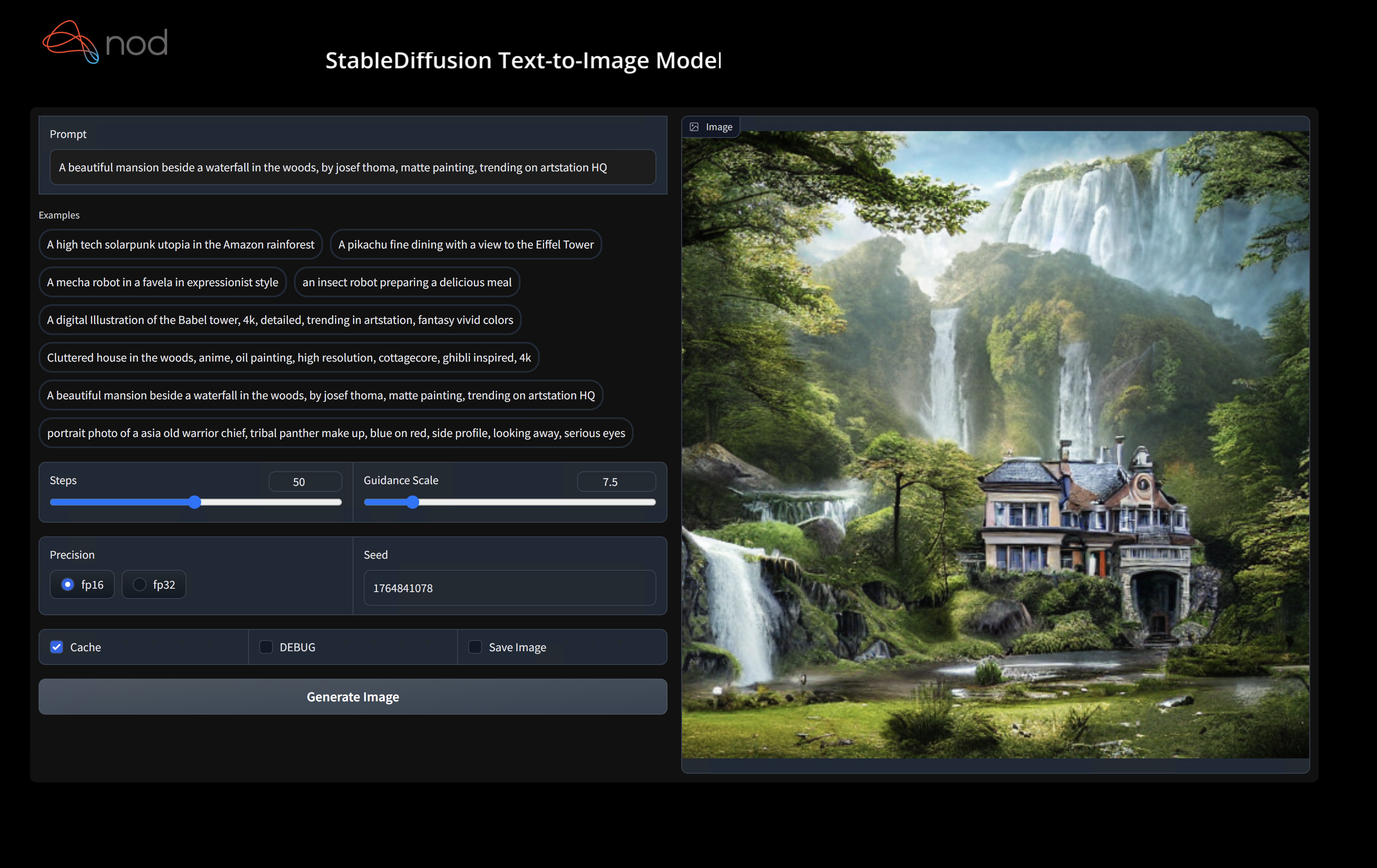
(amdshark1.venv) PS C:\g\amdshark> python .\apps\stable_diffusion\scripts\main.py --app="txt2img" --precision="fp16" --prompt="tajmahal, snow, sunflowers, oil on canvas" --device="vulkan"python3.11 apps/stable_diffusion/scripts/main.py --app=txt2img --precision=fp16 --device=vulkan --prompt="tajmahal, oil on canvas, sunflowers, 4k, uhd"You can replace vulkan with cpu to run on your CPU or with cuda to run on CUDA devices. If you have multiple vulkan devices you can address them with --device=vulkan://1 etc
The output on a AMD 7900XTX would look something like:
Average step time: 47.19188690185547ms/it
Clip Inference time (ms) = 109.531
VAE Inference time (ms): 78.590

Total image generation time: 2.5788655281066895sec
Here are some samples generated:


Find us on AMDSHARK Discord server if you have any trouble with running it on your hardware.
Binary Installation
This step sets up a new VirtualEnv for Python
python --version #Check you have 3.11 on Linux, macOS or Windows Powershell
python -m venv amdshark_venv
source amdshark_venv/bin/activate   # Use amdshark_venv/Scripts/activate on Windows

# If you are using conda create and activate a new conda env

# Some older pip installs may not be able to handle the recent PyTorch deps
python -m pip install --upgrade pip
macOS Metal users please install https://sdk.lunarg.com/sdk/download/latest/mac/vulkan-sdk.dmg and enable "System wide install"
This step pip installs AMD-SHARK and related packages on Linux Python 3.8, 3.10 and 3.11 and macOS / Windows Python 3.11
pip install nodai-amdshark -f https://nod-ai.github.io/AMD-SHARK-Studio/package-index/ -f https://llvm.github.io/torch-mlir/package-index/ -f https://nod-ai.github.io/SRT/pip-release-links.html --extra-index-url https://download.pytorch.org/whl/nightly/cpupytest tank/test_models.pySee tank/README.md for a more detailed walkthrough of our pytest suite and CLI.
curl -O https://raw.githubusercontent.com/nod-ai/AMD-SHARK-Studio/main/amdshark/examples/amdshark_inference/resnet50_script.py
#Install deps for test script
pip install --pre torch torchvision torchaudio tqdm pillow gsutil --extra-index-url https://download.pytorch.org/whl/nightly/cpu
python ./resnet50_script.py --device="cpu" #use cuda or vulkan or metalcurl -O https://raw.githubusercontent.com/nod-ai/AMD-SHARK-Studio/main/amdshark/examples/amdshark_inference/minilm_jit.py
#Install deps for test script
pip install transformers torch --extra-index-url https://download.pytorch.org/whl/nightly/cpu
python ./minilm_jit.py --device="cpu" #use cuda or vulkan or metalDevelopment, Testing and Benchmarks
If you want to use Python3.11 and with TF Import tools you can use the environment variables like:
Set USE_IREE=1 to use upstream IREE
# PYTHON=python3.11 VENV_DIR=0617_venv IMPORTER=1 ./setup_venv.sh
python -m  amdshark.examples.amdshark_inference.resnet50_script --device="cpu" # Use gpu | vulkan
# Or a pytest
pytest tank/test_models.py -k "MiniLM"If you are a Torch-mlir developer or an IREE developer and want to test local changes you can uninstall
the provided packages with pip uninstall torch-mlir and / or pip uninstall iree-compiler iree-runtime and build locally
with Python bindings and set your PYTHONPATH as mentioned here
for IREE and here
for Torch-MLIR.
How to use your locally built Torch-MLIR with AMDSHARK:
1.) Run `./setup_venv.sh in AMDSHARK` and activate `amdshark.venv` virtual env.
2.) Run `pip uninstall torch-mlir`.
3.) Go to your local Torch-MLIR directory.
4.) Activate mlir_venv virtual envirnoment.
5.) Run `pip uninstall -r requirements.txt`.
6.) Run `pip install -r requirements.txt`.
7.) Build Torch-MLIR.
8.) Activate amdshark.venv virtual environment from the Torch-MLIR directory.
8.) Run `export PYTHONPATH=`pwd`/build/tools/torch-mlir/python_packages/torch_mlir:`pwd`/examples` in the Torch-MLIR directory.
9.) Go to the AMDSHARK directory.
Now the AMDSHARK will use your locally build Torch-MLIR repo.
To produce benchmarks of individual dispatches, you can add --dispatch_benchmarks=All --dispatch_benchmarks_dir=<output_dir> to your pytest command line argument.
If you only want to compile specific dispatches, you can specify them with a space seperated string instead of "All". E.G. --dispatch_benchmarks="0 1 2 10"
For example, to generate and run dispatch benchmarks for MiniLM on CUDA:
pytest -k "MiniLM and torch and static and cuda" --benchmark_dispatches=All -s --dispatch_benchmarks_dir=./my_dispatch_benchmarks
The given command will populate <dispatch_benchmarks_dir>/<model_name>/ with an ordered_dispatches.txt that lists and orders the dispatches and their latencies, as well as folders for each dispatch that contain .mlir, .vmfb, and results of the benchmark for that dispatch.
if you want to instead incorporate this into a python script, you can pass the dispatch_benchmarks and dispatch_benchmarks_dir commands when initializing AMDSharkInference, and the benchmarks will be generated when compiled. E.G:
amdshark_module = AMDSharkInference(
        mlir_model,
        device=args.device,
        mlir_dialect="tm_tensor",
        dispatch_benchmarks="all",
        dispatch_benchmarks_dir="results"
    )
Output will include:
- An ordered list ordered-dispatches.txt of all the dispatches with their runtime
- Inside the specified directory, there will be a directory for each dispatch (there will be mlir files for all dispatches, but only compiled binaries and benchmark data for the specified dispatches)
- An .mlir file containing the dispatch benchmark
- A compiled .vmfb file containing the dispatch benchmark
- An .mlir file containing just the hal executable
- A compiled .vmfb file of the hal executable
- A .txt file containing benchmark output
See tank/README.md for further instructions on how to run model tests and benchmarks from the AMDSHARK tank.
API Reference
from amdshark.amdshark_importer import AMDSharkImporter

# AMDSharkImporter imports mlir file from the torch, tensorflow or tf-lite module.

mlir_importer = AMDSharkImporter(
    torch_module,
    (input),
    frontend="torch",  #tf, #tf-lite
)
torch_mlir, func_name = mlir_importer.import_mlir(tracing_required=True)

# AMDSharkInference accepts mlir in linalg, mhlo, and tosa dialect.

from amdshark.amdshark_inference import AMDSharkInference
amdshark_module = AMDSharkInference(torch_mlir, device="cpu", mlir_dialect="linalg")
amdshark_module.compile()
result = amdshark_module.forward((input))
from amdshark.amdshark_inference import AMDSharkInference
import numpy as np

mhlo_ir = r"""builtin.module  {
      func.func @forward(%arg0: tensor<1x4xf32>, %arg1: tensor<4x1xf32>) -> tensor<4x4xf32> {
        %0 = chlo.broadcast_add %arg0, %arg1 : (tensor<1x4xf32>, tensor<4x1xf32>) -> tensor<4x4xf32>
        %1 = "mhlo.abs"(%0) : (tensor<4x4xf32>) -> tensor<4x4xf32>
        return %1 : tensor<4x4xf32>
      }
}"""

arg0 = np.ones((1, 4)).astype(np.float32)
arg1 = np.ones((4, 1)).astype(np.float32)
amdshark_module = AMDSharkInference(mhlo_ir, device="cpu", mlir_dialect="mhlo")
amdshark_module.compile()
result = amdshark_module.forward((arg0, arg1))
AMDSHARK is maintained to support the latest innovations in ML Models:
| TF HuggingFace Models | AMDSHARK-CPU | AMDSHARK-CUDA | AMDSHARK-METAL |
|---|---|---|---|
| BERT | 💚 | 💚 | 💚 |
| DistilBERT | 💚 | 💚 | 💚 |
| GPT2 | 💚 | 💚 | 💚 |
| BLOOM | 💚 | 💚 | 💚 |
| Stable Diffusion | 💚 | 💚 | 💚 |
| Vision Transformer | 💚 | 💚 | 💚 |
| ResNet50 | 💚 | 💚 | 💚 |
For a complete list of the models supported in AMDSHARK, please refer to tank/README.md.
- AMDSHARK Discord server: Real time discussions with the AMDSHARK team and other users
- GitHub issues: Feature requests, bugs etc
IREE Project Channels
- Upstream IREE issues: Feature requests, bugs, and other work tracking
- Upstream IREE Discord server: Daily development discussions with the core team and collaborators
- iree-discuss email list: Announcements, general and low-priority discussion
MLIR and Torch-MLIR Project Channels
#torch-mlirchannel on the LLVM Discord - this is the most active communication channel- Torch-MLIR Github issues here
torch-mlirsection of LLVM Discourse- Weekly meetings on Mondays 9AM PST. See here for more information.
- MLIR topic within LLVM Discourse AMDSHARK and IREE is enabled by and heavily relies on MLIR.
nod.ai AMDSHARK is licensed under the terms of the Apache 2.0 License with LLVM Exceptions. See LICENSE for more information.


