

Licensed under S-Lab License 1.0
English|中文
- StableSR is a competitive super-resolution method originally proposed by Jianyi Wang et al.
- This repository is a migration of the StableSR project to the Automatic1111 WebUI.
Relevant Links
Click to view high-quality official examples!
If you find this project useful, please give me & Jianyi Wang a star! ⭐
- 2023.07.01: We occasionally found that proper negative prompts can significantly enhance the details of StableSR.
- We use CFG Scale=7 with the following negative prompts: 3d, cartoon, anime, sketches, (worst quality:2), (low quality:2)
- Click comparison1 to see the significant power of negative prompts.
- Postive prompts are not very useful, but it also helps. You can try (masterpiece:2), (best quality:2), (realistic:2),(very clear:2)
- With the above prompts, we are trying our best to approach close-source project GigaGAN's quality (while ours are still worse than their demo). Click comparison2 to see our current capability on 128x128->1024x1024 upscaling.
- 2023.06.30: We are happy to release a new SD 2.1 768 version of StableSR! (Thanks to Jianyi Wang)
- It produces similar amount of details, but with significantly less artifacts and better color.
- It supports the resolution of 768 * 768.
- To enjoy the new model:
- Use the SD 2.1 768 base model. It can be download from HuggingFace
- The corresponding SR Module (~400MB): Official Resource, 我的百度网盘-提取码8ju9
- Now you can use a larger tile size in the Tiled Diffusion (96 * 96, the same as default settings), the speed can be slightly faster.
- Keep other things the same.
- Janyi Wang keeps trying to train more powerful SR modules suitable for AIGC images. These models will be tuned on SD2.1 768 or SDXL later.
- High-fidelity detailed image upscaling:
- Being very detailed while keeping the face identity of your characters.
- Suitable for most images (Realistic or Anime, Photography or AIGC, SD 1.5 or Midjourney images...) Official Examples
- Less VRAM consumption
- I remove the VRAM-expensive modules in the official implementation.
- The remaining model is much smaller than ControlNet Tile model and requires less VRAM.
- When combined with Tiled Diffusion & VAE, you can do 4k image super-resolution with limited VRAM (e.g., < 12 GB).
Please be aware that sdp may lead to OOM for some unknown reasons. You may use xformers instead.
- Wavelet Color Fix
- The official StableSR will significantly change the color of the generated image. The problem will be even more prominent when upscaling in tiles (Have been merged into official repo).
- I implement a powerful post-processing technique that effectively matches the color of the upscaled image to the original. See Wavelet Color Fix Example.
⚪ Method 1: Official Market
- Open Automatic1111 WebUI -> Click Tab "Extensions" -> Click Tab "Available" -> Find "StableSR" -> Click "Install"
⚪ Method 2: URL Install
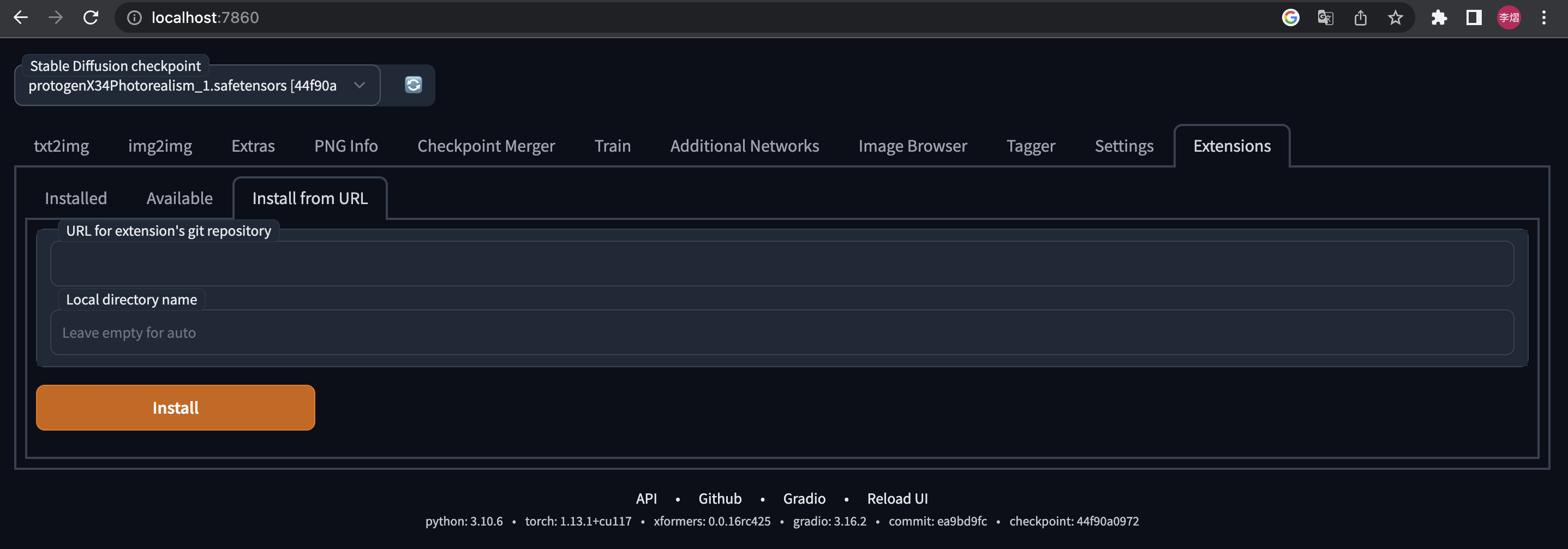
- Open Automatic1111 WebUI -> Click Tab "Extensions" -> Click Tab "Install from URL" -> type in https://github.com/pkuliyi2015/sd-webui-stablesr.git -> Click "Install"
We currently has two versions. They have similar amount of details, but the 768 has less artifacts.
-
You MUST use the Stable Diffusion V2.1 768 EMA checkpoint (~5.21GB) from StabilityAI
- You can download it from HuggingFace
- Put into stable-diffusion-webui/models/Stable-Diffusion/
-
Download the extracted StableSR module
- Official Resource
- Put the StableSR module (~400MB) into your stable-diffusion-webui/extensions/sd-webui-stablesr/models/
-
You MUST use the Stable Diffusion V2.1 512 EMA checkpoint (~5.21GB) from StabilityAI
- You can download it from HuggingFace
- Put into stable-diffusion-webui/models/Stable-Diffusion/
-
Download the extracted StableSR module
- Official resources: HuggingFace (~1.2 G). Note that this is a zip file containing both the StableSR module and the VQVAE.
- My resources: <GoogleDrive> <百度网盘-提取码aguq>
- Put the StableSR module (~400MB) into your stable-diffusion-webui/extensions/sd-webui-stablesr/models/
While we use SD2.1 checkpoint, you can still upscale ANY image (even from SD1.5 or NSFW). Your image won't be censored and the output quality won't be affected.
- Install Tiled Diffusion & VAE extension
- The original StableSR easily gets OOM for large images > 512.
- For better quality and less VRAM usage, we recommend Tiled Diffusion & VAE.
- Use the Official VQGAN VAE
- Official resources: See the link in 2.
- My resources: <GoogleDrive> <百度网盘-提取码83u9>
- Put the VQVAE (~700MB) into your stable-diffusion-webui/models/VAE
- At the top of the WebUI, select the v2-1_512-ema-pruned checkpoint you downloaded.
- Switch to img2img tag. Find the "Scripts" dropdown at the bottom of the page.
- Select the StableSR script.
- Click the refresh button and select the StableSR checkpoint you have downloaded.
- Choose a scale factor.
- Euler a sampler is recommended. CFG Scale=7, Steps >= 20.
- While StableSR can work without any prompts, we recently found that negative prompts can significantly improve details. Example negative prompts: 3d, cartoon, anime, sketches, (worst quality:2), (low quality:2)
- Click to see [comparison] with/without pos/neg prompts(https://imgsli.com/MTg5MjM1)
- For output image size > 512, we recommend using Tiled Diffusion & VAE, otherwise, the image quality may not be ideal, and the VRAM usage will be huge.
- Here are the official Tiled Diffusion settings:
- Method = Mixture of Diffusers
- For StableSR 768 version, you can use Latent tile size = 96, Latent tile overlap = 48
- For StableSR 512 version, you can use Latent tile size = 64, Latent tile overlap = 32
- Latent tile batch size as large as possible before Out of Memory.
- Upscaler MUST be None (will not upscale here; instead, upscale in StableSR).
- Method = Mixture of Diffusers
- The following figure shows the recommended settings for 24GB VRAM.
- For a 6GB device, just change Tiled Diffusion Latent tile batch size to 1, Tiled VAE Encoder Tile Size to 1024, Decoder Tile Size to 128.
- SDP attention optimization may lead to OOM. Please use xformers in that case.
- You DON'T need to change other settings in Tiled Diffusion & Tiled VAE unless you have a very deep understanding. These params are almost optimal for StableSR.


- What is "Pure Noise"?
- Pure Noise refers to starting from a fully random noise tensor instead of your image. This is the default behavior in the StableSR paper.
- When enabling it, the script ignores your denoising strength and gives you much more detailed images, but also changes the color & sharpness significantly
- When disabling it, the script starts by adding some noise to your image. The result will be not fully detailed, even if you set denoising strength = 1 (but maybe aesthetically good). See Comparison.
- If you disable Pure Noise, we recommend denoising strength=1
- What is "Color Fix"?
- This is to mitigate the color shift problem from StableSR and the tiling process.
- AdaIN simply adjusts the color statistics between the original and the outcome images. This is the official algorithm but ineffective in many cases.
- Wavelet decomposes the original and the outcome images into low and high frequency, and then replace the outcome image's low-frequency part (colors) with the original image's. This is very powerful for uneven color shifting. The algorithm is from GIMP and Krita, which will take several seconds for each image.
- When enabling color fix, the original image will also show up in your preview window, but will NOT be saved automatically.
Why my results are different from the official examples?
- It is not your or our fault.
- This extension has the same UNet model weights as the StableSR if installed correctly.
- If you install the optional VQVAE, the whole model weights will be the same as the official model with fusion weights=0.
- However, your result will be not as good as the official results, because:
- Sampler Difference:
- The official repo does 100 or 200 steps of legacy DDPM sampling with a custom timestep scheduler, and samples without negative prompts.
- However, WebUI doesn't offer such a sampler, and it must sample with negative prompts. This is the main difference.
- VQVAE Decoder Difference:
- The official VQVAE Decoder takes some Encoder features as input.
- However, in practice, I found these features are astonishingly huge for large images. (>10G for 4k images even in float16!)
- Hence, I removed the CFW component in VAE Decoder. As this lead to inferior fidelity in details, I will try to add it back later as an option.
- Sampler Difference:
This project is licensed under:
- All code in this extension is for research purposes only.
- The commercial use of the code and checkpoint is strictly prohibited.
- Please note that the S-Lab License 1.0 prohibits the commercial use of outcome images.
- If you wish to speed up his process for commercial purposes, please contact him through email: [email protected]
If our work is useful for your research, please consider citing:
@article{wang2024exploiting,
  author = {Wang, Jianyi and Yue, Zongsheng and Zhou, Shangchen and Chan, Kelvin C.K. and Loy, Chen Change},
  title = {Exploiting Diffusion Prior for Real-World Image Super-Resolution},
  article = {International Journal of Computer Vision},
  year = {2024}
}
I would like to thank Jianyi Wang et al. for the original StableSR method.


