

A comprehensive guide to building RAG-based LLM applications for production.
- Blog post: https://www.anyscale.com/blog/a-comprehensive-guide-for-building-rag-based-llm-applications-part-1
- GitHub repository: https://github.com/ray-project/llm-applications
- Interactive notebook: https://github.com/ray-project/llm-applications/blob/main/notebooks/rag.ipynb
- Anyscale Endpoints: https://endpoints.anyscale.com/
- Ray documentation: https://docs.ray.io/
In this guide, we will learn how to:
- 💻 Develop a retrieval augmented generation (RAG) based LLM application from scratch.
- 🚀 Scale the major components (load, chunk, embed, index, serve, etc.) in our application.
- ✅ Evaluate different configurations of our application to optimize for both per-component (ex. retrieval_score) and overall performance (quality_score).
- 🔀 Implement LLM hybrid routing approach to bridge the gap b/w OSS and closed LLMs.
- 📦 Serve the application in a highly scalable and available manner.
- 💥 Share the 1st order and 2nd order impacts LLM applications have had on our products.
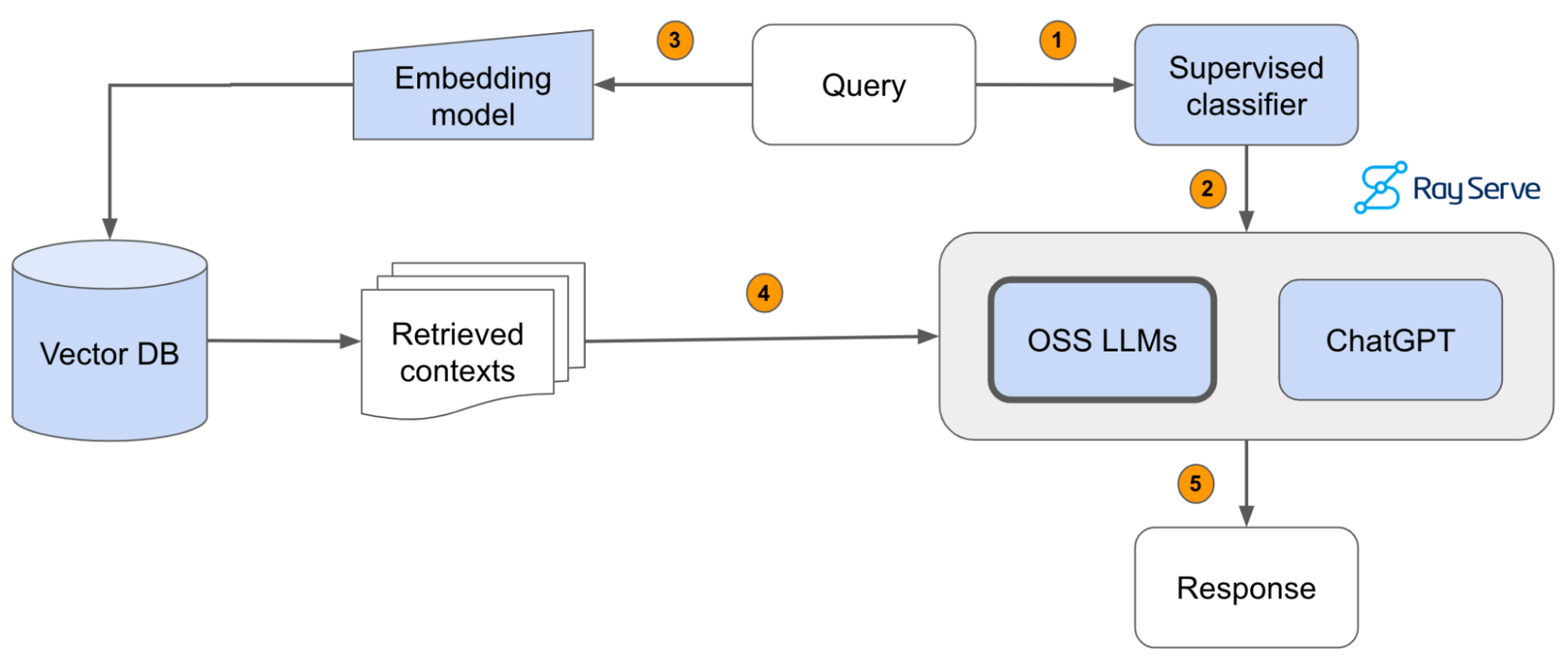
We'll be using OpenAI to access ChatGPT models like gpt-3.5-turbo, gpt-4, etc. and Anyscale Endpoints to access OSS LLMs like Llama-2-70b. Be sure to create your accounts for both and have your credentials ready.
Local
You could run this on your local laptop but a we highly recommend using a setup with access to GPUs. You can set this up on your own or on [Anyscale](http://anyscale.com/).Anyscale
- Start a new Anyscale workspace on staging using an
g3.8xlargehead node, which has 2 GPUs and 32 CPUs. We can also add GPU worker nodes to run the workloads faster. If you're not on Anyscale, you can configure a similar instance on your cloud. - Use the
default_cluster_env_2.6.2_py39cluster environment. - Use the
us-west-2if you'd like to use the artifacts in our shared storage (source docs, vector DB dumps, etc.).
git clone https://github.com/ray-project/llm-applications.git .
git config --global user.name <GITHUB-USERNAME>
git config --global user.email <EMAIL-ADDRESS>Our data is already ready at /efs/shared_storage/goku/docs.ray.io/en/master/ (on Staging, us-east-1) but if you wanted to load it yourself, run this bash command (change /desired/output/directory, but make sure it's on the shared storage,
so that it's accessible to the workers)
git clone https://github.com/ray-project/llm-applications.git .Then set up the environment correctly by specifying the values in your .env file,
and installing the dependencies:
pip install --user -r requirements.txt
export PYTHONPATH=$PYTHONPATH:$PWD
pre-commit install
pre-commit autoupdatetouch .env
# Add environment variables to .env
OPENAI_API_BASE="https://api.openai.com/v1"
OPENAI_API_KEY="" # https://platform.openai.com/account/api-keys
ANYSCALE_API_BASE="https://api.endpoints.anyscale.com/v1"
ANYSCALE_API_KEY="" # https://app.endpoints.anyscale.com/credentials
DB_CONNECTION_STRING="dbname=postgres user=postgres host=localhost password=postgres"
source .envNow we're ready to go through the rag.ipynb interactive notebook to develop and serve our LLM application!
- If your team is investing heavily in developing LLM applications, reach out to us to learn more about how Ray and Anyscale can help you scale and productionize everything.
- Start serving (+fine-tuning) OSS LLMs with Anyscale Endpoints ($1/M tokens for
Llama-3-70b) and private endpoints available upon request (1M free tokens trial). - Learn more about how companies like OpenAI, Netflix, Pinterest, Verizon, Instacart and others leverage Ray and Anyscale for their AI workloads at the Ray Summit 2024 this Sept 18-20 in San Francisco.


