





Interactive Pipe To: The Node.js cli interactive workflow
- About
- News
- Features
- Examples
- Install
- Awesome workflows
- Help
- Supported OS Terminals
- Contributing
- Alternatives
- Roadmap
- Credits
- License
ipt (pronounced iPipeTo) introduces the missing cli interactive workflow. It takes any kind of list as an input and uses that list to build an interactive interface to let you select an element from it.
Stop manually dragging your mouse around to copy output data from a terminal, using the ipt workflow you can pipe data from a command and select what to copy to clipboard from a convenient visual menu.
Selected data is also output to stdout allowing for easily composing various workflows - Just create your custom alias!
- v3.2.0:
- Added
-ioption for arbitrary input prompts
- Added
- v3.1.0:
- Added
-ooption for ordered multiple choice selection
- Added
- v2.1.0:
- Added
-Doption for defining a pre-selected item in the list
- Added
- v2.0.0:
- Added
-poption for extracting path out of selected items - Added
-Moption for customizing interface message - Added
-0option for better null char compatibility - Added
-Soption for setting number of lines to be displayed - Added a proper programmatic API
- Added
- v1.1.0: Added autocomplete (or fuzzy finder) mode
ipt -a
iPipeTo is inspired by the Unix Pipeline and is composable with any command line utility you already use and love.
The -m or --multiple flag allows you to select many items out of the interactive list instead of the standard "pick one" behavior.
Using -a or --autocomplete option switchs the behavior of the interactive list to that of a fuzzysearch (or autocomplete) where options are narrowed as you type.
A convenient option that helps extract file system path values out of the selected item, very useful when manipulating verbose output. Use -p or --extract-path options.
Use the -i or --input option in order to use ipt as a simple input prompt, default values can be set using standard input or the --default argument.
The -c or --copy option allows you to copy the selected item value to clipboard. Makes for useful workflows where you may need that value somewhere else such as out of the terminal or in a manual command to type later.
Customize your workflow by defining the separator to be used to generate the list (-s or --separator options), a custom message to display on the interactive interface (-M or --message) and much more. Make sure to take a look at the Help section to learn about all the available options.
Use the -D or --default option to determine which item(s) should be selected by default on the interactive list. The -P or --default-separator also allows for a custom char to be used to split these items (similar to -s option).
All you need in order to run ipt is the Node.js runtime and npm, if you have those you're already all set!
The default behavior of ipt is to allow for the selection of one item from the interactive list, once selected this item will be output to stdout, you can also use -c option to copy the result to your clipboard.
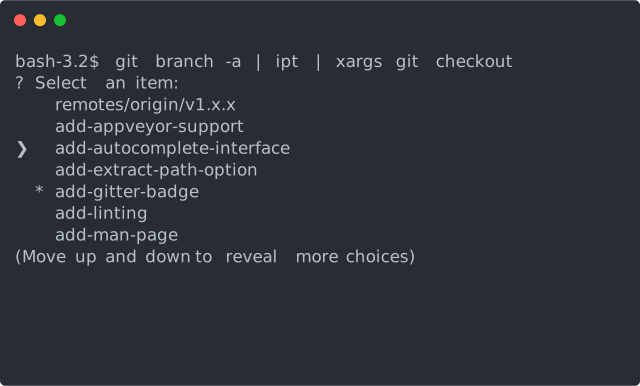
Here we get a simple list of branchs git branch -a, pipe into ipt and pipe the selected item value to git checkout to checkout into the selected branch. xargs is needed to get the data from standard input and read it as an argument.
In the following example we list all the files from the folder ls and pipe that list into ipt only that this time we use the "multiple" flag -m that allows for selecting multiple items from a list. The selected items get piped to trash that deletes them.
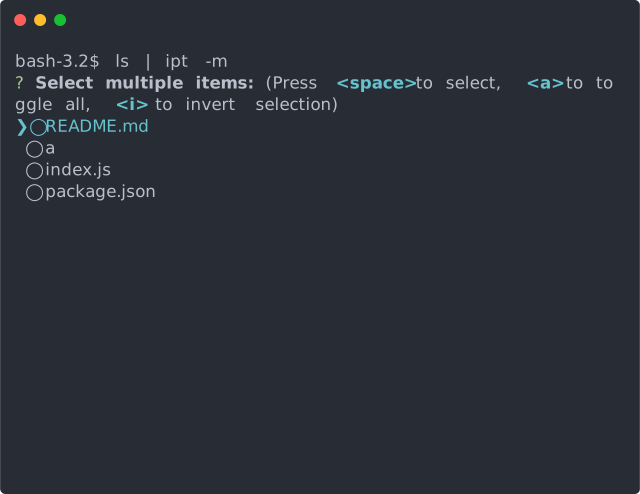
NOTE: An ordered multiple choice menu is available when using the -o OR --ordered option
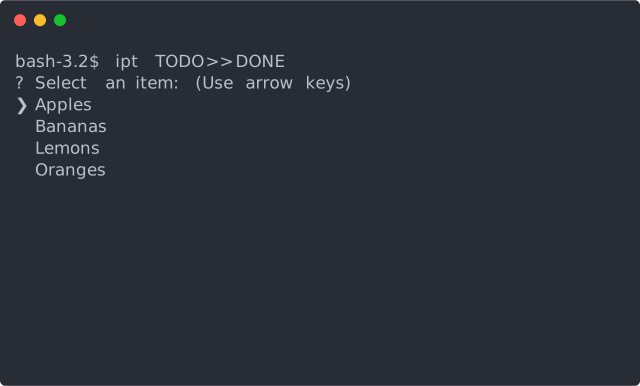
You can also read a file as source of input data instead of reading from the standard input, here we read from a TODO file and redirect the selected items to be written in a DONE file.
Available on npm:
npm install -g iptKeep in mind that you'll need the latest Node.js LTS installed!
Showcases some useful predefined workflow scripts for using iPipeTo:
- ntl: Interactive cli menu to list/run npm tasks
- itrash: Selects files to delete from current folder
- git-iadd: Interactive staging of selected changed files
- git-ishow: Choose one git stash item to show
- npmlist: Fuzzy list everything with npm module
Found an awesome workflow idea? Send us a PR to add it here!
Usage:
  ipt [options] [<path>]

Options:
  -0, --null               Uses a null character as separator          [boolean]
  -a, --autocomplete       Starts in autocomplete mode                 [boolean]
  -c, --copy               Copy selected item(s) to clipboard          [boolean]
  -d, --debug              Prints to stderr any internal error         [boolean]
  -D, --default            Select a default choices by their name       [string]
  -P, --default-separator  Separator element for default items          [string]
  -e, --file-encoding      Encoding for file <path>, defaults to utf8   [string]
  -h, --help               Shows this help message                     [boolean]
  -i, --input              Open an interactive input prompt            [boolean]
  -m, --multiple           Allows the selection of multiple items      [boolean]
  -o, --ordered            Selects multiple items in order             [boolean]
  -M, --message            Replaces interface message                   [string]
  -p, --extract-path       Returns only a valid path for each item     [boolean]
  -s, --separator          Separator to to split input into items       [string]
  -S, --size               Amount of lines to display at once           [number]
  -t, --no-trim            Prevents trimming of the result strings     [boolean]
  -u, --unquoted           Force the output to be unquoted             [boolean]
  -v, --version            Show version number                         [boolean]
iPipeTo should run just fine in any of the Inquirer.js supported terminals:
- Mac OS:
- Terminal.app
- iTerm
- Linux (Ubuntu, openSUSE, Arch Linux, etc):
- gnome-terminal (Terminal GNOME)
- konsole
- Windows*:
- cmd.exe
- Powershell
- Cygwin
Bug fixes / code changes: Please provide tests covering your changes, update docs accordingly and keep your changes to a single commit.
As in any cool idea, iPipeTo is not the only available choice, here are some other cool similar tools found in the wild:
Are you wondering what can you do or how would you start contributing to iPipeTo's future? Take a look at our Roadmap document to find out about what's planned ahead and what currently needs help.
- The iPipeTo logo is a kind contribution from Bruno Magal
MIT © 2021 Ruy Adorno


