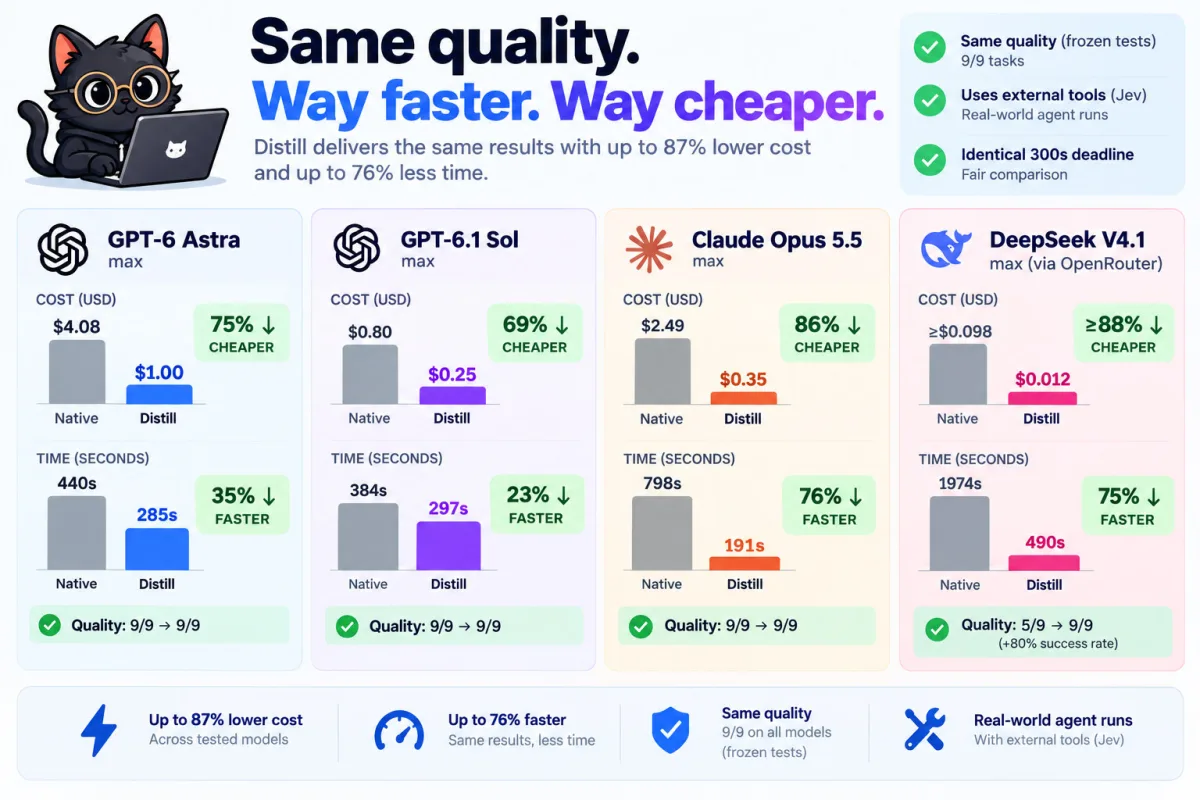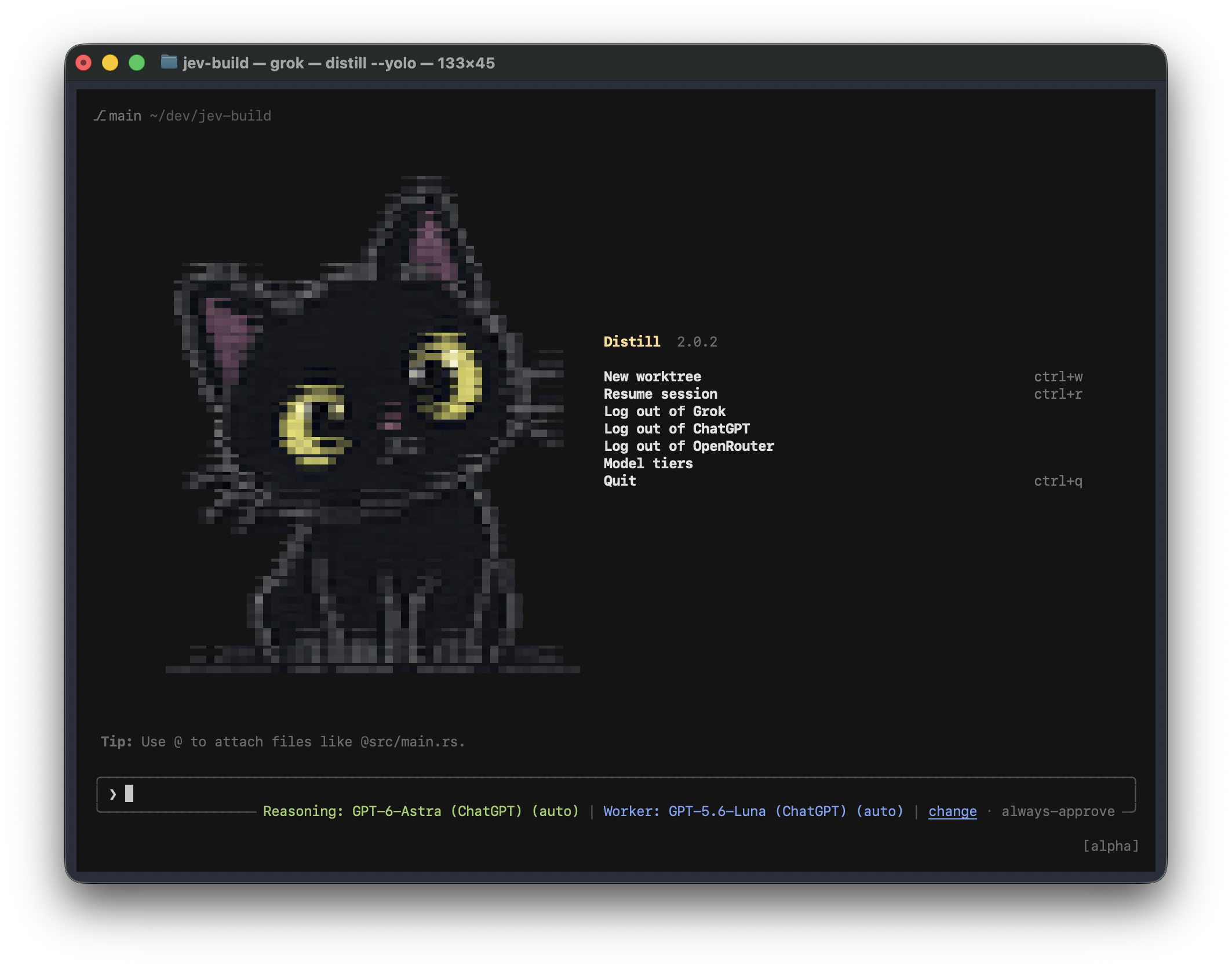
Distill is a terminal coding harness by Samuel Fajreldines. It reads your codebase, edits files, runs commands, and keeps the conversation in your terminal. Version 2.0.0 supports Grok, ChatGPT, OpenRouter, and local OpenAI-compatible model servers.
You can open Distill without signing in to any provider. To generate an answer, you need a reachable model, whether it runs on your machine or through a provider account.
Download a prebuilt binary from GitHub Releases, or run the installer on macOS or Linux:
curl -fsSL https://raw.githubusercontent.com/samuelfaj/distill/main/install.sh -o /tmp/distill-install.sh
sh /tmp/distill-install.sh
export PATH="$HOME/.local/share/distill/bin:$PATH"
distillAdd the export PATH line to your shell configuration, such as ~/.zshrc or
~/.bashrc, to use distill in new terminals. The installer selects the binary
for your OS and CPU, checks its SHA-256 checksum, and runs --version before
activating it. It does not require Rust, a GitHub account, or provider login.
Release binaries target Apple Silicon and Intel Macs, and Linux on x86_64 and ARM64. Linux builds use glibc; use a source build for other environments.
To install a specific release:
DISTILL_VERSION=2.0.0 sh /tmp/distill-install.shSet DISTILL_INSTALL_DIR to choose another installation directory. Its bin
subdirectory must be on your PATH.
For an installation made with the release installer:
distill updateYou can also download and run install.sh again to install the latest release.
Both paths verify the downloaded binary before switching the executable. Your
settings, credentials, and sessions stay in your profile. Restart open Distill
sessions to use the new version.
Source builds are separate from release installations. Update your checkout and rebuild when working from source.
Open Model tiers on the home screen, click change beside the current
model, or enter /tiers. You can edit each tier in that screen.
| Tier | Purpose | Picker |
|---|---|---|
| Reasoning model | Handles the main conversation, difficult reasoning, and code changes. | /model or /tiers reasoning |
| Worker model | Takes suitable calls in the same conversation when a lighter model can handle them. Optional. | /worker-model or /tiers worker |
| Utility model | Handles bounded tasks such as extraction, summaries, and compression. | /utility-model or /tiers utility |
Each picker helps you choose a model and its effort. auto is available and is
the default. You can also supply the selection directly:
/model gpt-6-astra auto
/worker-model gpt-5.6-luna auto
/utility-model openrouter-qwen37 auto
Reasoning and Worker must use a compatible provider connection: the same base URL, API backend, and credential scheme. Distill checks this before accepting a Worker. It also checks that the conversation and response reserve fit the Worker's context window before routing a call to it. The Reasoning model keeps the call when they do not fit.
OpenRouter models can fill any tier. A Worker selected through OpenRouter must still be compatible with the Reasoning model's connection. The Utility model can use a separate connection.
Use /worker-model clear to remove the Worker. /utility-model clear restores
the configured default utility chain. With a Worker, the prompt footer shows
both models and their efforts. Without one, it shows only the current model.
The home menu has separate login and logout actions for Grok, ChatGPT, and
OpenRouter. Signing out of one does not sign out of the others. ChatGPT uses
OAuth and the model catalog available to your account. OpenRouter supports
browser login or an OPENROUTER_API_KEY environment variable.
For a local model, start an OpenAI-compatible server and add an entry to your
profile's config.toml. Replace the model ID and URL with your server's values:
[models]
default = "local"
[model.local]
name = "Local model"
model = "your-local-model-id"
base_url = "http://127.0.0.1:8000/v1"
api_backend = "chat_completions"New profiles use ~/.distill. Set DISTILL_HOME to use another directory.
An existing ~/.grok profile remains supported when no new profile exists, so
previous credentials and sessions remain accessible. An explicit
DISTILL_HOME takes priority.
Jev is Distill's decision layer. It answers structured questions about a small state assembled by the harness: which model should handle a call, how much effort it needs, or which parts of a tool result are worth keeping.
The Reasoning model handles calls unless a routing decision selects another path. The Worker shares the conversation. Utility tasks receive a bounded payload, such as a tool result, log excerpt, or candidate list, instead of the full conversation.
Jev decision
|
+-------------+-------------+
| |
Reasoning model Worker model
| same conversation
|
Utility tasks
bounded payloads and checked results
Jev chooses among candidates supplied by code. It does not invent candidates or decide permissions. Distill owns plan mode, auto approval, YOLO, and permission policies; Jev cannot approve, veto, or hold a tool call for confirmation. If a Jev decision fails, times out, or lacks enough confidence, the harness keeps its normal execution path.
With /effort auto, Jev can choose a model and effort for each call within a
turn. It receives the model's supported effort choices, the current phase of
the turn, recent steps, and the user's request. It can keep the session's model
or effort instead of changing them.
Worker routing requires a confidence of at least 0.55. Effort selection uses a
floor of 0.40. A fixed effort, selected in a picker or with /effort <level>,
takes precedence over automatic effort selection.
The configuration keys retain their internal names:
[jev]
effort_auto = true
[jev.tiers]
light = "codex-luna"
[jev.ladder]
b2_light_model = truelight names a configured model entry. Leave it unset to run without a Worker,
or set b2_light_model = false to turn off Worker routing.
Utility tasks extract literal values, digest logs, compress text, answer questions about a supplied payload, pick candidate IDs, or classify content. Each task checks the result before the harness uses it. Depending on the task, checks preserve literal paths and error messages, require quoted spans, or reject labels and IDs outside the supplied set. A rejected result falls back to the normal path.
You can configure a single model entry or an ordered OpenRouter fallback chain:
[jev.local]
model = "inclusionai/ling-3.0-flash-vl:free,inclusionai/ling-3.0-flash-vl,qwen/qwen3.7-flash"
max_context_tokens = 262144
notes = "Extraction, summaries, and mechanical edits."A comma-separated chain is tried in order. Model availability and charges come from the provider. Keep API keys in the environment or use provider login; do not paste them into this example.
The b2_local_model route can also hand an entire call to the Utility model
when the capacity checks and context limit allow it. This is separate from the
bounded utility tasks. The e_retention route breaks large outputs into blocks
and decides what to retain before discarding the original text, with special
handling for secrets. Each route has a per-turn failure limit, so a failing
endpoint does not get retried at every step.
| Area | What Jev decides |
|---|---|
| Content | Which files, lines, logs, search results, and instructions merit another look. |
| Planning | Intent, relevant tool families, and delegation hints. |
| Quality | Whether an edit or failed check needs another attempt, and which errors to address first. |
| Context | What to preserve during compression and compaction. |
Individual switches live under [jev.ladder]. For example:
[jev]
provider = "openrouter_decisions"
base_url = "https://openrouter.ai/api"
model = "~typesafe/jev-latest"
api_key_env = "OPENROUTER_API_KEY"
timeout_ms = 20000
effort_auto = true
[jev.ladder]
b2_light_model = true
b2_local_model = true
e_retention = trueJev needs credentials for its configured decision endpoint. Without them, the harness still runs: routing decisions fall back to the session model, and unavailable utility routes stay out of the way.
To inspect decisions:
GROK_LOG_JEV=1 distillThis compatibility-named variable enables logs/jev.jsonl inside the active
profile. Entries record the route, decision, confidence, latency, model, and
whether the requested choice was applied. See the decision inventory
for implementation pointers.
Install the Rust toolchain specified in rust-toolchain.toml and the native
build dependencies for your platform, including a C/C++ compiler, CMake,
pkg-config, and Protocol Buffers. The release workflow
contains the build steps used for each platform.
git clone https://github.com/samuelfaj/distill.git
cd distill
cargo build --locked --release -p distill-pager-bin --bin distill
./target/release/distillFor a local debug build and installation, run sh tools/install-local.sh.
Distill is licensed under Apache 2.0. Samuel Fajreldines creates and maintains the Distill modifications. Preserved copyright notices and dependency attributions are in NOTICE and THIRD-PARTY-NOTICES. See CONTRIBUTING.md for the contribution policy.