


Essential software should be fully automatable. Web browsers aren't. Let's change that.
Beachpatrol is a CLI tool to replace and automate your everyday web browser.
demo.mov


Run beachpatrol to launch a Chromium or Firefox browser which can be
controlled externally through Playwright scripts.
You can use it as your daily driver; it works like a regular browser.
Use also beachpatrol --profile <profile-name> to launch a specific profile,
or beachpatrol --incognito.
To automate it, create a custom Playwright script in
($XDG_DATA_HOME/beachpatrol/commands/, default
~/.local/share/beachpatrol/commands/). Then, run beachmsg <script-name> [<argument>...], and it will run it. You can use the Playwright API to work
on the currently focused tab, move to an existing tab, open a new one, or use
a headless tab instead.
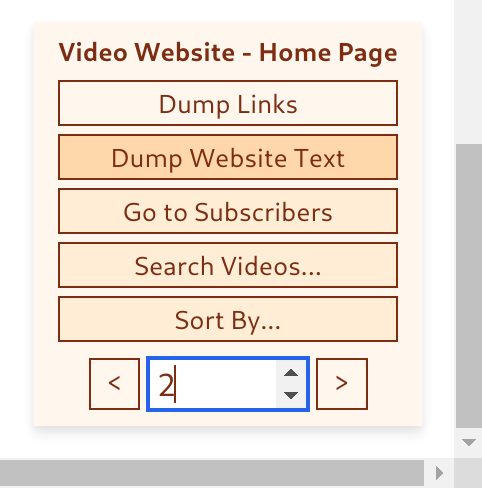
If you don't want to go back and forth to the CLI to automate your browser, you can
install the beachpatrol-browser-extension. Its UI allows you to select a
command and call it with arguments. It will call beachmsg itself through the
browser extension's Native Messaging feature. Also, the UI will highlight commands
which are meant to run on the current URL, will provide GUI elements for common
situations (such as pagination and dropdowns), and will support hotkeys:
- Automate your job search end to end
(SHOBR does exactly this: a
Python CLI that discovers, enriches, screens, writes PDFs, and tracks job
applications through its own
beachpatrolcommands). - Check your email.
- Check your bank transactions.
- Download a file from a website.
- Dump the text from the current tab into a file.
- Fill an online form.
- Check for messages in your social media or work communication platform.
- Integrate with your OS: Add browser task to your Bash/Python scripts.
- All of this right there on your everyday browser!
- Linux (Wayland or X11), macOS or Windows
- Node.js LTS (v22)
- Chromium or Firefox (installed automatically by Playwright)
- Clone the repo:
git clone https://github.com/sebastiancarlos/beachpatrol - Move to the folder:
cd beachpatrol - Run
npm installto install dependencies. - Run
maketo install symlinks to the executables (in/usr/local/binby default, which should be in yourPATH)- On Windows, you can instead run
npm install -g .to install it globally.
- On Windows, you can instead run
- Launch a browser with
beachpatrol- Optionally launch it in the background with
beachpatrol &
- Optionally launch it in the background with
- Use it as your regular browser.
- Install browser extensions if you want.
- If you close it. Run
beachpatrolagain and you should still be logged-in to all your sites. - If you want a different profile, use
beachpatrol --profile new-profile-name- Note: Due to a Chromium's limitation, it is not possible to use the in-browser's profile features to switch profiles. However, this might be fixed in the future.
- Run
beachmsg smoke-testto run the pre-installed test command, which performs the classic Selenium smoke test. - If it reads "Form submitted", it worked correctly.
- Now create your own automation commands!
Beachpatrol resolves commands from two places, in this order:
- The user commands home (recommended):
$XDG_DATA_HOME/beachpatrol/commands/ - The bundled
commandsdirectory of the beachpatrol installation.
Common setups for using the user commands home:
- Plain. Add a
package.jsonwith"type": "module", andnpm installwhatever your commands need. - Keep your commands in a repo elsewhere. Make the commands home a symlink
to your repository root, and every
.jsfile there becomes a command. Dependencies are resolved from your repo's ownnode_modules. - Symlink individual files.
ln -s ~/path/to/my-command.js ~/.local/share/beachpatrol/commands/for each command you want. This particularly allows you to have commands which live in their own independent folders, with their own dependencies.
Suppose you want to automate web search. Create search.js (or .ts) in your
commands home with the following content:
export default async ({ context, activePage }, ...searchTerms) => {
  const page = await context.newPage();
  await page.goto(
    `https://www.google.com/search?q=${encodeURIComponent(searchTerms.join(" "))}`,
  );
};
Every Beachpatrol command must export a default async function (or generator, for streaming), which is the entry point of your command.
The function should take:
- An object containing
{ context, activePage }as its first argument, where:contextis the Playwright BrowserContextactivePageis the currently focused Page object, ornull
- The arguments to the command, if any.
Then, you simply automate the browser by interacting with the Playwright API.
The search.js command above opens a new tab (context.newPage()), performs
the task, and leaves it focused. Other possible commands might work on the
currently focused tab, or expect one or more particular tabs to be already
open. All of this depends on your use-case; you are free to implement commands
as you see fit.
To run your new command, execute the following from your terminal:
beachmsg search "your search terms here"Tip: You can edit your command files and re-run them without needing to
restart the beachpatrol server! Your changes will be picked up automatically.
The return value of your command is sent back to the client as output. To
stream multiple lines, write the function as a generator function (export default async function*) and yield each line (A return in a generator is
ignored, because by iterator semantics it's not considered part of the
message). A thrown error is printed by the client, which then exits with code
1.
You can always look at the built-in commands for inspiration: commands/smoke-test.js (used for E2E tests)
and commands/list-tabs.js (used for the --list feature)
First and foremost, beachpatrol contains a customized Playwright script to
launch your browser. It passes arguments which closely recreate the experience
of using a non-automated browser. For example, it does not set a fixed viewport
(which is, otherwise, a sensible default for Playwright's main use-case of
automated testing.)
Beachpatrol also installs and loads the packages patchright,
playwright-extra and puppeteer-extra-plugin-stealth. This is needed to hide
the fact that the browser is automated, which in turn is needed for basic
features such as Google Sign-in.
Naturally, the above packages are tangentially related to a cat-and-mouse game between web-scrapers and web-masters. As such, they might stop working at any time. Beachpatrol guarantees to find new automation-hiding techniques if that happens. Beachpatrol also encourages users to respect every website's terms and conditions.
patchright is currently one of the best tools for this task. However, it
doesn't support Firefox. We use puppeteer-extra-plugin-stealth for Firefox,
which might encounter some issues such as Cloudflare's false positives, and
extra Google captchas.
After the browser is launched, it listens on a UNIX socket for messages by
beachmsg. Each browser/profile(/incognito) combination gets its own socket
(<browser>-<profile>[-incognito].sock), so multiple instances can run at
once and beachmsg routes each command to the right one.
Usage: beachpatrol [--profile <profile_name>] [--incognito] [--headless]

- Launches a browser with the specified profile.
- Opens a socket to listen for commands. Commands can be sent with the
  'beachmsg' command.

Options:
  --profile <profile_name>  Use the specified profile. Default: default
  --browser <browser_name>  Use the specified browser. Default: chromium
      Supported browsers: chromium, firefox
  --incognito               Launch browser in incognito mode.
  --headless                Launch browser in headless mode.
  --help                    Show this help message.
Usage: beachmsg [ROUTE FLAGS] <command> [args...]

- Sends a command to the beachpatrol server controlling the browser.
- Commands live in the user commands home (`$XDG_DATA_HOME/beachpatrol/commands/`)
  or the bundled "commands" directory of beachpatrol.

ROUTE FLAGS:
  --browser <name>          Target browser. Default: chromium
      Supported browsers: chromium, firefox
  --profile <name>          Target profile. Default: default
  --incognito               Target the incognito instance.

Options:
  --list                    List all running instances and their open tabs.
  --commands                List all available commands.
  --help                    Show this help message.
  --version                 Show version.
When we say that web browsers aren't automatable, we're thinking more along the lines of the depth of automation available with tools like Bash, Vim or Emacs (where virtually every interaction can be scripted and interwoven into custom workflows without much resistance.)
Yes, we acknowledge there are existing ways to automate browser tasks like autofill, mouse and keyboard macros, bookmarklets, extensions, and of course various tools like Playwright.
Beachpatrol aspires to bring a new spin to the state-of-the-art, re-imagining automation tools not as a one-time task, but integrated into your daily browser. Just as your favorite shell or extendable text editor.
In short, our aim is to take existing automation tools (currently designed for testing or scraping) and tweak them for everyday browsing, while also providing a UI which is both simple and power-user friendly.
True, but it offers several value-added features, including:
- Automation Detection Evasion: Beachpatrol carefully selects Playwright options and plugins to mirror the activity of a regular browser, helping to avoid detection mechanisms that websites use to identify and block automated browsers.
- Client/Server Architecture:
beachpatrollaunches a browser and listens on a socket. The separate clientbeachmsgcan then be used to transmit Playwright commands to the controlled browser. This separation allows for greater flexibility and integration with other tools and scripts. - Browser Extension: An accompanying browser extension is designed to also communicate with the socket and send commands. The extension provides a user-friendly graphical interface and contextual tools.
Initial browser launch benchmarks suggested us to prioritize Playwright.
| Browser | Launch time |
|---|---|
| Playwright Chrome | 1.7s |
| Selenium Node Chrome | 1.8s |
| Selenium Java Chrome | 4s |
| Playwright Firefox | 4.3s |
| Selenium Java Firefox | 6s |
| Selenium Node Firefox | 9s |
While Python is a popular language for web automation, we decided for JavaScript to enable code sharing with the browser extension.
Similar functionality can indeed be achieved with Userscript managers, such as the Violentmonkey browser extension.
But, while Beachpatrol allows us to control the browser from both the OS and a browser extension, our priority is the OS. Also, there are limitations on how much you can interact with the OS from a browser extension. Therefore, something like Playwright was the natural choice.
Furthermore, while controlling the browser from an extension is possible, Manifest v3 removed the ability to execute third-party strings of code. Popular automation extensions like Greasemonkey and Tampermonkey could also be affected by Manifest v3. The alternative is to embed the code into the extension, but that would require re-bundling the extensions after every change. Other tricks do exist to make this approach work, and there is some hope for future Manifest v3 solutions, but this path is certainly tricky.
It is more likely that Selenium and related tools will continue to work in the foreseeable future given the business demand for traditional browser testing.
While direct protocol communication is possible, Playwright provides a well-regarded, higher-level API with built-in features like automatic waiting, RPC object references (JSHandle), and cross-browser support.
Direct protocol communication would require implementing these features manually over what is essentially a message-passing interface, significantly increasing complexity.
Bookmarklets are handy for executing scripts with a click, but they are limited to user-triggered actions and may not handle complex workflows, such as automation based on specific timing or interaction with operating system features.
Plus, there's a personal preference factor. For those who like to have finer control, keeping automation scripts within their file system feels cleaner and less bound to a particular browser ecosystem. However, we recognize that bookmarklets have their place and can be the preferred choice for many users.
You can use Chromium DevDool's Recorder
tab to record
actions and export them as Puppeteer scripts, which use the same API as
Playwright. Or, you can use the Playwright
codegen.
Also, given Playwright's popularity, you can describe your task in natural language to an AI and ask for it as a Playwright script. With some practice, this should get you halfway to a working script.
This project is in alpha.
- The API is subject to change.
- Currently only Chromium and Firefox are supported.
- The ability to run a command when a new URL matches a pattern will be added soon.
- The
beachpatrol-browser-extensionis in early-testing and not publicly released. It is expected to launch in a fully-functional state by the next release. - Contributions welcome!
- Due to a known limitation of Playwright, the in-browser download manager shows UUIDs for downloaded file names. However, the download functionality itself should work as expected: all downloaded files should correctly appear in to the expected folder with the originally suggested file name.
- Due to a Chromium limitation, it is not possible to use the in-browser's profile features to switch profiles. However, this might be fixed in the future.
- The state-of-the-art stealth plugins are currently only available for Chromium. Firefox has slightly less advanced plugins currently, so users might encounter some issues such as Cloudflare's false positives, and extra Google captchas.
- Active page detection (tracking which tab is currently focused) only works
with Chromium. Firefox support is planned for a future browser extension
release. For now,
activePagewill always benullwhen using Firefox.
MIT
We welcome contributions of all kinds. If you have a suggestion or fix, please feel free to open an issue or pull request.
Formatting with prettier (default configuration) isn't enforced but
appreciated.


