

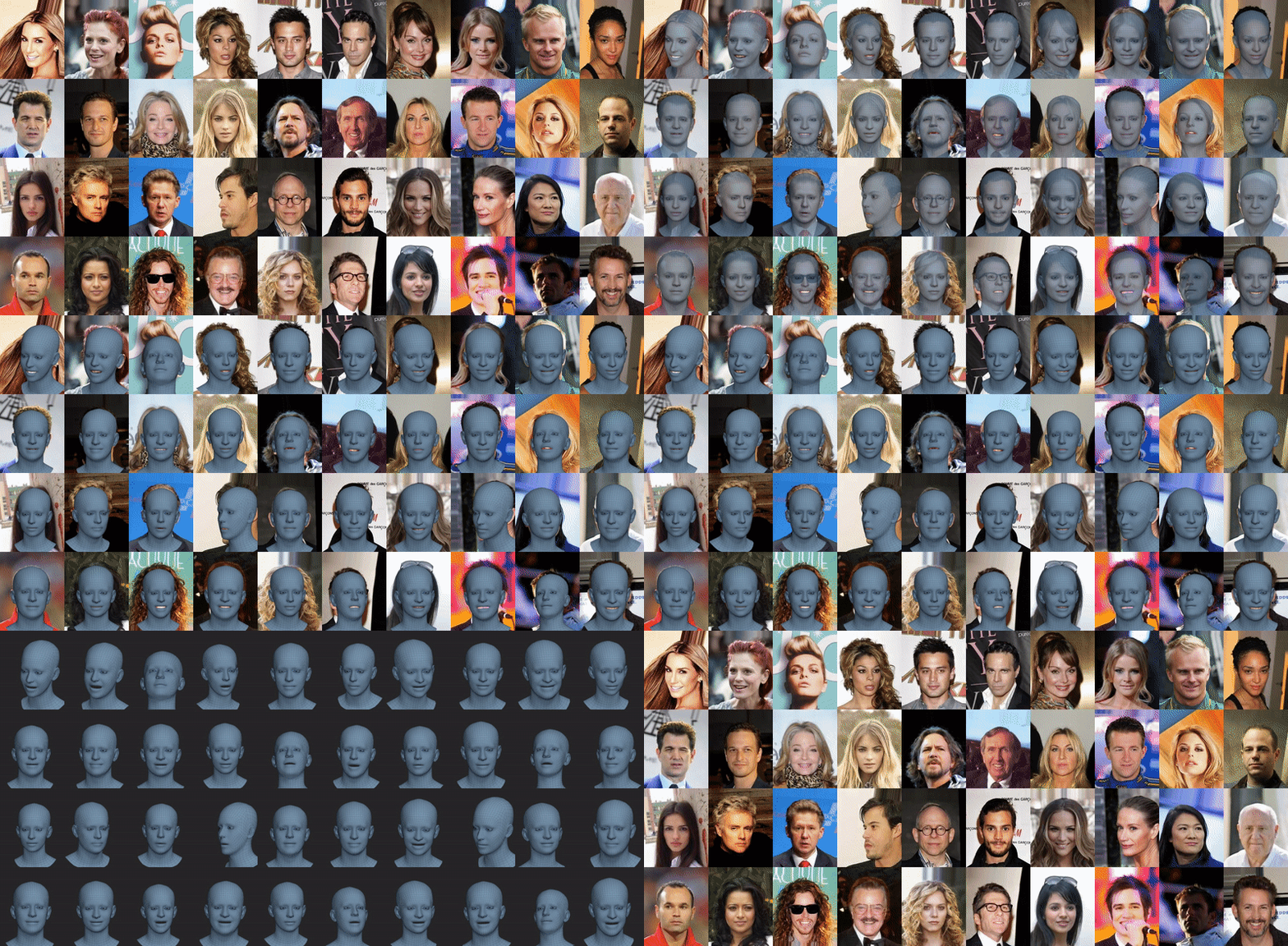
This is an official repository of the paper Learning to Regress 3D Face Shape and Expression from an Image without 3D Supervision. The project was formerly referred by RingNet. The codebase consists of the inference code, i.e. give an face image using this code one can generate a 3D mesh of a complete head with the face region. For further details on the method please refer to the following publication,
Learning to Regress 3D Face Shape and Expression from an Image without 3D Supervision
Soubhik Sanyal, Timo Bolkart, Haiwen Feng, Michael J. Black
CVPR 2019
More details on our NoW benchmark dataset, 3D face reconstruction challenge can be found in our project page. A pdf preprint is also available on the project page.
-
Update: We have changed the license agreemnt for the RingNet code and pre-trained weights. Both are now available under MIT license excluding the NoW Challenge dataset.
-
Update: We have released the evaluation code for NoW Benchmark challenge here.
-
Update: Add demo to build a texture for the reconstructed mesh from the input image.
-
Update: NoW Dataset is divided into Test set and Validation Set. Ground Truth scans are available for the Validation Set. Please Check our project page for more details.
-
Update: We have released a PyTorch implementation of the decoder FLAME with dynamic conture loading which can be directly used for training networks. Please check FLAME_PyTorch for the code.
The code uses Python 2.7 and it is tested on Tensorflow gpu version 1.12.0, with CUDA-9.0 and cuDNN-7.3.
virtualenv --no-site-packages <your_home_dir>/.virtualenvs/RingNet
source <your_home_dir>/.virtualenvs/RingNet/bin/activate
pip install --upgrade pip==19.1.1
git clone https://github.com/soubhiksanyal/RingNet.git
cd RingNet
pip install -r requirements.txt
pip install opendr==0.77
mkdir model
Install mesh processing libraries from MPI-IS/mesh. (This now only works with python 3, so donot install it)
- Update: Please install the following fork for working with the mesh processing libraries with python 2.7
- Download pretrained RingNet weights from the project website, downloads page. Copy this inside the model folder
- Download FLAME 2019 model from here. Copy it inside the flame_model folder. This step is optional and only required if you want to use the output Flame parameters to play with the 3D mesh, i.e., to neutralize the pose and expression and only using the shape as a template for other methods like VOCA (Voice Operated Character Animation).
- Download the FLAME_texture_data and unpack this into the flame_model folder.
RingNet requires a loose crop of the face in the image. We provide two sample images in the input_images folder which are taken from CelebA Dataset.
Run the following command from the terminal to check the predictions of RingNet
python -m demo --img_path ./input_images/000001.jpg --out_folder ./RingNet_output
Provide the image path and it will output the predictions in ./RingNet_output/images/.
If you want the output mesh then run the following command
python -m demo --img_path ./input_images/000001.jpg --out_folder ./RingNet_output --save_obj_file=True
It will save a *.obj file of the predicted mesh in ./RingNet_output/mesh/.
If you want the output the predicted mesh with the image projected onto the mesh as texture then run the following command
python -m demo --img_path ./input_images/000001.jpg --out_folder ./RingNet_output --save_texture=True
It will save a *.obj, *.mtl, and *.png file of the predicted mesh in ./RingNet_output/texture/.
If you want the predicted FLAME and camera parameters then run the following command
python -m demo --img_path ./input_images/000001.jpg --out_folder ./RingNet_output --save_obj_file=True --save_flame_parameters=True
It will save a *.npy file of the predicted flame and camera parameters and in ./RingNet_output/params/.
If you want to play with the 3D mesh, i.e. neutralize pose and expression of the 3D mesh to use it as a template in VOCA (Voice Operated Character Animation), run the following command
python -m demo --img_path ./input_images/000013.jpg --out_folder ./RingNet_output --save_obj_file=True --save_flame_parameters=True --neutralize_expression=True
Free for non-commercial and scientific research purposes. By using this code, you acknowledge that you have read the license terms (https://ringnet.is.tue.mpg.de/license.html), understand them, and agree to be bound by them. If you do not agree with these terms and conditions, you must not use the code. For commercial use please check the website (https://ringnet.is.tue.mpg.de/license.html).
Please cite the following paper if you use the code directly or indirectly in your research/projects.
@inproceedings{RingNet:CVPR:2019,
title = {Learning to Regress 3D Face Shape and Expression from an Image without 3D Supervision},
author = {Sanyal, Soubhik and Bolkart, Timo and Feng, Haiwen and Black, Michael},
booktitle = {Proceedings IEEE Conf. on Computer Vision and Pattern Recognition (CVPR)},
month = jun,
year = {2019},
month_numeric = {6}
}
If you have any questions you can contact us at [email protected] and [email protected].
- We thank Ahmed Osman for his support in the tensorflow implementation of FLAME.
- We thank Raffi Enficiaud and Ahmed Osman for pushing the release of psbody.mesh.
- We thank Benjamin Pellkofer and Jonathan Williams for helping with our RingNet project website.


