

Swiftly configure a fresh Windows 10 installation with useful tweaks and antispy settings.
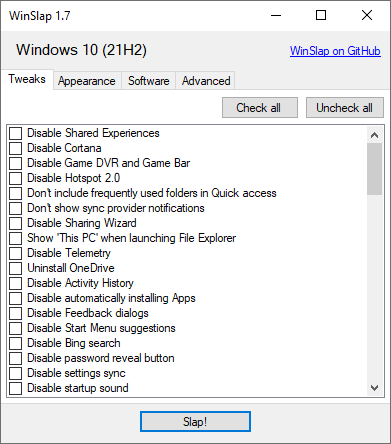
WinSlap is primarily developed for my own use cases. Feel free to use it under any terms the license permits. However, I can not guarantee that it works as intended, doesn't break your system or is actively maintained.
- Apply tweaks to a fresh installation of Windows 10 after using a clean retail image (if you're looking to apply tweaks during installation, check out image creation tools)
- No bloat. WinSlap does what it's features list says and nothing else.
WinSlap is currently developed for and tested against Windows 10 Pro 22H2 (64-bit) on single-user systems. While it should work on older versions and can work on newer versions or multi-user systems, I have not tested it myself.
- Disable Shared Experiences
- Disable Cortana
- Disable Game DVR and Game Bar
- Disable Hotspot 2.0
- Don't include frequently used folders in Quick access
- Don't show sync provider notifications
- Disable Sharing Wizard
- Show 'This PC' when launching File Explorer
- Disable Telemetry
- Uninstall OneDrive
- Disable Activity History
- Disable automatically installing Apps
- Disable Feedback dialogs
- Disable Start Menu suggestions
- Disable Bing search
- Disable password reveal button
- Disable settings sync
- Disable startup sound
- Disable autostart startup delay
- Disable location
- Disable Advertising ID
- Disable Malware Removal Tool data reporting
- Disable sending typing info to Microsoft
- Disable Personalization
- Hide language list from websites
- Disable Miracast
- Disable App Diagnostics
- Disable Wi-Fi Sense
- Disable lock screen Spotlight
- Disable automatic maps updates
- Disable error reporting
- Disable Remote Assistance
- Use UTC as BIOS time
- Hide network from lock screen
- Disable sticky keys prompt
- Hide 3D Objects from File Explorer
- Remove preinstalled apps except Photos, Calculator, Store
- Update Windows Store Apps
- Prevent preinstalling apps for new users
- Unpin preinstalled apps
- Disable Smart Screen
- Disable Smart Glass
- Remove Intel Control Panel from context menus
- Remove NVIDIA Control Panel from context menus
- Remove AMD Control Panel from context menus
- Disable suggested apps in Windows Ink Workspace
- Disable experiments by Microsoft
- Disable Inventory Collection
- Disable Steps Recorder
- Disable Application Compatibility Engine
- Disable pre-release features and settings
- Disable camera on lock screen
- Disable Microsoft Edge first run page
- Disable Microsoft Edge preload
- Install .NET Framework 2.0, 3.0 and 3.5
- Enable Windows Photo Viewer
- Uninstall Microsoft XPS Document Writer
- Disable security questions for local accounts
- Disable app suggestions (e.g. use Edge instead of Firefox)
- Remove default Fax printer
- Remove Microsoft XPS Document Writer
- Disable clipboard history
- Disable cloud sync of clipboard history
- Disable automatic update of speech data
- Disable handwriting error reports
- Disable cloud sync of text messages
- Disable Bluetooth advertisements
- Disable Windows Media DRM internet access
- Disable Get even more out of Windows screen
- Set power plan to high performance
- Disable notifications on the lock screen
- Disable reminders and incoming VoIP calls on the lock screen
- Disable Windows welcome experience
- Disable Aero Shake
- Disable suggestions in timeline
- Disable typing insights
- Disable spell checker
- Disable text suggestions on the software keyboard
- Disable SafeSearch
- Disable suggested content in settings app
- Disable automatic login after finishing updates
- Disable Windows Defender submitting sample files
- Add This PC shortcut to desktop
- Small taskbar icons
- Don't group tasks in taskbar
- Hide Taskview button in taskbar
- Hide People button in taskbar
- Hide search bar in taskbar
- Remove compatibility item from context menu
- Hide OneDrive Cloud states in File Explorer
- Always show file name extensions
- Remove OneDrive from File Explorer
- Delete quicklaunch items
- Use Windows 7 volume control
- Remove Microsoft Edge desktop shortcut
- Disable Lockscreen Blur
- Hide Meet Now icon in taskbar
- Hide News and interests in taskbar
- Install 7Zip
- Install Adobe Acrobat Reader DC
- Install Audacity
- Install BalenaEtcher
- Install calibre
- Install CPU-Z
- Install DupeGuru
- Install EarTrumpet
- Install Epic Games Launcher
- Install GIMP
- Install GPU-Z
- Install Git
- Install Google Chrome
- Install Inkscape
- Install Irfanview
- Install Java Runtime Environment
- Install KeePassXC
- Install LibreOffice
- Install Minecraft
- Install Mozilla Firefox
- Install Mozilla Thunderbird
- Install Nextcloud Desktop
- Install Notepad++
- Install OBS Studio
- Install OpenHashTab
- Install OpenVPN Connect
- Install PowerToys
- Install PuTTY
- Install Python
- Install Slack
- Install Speccy
- Install Steam
- Install TeamViewer
- Install TeamSpeak
- Install Telegram
- Install Ubisoft Connect
- Install VirtualBox
- Install VLC media player
- Install WinRAR
- Install WinSCP
- Install Windows Terminal
- Install Wireguard
- Install Wireshark
- Install Zoom
- Disable Background Apps
- Precision Trackpad: Disable keyboard block after clicking
- Disable Windows Defender
- Disable Link-local Multicast Name Resolution
- Disable Smart Multi-Homed Name Resolution
- Disable Web Proxy Auto-Discovery
- Disable Teredo tunneling
- Disable Intra-Site Automatic Tunnel Addressing Protocol
- Enable Windows Subsystem for Linux
- Uninstall Internet Explorer
- Enable Storage Sense
- Disable fast startup
- Disable mouse pointer acceleration