










A simple, modern alternative to GNU Make. taskctl is a concurrent task runner that allows you to design your routine tasks and development pipelines in a nice and neat way in a human-readable format (YAML, JSON or TOML). Given a pipeline (composed of tasks or other pipelines), it builds a graph that outlines the execution plan. Tasks may run concurrently or cascade. Besides pipelines, each single task can be started manually or triggered by the built-in filesystem watcher.
- human-readable configuration (YAML, JSON or TOML) with local or remote imports
- concurrent task execution with DAG-based pipelines: dependencies, conditions, allowed failures, graph visualization
- cross-platform: embedded shell interpreter, no dependency on a system shell
- AI-agent friendly: JSON discovery, NDJSON run events, non-interactive mode, installable agent skill
- customizable execution contexts (wrap commands in
docker,ssh, any binary) - templated commands with variables, task variations, and output piped between tasks
- integrated file watcher (live reload)
- output formats: raw, prefixed, live dashboard (
default), or JSON event stream - interactive task selector and shell autocomplete
- embeddable task runner for Go programs
tasks:
  lint:
    command:
      - golangci-lint run
      - go vet ./...

  test:
    allow_failure: true
    command: go test ./...

  build:
    command: go build -o bin/app ./...
    env:
      GOOS: linux
      GOARCH: amd64
    before: rm -rf bin/*

pipelines:
  release:
    - task: lint
    - task: test
    - task: build
      depends_on: [lint, test]
According to this plan, lint and test will run concurrently, and build will start only when both lint and test have finished.

- Getting started
- taskctl for AI agents
- Configuration
- Tasks
- Pipelines
- Output formats
- Filesystem watchers
- Contexts
- CLI reference
- Embeddable task runner
- Autocomplete
- How to contribute?
- License
brew tap taskctl/taskctl
brew install --cask taskctl
sudo wget https://github.com/taskctl/taskctl/releases/latest/download/taskctl_linux_amd64 -O /usr/local/bin/taskctl
sudo chmod +x /usr/local/bin/taskctl
Download the .deb or .rpm from the releases page and install with dpkg -i and rpm -i respectively.
scoop bucket add taskctl https://github.com/taskctl/scoop-taskctl.git
scoop install taskctl
git clone https://github.com/taskctl/taskctl
cd taskctl
go build -o taskctl .
Docker images are available on Docker Hub and GitHub Container Registry (ghcr.io/taskctl/taskctl).
taskctl- run the interactive task prompttaskctl pipeline1- run a single pipelinetaskctl task1- run a single tasktaskctl pipeline1 task1- run one or more pipelines and/or taskstaskctl watch watcher1 watcher2- start one or more watchers
taskctl has a machine-readable CLI surface designed for use by AI agents and other tooling: JSON discovery documents, an NDJSON event stream for runs, non-interactive execution, and an installable Claude Code skill. A full per-command reference — every command, flag and example — is generated into docs/cli/, one Markdown page per command, kept in sync with the binary by the update-docs task.
taskctl --output json list prints a single schema_version-tagged JSON document describing every task, pipeline, context and watcher in the config. taskctl --output json show <name> prints the full detail for a single task (resolved commands, env, variables, allow_failure) or pipeline (its stages, sorted by name for stability — each with its task, or pipeline for a nested sub-pipeline, plus dependencies and conditions). See docs/cli/ for the per-command reference.
Running with --output json switches the run's output to newline-delimited JSON (NDJSON) — one event object per line — instead of human-oriented text, so an agent can parse progress and results without screen-scraping. The target is passed directly, with no run keyword. The stream is:
| event | key fields |
|---|---|
run_started |
schema_version, targets |
task_started |
task |
task_output |
task, stream (stdout/stderr), data |
task_finished |
task, status (done/failed/skipped), exit_code, duration_ms, error (on failure) |
run_finished |
status (done/failed), duration_ms, tasks (array of {task, status (done/failed/skipped/canceled), exit_code, duration_ms}), error (on failure) |
taskctl validate <config-file> also honors --output json, emitting a single schema_version-tagged document (with valid, file and error fields; error is present only when valid is false) instead of the human ✓/✗ line. Invalid config exits non-zero.
By default taskctl may prompt interactively (e.g. for confirmation or input tasks). Non-interactive mode disables all of that, and is enabled whenever either of the following is true:
--no-inputis passed, or theTASKCTL_NO_INPUTenvironment variable is set- output format is
json
A non-TTY stdin (e.g. a pipe or an agent harness) does not by itself enable non-interactive mode — prompts still run in accessible, line-based mode against the pipe. It only affects the no-target case: when you run taskctl with no task or pipeline, the interactive selector requires a TTY, so on a non-TTY stdin taskctl errors with guidance instead of blocking. Pass --no-input (or --output json) to suppress prompts explicitly.
Separately, the default live dashboard (the default format on a TTY) requires an interactive stdout; if stdout is not a TTY, taskctl automatically degrades it to prefixed output instead of failing.
taskctl skill install writes a Claude Code skill (SKILL.md) that teaches an agent how to use taskctl's JSON surface, into .claude/skills/taskctl/SKILL.md in the current directory.
--globalinstalls into the user's home directory instead of the current directory.--forceoverwrites an existing installation.
taskctl uses a config file (tasks.yaml or taskctl.yaml) where your tasks and pipelines are stored. The config file includes the following sections:
- tasks
- pipelines
- watchers
- contexts
- variables
A config file may import other config files, directories or URLs.
import:
- .tasks/database.yaml
- .tasks/lint/
- https://raw.githubusercontent.com/taskctl/taskctl/main/docs/example.yamlConfig file example
taskctl has a global configuration stored in the $HOME/.taskctl/config.yaml file. It is handy for storing system-wide tasks, reusable contexts, defaults, etc.
A task is the foundation of taskctl. It describes one or more commands to run, their environment, executors and attributes such as the working directory, execution timeout, acceptance of failure, etc.
tasks:
    lint:
        allow_failure: true
        command:
          - golint $(go list ./... | grep -v /vendor/)
          - go vet $(go list ./... | grep -v /vendor/)

    build:
        command: go build ./...
        env:
          GOOS: linux
          GOARCH: amd64
        env_file: /data/.env
        after: rm -rf tmp/*
        variations:
          - GOARCH: amd64
          - GOARCH: arm
            GOARM: 7
A task definition takes the following parameters:
command- one or more commands to rundescription- human-readable description, shown bytaskctl listandtaskctl showvariations- list of variations (env variables) to apply to commandcontext- execution context's nameenv- environment variables. All existing environment variables will be passed automaticallyenv_file- env file ink=vformat to read variables fromdir- working directory. Current working directory by defaulttimeout- command execution timeout (default: none)allow_failure- if set totrue, failed commands will not interrupt execution (default:false)after- command that will be executed after the task completesbefore- command that will be executed before the task startsexportAs- name of the env variable that receives the task's stdout; when omitted, the output is not exported to the environment (it remains available via.Tasks.<Name>.Stdout)condition- condition to check before running taskvariables- task's variablesinteractive- iftrueprovides STDIN to commands (default:false)
Each task, stage and context has variables that are used to render a task's fields - command, dir, before, after. Along with the globally predefined ones, variables can be set in a task's definition. You can use those variables according to the text/template documentation.
Variables layer by precedence, last wins: global < context < task. So a variable declared under a context's variables: is available in the command, dir, before and after of any task using that context, and a task-level variable of the same name overrides it. A task's condition: is rendered with the same merged variables — global, context, task, and the predefined ones below — as its commands.
Predefined variables are:
.Root- root config file directory.Dir- config file directory (same as.Root).TempDir- system's temporary directory.Args- provided arguments as a string.ArgsList- array of provided arguments.Output- previous command's output.Task- the running task's static metadata:.Task.Name,.Task.Description,.Task.Dir,.Task.Context,.Task.Condition,.Task.Timeout,.Task.AllowFailure,.Task.Interactive,.Task.ExportAs.Context- the resolved execution context:.Context.Name,.Context.Dir,.Context.Executable(with.Context.Executable.Binand.Context.Executable.Args;.Context.Executableis nil when the context sets no executable).Stage- when the task runs inside a pipeline stage:.Stage.Name,.Stage.Condition,.Stage.Dir,.Stage.AllowFailure,.Stage.DependsOn.Tasks.<Name>- results of an already-completed task, visible across the whole run:.Tasks.<Name>.Stdout,.Tasks.<Name>.Stderr,.Tasks.<Name>.ExitCode.<Name>is title-cased, so taskproduceris.Tasks.Producer.Stdout. A name containing a dash can't use field syntax ({{ .Tasks.Build-Host.Stdout }}fails to parse) - use{{ (index .Tasks "Build-Host").Stdout }}instead
Variables can be used inside task definition. For example:
tasks:
    task1:
        dir: "{{ .Root }}/some-dir"
        command:
          - echo "My name is {{ .Task.Name }}"
          - echo {{ .Output }} # My name is task1
          - echo "Sleep for {{ .sleep }} seconds"
          - sleep {{ .sleep | default 10 }}
          - sleep {{ .sleep }}
        variables:
sleep: 3Any command line arguments succeeding -- are passed to each task via the .Args and .ArgsList variables or the TASKCTL__ARGS environment variable.
Given this definition:
lint1:
  command: go lint {{.Args}}

lint2:
  command: go lint {{index .ArgsList 1}}
the resulting command is:
$ taskctl lint1 -- package.go
# go lint package.go

$ taskctl lint2 -- package.go main.go
# go lint main.go
A task's stdout is automatically stored in the .Tasks.<Name>.Stdout variable (alongside .Tasks.<Name>.Stderr and .Tasks.<Name>.ExitCode), where <Name> is the task's title-cased name. Results accumulate in a run-wide map, so a task sees any task that finished before it started; a stage that depends_on the producer is guaranteed to see its result. The stdout is exported to an environment variable only if the task sets exportAs, in which case it is written verbatim to the env var of that name; with no exportAs there is no environment export.
A task may run in one or more variations. Variations allow you to reuse a task with different env variables:
tasks:
  build:
    command:
      - GOOS=${GOOS} GOARCH=amd64 go build -o bin/taskctl_${GOOS} ./cmd/taskctl
    env:
      GOFLAGS: -ldflags=-s -ldflags=-w
    variations:
      - GOOS: linux
      - GOOS: darwin
      - GOOS: windows
This config will run the build 3 times, each with a different GOOS.
The following task will run only when there are any changes that are staged but not committed:
tasks:
  build:
    command:
      - ...build...
condition: git diff --exit-codeA pipeline is a set of stages (tasks or other pipelines) to be executed in a certain order. Stages may be executed in parallel or one-by-one. A stage may override the task's environment, variables, etc.
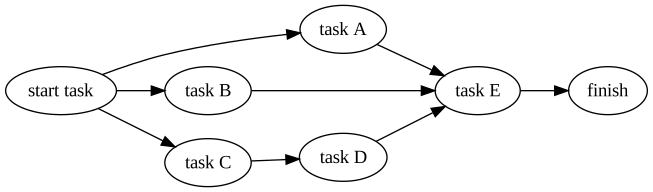
This pipeline:
pipelines:
    pipeline1:
        - task: start task
        - task: task A
          depends_on: "start task"
        - task: task B
          depends_on: "start task"
        - task: task C
          depends_on: "start task"
        - task: task D
          depends_on: "task C"
        - task: task E
          depends_on: ["task A", "task B", "task D"]
        - task: finish
          depends_on: ["task E"]
will result in an execution plan like this:
A stage definition takes the following parameters:
name- stage name. If not set, the referenced task or pipeline name will be used.task- task to execute on this stagepipeline- pipeline to execute on this stageenv- environment variables. All existing environment variables will be passed automaticallyenv_file- file with env variables ink=vformat to read variables fromdir- working directory override for the task run in this stagedepends_on- names of the stages this stage depends on. This stage will be started only after the referenced stages have completed.allow_failure- iftrue, a failing stage will not interrupt pipeline execution.falseby defaultcondition- condition to check before running stagevariables- stage's variables
Taskctl has several output formats:
raw- prints raw commands outputprefixed- strips ANSI escape sequences where possible, prefixes command output with task's namedefault- live dashboard (the default on a TTY): a spinner, name and elapsed time per running task, each with its latest output line; downgrades toprefixedwhen stdout is not a TTYjson- newline-delimited JSON event stream for machine consumption (see taskctl for AI agents)
A watcher watches for changes in files selected by the provided patterns and triggers the task any time an event occurs.
watchers:
  watcher1:
    watch: ["README.*", "pkg/**/*.go"] # Files to watch
    exclude: ["pkg/excluded.go", "pkg/excluded-dir/*"] # Exclude patterns
    events: [create, write, remove, rename, chmod] # Filesystem events to listen to
    task: task1 # Task to run when event occurs
A watcher definition takes the following parameters:
watch- patterns of files to watchexclude- patterns of files to excludeevents- filesystem events to listen to (create,write,remove,rename,chmod)task- task to run when an event occursvariables- watcher's variables, passed to the task
Thanks to doublestar taskctl supports the following special terms within include and exclude patterns:
| Special Terms | Meaning |
|---|---|
* |
matches any sequence of non-path-separators |
** |
matches any sequence of characters, including path separators |
? |
matches any single non-path-separator character |
[class] |
matches any single non-path-separator character against a class of characters (details) |
{alt1,...} |
matches a sequence of characters if one of the comma-separated alternatives matches |
Any character with a special meaning can be escaped with a backslash (\).
Contexts allow you to set up the execution environment, variables, the binary that will run your task, up/down commands, etc.
contexts:
  local:
    executable:
      bin: /bin/zsh
      args:
        - -c
    env:
      VAR_NAME: VAR_VALUE
    variables:
      sleep: 10
    quote: "'" # will quote command with provided symbol: "/bin/zsh -c 'echo 1'"
    before: echo "I'm local context!"
    after: echo "Have a nice day!"
A context definition takes the following parameters:
dir- working directory. Also the base for a relativeenv_filepathexecutable- binary (bin) and its arguments (args) that will run the task's commandsquote- symbol to quote commands with when passing them to the executableenv- environment variablesenv_file- file with env variables ink=vformat to read variables fromvariables- context's variablesup,down,before,after- lifecycle hooks (see below)
A task that declares no context: runs in the context named default. Define one to share environment variables, variables, a working directory, executable or lifecycle hooks across every such task — this is how you give all tasks a common env. A task's own env/variables override the default context's (precedence: default context < task). Tasks that opt into another context use that one instead; if no default context is defined, context-less tasks run in an empty implicit context.
A context has lifecycle hooks: up and down run once per taskctl run - up before the context's first usage, down during cleanup when the run finishes. before and after run every time around each task that uses the context.
context:
    docker-compose:
      executable:
        bin: docker-compose
        args: ["exec", "api"]
      up: docker-compose up -d api
      down: docker-compose down api

    local:
after: rm -rf var/* alpine:
executable:
bin: /usr/local/bin/docker
args:
- run
- --rm
- alpine:latest
env:
DOCKER_HOST: "tcp://0.0.0.0:2375"
before: echo "SOME COMMAND TO RUN BEFORE TASK"
after: echo "SOME COMMAND TO RUN WHEN TASK FINISHED SUCCESSFULLY"
tasks:
mysql-task:
context: alpine
command: uname -aThe tables below cover the common commands and flags. For the full per-command reference — every command, flag and example — see docs/cli/taskctl.md, generated from the command tree by the update-docs task.
| command | description |
|---|---|
taskctl [target...] (or taskctl run [target...]) |
run one or more pipelines and/or tasks; with no target, opens the interactive selector |
taskctl init |
create a sample config file in the current (or --dir) directory |
taskctl list |
list all tasks, pipelines and watchers; list tasks, list pipelines, list watchers narrow the output |
taskctl show <name> |
show a task's or pipeline's details |
taskctl watch <watcher...> |
start one or more filesystem watchers |
taskctl graph [pipeline] (alias g) |
visualize a pipeline's execution graph in DOT format (e.g. taskctl graph release | dot -Tsvg > graph.svg); --lr orients it left-to-right |
taskctl validate <config-file> |
validate a config file; prints ✓/✗ (or a JSON document with --output json) and exits non-zero if it is invalid |
taskctl completion <shell> |
generate a completion script for bash, zsh, fish or powershell |
taskctl skill install |
install the AI agent skill (see taskctl for AI agents) |
| flag | env variable | description |
|---|---|---|
-c, --config <file> |
TASKCTL_CONFIG_FILE |
config file to use (default: tasks.yaml or taskctl.yaml) |
-o, --output <format> |
TASKCTL_OUTPUT_FORMAT |
output format: raw, prefixed, default or json |
-r, --raw |
shortcut for --output=raw |
|
-q, --quiet |
quiet mode | |
--set <name=value> |
set a global variable value (repeatable) | |
--dry-run |
validate each task's commands (template render + shell parse) without executing them; valid tasks complete as done, an invalid template or command still fails (overrides the dryrun: config key in both directions) |
|
-s, --summary |
show a run summary; on by default in human output modes, off with --quiet or in raw mode (unless opted in via config), never in json. An explicit flag wins over these defaults |
|
--no-input |
TASKCTL_NO_INPUT |
disable interactive prompts |
-d, --debug |
TASKCTL_DEBUG |
enable debug output |
| code | meaning |
|---|---|
0 |
success |
1 |
runtime error (bad config, unknown task or pipeline) or a failed task/pipeline run |
2 |
usage error (missing/extra argument, unknown flag) — the command's usage is printed alongside the message |
Errors are written to stderr as Error: <message> and a failed run exits 1. When the failure has already been surfaced — by the end-of-run summary or, in json mode, the run_finished event — the duplicate Error: line is suppressed; when no summary is shown (--summary=false, --quiet, or raw output) the Error: line is printed.
taskctl may be embedded into any Go program. Additional information may be found on taskctl's pkg.go.dev page.
The public, embeddable API is exactly five packages — task, variables, executor, runner, scheduler. Everything under internal/ is CLI-only and not importable; cmd/ contains CLI plumbing and is not part of the supported embeddable API.
t := task.FromCommands("go fmt ./...", "go build ./...")
r, err := runner.NewTaskRunner()
if err != nil {
    return
}
err  = r.Run(t)
if err != nil {
    fmt.Println(err, t.ExitCode, t.ErrorMessage())
}
fmt.Println(t.Stdout())format := task.FromCommands("go fmt ./...")
build := task.FromCommands("go build ./...")
r, _ := runner.NewTaskRunner()
s := scheduler.NewScheduler(r)
graph, err := scheduler.NewExecutionGraph(
&scheduler.Stage{Name: "format", Task: format},
&scheduler.Stage{Name: "build", Task: build, DependsOn: []string{"format"}},
)
if err != nil {
return
}
err = s.Schedule(graph)
if err != nil {
fmt.Println(err)
}Completion scripts are generated natively for bash, zsh, fish and powershell, and complete task and pipeline names dynamically from your config. Run taskctl completion <shell> --help for shell-specific install steps.
Add to ~/.bashrc or ~/.profile
. <(taskctl completion bash)
Add to ~/.zshrc
. <(taskctl completion zsh)
Feel free to contribute in any way you want. Share ideas, submit issues, create pull requests. You can start by improving this README.md or suggesting new features. Thank you!
This project is licensed under the GNU GPLv3 - see the LICENSE.md file for details
- Yevhen Terentiev - trntv See also the list of contributors who participated in this project.