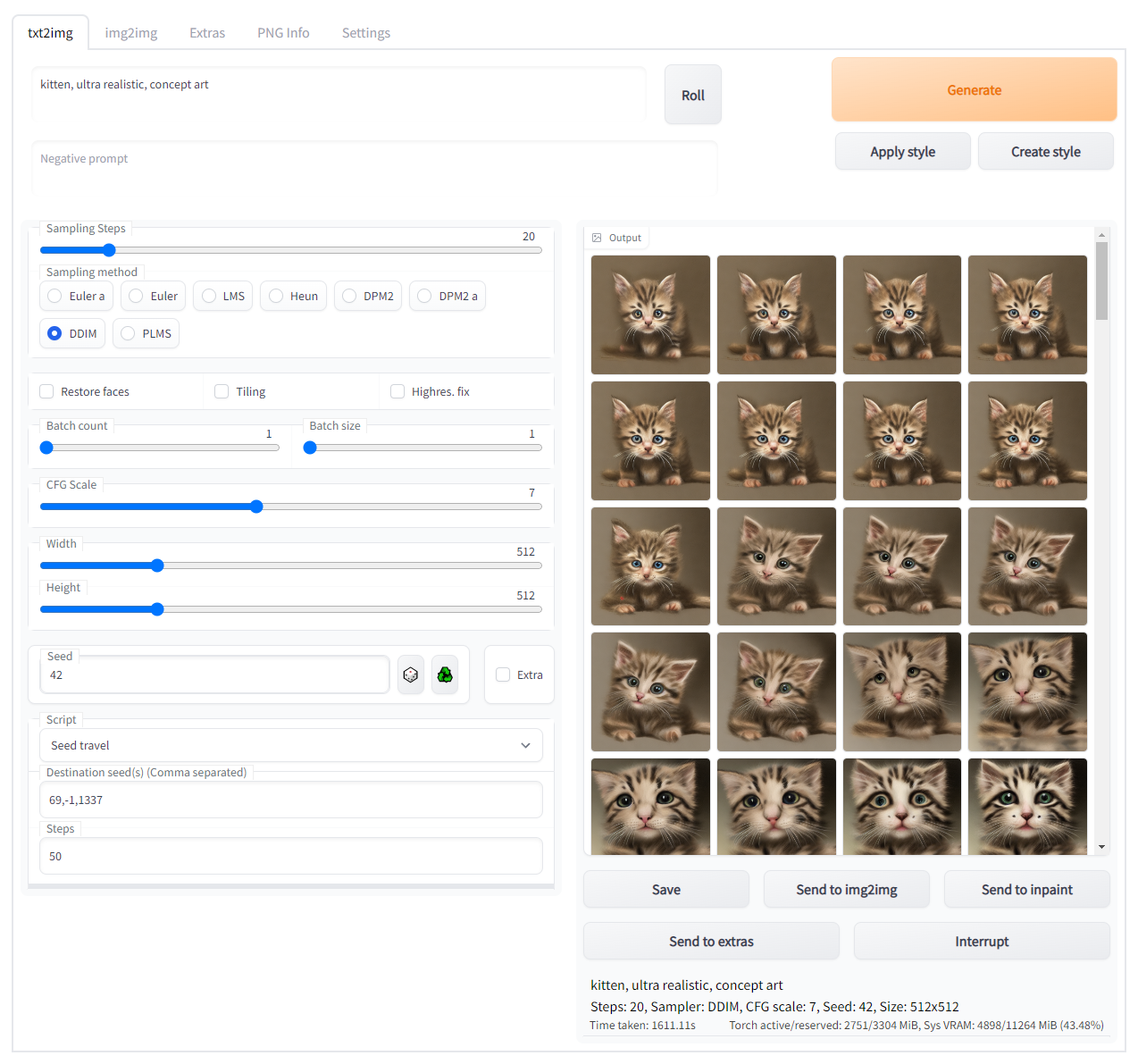
Small script for AUTOMATIC1111/stable-diffusion-webui to create images that exists between seeds.
Will let you pick two seeds (or more) and then create a number of images while it morph between the two points of noise generated.
Samplers that work well are: Euler, LMS, Heun, DPM2, DPM++ 2M, LMS Karras, DPM2 Karras, DPM++ 2M Karras, DDIM and PLMS
Look here for more information about issues with some samplers.
Batch Count and Batch Size will be ignored and set to 1. Trying to generate images with Euler a will fail and print an error. If you really want to use it there is a checkbox to allow it.
The recommended way to install it is to:
- Find "seed travel" in the list of available extensions in the webui, and then click Install.
If you can't find it in the list:
- Go to the "Extensions" tab in the webui
- Click on the "Install from URL" tab
- Paste https://github.com/yownas/seed_travel.git into "URL for extension's git repository" and click install
- ("Optional". You will need to restart the webui for dependensies to be installed or you won't be able to generate video files.)
Manual install (not recommmended):
- Place the files from this repo in a folder in the extensions folder.
- Restart. Pray. It might work properly. Maybe.
To understand what "seed traveling" is I first have to give a very very simplified explaination of how Stable Diffusion generates pictures. It starts with noise and then tweak and poke it until it gets an image that looks like something that match the prompt you gave. And to get all this initial noise you use a seed. The seed is used to generate a bunch of random numbers which will be your inital noise. A different seed generates a different set of random numbers.
The problem is that the seed is a 32 bit value, around 4 billion different possible values. Which is a lot, but it is infinitesimal compared to the possible initial noises.
If we imagine all the possible noises as a map, a seed could be seen as one single point on that map. A huge universe with only a few possible places to stand and look at it. What seed traveling lets you do is to pick two "points" on this map and then travel between them, each step a new variation of noise that no one could ever reach by only using a seed.
So, interpolating between the noise from two seeds will not only look cool as a video, you will also get images you might never have seen.
Destination seeds: Seeds to travel to from Seed. If initial seed is empty, the first destination seed will be chosen as start seed. Seeds placed between parentheses will be ignored. (Might be useful while testing.)
Use random seeds: Let you set Number of random seeds instead of typing them manually. Seed will be ignored unless comparing paths (see below).
Steps: Number of images to generate between each seed.
Loop back to Initial seed: When reaching the end, generate images to get back to the first seed.
FPS: The Frames Per Second of the video. It has a hidden feature where if you set this to a negative value, it will be used as the length (in seconds) of the resulting video(s). Setting this to 0 will skip generating a video.
Lead in/out: Amount of frames to be padded with a static image at the start and ending of the video. So you'll get a short pause before the video start/ends.
SSIM threshold: If this is set to something other than 0, the script will first generate the steps you've specified above, but then take a second pass and fill in the gaps between images that differ too much according to Structual Similarity Index Metric (pdf). A good value depends a lot on which model and prompt you use, but 0.7 to 0.8 should be a good starting value. More than 0.95 will probably not improve much. If you want a very smooth video you should enable RIFE below.
SSIM CenterCrop%: Crop a piece from the center of the image to be used for SSIM. In percent of the height and width. 0 will use the entire image. Only checking a small part of the image might make SSIM more sensitive. Be prepared to lower SSIM threshold to 0.4 to 0.5 if you use this.
RIFE passes: Use Real-Time Intermediate Flow Estimation to interpolate between frames. Each pass will add 1 frame per frame, doubling the total number of frames. This does not change the fps above, so you need to keep that in mind if it is important to you. (This will save a seperate video file.)
Drop original frames: Drop the original frames and only keep the RIFE-frames. Keeping the same frame count and fps as before.
Interpolation curve: Select how the interpolation should be done. See links below. This can be used if you want your animation to change to the beat of music or make the interpolation more interesting.
- Linear - Simple linear interpolation
- Hug-the-middle - Pause around the middle
- Hug-the-nodes - Pause at seed-change nodes
- Slow start - Starts slow and speeds up
- Quick start - Starts quick and slows down
- Easy ease - Pause before smooth transition
- Partial - Move only part of the way. Will create something like a slideshow with some slight movement.
- Random - Random flicker before switching to next seed
Curve strength: Choose how fast/slow interpolation should be done. Useful numbers depend on which curve you've chosen. Quickest way to check is to go to the link to WolframAlpha and try changing s=3 to what you want to try.
Seed Travel Extras...: Accordion-block that hides options that are rarely used.
Upscaler: Choose upscale method to be applied to the images before made into a video.
Upscale ratio: How much the images should be upscaled. A value of 0 or 1 will disable scaling.
Use cache: To speed up generation, generated images are cached and re-used if possible. If you want to manually post-process the images and want all of them to be generated, please disable this.
Show generated images in ui: Disable this if you generate a lot of steps to make life easier for your browser.
Allow default sampler: By default Euler A is disabled since it breaks animations with more than 2 seeds. Some Samplers doesn't seem to handle Variation Seeds well, and fail when switching from one seed to another. Mostly the ones with a "a" in them. You are of course free to use them, but you might get weird skips in the animation. If you want to try to enable this, try go into settings under Sampler Parameters and set eta (noise multiplier) for ancestral samplers to 0. This might help.
Compare paths: Instead of traveling betwen the seeds in order, travel from the first seed to each of the other seeds. For example, "1, 2, 3, 4" would normally travel from 1 to 2, to 3 to 4. If this is enabled the script will travel from 1 to 2, 1 to 3, 1 to 4. Useful if you want to test paths.
Bump seed: If this is set higher than 0, instead of traveling to the destination seeds you will get a number of images based on the initial seed, mixed with the destination seeds. Perfect for when you have an almost perfect image but want to nudge it a little to see if you can improve it.
SSIM min substep: Smallest "step" SSIM is allowed to take. Sometimes animations can't me smoothed out, no matter how small steps you take. It is better to let the script give up and have a single skip than force it and get an animation that flickers.
SSIM min threshold: Try to make new images "at least" this good (in % of SSIM threshold). By default SSIM will give up if a newly generated image is worse then the gap it is trying to fill. This will allow you to set "Steps" to something as low as 1 and not have SSIM give up just because the image halfway through was bad. Forcing it to go above the SSIM min threshold will make it avoid generating anything at all just because you had bad luck and and the "quality" dipped.
Save extra status information: Create files with extra information.
The images and video (if selected) will show up in the outputs\txt2-images\travels folder. With a separate numbered folder for each travel you've made.
If you get an error like this ValueError: could not convert string to float: '' the problem might be that you have old default values stored. To fix this edit the file ui-config.json and remove the lines starting with "customscript/seed_travel.py/.... This issue could also be caused by other scripts, and the simplest way to fix is to remove the lines for those scripts as well.