

[Blog] [Demo on YouTube] [Paper]
Search any folder by what its images contain. Use natural language, an example image, or both – without tagging, uploading, or importing your files into a photo library.
Local. Terminal-native. Works over SSH. Plays well with Unix tools.
cd ~/images  # rclip searches the current directory and its subdirectories
rclip "an orange cat"
# score  filepath
# 0.307  "/Users/me/images/DSC06415.JPG"
# 0.306  "/Users/me/images/DSC03514.JPG"
# 0.287  "/Users/me/images/DSC05871.JPG"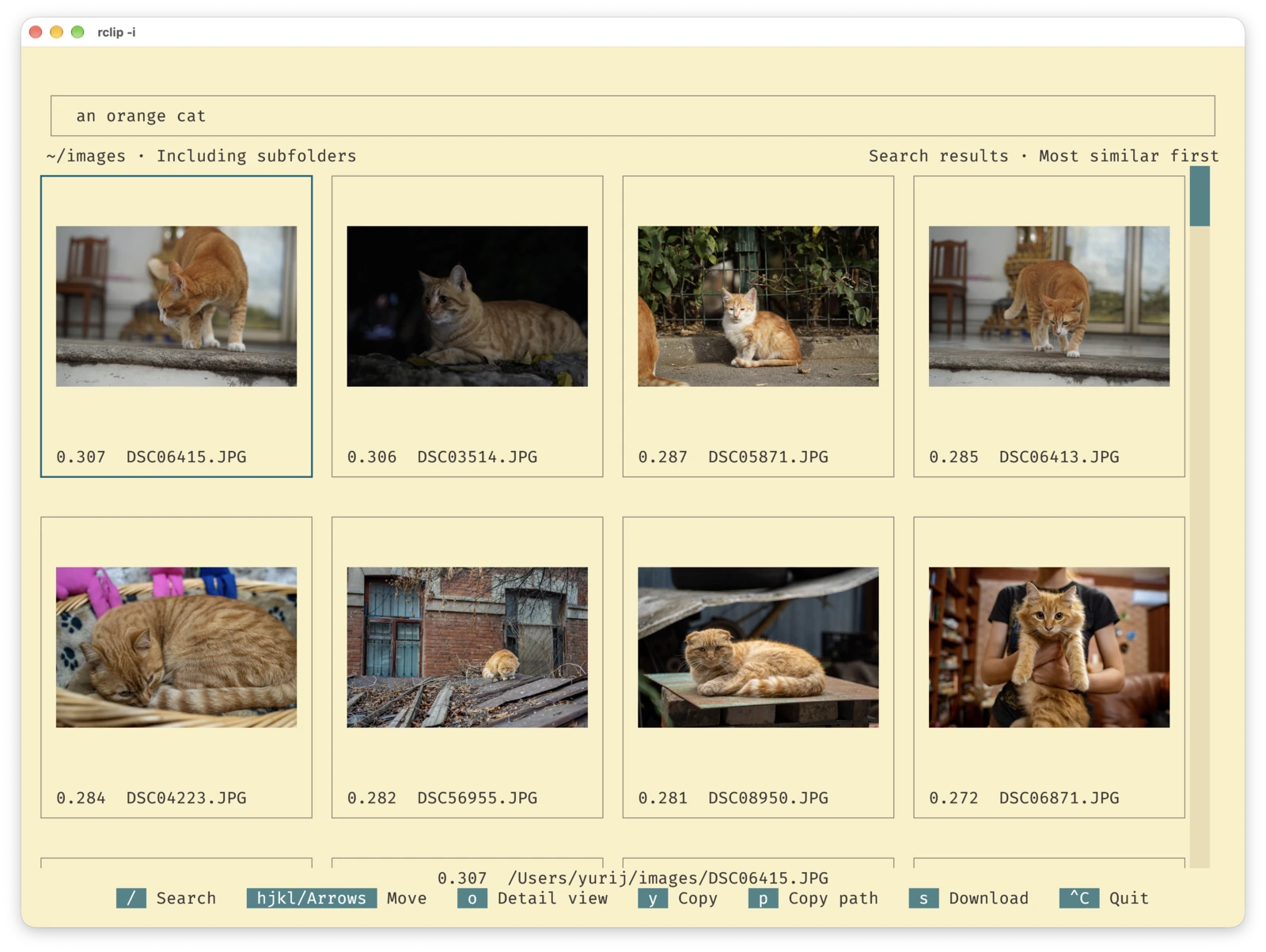
rclip -i. The interactive UI needs Kitty, Ghostty, or latest iTerm2; previews (-p) also work in Konsole. Search and scripting work in any terminal.
- No import. Photo apps make you import your photos or run a server. rclip searches your folders where they already are: a local disk, an external drive, or a NAS.
- Nothing leaves your machine. Unlike cloud photo search, the model runs locally and the index stays on your computer.
- Built for the terminal. Use it over SSH on a headless server, pipe results into
xargsorfeh, or call it from scripts and AI agents with--json. - Search by meaning. Describe what you're looking for, give an example image, or combine both, e.g.
"./beach.jpg" + sunset - people.
sudo snap install rclipAlternative options (AppImage and pip)
If your distribution doesn't support snap:
-
Download the AppImage from the latest release.
-
Install it:
chmod +x <downloaded AppImage filename>
sudo mv <downloaded AppImage filename> /usr/local/bin/rclippip install --extra-index-url https://download.pytorch.org/whl/cpu rclipbrew install yurijmikhalevich/tap/rclipNote: only Apple Silicon (arm64) Macs are supported.
Alternative option (pip)
pip install rclipDownload and run the *.msi installer from the latest release.
Alternative option (pip)
pip install rclipSearch the current directory with a natural-language query:
cd photos && rclip "search query"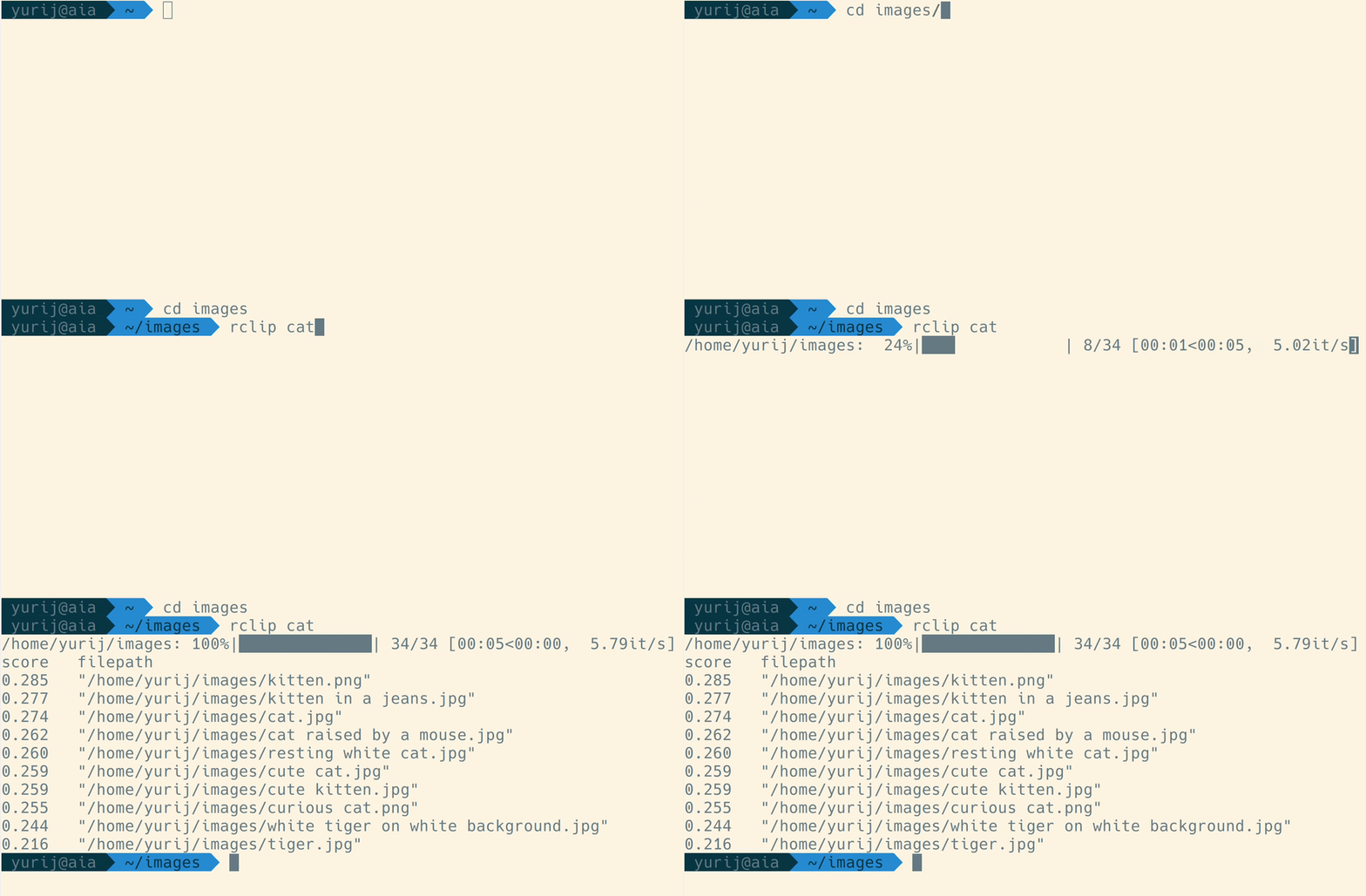
The first run in a directory indexes its images. How long it takes depends on their number and your CPU: 7 minutes for 50,000 images and 3 hours for 1.28 million on an M1 Max MacBook, or 15 hours for 84,725 photos on a NAS with an Intel Celeron J3455. Later runs only index added or changed images and drop deleted ones; if nothing changed, pass --no-indexing (-n) to skip the check.
Video demo: https://www.youtube.com/watch?v=tAJHXOkHidw.
Pass an image path or URL as the query to find similar images. Relative paths must start with ./:
cd photos && rclip ./cat.jpg

# or a URL
cd photos && rclip https://raw.githubusercontent.com/yurijmikhalevich/rclip/main/tests/e2e/images/cat.jpg
Video demo: https://www.youtube.com/watch?v=1YQZKeCBxWM.
Add and subtract text and image queries, and weight any of them with a multiplier prefix such as 2::
cd photos
rclip horse + stripes
rclip apple - fruit
rclip "./new york city.jpg" + night
rclip "2:golden retriever" + "./swimming pool.jpg"
rclip "./racing car.jpg" - "2:sports car" + "2:snow"
Video demo on the 1.28 million images of ImageNet-1k: https://www.youtube.com/watch?v=MsTgYdOpgcQ.
In a terminal supporting Kitty graphics, such as Kitty, Ghostty, latest iTerm2, or Konsole, pass --preview (-p):
rclip -p kitty-0 (--null) prints only paths, each terminated by a NUL character, so xargs -0 handles spaces, quotes, and newlines. For example, to open the top 5 results in your default image viewer on Linux:
rclip -0 -t 5 kitty | xargs -0 -n 1 xdg-open-f (--filepath-only) prints one path per line instead, for tools that read lines, such as feh's thumbnail mode:
rclip -f -t 5 kitty | feh -f - -tTo copy the top 3 matches to a directory on macOS, Linux, or WSL:
rclip -0 -t 3 "search query" | xargs -0 -I {} cp {} /path/to/destination--json prints a JSON array ordered from the best match. Each result has a score (higher is better) and an absolute filepath:
rclip --json -t 2 "search query"
# [{"score": 0.297, "filepath": "/photos/sunrise-beach.jpg"}, {"score": 0.286, "filepath": "/photos/dawn-walk.png"}]- rclip searches the current directory and its subdirectories.
- stdout contains only the results; progress, warnings, and errors go to stderr.
- If the directory has no images, the array is empty.
- The exit code is
0on success,2for invalid arguments, and1for other errors. - Each run first checks the index for changes; for several queries in a row with no image changes, pass
-nto skip the check.
Open the interactive UI and type a query:
rclip --interactive
The UI requires Kitty graphics with Unicode-placeholder support. With an empty query it browses recently modified images, loading more as you scroll. It supports text queries; use the CLI for image queries.
Keyboard shortcuts and details
| Action | Shortcut | Browse alias |
|---|---|---|
| Focus search | Ctrl+F | / |
| Toggle grid/detail | Ctrl+O | o |
| Copy image | Ctrl+Y | y |
| Copy image path | Ctrl+P | p |
| Download image | Ctrl+S | s |
| Quit | Ctrl+C |
In search, Enter runs the query, and Down or Esc focuses the results. In the grid, arrows or hjkl navigate and Enter opens detail; in detail, Left/Right or h/l browse and Esc returns to the grid. With a mouse, double-click a grid image to open it and the detail image to go back; click a filmstrip thumbnail to select it.
Copy and download act on the focused grid result or the detail image, and are unavailable while the grid's search input is focused. In detail, their Ctrl shortcuts work while typing, and Ctrl+O keeps search focus and cursor position in either view. Copying images requires Kitty 0.27+ and a discoverable kitten executable.
Over SSH, download saves the original file to ~/Downloads on your local machine after Kitty asks for confirmation. It requires Kitty 0.30+ and a remote kitten executable (kitten ssh provides it). Locally, download only shows the file path.
Run rclip --help (-h) to see this list in your terminal.
| Option | Description |
|---|---|
query |
A text query or a path/URL to an image file. Cannot be used with --interactive. A relative path must be prefixed with ./ (e.g. ./cat.jpg). Any query can be prefixed with a multiplier, e.g. 2:cat or 0.5:./cat.jpg. |
--add, -a, + QUERY |
A query to add to the main query. Can be used multiple times. |
--subtract, --sub, -s, - QUERY |
A query to subtract from the main query. Can be used multiple times. |
--top, -t N |
Number of top results to display, or search results to load per batch with --interactive. Default: 10, or 100 with --interactive; interactive maximum: 100. |
--interactive, -i |
Open the interactive terminal UI and enter text queries there. Does not accept a positional query or --add/--subtract. |
--force-interactive |
Force interactive mode even if the terminal is not recognized as supporting Kitty graphics with Unicode placeholders. |
--preview, -p |
Preview results in the terminal using Kitty graphics (e.g. Kitty, Ghostty, latest iTerm2, Konsole). |
--force-preview |
Force image previews even if the terminal is not recognized as supporting Kitty graphics. |
--filepath-only, -f |
Output only filepaths, without scores or the header. |
--null, -0 |
Output only filepaths, each terminated by a NUL character instead of a newline, for xargs -0. |
--json |
Output results as a JSON array of {"score": ..., "filepath": ...} objects, ordered from the best match. |
--preview-height, -H PX |
Preview height in pixels. Default: 400. |
--no-indexing, --skip-index, --skip-indexing, -n |
Skip updating the index. Use only when no images were added, changed, or removed since the last run. |
--indexing-batch-size, -b N |
Image batch size for indexing. Larger values may slightly speed up indexing on some hardware but use more RAM. Default: 8. |
--exclude-dir DIR |
Directory to exclude from search. Can be used multiple times. Specifying this overrides the default of @eaDir, node_modules, .git, and System Volume Information. |
--include-hidden |
Index dot-prefixed hidden files and directories (e.g. .DS_Store, ._IMG_1234.JPG, .Spotlight-V100). Skipped by default since they are usually OS metadata rather than user files. |
--experimental-raw-support |
Index RAW images. |
--max-image-megapixels MP |
Maximum size, in megapixels, an image may have to be indexed. Larger images are skipped to avoid running out of memory on huge or maliciously crafted images. Pass none to disable the limit. Default: chosen automatically based on the available memory. |
--version, -v |
Print the rclip version and exit. |
--help, -h |
Show the help message and exit. |
The output modes --interactive/--force-interactive, --preview/--force-preview, --filepath-only, --null, and --json are mutually exclusive.
rclip always indexes the following image formats: jpg, jpeg, png, webp, tiff, tif, bmp, gif, jp2, pnm, pbm, pgm, and ppm.
HEIC is supported on macOS (Image I/O) and Windows (WIC) when an HEIF/HEVC codec is installed; rclip doesn't bundle one. HEIC isn't available on Linux yet.
RAW formats (3fr, arw, cr2, cr3, dng, erf, iiq, mos, mrw, nef, nrw, orf, pef, raf, rw2, and srw) are supported when you pass the --experimental-raw-support flag:
rclip --experimental-raw-support catWith this flag, a RAW file is skipped if an image with the same name (e.g., a JPEG export) sits next to it.
rclip currently uses OpenCLIP's ViT-B/32 model, based on OpenAI's CLIP architecture, to embed images and text in a shared space, and ranks images by similarity to the query embedding, all on your machine.
https://github.com/yurijmikhalevich/rclip/discussions/new/choose
Thank you to everyone who has contributed to rclip!
This repository follows the Conventional Commits standard.
With Python and uv installed, run:
git clone [email protected]:yurijmikhalevich/rclip.git
cd rclip
uv sync
Then use uv run rclip in place of rclip.
Self-contained rclip bundles include a THIRD_PARTY_NOTICES.txt file and the
complete licence and patent notices for their redistributed dependencies. Each
GitHub release also includes CycloneDX SBOMs and corresponding rawpy/LibRaw and
textual-image source archives. The reviewed dependency and codec policy is
documented in compliance/.
The separately downloaded model includes its model card, attribution, and the MIT notices for OpenCLIP and the OpenAI CLIP tokenizer and vocabulary.
This product includes DNG technology under license by Adobe.
MIT


