



"Google Now" style animation for Speech Recognizer.
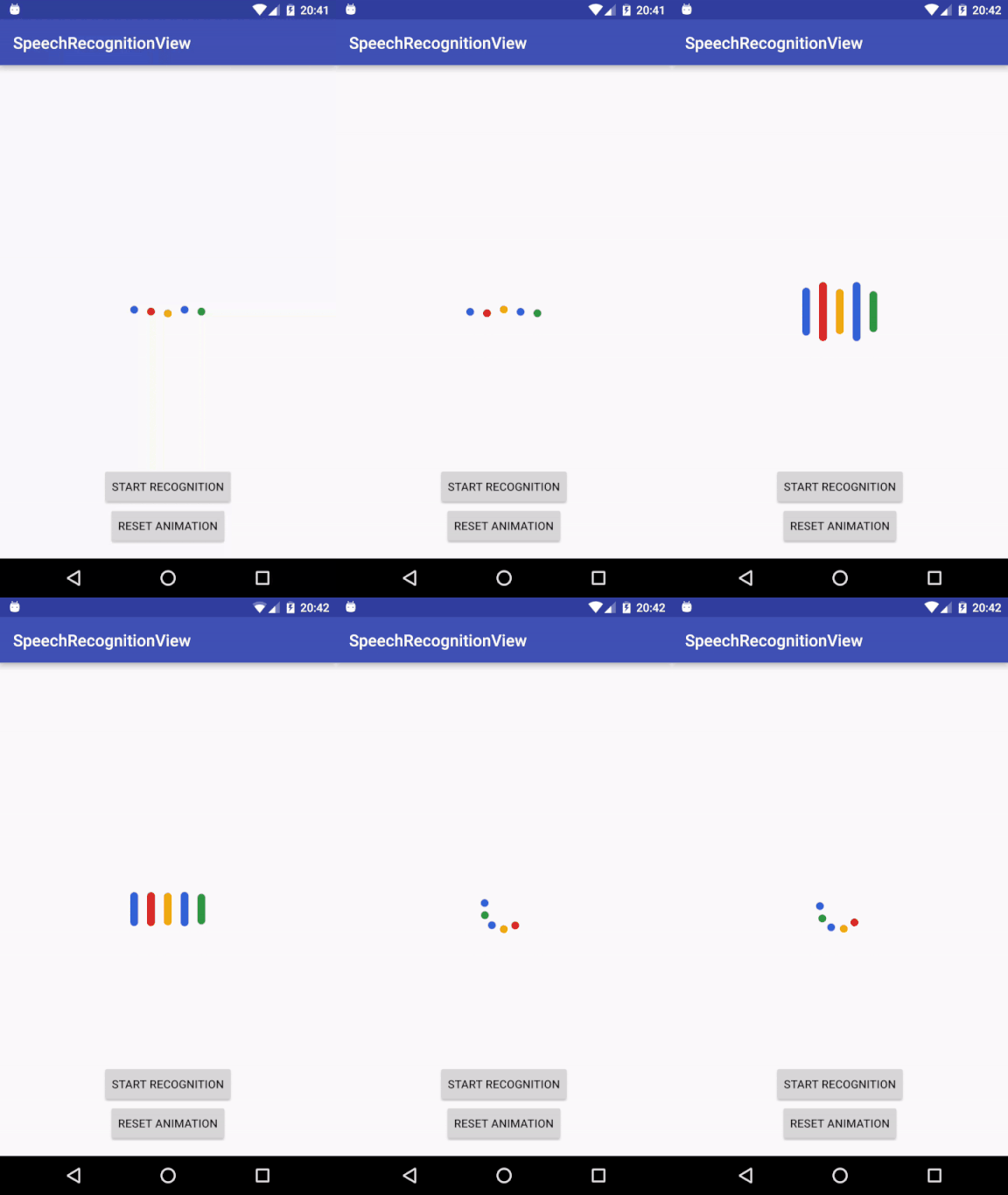
This library is compatible from API 15 (Android 4.0.3).
Add it in your root build.gradle at the end of repositories:
allprojects {
    repositories {
        ...
        maven { url "https://jitpack.io" }
    }
}
Add the dependency
dependencies {
    compile 'com.github.zagum:SpeechRecognitionView:1.2.2'
}- Xml file:
Simply add view to your layout:
<com.github.zagum.speechrecognitionview.RecognitionProgressView
	android:id="@+id/recognition_view"
	android:layout_width="wrap_content"
	android:layout_height="wrap_content"
android:layout_gravity="center"/>- Initialization:
Init speech recognizer:
SpeechRecognizer speechRecognizer = SpeechRecognizer.createSpeechRecognizer(context);Init RecognitionProgressView:
RecognitionProgressView recognitionProgressView = (RecognitionProgressView) findViewById(R.id.recognition_view);
recognitionProgressView.setSpeechRecognizer(speechRecognizer);
recognitionProgressView.setRecognitionListener(new RecognitionListenerAdapter() {
        @Override
        public void onResults(Bundle results) {
	        showResults(results);
        }
});
When SpeechRecognizer and RecognitionProgressView inited, use your speech recognizer as usual:
listen.setOnClickListener(new View.OnClickListener() {
	@Override
	public void onClick(View v) {
		startRecognition();
	}
});

private void startRecognition() {
	Intent intent = new Intent(RecognizerIntent.ACTION_RECOGNIZE_SPEECH);
	intent.putExtra(RecognizerIntent.EXTRA_CALLING_PACKAGE, getPackageName());
	intent.putExtra(RecognizerIntent.EXTRA_LANGUAGE_MODEL, RecognizerIntent.LANGUAGE_MODEL_FREE_FORM);
	speechRecognizer.startListening(intent);
}
Start and stop RecognitionProgressView animation:
recognitionProgressView.play();

recognitionProgressView.stop();- Customization:
Set custom colors:
int[] colors = {
		ContextCompat.getColor(this, R.color.color1),
		ContextCompat.getColor(this, R.color.color2),
		ContextCompat.getColor(this, R.color.color3),
		ContextCompat.getColor(this, R.color.color4),
		ContextCompat.getColor(this, R.color.color5)
};
recognitionProgressView.setColors(colors);
Set custom bars heights:
int[] heights = {60, 76, 58, 80, 55};
recognitionProgressView.setBarMaxHeightsInDp(heights);
Set custom circle radius/spacing between circles/idle animation amolitude size/rotation animation radius:
recognitionProgressView.setCircleRadiusInDp(2);
recognitionProgressView.setSpacingInDp(2);
recognitionProgressView.setIdleStateAmplitudeInDp(2);
recognitionProgressView.setRotationRadiusInDp(10);
Don't forget to add permission to your AndroidManifest.xml file
<uses-permission android:name="android.permission.RECORD_AUDIO"/>- Warning
From Android Documentation
For java public abstract void onRmsChanged (float rmsdB) callback There is no guarantee that this method will be called.,
so if this callback does not return values the Bars animation will be skipped.
I found some hack to make it working every time you want to start speech recognition:
listen.setOnClickListener(new View.OnClickListener() {
	@Override
	public void onClick(View v) {
		startRecognition();
		recognitionProgressView.postDelayed(new Runnable() {
			@Override
			public void run() {
				startRecognition();
			}
		}, 50);
	}
});Copyright 2016 Evgenii Zagumennyi
Licensed under the Apache License, Version 2.0 (the "License");
you may not use this file except in compliance with the License.
You may obtain a copy of the License at
http://www.apache.org/licenses/LICENSE-2.0
Unless required by applicable law or agreed to in writing, software
distributed under the License is distributed on an "AS IS" BASIS,
WITHOUT WARRANTIES OR CONDITIONS OF ANY KIND, either express or implied.
See the License for the specific language governing permissions and
limitations under the License.