


This repo provides a clean implementation of YoloV3 in TensorFlow 2.0 using all the best practices.
- TensorFlow 2.0
-
yolov3with pre-trained Weights -
yolov3-tinywith pre-trained Weights - Inference example
- Transfer learning example
- Eager mode training with
tf.GradientTape - Graph mode training with
model.fit - Functional model with
tf.keras.layers - Input pipeline using
tf.data - Tensorflow Serving
- Vectorized transformations
- GPU accelerated
- Fully integrated with
absl-pyfrom abseil.io - Clean implementation
- Following the best practices
- MIT License

# Tensorflow CPU
conda env create -f conda-cpu.yml
conda activate yolov3-tf2-cpu

# Tensorflow GPU
conda env create -f conda-gpu.yml
conda activate yolov3-tf2-gpupip install -r requirements.txt# Ubuntu 18.04
sudo apt-add-repository -r ppa:graphics-drivers/ppa
sudo apt install nvidia-driver-430
# Windows/Other
https://www.nvidia.com/Download/index.aspx# yolov3
wget https://pjreddie.com/media/files/yolov3.weights -O data/yolov3.weights
python convert.py --weights ./data/yolov3.weights --output ./checkpoints/yolov3.tf
# yolov3-tiny
wget https://pjreddie.com/media/files/yolov3-tiny.weights -O data/yolov3-tiny.weights
python convert.py --weights ./data/yolov3-tiny.weights --output ./checkpoints/yolov3-tiny.tf --tiny# yolov3
python detect.py --image ./data/meme.jpg
# yolov3-tiny
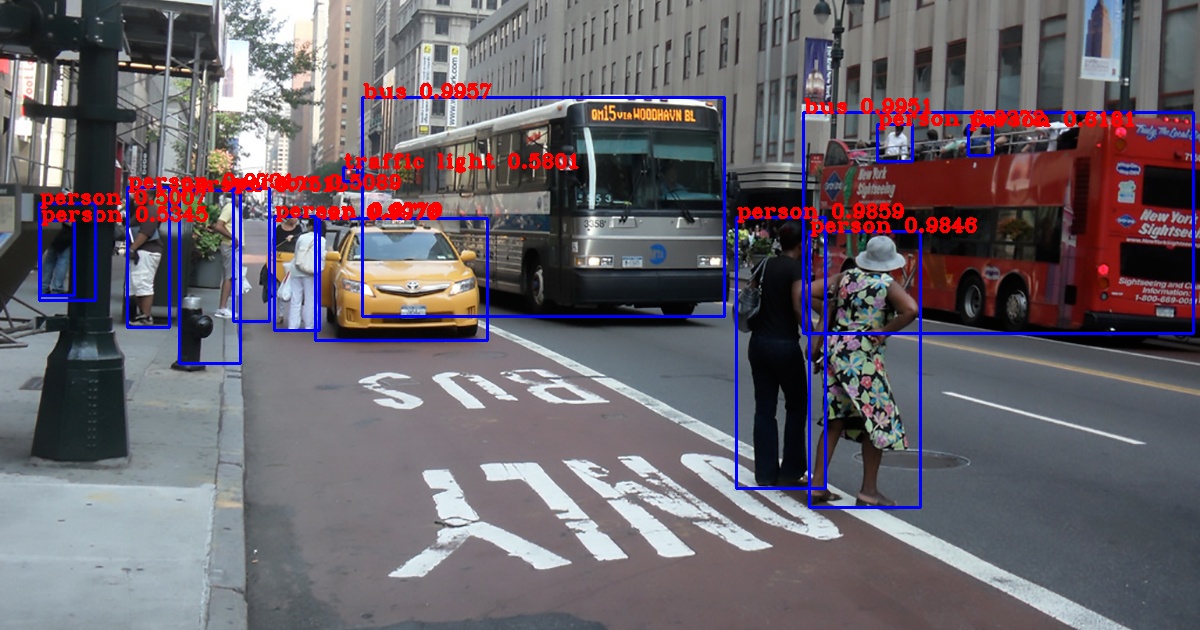
python detect.py --weights ./checkpoints/yolov3-tiny.tf --tiny --image ./data/street.jpg
# webcam
python detect_video.py --video 0
# video file
python detect_video.py --video path_to_file.mp4 --weights ./checkpoints/yolov3-tiny.tf --tiny
# video file with output
python detect_video.py --video path_to_file.mp4 --output ./output.aviI have created a complete tutorial on how to train from scratch using the VOC2012 Dataset. See the documentation here https://github.com/zzh8829/yolov3-tf2/blob/master/docs/training_voc.md
For customzied training, you need to generate tfrecord following the TensorFlow Object Detection API. For example you can use Microsoft VOTT to generate such dataset. You can also use this script to create the pascal voc dataset.
Example commend line arguments for training
python train.py --batch_size 8 --dataset ~/Data/voc2012.tfrecord --val_dataset ~/Data/voc2012_val.tfrecord --epochs 100 --mode eager_tf --transfer fine_tune

python train.py --batch_size 8 --dataset ~/Data/voc2012.tfrecord --val_dataset ~/Data/voc2012_val.tfrecord --epochs 100 --mode fit --transfer none

python train.py --batch_size 8 --dataset ~/Data/voc2012.tfrecord --val_dataset ~/Data/voc2012_val.tfrecord --epochs 100 --mode fit --transfer no_output

python train.py --batch_size 8 --dataset ~/Data/voc2012.tfrecord --val_dataset ~/Data/voc2012_val.tfrecord --epochs 10 --mode eager_fit --transfer fine_tune --weights ./checkpoints/yolov3-tiny.tf --tinyYou can export the model to tf serving
python export_tfserving.py --output serving/yolov3/1/
# verify tfserving graph
saved_model_cli show --dir serving/yolov3/1/ --tag_set serve --signature_def serving_default
The inputs are preprocessed images (see dataset.transform_iamges)
outputs are
yolo_nms_0: bounding boxes
yolo_nms_1: scores
yolo_nms_2: classes
yolo_nms_3: numbers of valid detections
Numbers are obtained with rough calculations from detect_video.py
| Detection | 416x416 | 320x320 | 608x608 |
|---|---|---|---|
| YoloV3 | 1000ms | 500ms | 1546ms |
| YoloV3-Tiny | 100ms | 58ms | 208ms |
| Detection | 416x416 | 320x320 | 608x608 |
|---|---|---|---|
| YoloV3 | 74ms | 57ms | 129ms |
| YoloV3-Tiny | 18ms | 15ms | 28ms |
| Detection | 416x416 | 320x320 | 608x608 |
|---|---|---|---|
| YoloV3 | 66ms | 50ms | 123ms |
| YoloV3-Tiny | 15ms | 10ms | 24ms |
| Detection | 416x416 |
|---|---|
| YoloV3 predict_on_batch | 29-32ms |
| YoloV3 predict_on_batch + TensorRT | 22-28ms |
Darknet version of YoloV3 at 416x416 takes 29ms on Titan X. Considering Titan X has about double the benchmark of Tesla M60, Performance-wise this implementation is pretty comparable.
Great addition for existing TensorFlow experts. Not very easy to use without some intermediate understanding of TensorFlow graphs. It is annoying when you accidentally use incompatible features like tensor.shape[0] or some sort of python control flow that works fine in eager mode, but totally breaks down when you try to compile the model to graph.
When calling model(x) directly, we are executing the graph in eager mode. For
model.predict, tf actually compiles the graph on the first run and then
execute in graph mode. So if you are only running the model once, model(x) is
faster since there is no compilation needed. Otherwise, model.predict or
using exported SavedModel graph is much faster (by 2x). For non real-time usage,
model.predict_on_batch is even faster as tested by @AnaRhisT94)
Extremely useful for debugging purpose, you can set breakpoints anywhere.
You can compile all the keras fitting functionalities with gradient tape using the
run_eagerly argument in model.compile. From my limited testing, all training methods
including GradientTape, keras.fit, eager or not yeilds similar performance. But graph
mode is still preferred since it's a tiny bit more efficient.
@tf.function is very cool. It's like an in-between version of eager and graph. You can step through the function by disabling tf.function and then gain performance when you enable it in production. Important note, you should not pass any non-tensor parameter to @tf.function, it will cause re-compilation on every call. I am not sure whats the best way other than using globals.
Absolutely amazing. If you don't know already, absl.py is officially used by internal projects at Google. It standardizes application interface for Python and many other languages. After using it within Google, I was so excited to hear abseil going open source. It includes many decades of best practices learned from creating large size scalable applications. I literally have nothing bad to say about it, strongly recommend absl.py to everybody.
very hard with pure functional API because the layer ordering is different in tf.keras and darknet. The clean solution here is creating sub-models in keras. Keras is not able to save nested model in h5 format properly, TF Checkpoint is recommended since its offically supported by TensorFlow.
It doesn't work very well for transfer learning. There are many articles and github issues all over the internet. I used a simple hack to make it work nicer on transfer learning with small batches.
I know it's very confusion but the output is tuple of shape
(
  [N, 13, 13, 3, 6],
  [N, 26, 26, 3, 6],
  [N, 52, 52, 3, 6]
)
where N is the number of labels in batch and the last dimension "6" represents
[x, y, w, h, obj, class] of the bounding boxes.
the default threshold is 0.5 for both IOU and score, you can adjust them
according to your need by setting --yolo_iou_threshold and
--yolo_score_threshold flags
By default there can be maximum 100 bounding boxes per image,
if for some reason you would like to have more boxes you can use the --yolo_max_boxes flag.
Many people including me have succeeded in training, so the code definitely works @LongxingTan in #128 provided some of his insights summarized here:
- For nan loss, try to make learning rate smaller
- Double check the format of your input data. Data input labelled by vott and labelImg is different. so make sure the input box is the right, and check carefully the format is
x1/width,y1/height,x2/width,y2/heightand NOT x1,y1,x2,y2, or x,y,w,h
Make sure to visualize your custom dataset using this tool
python tools/visualize_dataset.py --classes=./data/voc2012.names
It will output one random image from your dataset with label to output.jpg
Training definitely won't work if the rendered label doesn't look correct
convert.py:
  --output: path to output
    (default: './checkpoints/yolov3.tf')
  --[no]tiny: yolov3 or yolov3-tiny
    (default: 'false')
  --weights: path to weights file
    (default: './data/yolov3.weights')
  --num_classes: number of classes in the model
    (default: '80')
    (an integer)

detect.py:
  --classes: path to classes file
    (default: './data/coco.names')
  --image: path to input image
    (default: './data/girl.png')
  --output: path to output image
    (default: './output.jpg')
  --[no]tiny: yolov3 or yolov3-tiny
    (default: 'false')
  --weights: path to weights file
    (default: './checkpoints/yolov3.tf')
  --num_classes: number of classes in the model
    (default: '80')
    (an integer)

detect_video.py:
  --classes: path to classes file
    (default: './data/coco.names')
  --video: path to input video (use 0 for cam)
    (default: './data/video.mp4')
  --output: path to output video (remember to set right codec for given format. e.g. XVID for .avi)
    (default: None)
  --output_format: codec used in VideoWriter when saving video to file
    (default: 'XVID)
  --[no]tiny: yolov3 or yolov3-tiny
    (default: 'false')
  --weights: path to weights file
    (default: './checkpoints/yolov3.tf')
  --num_classes: number of classes in the model
    (default: '80')
    (an integer)

train.py:
  --batch_size: batch size
    (default: '8')
    (an integer)
  --classes: path to classes file
    (default: './data/coco.names')
  --dataset: path to dataset
    (default: '')
  --epochs: number of epochs
    (default: '2')
    (an integer)
  --learning_rate: learning rate
    (default: '0.001')
    (a number)
  --mode: <fit|eager_fit|eager_tf>: fit: model.fit, eager_fit: model.fit(run_eagerly=True), eager_tf: custom GradientTape
    (default: 'fit')
  --num_classes: number of classes in the model
    (default: '80')
    (an integer)
  --size: image size
    (default: '416')
    (an integer)
  --[no]tiny: yolov3 or yolov3-tiny
    (default: 'false')
  --transfer: <none|darknet|no_output|frozen|fine_tune>: none: Training from scratch, darknet: Transfer darknet, no_output: Transfer all but output, frozen: Transfer and freeze all,
    fine_tune: Transfer all and freeze darknet only
    (default: 'none')
  --val_dataset: path to validation dataset
    (default: '')
  --weights: path to weights file
(default: './checkpoints/yolov3.tf')- Updated to Tensorflow to v2.0.0 Release
It is pretty much impossible to implement this from the yolov3 paper alone. I had to reference the official (very hard to understand) and many un-official (many minor errors) repos to piece together the complete picture.
- https://github.com/pjreddie/darknet
- official yolov3 implementation
- https://github.com/AlexeyAB
- explinations of parameters
- https://github.com/qqwweee/keras-yolo3
- models
- loss functions
- https://github.com/YunYang1994/tensorflow-yolov3
- data transformations
- loss functions
- https://github.com/ayooshkathuria/pytorch-yolo-v3
- models
- https://github.com/broadinstitute/keras-resnet
- batch normalization fix


