

PyTorch implementation of DeepLabV3, trained on the Cityscapes dataset.
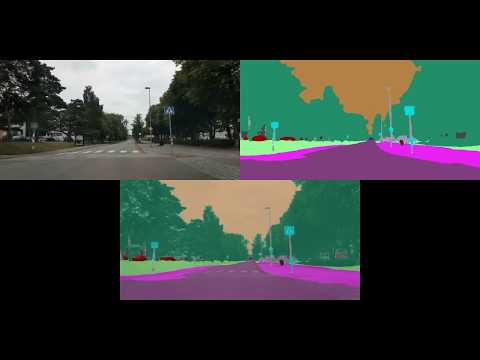
- Youtube video of results:
- Using a VM on Paperspace
- Pretrained model
- Training a model on Cityscapes
- Evaluation
- Visualization
- Documentation of remaining code
To train models and to run pretrained models (with small batch sizes), you can use an Ubuntu 16.04 P4000 VM with 250 GB SSD on Paperspace. Below I have listed what I needed to do in order to get started, and some things I found useful.
-
Install docker-ce:
-
- $ curl -fsSL https://download.docker.com/linux/ubuntu/gpg | sudo apt-key add -
-
- $ sudo add-apt-repository "deb [arch=amd64] https://download.docker.com/linux/ubuntu $(lsb_release -cs) stable"
-
- $ sudo apt-get update
-
- $ sudo apt-get install -y docker-ce
-
Install CUDA drivers:
-
- $ CUDA_REPO_PKG=cuda-repo-ubuntu1604_9.1.85-1_amd64.deb
-
- $ wget -O /tmp/${CUDA_REPO_PKG} http://developer.download.nvidia.com/compute/cuda/repos/ubuntu1604/x86_64/${CUDA_REPO_PKG}
-
- $ sudo dpkg -i /tmp/${CUDA_REPO_PKG}
-
- $ sudo apt-key adv --fetch-keys http://developer.download.nvidia.com/compute/cuda/repos/ubuntu1604/x86_64/7fa2af80.pub
-
- $ rm -f /tmp/${CUDA_REPO_PKG}
-
- $ sudo apt-get update
-
- $ sudo apt-get install cuda-drivers
-
- Reboot the VM.
-
Install nvidia-docker:
-
- $ sudo dpkg -i /tmp/nvidia-docker*.deb && rm /tmp/nvidia-docker*.deb
-
- $ sudo nvidia-docker run --rm nvidia/cuda nvidia-smi
-
Download the PyTorch 0.4 docker image:
-
- $ sudo docker pull pytorch/pytorch:0.4_cuda9_cudnn7
-
Create start_docker_image.sh containing:
#!/bin/bash

# DEFAULT VALUES
GPUIDS="0"
NAME="paperspace_GPU"


NV_GPU="$GPUIDS" nvidia-docker run -it --rm \
        -p 5584:5584 \
        --name "$NAME""$GPUIDS" \
        -v /home/paperspace:/root/ \
        pytorch/pytorch:0.4_cuda9_cudnn7 bash
-
Inside the image, /root/ will now be mapped to /home/paperspace (i.e., $ cd -- takes you to the regular home folder).
-
To start the image:
-
- $ sudo sh start_docker_image.sh
-
To commit changes to the image:
-
- Open a new terminal window.
-
- $ sudo docker commit paperspace_GPU0 pytorch/pytorch:0.4_cuda9_cudnn7
-
To stop the image when it’s running:
-
- $ sudo docker stop paperspace_GPU0
-
To exit the image without killing running code:
-
- Ctrl + P + Q
-
To get back into a running image:
-
- $ sudo docker attach paperspace_GPU0
-
To open more than one terminal window at the same time:
-
- $ sudo docker exec -it paperspace_GPU0 bash
-
To install the needed software inside the docker image:
-
- $ apt-get update
-
- $ apt-get install nano
-
- $ apt-get install sudo
-
- $ apt-get install wget
-
- $ sudo apt install unzip
-
- $ sudo apt-get install libopencv-dev
-
- $ pip install opencv-python
-
- $ python -mpip install matplotlib
-
- Commit changes to the image (otherwise, the installed packages will be removed at exit!)
-
Do the following outside of the docker image:
-
- $ --
-
- $ git clone https://github.com/fregu856/deeplabv3.git
-
- Download the Cityscapes dataset:
-
-
- Register on the website.
-
-
-
- $ wget --keep-session-cookies --save-cookies=cookies.txt --post-data 'username=XXXXX&password=YYYYY&submit=Login' https://www.cityscapes-dataset.com/login/ (where you replace XXXXX with your username, and YYYYY with your password)
-
-
-
- $ wget --load-cookies cookies.txt --content-disposition https://www.cityscapes-dataset.com/file-handling/?packageID=1
-
-
-
- $ wget --load-cookies cookies.txt --content-disposition https://www.cityscapes-dataset.com/file-handling/?packageID=3
-
-
-
- $ unzip gtFine_trainvaltest.zip
-
-
-
- $ unzip leftImg8bit_trainvaltest.zip
-
-
-
- $ mkdir deeplabv3/data
-
-
-
- $ mkdir deeplabv3/data/cityscapes
-
-
-
- $ mv gtFine deeplabv3/data/cityscapes
-
-
-
- $ mv leftImg8bit deeplabv3/data/cityscapes
-
-
-
- $ wget --load-cookies cookies.txt --content-disposition https://www.cityscapes-dataset.com/file-handling/?packageID=12
-
-
-
- $ unzip leftImg8bit_demoVideo.zip
-
-
-
- $ mv leftImg8bit/demoVideo deeplabv3/data/cityscapes/leftImg8bit
-
-
-
- $ wget https://www.dropbox.com/s/vt1d0pjjphwivvc/thn.zip?dl=0 (to download the OPTIONAL Thn sequence data (standard dash cam))
-
-
-
- $ unzip thn.zip?dl=0
-
-
-
- $ mv thn deeplabv3/data
-
-
-
- $ cd deeplabv3
-
-
-
- $ git clone https://github.com/mcordts/cityscapesScripts.git
-
-
-
- Comment out the line
print type(obj).nameon line 238 in deeplabv3/cityscapesScripts/cityscapesscripts/helpers/annotation.py (this is need for the cityscapes scripts to be runnable with Python3)
- Comment out the line
-
- pretrained_models/model_13_2_2_2_epoch_580.pth:
-
- Trained for 580 epochs on Cityscapes train and 3333 + 745 images from Berkeley DeepDrive.
- SSH into the paperspace server.
- $ sudo sh start_docker_image.sh
- $ cd --
- $ python deeplabv3/utils/preprocess_data.py (ONLY NEED TO DO THIS ONCE!)
- $ python deeplabv3/train.py
-
SSH into the paperspace server.
-
$ sudo sh start_docker_image.sh
-
$ cd --
-
$ python deeplabv3/utils/preprocess_data.py (ONLY NEED TO DO THIS ONCE!)
-
$ python deeplabv3/evaluation/eval_on_val.py
-
- This will run the pretrained model (set on line 31 in eval_on_val.py) on all images in Cityscapes val, compute and print the loss, and save the predicted segmentation images in deeplabv3/training_logs/model_eval_val.
-
SSH into the paperspace server.
-
$ sudo sh start_docker_image.sh
-
$ cd --
-
$ python deeplabv3/utils/preprocess_data.py (ONLY NEED TO DO THIS ONCE!)
-
$ python deeplabv3/evaluation/eval_on_val_for_metrics.py
-
$ cd deeplabv3/cityscapesScripts
-
$ pip install . (ONLY NEED TO DO THIS ONCE!)
-
$ python setup.py build_ext --inplace (ONLY NEED TO DO THIS ONCE!) (this enables cython, which makes the cityscapes evaluation script run A LOT faster)
-
$ export CITYSCAPES_RESULTS="/root/deeplabv3/training_logs/model_eval_val_for_metrics"
-
$ export CITYSCAPES_DATASET="/root/deeplabv3/data/cityscapes"
-
$ python cityscapesscripts/evaluation/evalPixelLevelSemanticLabeling.py
-
- This will run the pretrained model (set on line 55 in eval_on_val_for_metrics.py) on all images in Cityscapes val, upsample the predicted segmentation images to the original Cityscapes image size (1024, 2048), and compute and print performance metrics:
classes          IoU      nIoU
--------------------------------
road          : 0.918      nan
sidewalk      : 0.715      nan
building      : 0.837      nan
wall          : 0.413      nan
fence         : 0.397      nan
pole          : 0.404      nan
traffic light : 0.411      nan
traffic sign  : 0.577      nan
vegetation    : 0.857      nan
terrain       : 0.489      nan
sky           : 0.850      nan
person        : 0.637    0.491
rider         : 0.456    0.262
car           : 0.897    0.759
truck         : 0.582    0.277
bus           : 0.616    0.411
train         : 0.310    0.133
motorcycle    : 0.322    0.170
bicycle       : 0.583    0.413
--------------------------------
Score Average : 0.593    0.364
--------------------------------


categories       IoU      nIoU
--------------------------------
flat          : 0.932      nan
construction  : 0.846      nan
object        : 0.478      nan
nature        : 0.869      nan
sky           : 0.850      nan
human         : 0.658    0.521
vehicle       : 0.871    0.744
--------------------------------
Score Average : 0.786    0.632
--------------------------------
-
SSH into the paperspace server.
-
$ sudo sh start_docker_image.sh
-
$ cd --
-
$ python deeplabv3/utils/preprocess_data.py (ONLY NEED TO DO THIS ONCE!)
-
$ python deeplabv3/visualization/run_on_seq.py
-
- This will run the pretrained model (set on line 33 in run_on_seq.py) on all images in the Cityscapes demo sequences (stuttgart_00, stuttgart_01 and stuttgart_02) and create a visualization video for each sequence, which is saved to deeplabv3/training_logs/model_eval_seq. See Youtube video from the top of the page.
-
SSH into the paperspace server.
-
$ sudo sh start_docker_image.sh
-
$ cd --
-
$ python deeplabv3/utils/preprocess_data.py (ONLY NEED TO DO THIS ONCE!)
-
$ python deeplabv3/visualization/run_on_thn_seq.py
-
- This will run the pretrained model (set on line 31 in run_on_thn_seq.py) on all images in the Thn sequence (real-life sequence collected with a standard dash cam) and create a visualization video, which is saved to deeplabv3/training_logs/model_eval_seq_thn. See Youtube video from the top of the page.
-
model/resnet.py:
-
- Definition of the custom Resnet model (output stride = 8 or 16) which is the backbone of DeepLabV3.
-
model/aspp.py:
-
- Definition of the Atrous Spatial Pyramid Pooling (ASPP) module.
-
model/deeplabv3.py:
-
- Definition of the complete DeepLabV3 model.
-
utils/preprocess_data.py:
-
- Converts all Cityscapes label images from having Id to having trainId pixel values, and saves these to deeplabv3/data/cityscapes/meta/label_imgs. Also computes class weights according to the ENet paper and saves these to deeplabv3/data/cityscapes/meta.
-
utils/utils.py:
-
- Contains helper funtions which are imported and utilized in multiple files.
-
datasets.py:
-
- Contains all utilized dataset definitions.

