
Top AI Repos — open-source AI, indexed and scored
Top AI Repos tracks AI repositories on GitHub and answers two different questions about each one: is it moving right now, and would you bet a product on it.
Top AI Repos tracks AI repositories on GitHub and answers two different questions about each one: is it moving right now, and would you bet a product on it.

Super Fast and Accurate 3D Object Detection based on 3D LiDAR Point Clouds (The PyTorch implementation)
| Date | Stars |
|---|---|
| 2026-07-30 | 1127 |
| 2026-08-18 | 1128 |
| 2026-09-10 | 1129 |
| 2026-09-23 | 1129 |
| 2026-09-29 | 1130 |
| 2026-10-21 | 1131 |
| 2026-10-26 | 1131 |
| 2026-10-27 | 1130 |
| 2026-10-31 | 1131 |
| 2026-11-04 | 1131 |
Today
— stars today
This week
+1 stars this week
This month
+1 stars this month
Momentum
0.0
growth rate 0.09%/day
# Super Fast and Accurate 3D Object Detection based on 3D LiDAR Point Clouds (SFA3D)
[![python-image]][python-url]
[![pytorch-image]][pytorch-url]
---
## Features
- [x] Super fast and accurate 3D object detection based on LiDAR
- [x] Fast training, fast inference
- [x] An Anchor-free approach
- [x] No Non-Max-Suppression
- [x] Support [distributed data parallel training](https://github.com/pytorch/examples/tree/master/distributed/ddp)
- [x] Release pre-trained models
## Highlights
- [x] The technical details are described **[here](./Technical_details.md)**
- [x] The great introduction and explanation from _`Computer Vision and Perception for Self-Driving Cars Course`_ **[Youtube link](https://youtu.be/cPOtULagNnI?t=4858)**
- [x] SFA3D is used for the second course in the _`Udacity Self-Driving Car Engineer Nanodegree Program: Sensor Fusion and Tracking`_ **[GitHub link](https://github.com/udacity/nd013-c2-fusion-starter/tree/b1455b8ff433cb7f537d62e526209738293e7d8b)**
**Update 2020.09.06**: Add `ROS` source code. The great work has been done by [@AhmedARadwan](https://github.com/AhmedARadwan).
The implementation is [here](https://github.com/maudzung/SFA3D/tree/ea0222c1b35489dc35d8452c989c4b014e20e0da)
## Demonstration (on a single GTX 1080Ti)
[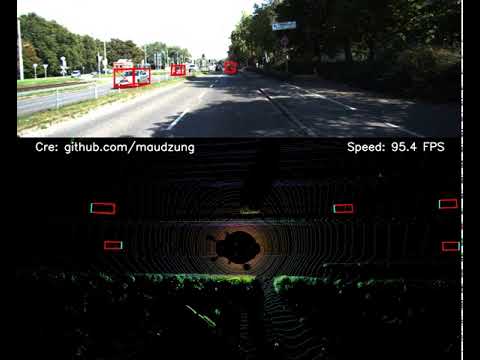](http://www.youtube.com/watch?v=FI8mJIXkgX4)
**[Youtube link](https://youtu.be/FI8mJIXkgX4)**
## 2. Getting Started
### 2.1. Requirement
The instructions for setting up a virtual environment is [here](https://github.com/maudzung/virtual_environment_python3).
```shell script
git clone https://github.com/maudzung/SFA3D.git SFA3D
cd SFA3D/
pip install -r requirements.txt
```
### 2.2. Data Preparation
Download the 3D KITTI detection dataset from [here](http://www.cvlibs.net/datasets/kitti/eval_object.php?obj_benchmark=3d).
The downloaded data includes:
- Velodyne point clouds _**(29 GB)**_
- Training labels of object data set _**(5 MB)**_
- Camera calibration matrices of object data set _**(16 MB)**_
- **Left color images** of object data set _**(12 GB)**_ (For visualization purpose only)
Please make sure that you construct the source code & dataset directories structure as below.
### 2.3. How to run
#### 2.3.1. Visualize the dataset
To visualize 3D point clouds with 3D boxes, let's execute:
```shell script
cd sfa/data_process/
python kitti_dataset.py
```
#### 2.3.2. Inference
The pre-trained model was pushed to this repo.
```
python test.py --gpu_idx 0 --peak_thresh 0.2
```
#### 2.3.3. Making demonstration
```
python demo_2_sides.py --gpu_idx 0 --peak_thresh 0.2
```
The data for the demonstration will be automatically downloaded by executing the above command.
#### 2.3.4. Training
##### 2.3.4.1. Single machine, single gpu
```shell script
python train.py --gpu_idx 0
```
##### 2.3.4.2. Distributed Data Parallel Training
- **Single machine (node), multiple GPUs**
```
python train.py --multiprocessing-distributed --world-size 1 --rank 0 --batch_size 64 --num_workers 8
```
- **Two machines (two nodes), multiple GPUs**
- _**First machine**_
```
python train.py --dist-url 'tcp://IP_OF_NODE1:FREEPORT' --multiprocessing-distributed --world-size 2 --rank 0 --batch_size 64 --num_workers 8
```
- _**Second machine**_
```
python train.py --dist-url 'tcp://IP_OF_NODE2:FREEPORT' --multiprocessing-distributed --world-size 2 --rank 1 --batch_size 64 --num_workers 8
```
#### Tensorboard
- To track the training progress, go to the `logs/` folder and
```shell script
cd logs/<saved_fn>/tensorboard/
tensorboard --logdir=./
```
- Then go to [http://localhost:6006/](http://localhost:6006/)
## Contact
If you think this work is useful, please give me a star! <br>
If you find any errors or have any suggestions, please contact me (**Email:** `[email protected]`). <br>
Thank you!
## Citation
```bash
@misc{Super-Fast-Accurate-3D-Object-Detection-PyTorch,
author = {NguyExcerpt of 6,252 characters
Read on GitHub
17

10

ausk · China
1

1
Would you bet a product on this? Bounded 0–100 and slow moving.
matched fp:1ccc131d4394fe69, topic:ros, readme:self-driving